June 20, 2026
Creating a Productive Home Office Environment with Ergonomic Lighting

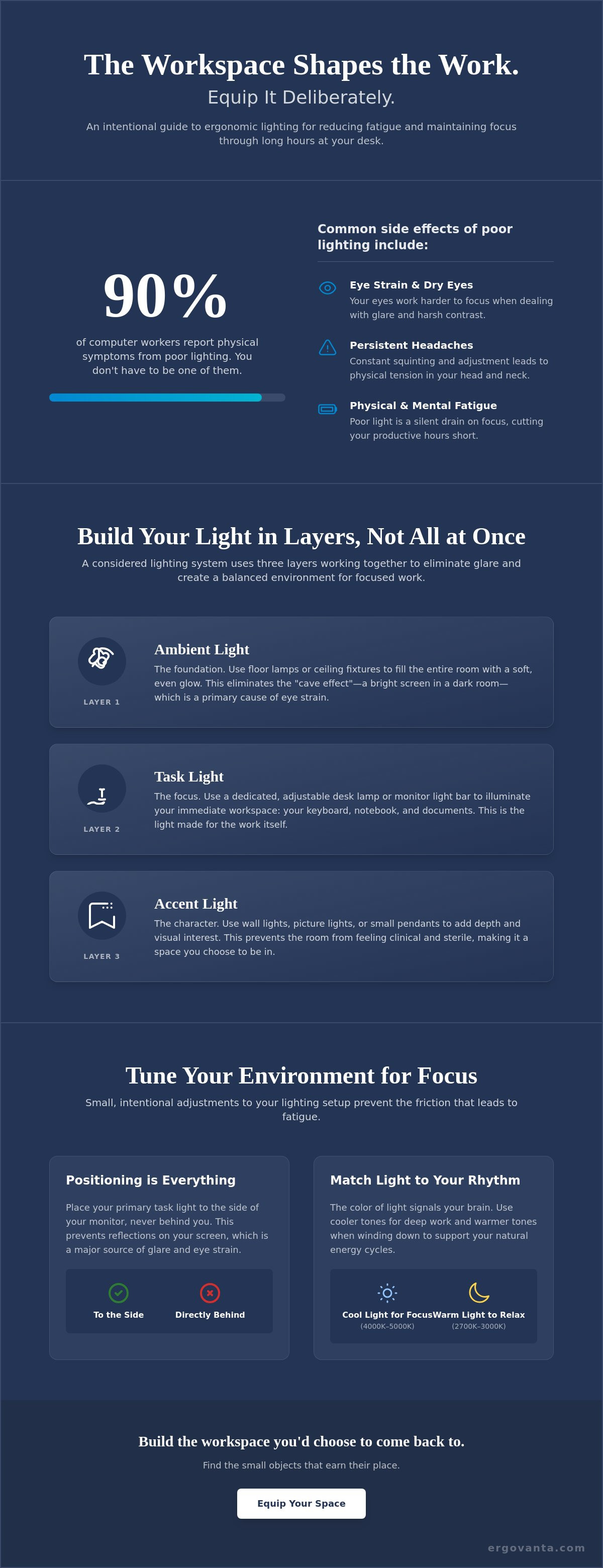
If you spend serious hours at a desk, you likely accept dry eyes and mid-afternoon headaches as part of the job. You shouldn't. The National Institute for Occupational Safety and Health reports that 90% of computer workers suffer from visual symptoms due to poor lighting. The workspace shapes the work. Equip it deliberately. By implementing ergonomic lighting for computer work, you can turn a clinical, harsh environment into a space built for focus.
Most of us have dealt with a screen reflection that won't go away or overhead lights that feel more like a hospital wing than a home office. These small frictions lead to physical fatigue that cuts your day short. This guide will help you build a workspace that protects your eyes and helps you stay engaged through intentional lighting choices. You will learn the exact placement for your lamps, how to manage glare, and how to select the right color temperature for your specific tasks. It is time to equip a room that earns its place in your daily ritual.
Key Takeaways
- Understand why the room around your desk matters as much as the screen for maintaining long-term focus.
- Learn to build a layered system that combines ambient and task lighting to eliminate harsh contrast and screen glare.
- Discover how to implement ergonomic lighting for computer work to reduce physical fatigue and persistent headaches.
- Equip your workspace with intentional choices like high CRI bulbs that help you see your work more clearly.
- Find out how to adjust your setup throughout the day to account for changing natural light from your windows.
Why Your Workspace Lighting Matters More Than You Think
The workspace shapes the work. Equip it deliberately. If you spend serious hours at a desk, poor lighting is a silent thief of focus. It causes physical tension you might not even notice until the day is over. Most people treat lighting as an afterthought; however, it is actually a tool for purposeful function. This is the core of what is light ergonomics? It is a system designed to reduce glare, contrast, and eye strain. When you implement ergonomic lighting for computer work, you are giving yourself an advantage rather than a hindrance.
Ergo comes from the Ancient Greek for purposeful function in action. In your home office, this means moving beyond just being able to see your keyboard. It means creating an environment that supports the way you actually feel after six hours of deep work. To better understand how your setup affects your physical well-being, watch this helpful video:
The Problem with Single-Source Lighting
Relying on a single bright overhead light or one large window is a common mistake. This creates harsh shadows and the "cave effect," where your monitor is a bright island in a dark room. Your eyes must constantly adjust between the glow of the screen and the shadows around it. This forces them to work harder than necessary. Small objects earn their place when they solve these specific issues. A considered desk lamp or monitor light bar can fill these gaps, eliminating the glare that leads to mid-afternoon headaches.
Understanding the Circadian Connection
The color of your light tells your brain what to do. Cool, blue-toned light mimics daylight and is made for the work that requires deep focus. It keeps you alert. Conversely, warm, amber tones are better for considered reflection or winding down. By choosing an intentional lighting setup, you can signal to your brain when it's time to push through a project and when it's time to step away. Don't let your environment dictate your energy levels. Build a space that supports your rhythm.
A Step-by-Step Guide to Layering Ergonomic Lighting
Equipping a room for work requires more than just flipping a single switch. It requires layers. Effective ergonomic lighting for computer work relies on three distinct types of light working together to support your focus. Layer 1 is ambient light. Use floor lamps or ceiling lights to fill the room with a soft, even glow. This reduces the stark contrast between your glowing monitor and the dark walls behind it, which is a major cause of physical fatigue. Layer 2 is task lighting. This is the light that illuminates the tools, notebooks, or documents you are using directly. Layer 3 is accent light. Pendants or wall lights create a room that feels lived-in and intentional rather than clinical.
Positioning is everything. Never place a light where it can reflect directly off your monitor screen. Effective reducing glare in your workspace often involves placing light sources to the side of your desk rather than directly behind your chair. If you spend serious hours at a desk, these small adjustments prevent the squinting that leads to tension by the end of the day.
Choosing the Right Task Lamps
When looking for desk lamps, prioritize adjustable arms. These allow you to direct light exactly where the work happens without moving the entire base. Place the lamp opposite your dominant hand to minimize shadows across your documents. To prevent direct bulb glare, ensure the bottom of the lamp shade sits at eye level or slightly below when you are seated.
The Rise of the Monitor Light Bar
Monitor light bars are made for the work. They save desk space while illuminating the workspace without hitting the screen or causing reflections. If you have limited real estate, these are often a better choice than traditional lamps. Pair them with monitor and laptop stands to build a considered setup that keeps your eyes level and your desk clear. If you have questions about which objects best suit your specific setup, you can reach out to our team for a more intentional recommendation.
Tuning Your Environment for Focus and Longevity
The workspace shapes the work. Equip it deliberately. If you spend serious hours at a desk, the room around it matters more than you think. Proper ergonomic lighting for computer work is as much about the quality of the light as it is about the quantity. Equip your desk with bulbs featuring a high Color Rendering Index (CRI). A score of 90 or above ensures you see colors accurately; this reduces the subconscious strain of your brain trying to fill in visual gaps caused by poor spectrums.
Lighting is not static. Adjust your setup throughout the day as natural light from windows changes. Working in the dark is not a badge of honor. It is a recipe for eye strain and physical tension. A well-lit space is a tool for personal ownership of your time. Consider the entire room, not just the desk surface. Use intentional decor to soften the environment and make it a space you actually choose to come back to.
Managing Natural Light and Glare
Position your desk perpendicular to windows. This is usually the best way to prevent light from hitting your screen directly or shining right into your eyes. Use diffusers or blinds to manage the intensity of the midday sun. These small adjustments keep your focus steady and your eyes relaxed when the outside light is at its harshest.
Maintenance for the Serious Professional
Maintain your setup with a few simple habits. Clean your bulbs and fixtures regularly. Dust blocks light and can shift the color temperature of your environment. Check for flicker in aging LEDs. Even if you cannot see the flicker, your brain processes it, which leads to unexplained fatigue and tension. Equip your space with workspace essentials that earn their place through long-term reliability and purposeful function. Build a room that supports the work you do every day.
Build a Workspace Designed for the Long Haul
The workspace shapes the work. Equip it deliberately. You now have the tools to move beyond harsh overheads and clinical environments. By layering ambient, task, and accent sources, you create a system that protects your eyes and supports your focus. Implementing ergonomic lighting for computer work is a matter of personal ownership over your environment. These small, intentional changes eliminate the physical tension that often marks the end of a long day.
We provide functional designs for those who spend serious hours at a desk. Every object in our collection offers a considered aesthetic that earns its place in an intentional workspace. We offer fast shipping across the United States to help you get your build started. If you are ready to make a change, equip your space with lighting made for the work. Your future self will thank you for the clarity.
Frequently Asked Questions
What is the best color temperature for computer work?
The ideal color temperature for your workspace falls between 3000K and 4000K. This range provides a neutral white light that balances warm and cool tones, making it easier to stay focused without feeling clinical. If you are doing deep work that requires high alertness, you might shift toward 5000K. Choosing intentional bulbs helps your brain stay engaged during the most demanding parts of your day.
How do I stop my desk lamp from reflecting off my computer screen?
Position your light source to the side of your monitor rather than directly in front of it or behind your chair. This placement ensures the light hits your desk surface without bouncing off the glass and back into your eyes. Using ergonomic lighting for computer work often involves a monitor light bar. These tools are made for the work; they illuminate your space while using a precise cutoff to keep the screen clear of glare.
Is warm light or cool light better for eye strain?
Cool light is better for alertness during the day, but warm light is better for reducing strain as the sun goes down. Cool light mimics midday sun and keeps your energy levels steady while you work. However, as you finish your tasks, switching to warmer amber tones helps your eyes relax. Equip your space with adjustable bulbs so you can change the tone to match your natural rhythm and avoid physical fatigue.
Do I really need a desk lamp if I have bright overhead lights?
Yes, because overhead lights often create harsh shadows and high contrast that a single fixture cannot fix. Relying on ceiling lights alone can lead to the "cave effect," where your monitor is too bright for the surrounding environment. Adding a considered desk lamp is a key part of ergonomic lighting for computer work. It allows you to direct light exactly where it is needed, balancing the room and letting your eyes focus without constant adjustment.
From the catalog