May 23, 2026
How to Reduce Neck Pain from Computer Use: The Ergonomic Benefits of a Laptop Stand

A 2025 review found that sitting for more than six hours a day increases your risk of chronic neck pain by nearly 88 percent. If you spend serious hours at a desk, the room around it matters more than you think. You likely know the sensation of poor alignment. It starts as a dull ache in your shoulders and ends as a tension headache that follows you home. You've tried stretching, but the pain returns the moment you look back down at your screen.
The ergonomic benefits of a laptop stand go beyond simple comfort. It's about building a workspace that works with your body. By making a few intentional adjustments to your screen height, you can fix your posture and make long hours at the desk sustainable. This guide covers how to align your screen correctly, why a dedicated stand is a tool made for the work, and the simple steps to equip your space for long-term health.
Key Takeaways
- Identify why laptop portability often leads to the "C-curve" neck posture that causes chronic stiffness during long hours.
- Learn how the ergonomic benefits of a laptop stand allow you to align your screen at eye level for a neutral neck position.
- Discover the specific height adjustments needed to build a workspace that remains sustainable for your body throughout the day.
- Understand how a considered stand improves device airflow and recovers space for the small objects that earn their place on your desk.
The Laptop Trap: Why Your Screen Height Causes Neck Pain
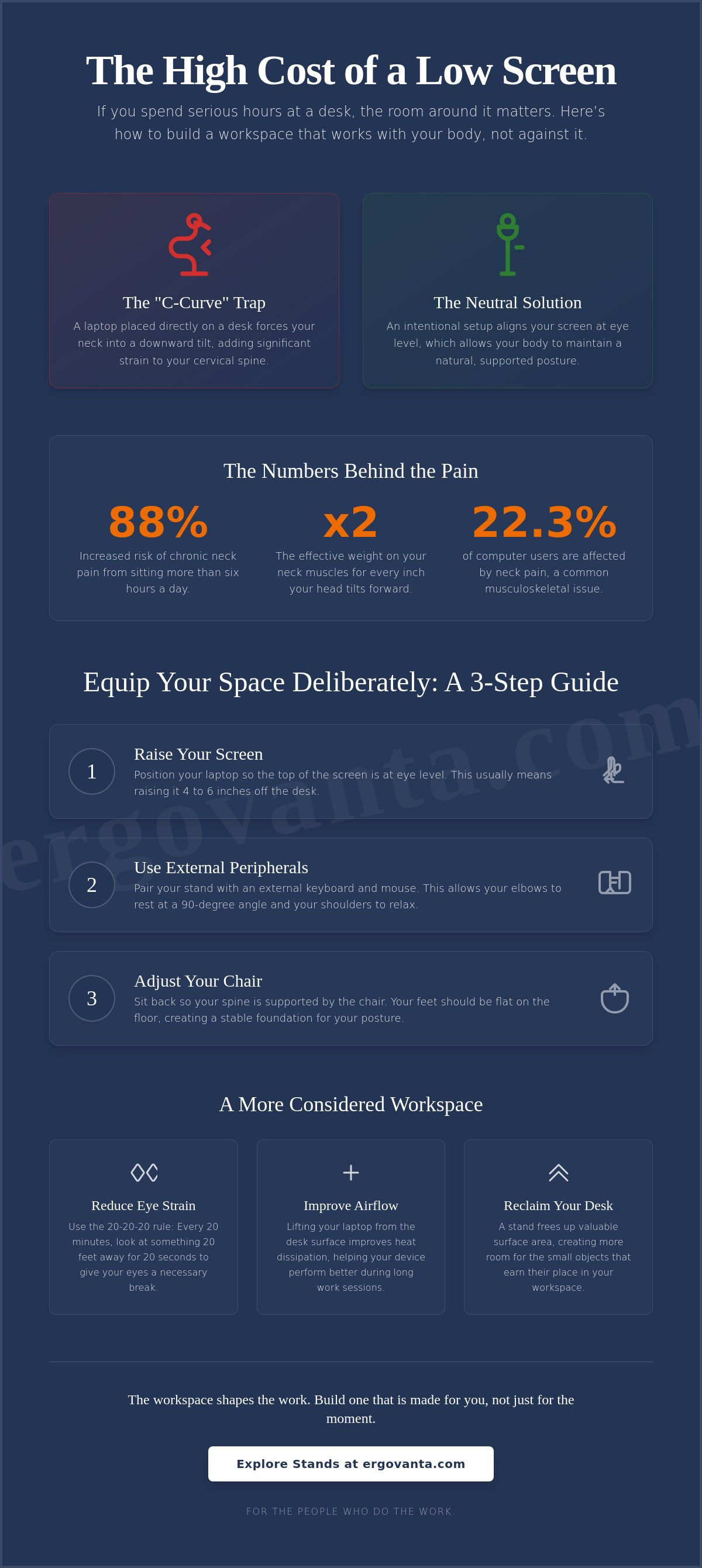
Laptops were built for portability, not for the eight-hour sessions that define our workdays. When you place a laptop directly on a desk, the screen is inevitably too low. This forces your neck into a natural downward tilt, creating a "C-curve" that adds significant weight to your cervical spine. According to a 2025 systematic review, computer use increases the odds of neck pain by 23 percent. This misalignment is the primary source of tension in your upper back and shoulders. To avoid this, you should equip your space so your eyes naturally meet the top third of your screen.
Understanding the ergonomic benefits of a laptop stand starts with recognizing that your body isn't meant to hold a downward gaze for hours. When your screen is too low, you aren't just looking down; you're fundamentally changing how your body supports itself. If you spend serious hours at a desk, the room around it matters more than you think. Building a workspace that works with you, rather than against you, is essential for staying productive without the physical cost.
To better understand this concept, watch this helpful video:
The physics of the downward tilt
The human head weighs about 10 to 12 pounds in a neutral position. However, for every inch your head tilts forward, the pressure on your neck muscles effectively doubles. This condition, often referred to as Forward head posture, forces your muscles to work overtime just to keep your head upright. Research from October 2025 shows that neck pain affects 22.3 percent of computer users, making it one of the most common musculoskeletal issues in the workspace. A considered setup brings the work to your eye level instead of forcing your head to meet the work. By using monitor and laptop stands, you build a foundation that supports your natural alignment.
Identifying the signs of poor alignment
You don't need a clinical diagnosis to know when your setup is failing you. Most people feel it as "heavy shoulders" or a nagging tension headache that creeps in by late afternoon. Sitting for more than six hours a day increases the risk of this pain by nearly 88 percent. Take a moment to assess your current setup. Are you leaning into the screen, or are you sitting back in your chair? If you find yourself hunching forward to read text or see the screen clearly, your workspace isn't made for the work you're doing. Recognizing these signs is the first step toward building a space you actually want to come back to.
How to Adjust Your Setup to Reduce Computer-Related Pain
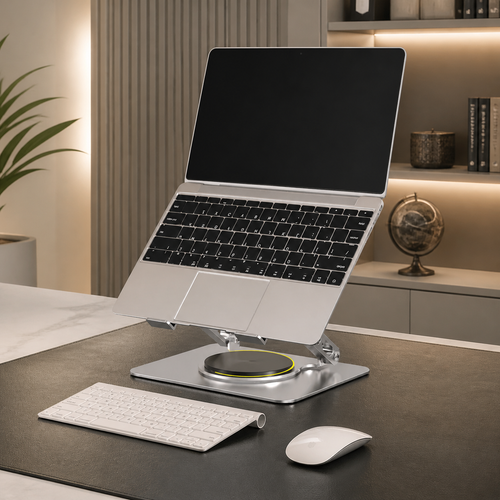
The workspace shapes the work. Equip it deliberately. If you want to realize the full ergonomic benefits of a laptop stand, you must treat your desk as a cohesive system rather than a collection of parts. Start by raising your laptop four to six inches off the desk surface. Your goal is a neutral, upright position where the top of the screen meets your eye level. This simple shift prevents the downward gaze that strains your neck over time.
Using a dedicated laptop stand ensures stability that a stack of books simply cannot provide. However, a stand is only half the solution. To avoid shoulder tension, you must pair it with an external keyboard and mouse. This setup allows your elbows to rest at a 90-degree angle while your screen stays where it belongs. Without these peripherals, you're just trading neck pain for wrist strain. It's about building a space that's actually made for the work.
Steps for a balanced alignment
Sit back in your chair and look straight ahead. Your laptop screen should be exactly where your gaze lands naturally. Consult guides like The Best Laptop Stands to find hardware that matches your specific height requirements. Keep your external keyboard at a height that allows your shoulders to stay relaxed and down. You might also consider items from our ergonomics and comfort collection (such as seat cushions or lumbar pillows) to support the natural curve of your spine while you work.
The 20-20-20 rule for focus
Eye strain is a silent saboteur of good posture. When your eyes tire, you instinctively lean forward to see better. This craning ruins your alignment and brings back the neck pain you're trying to avoid. Every 20 minutes, look at something 20 feet away for 20 seconds. It's a simple ritual that keeps your focus sharp and your head back where it should be. If you're still finding the light in your room harsh, you can browse our lighting collection to build a more intentional environment.
Beyond Posture: The Practical Benefits of a Considered Stand
The workspace shapes the work. Equip it deliberately. While we often focus on the physical relief, the ergonomic benefits of a laptop stand extend into the health of your hardware and the clarity of your environment. A stand is a signal of intent. It transforms a kitchen table or a cluttered surface into a space specifically made for the work. By choosing materials like walnut or aluminum, you build a foundation that feels permanent and intentional rather than temporary.
If you spend serious hours at a desk, the room around it matters more than you think. An intentional setup does more than just fix your gaze; it reclaims the surface area often lost to the footprint of a device. This allows you to curate your environment with small objects that earn their place in your daily ritual. Whether it's a notebook for analog thoughts or a dedicated tool, a considered stand provides the physical and mental space to focus.
Protecting your hardware
Lifting your laptop off the desk surface allows the internal fans to breathe from the bottom, which prevents the heat buildup that plagues many portable devices. When a laptop overheats, it intentionally slows its processor to cool down, directly hindering your productivity. This process, known as thermal throttling, can be avoided simply by ensuring proper airflow. A stand is a functional tool that protects your hardware from the performance dips that occur during intensive tasks.
Organizing for clarity
We believe in the concept of "the rooms that get used." An organized desk is one that invites you to start the work rather than giving you a reason to procrastinate. The space created under a stand is ideal for housing a minimalist desk accessory or tucking away your external keyboard when the day is done. This level of organization creates a sense of ownership over your space. It turns a simple desk into a personal environment where every object has a purpose and a place.
Own Your Alignment
The workspace shapes the work. Equip it deliberately. You now understand that screen height isn't just about aesthetics; it's about the biomechanics of how you feel after an eight-hour session. By addressing the "C-curve" in your neck and pairing your setup with external peripherals, you move from a temporary landing spot to a space made for the work. The ergonomic benefits of a laptop stand go beyond physical relief, they protect your hardware through better airflow and reclaim the desk surface for the objects that truly earn their place.
We build functional tools for the people who do the work. By focusing on materials that last and designs that prioritize intentionality, we help you build an environment that feels permanent. Stop compromising with a setup that causes pain and start choosing a workspace that supports your long-term focus. Your desk should be a place that works with you, not against you.
Equip your space with a considered laptop stand and discover the advantage of a setup built for your daily ritual. You've put in the hours; now build the space you'd choose to come back to.
Frequently Asked Questions
Can a laptop stand really fix my neck pain?
A laptop stand addresses the physical strain by shifting your screen into your natural line of sight. This is one of the primary ergonomic benefits of a laptop stand, as it stops the downward tilt that adds weight to your spine. While it isn't a medical device, it removes the environmental trigger for daily stiffness. By building a workspace that respects your body's alignment, you break the cycle of tension.
Do I need an external keyboard if I use a laptop stand?
You definitely need an external keyboard and mouse when using a stand. Typing on a raised laptop forces your wrists into an awkward angle, which can lead to new aches. One of the key ergonomic benefits of a laptop stand is that it separates the display from the inputs. This allows you to position the screen at eye level while keeping your hands at a height that lets your shoulders stay relaxed.
How high should my laptop stand be?
Your stand should be high enough that the top third of your screen is level with your eyes. For most setups, this means raising the device four to six inches off the desk. When you sit back, your gaze should land naturally on the display without any chin tilting. Equip your space so you aren't craning to see your work; your body will feel the difference by the end of the day.
Will a laptop stand stop my computer from overheating?
A stand effectively reduces overheating by lifting the laptop away from the flat desk surface. Most portable computers pull air from the bottom; sitting flat restricts this flow. By lifting the device, you allow the internal fans to breathe properly. This helps prevent the hardware from slowing down to cool itself, which ensures your machine stays as productive as you are during long sessions at your desk.
From the catalog