July 30, 2026
Reduce Computer Eye Strain: Equip Your Space for Focus

Eye strain isn't an inevitability of digital work; it's a symptom of an unconsidered workspace. If you spend serious hours at a desk, you've likely felt the dry, burning sensation or the nagging headache that arrives by mid-afternoon. It's common to assume this is just part of the job, but your physical environment dictates how your body handles the screen. Learning how to reduce eye strain at computer stations starts with a shift in perspective. Your space should be built to support the work you do, not just house the tools you use.
You deserve a setup that feels good to work in from the first hour to the last. This article will show you how to build a workspace that protects your vision through intentional screen placement and considered lighting. We'll explore how adjustments to monitor height can resolve neck tension and how the right light bars can eliminate the glare that causes fatigue. By equipping your desk with objects that earn their place, you can maintain a clearer focus during long sessions and leave your desk feeling as good as when you started.
Key Takeaways
- Align your monitor height to match your natural field of view: keep the top of the screen at or slightly below eye level to ease muscle tension.
- Discover how to reduce eye strain at computer setups by balancing ambient light with screen brightness to eliminate harsh glare and high-contrast fatigue.
- Equip your desk with intentional tools like monitor light bars and desk lamps to create a consistent, glare-free environment for deep focus.
- Implement the 20-20-20 rule as a simple reset for your vision: every 20 minutes, look at something 20 feet away for 20 seconds.
- Build a workspace that earns its place by selecting objects that prioritize purposeful function and long-term physical comfort.
Correct Screen Geometry to Align Your Field of View
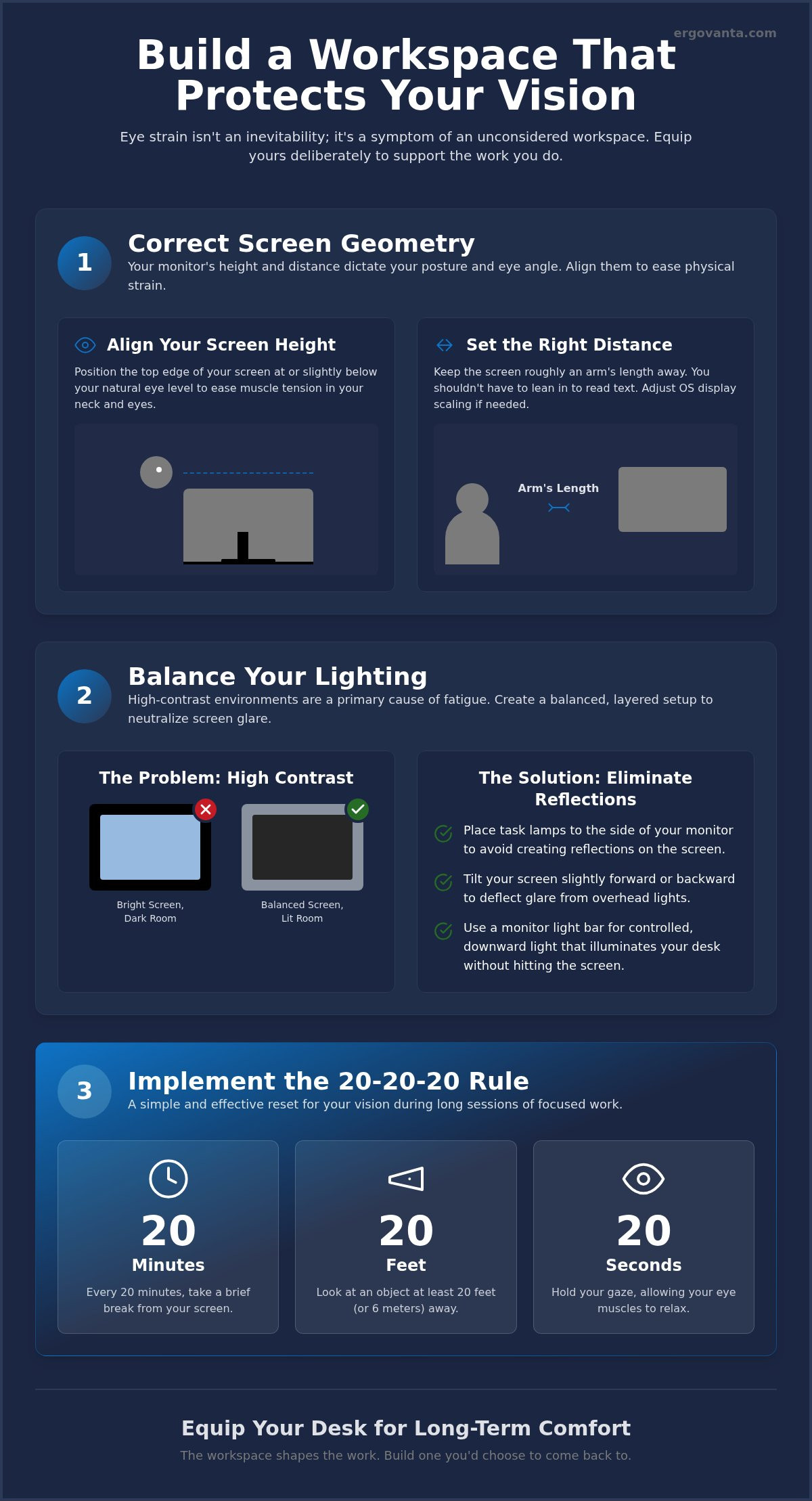
The workspace shapes the work. If you spend serious hours at a desk, the geometry of your screen isn't just about desk aesthetics; it's about physical endurance. Your monitor height dictates your posture and your eye angle. Setting the top of your screen at or slightly below eye level is the first step in learning how to reduce eye strain at computer setups. This alignment reduces the constant, subtle work your ocular muscles do to maintain focus throughout the day.
Ignoring these details often leads to Computer Vision Syndrome, a cluster of symptoms ranging from blurred vision to persistent neck tension. To build a space made for the work, maintain a distance of roughly an arm's length between your eyes and the display. This considered distance prevents your eyes from working too hard to process pixels. Equip your space deliberately; don't just place your screen where it fits.
To better understand this concept, watch this helpful video:
The Role of Vertical Alignment
Looking up or down for hours creates muscle fatigue that radiates from your eyes to your neck. A stable riser provides a permanent, considered focal point for your workday. By using a computer monitor stand, you achieve this alignment without sacrificing the surface area of your desk. It's a small object that earns its place by keeping your head level and your gaze natural. When your screen is at the right height, your body stays open and your focus stays sharp.
Screen Distance and Scaling
Distance matters as much as height. Adjust your screen resolution so the text is legible from your natural seated position. You shouldn't have to lean forward to read fine print. Positioning the screen correctly minimizes the need for your eyes to constantly refocus between the physical objects on your desk and the digital display. This is a practical, intentional way to manage how to reduce eye strain at computer workstations while maintaining the flow of your work sessions.
Balance Your Lighting to Neutralize Screen Glare
High-contrast environments are the primary cause of digital eye fatigue. Working on a bright screen in a dim room forces your eyes to adjust constantly between two extremes, which leads to that familiar 3 PM burn. Equip your desk with ambient lighting that matches your display's brightness to create a more balanced environment. This intentionality is a key part of the tips to reduce computer eye strain shared by health experts. Avoid placing your monitor directly in front of a window; the backlighting is too harsh. A monitor light bar is a better choice. It offers a controlled, downward beam that illuminates your desk without bouncing off the screen surface.
Layering Workspace Light
A room that gets used for serious hours needs more than one light source. Use desk lamps to create a warm, secondary glow that softens the atmosphere of your workspace. This layering helps reduce the sharp shadows that cause your eyes to work harder than they should. Look for fixtures with adjustable color temperatures. Cool, blue-toned light is excellent for morning focus, while warmer, amber tones are better for late-afternoon sessions. It is about building a space that adapts to your workflow rather than forcing your body to adapt to the room.
Eliminating Reflections
Glare is often a symptom of poor positioning. Glossy displays and improperly placed task lights create reflections that lead to squinting and fatigue. Learning how to reduce eye strain at computer desks requires a quick audit of your light fixtures. Use this checklist to optimize your layout:
- Place task lamps to the side of your monitor rather than behind you to avoid direct reflections.
- Tilt your screen slightly forward or backward to deflect overhead light hot spots.
- Use a monitor light bar to illuminate the desk surface without washing out the screen colors.
If you're still seeing spots on your screen after making these changes, send us a note for more specific layout suggestions. Small, considered adjustments to your light sources often yield the biggest results in daily comfort.
Equip Your Desk for Long-Term Visual Comfort
The workspace shapes the work. If you spend serious hours at a desk, building a setup you choose to come back to isn't about aesthetics; it is about physical endurance. One of the most effective habits for anyone learning how to reduce eye strain at computer stations is the 20-20-20 rule. Every 20 minutes, look at something 20 feet away for 20 seconds. It is a simple reset that prevents your ocular muscles from locking into a single focal point for hours on end.
This physiological break is necessary because digital work significantly reduces your blink rate, leading to dryness and irritation. Incorporating workspace essentials that encourage these moments of pause makes the habit feel like a natural part of your flow. Research into ergonomic solutions for eye fatigue suggests that your environment dictates your physical outcomes. Intentionality in your setup leads to a sustainable pace for the person doing the work.
Habit-Supporting Accessories
A well-organized desk reduces the cognitive load that contributes to overall fatigue. When your space is cluttered, your brain works harder to filter out distractions, which can indirectly worsen your visual focus. Use tactile objects as physical anchors for your gaze. A considered accent piece or a small figurine on your desk provides a non-digital target for your eyes to rest on during breaks. These small objects earn their place by breaking the digital monotony and reminding you to look away from the screen periodically.
Selecting Your Essential Gear
Equip your space deliberately by focusing on the tools that have the highest impact on your daily comfort. Prioritize a monitor stand and high-quality lighting as your first ergonomic investments. These are not status symbols; they are functional tools made for the work. Choose materials and build quality that reflect a long-term commitment to your space. By mastering how to reduce eye strain at computer desks through better gear, you ensure that your workspace remains a place where you can actually get things done without the 3 PM burnout.
Build a Workspace Made for the Work
The workspace shapes the work. If you spend serious hours at a desk, the room around it matters more than you think. Eye strain isn't a mandatory part of digital life; it's a signal that your setup needs more intentionality. By aligning your monitor height and balancing your lighting to eliminate glare, you take ownership of your physical comfort. These adjustments ensure your eyes aren't working harder than the project requires.
Mastering how to reduce eye strain at computer stations requires both the gear you choose and the habits you maintain. Every object in your space should earn its place through purposeful function. When you equip your desk with considered tools, you create an environment that supports your focus rather than draining it. We offer free shipping on essential desk gear because we're for the people who do the work, and we believe in purposeful function in every design.
Ready to build a better setup? Equip your workspace with considered monitor stands and lighting to ensure your environment is built for focus. Build a space you'll actually want to come back to.
Frequently Asked Questions
How high should my monitor be to prevent eye strain?
Position the top of your monitor at or slightly below eye level so your gaze is naturally neutral or slightly downward. This alignment prevents your eyes from opening too wide, which reduces the rate of tear evaporation and subsequent dryness. It is a fundamental step in learning how to reduce eye strain at computer stations while maintaining a posture that doesn't fatigue your neck or shoulders.
Do monitor light bars actually help with eye fatigue?
Monitor light bars are highly effective because they provide asymmetrical lighting that illuminates your desk without reflecting off the screen surface. By increasing the ambient light around your display, they reduce the harsh contrast that causes digital eye fatigue. This considered lighting choice ensures your workspace brightness matches your screen output, which is a key tactic for anyone wondering how to reduce eye strain at computer desks during long nights.
What is the 20-20-20 rule for computer users?
The 20-20-20 rule is a simple habit where you look at an object 20 feet away for 20 seconds every 20 minutes. This practice forces your eye muscles to relax and reset their focal point after being locked on a screen. It is an intentional break that works best when you have a physical target in your room, like a faux plant or a figurine, to look at.
Can a monitor stand reduce headaches and neck pain?
A monitor stand addresses the root cause of screen-related headaches by bringing the display into your natural field of view. When your monitor is too low, you naturally hunch forward, which creates tension in your neck and the base of your skull. By equipping your desk with a riser, you align your spine and reduce the physical stress that often manifests as a dull headache by the end of the day.
From the catalog