October 6, 2026
7 Best Desk Fans for a Cool and Productive Home Office
The smallest fan isn’t always the best fit for a home office. Airflow direction, operating noise, and placement matter as much as footprint. Finding the best desk fan for a home office means choosing one that keeps air moving without competing with calls, concentration, or the desk space you rely on.
A fan can make a warm workday feel more manageable, but styles and features suit different setups. A focused breeze feels different from broader room circulation, and even a useful fan can become one more thing in the way if it has nowhere sensible to sit.
Use this guide to compare desk, clip-on, and tower-style options by airflow, noise, controls, and placement. The right fit depends on your room and work habits, not a feature list in isolation. A few considered workspace choices can help every object earn its place.
Key Takeaways
- Find the best desk fan for a home office by matching its airflow pattern and placement to your room and work habits.
- Compare desk, clip-on, and tower styles by how they use space and direct air, rather than assuming one style works for every setup.
- Consider sound in the context of your workday, especially if you take calls or need a quiet space to focus.
- Before choosing a fan, check where it can sit and how your monitor, papers, and walking paths affect airflow and access.
- Choose the fan first, then arrange lighting, monitor positioning, and cables so each object has a clear place.
What Makes a Desk Fan the Best Fit for a Home Office?
A home-office desk fan directs moving air toward a particular work area. The best desk fan for a home office isn’t automatically the smallest or strongest. It’s the one that suits your room, reaches your seated position, and has a place that doesn’t crowd the work you’re doing.
A fan moves air; it doesn’t lower the room’s temperature. Moving air can help you feel cooler by supporting the evaporation of sweat, but how comfortable that feels depends on the room and your preference. Some people like a steady breeze. Others would rather not have air blowing directly at their face or hands. Start with what feels comfortable in your space, not a promise that a fan will improve your health or productivity.
Fan designs direct air in different ways. A quick overview of types of mechanical fans can explain why models vary. For choosing one, focus on how its airflow is intended to work in your room.
What should a home-office desk fan do?
Its job is straightforward: send useful airflow toward the area where you sit. A fan aimed across your hands may feel different from one angled toward your upper body. A breeze that feels pleasant at first may also become distracting over a long work session. Room temperature, airflow from windows or vents, and how close you sit to the fan all shape the experience. Your preferred breeze is the useful measure.
Which desk fan features matter during focused work?
Compare airflow direction, speed controls, noise information, and physical footprint. Adjustable direction can help you aim air away from papers or screens. Multiple speeds give you options as the room or your comfort changes. Controls that are easy to reach make quick adjustments simpler during a call or focused task.
Check the manufacturer’s specifications for dimensions, control options, and any stated noise information. Use those details as a starting point, not a guarantee of how the fan will sound or feel in your room. Noise can stand out more during quiet tasks or calls, so consider where the fan will sit in relation to your microphone and usual work position.
Picture the fan in place before choosing. Will it sit in a corner, share space with a lamp, or clip onto an edge? A few inches can matter when your desk already holds a monitor, keyboard, and the objects you reach for every day. Match the airflow to your work area, then give the fan a spot it can keep without turning your desk into an obstacle course.
How Airflow, Sound, and Size Shape Desk Fan Comfort
A fan can move plenty of air and still feel wrong at your desk. The breeze might hit your papers, the motor may catch your attention during a quiet call, or the base may take up the one patch of surface you need for a notebook. The best desk fan for a home office balances airflow, sound, controls, and fit. Consider all four together.
How much airflow do you need at your desk?
First decide whether you want air directed at your seated work area or broader circulation around the room. A personal fan can suit a desk where you want a nearby breeze. A fan designed to circulate air more widely may make more sense in a room shared with other people. Neither approach is automatically better.
Room layout, distance, and personal preference shape how airflow feels. A fan near your keyboard may feel more noticeable than the same fan placed farther away or angled across the room. For more context on benefits of desk fans in office settings, this University of California resource discusses desk fan use in office environments. Treat airflow descriptions as clues about a fan’s intended use, not a promise that it will cool every corner.
How can you assess fan noise before buying?
Noise is personal, and the room matters. A steady hum may fade into the background for one person and become distracting for another, especially during calls, reading, or focused work. Manufacturer sound descriptions and measurements can help you compare models, but they don’t guarantee how a fan will sound in your room at your chosen setting.
Look for multiple speed settings if you expect to want different airflow during the day. A lower setting may suit a quiet task, while a stronger one may feel preferable when you want more air movement. A powered fan will make some operating sound. Plan for that, rather than expecting silence from a machine whose job is to move air.
Size includes more than the fan’s base. Check its dimensions and consider where the cord will run. A cable stretched across your writing area or tangled with charging leads can make a small fan feel much larger. If the desk is tight, compare a tabletop base with options that attach elsewhere, and leave room for the things you use throughout the day.
- Airflow: Match direction and coverage to where you sit.
- Sound: Use ratings and descriptions as comparison points, not guarantees.
- Controls: Choose settings you can adjust without disrupting your work.
- Fit: Account for the fan, its cord, and the clear desk space you want to keep.
A considered setup is made of small choices that work together. If you’re arranging a broader workspace, you can connect with Ergovanta about your workspace.
Desk, Clip-On, or Tower Fan: Which Style Suits Your Setup?
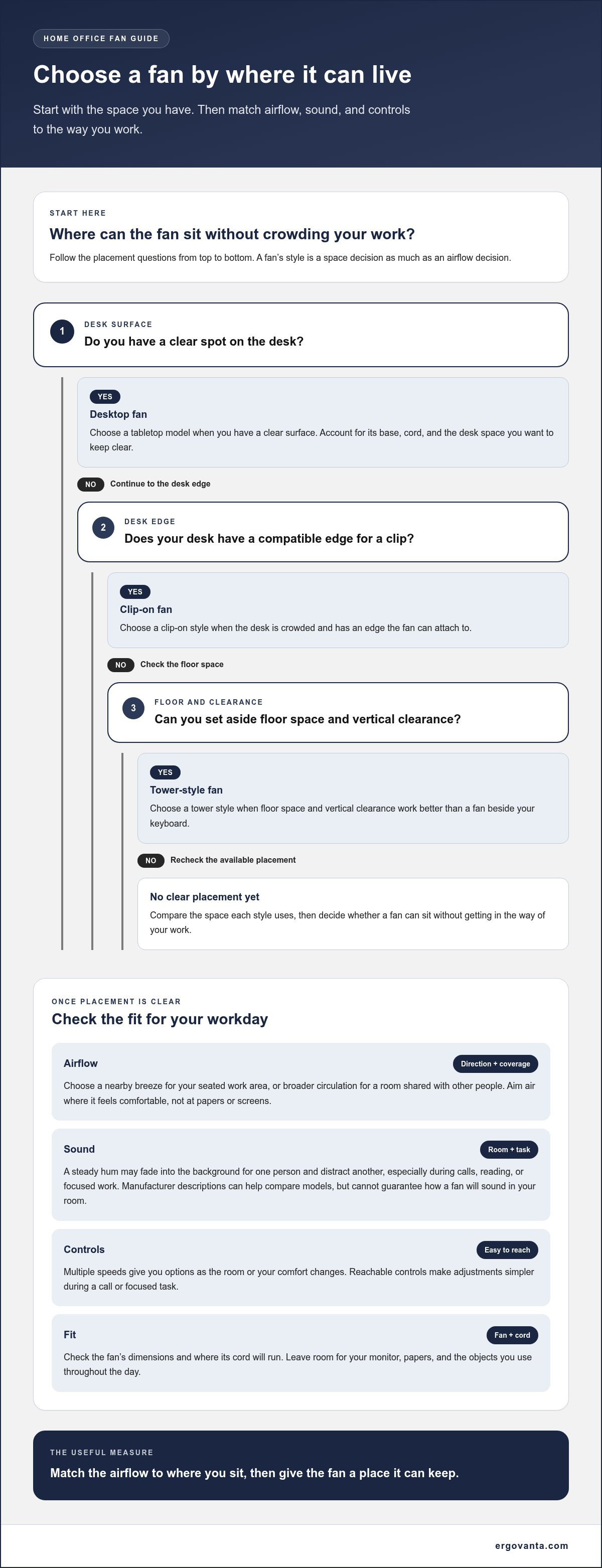
Fan style is a placement decision as much as an airflow decision. A desktop model takes up work-surface space. A clip-on model uses an edge instead. A tower-style fan uses floor space and vertical clearance rather than sitting beside your keyboard. None is a universal winner. The best desk fan for a home office is the style that fits the space you have and puts airflow where you want it.
Rule of thumb: Choose a desktop fan when you have a clear surface, a clip-on style when the desk is crowded and has a compatible edge, and a tower style when the room has floor space for a taller fan.
| Style | Typical placement | Space needs | Airflow and trade-offs |
|---|---|---|---|
| Desktop | On a desk, shelf, or nearby surface | Uses tabletop area; check base dimensions | Often aimed toward a nearby work area, but direction and coverage vary by model |
| Clip-on | Attached to a desk edge or another compatible surface | Can preserve desktop space; needs a suitable mounting point | Placement may offer a different angle, but attachment and stability depend on the design |
| Tower-style | On the floor or another open, stable surface | Uses floor space and vertical clearance | May suit broader room circulation, though airflow direction and coverage vary |
These are broad categories, not fixed product standards. Names and designs vary between manufacturers, so compare actual dimensions, mounting method, and airflow details in each product listing. The label alone won’t tell you whether a fan fits your desk.
When does a compact desktop fan make sense?
Choose a desktop model if you want airflow close to your seated work area and can spare a stable patch of surface. Check the base size and control placement. A fan may be compact on paper but awkward if it blocks a lamp, covers frequently used items, or puts its controls behind your monitor. Compact models also differ in airflow, so don’t assume small means weak or identical.
When should you consider a clip-on or tower-style fan?
A clip-on fan can keep the desktop clear if its clip fits the edge and holds securely in the intended position. Check the product details for mounting compatibility, stability, and dimensions. A tower-style fan may suit a room where a taller profile works better than a fan beside your keyboard. Measure the spot and consider nearby furniture, walking paths, and cord placement. Give the fan room to do its job, and keep the work surface made for the work.
How to Choose and Position a Desk Fan for Your Workday
A good fit starts with your room, not the product page. Use this sequence to narrow your options:
- Assess the room. Notice whether warm air gathers near your desk, whether a window or vent affects airflow, and who else uses the space.
- Pick a placement. Decide whether the fan belongs on the desk, at its edge, or on the floor. Keep walking paths and frequently used items in mind.
- Compare features. Check airflow direction, available settings, sound information, controls, cleaning access, and power connection in the product details.
- Check dimensions. Compare the listed measurements with the actual space you can give the fan, including room for its cord.
This order helps you compare the best desk fan for a home office against your real setup, not an imagined, perfectly empty desk.
How should you position a fan beside your desk?
Aim airflow toward your work area without placing the fan where it blocks your screen, papers, or tools. Try a position beside or slightly beyond your main work surface, then adjust its direction and distance until the breeze feels right. Keep controls within reach, and route the cord so it doesn’t cross your writing space or become a nuisance underfoot.
There’s no universal placement formula. A fan that feels refreshing close by may feel distracting at the same distance for someone else. Test the position during ordinary work, including a call or a stretch of quiet reading, then make small adjustments.
What should you check before settling on a desk fan?
Compare listed dimensions with the available desk or floor space, and picture how the fan will sit alongside your monitor, lamp, and other daily essentials. Review product details for controls, cleaning access, and the power connection. Consider whether the airflow settings and sound descriptions suit the work you actually do, not just a quick first impression.
Give the fan a short trial in its intended spot. If the airflow misses you, the controls are awkward to reach, or the cord interrupts your setup, move it or reconsider the placement. The aim is a fan that fits into your routine without requiring constant negotiation with your desk.
Build a Home-Office Setup That Works Around Your Desk Fan
Choose the fan first, then arrange the work surface around it. That gives the fan a defined place instead of leaving it to compete with your monitor, lamp, notebook, and the mug that somehow always ends up in the way. The goal is a setup where airflow can reach you and your essential tools stay easy to use.
How can you keep a desk fan from adding clutter?
Mark out the fan’s footprint before settling on its position. Leave clear space for the keyboard, writing, and objects you reach for often. If the base crowds your work area, a different location or form factor may suit the desk better.
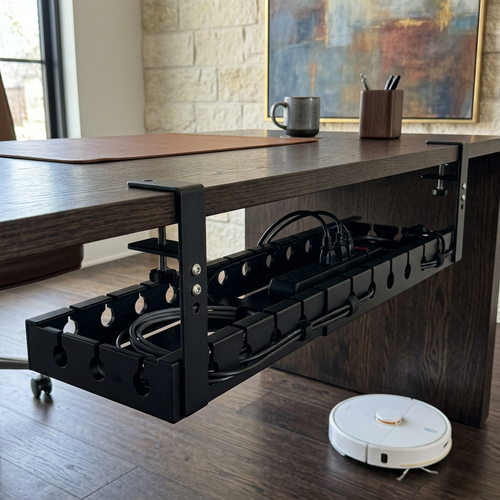
Look at the whole arrangement. A monitor can block airflow, while papers placed directly in its path may become distracting. Keep controls accessible, and route the fan’s cord alongside existing cables rather than across your work area. Cable management can help keep those routes clear. Move anything that obstructs the breeze or makes the fan awkward to adjust. Small edits count; the desk doesn’t need another committee meeting.
What belongs in a considered home-office setup?
A fan is one part of a workspace, not the whole plan. Desk lighting should make your work visible without taking over the surface or getting in the way of airflow. Monitor positioning is a separate consideration: place the screen where it works for your tasks, then position the fan around it rather than asking one object to solve every layout problem.
Build from what you use. A monitor arm or laptop stand can free up some desk surface, while a desk lamp can support the lighting you need for focused tasks. If comfort is part of what your setup needs, seat cushions and foot rests are separate options to consider. Browse workspace essentials for objects that can earn a place in your routine.
Once everything is in position, use the setup for a typical work session. Check whether the airflow feels right, controls are reachable, cables stay out of your way, and frequently used tools still have a home. Adjust what doesn’t work. A considered workspace isn’t a showroom; it’s a room and desk that work for you.
Build a Workspace That Works for You
The best desk fan for a home office is the one that fits your room, work habits, and available space. Compare airflow direction and sound, then consider whether a desktop, clip-on, or tower style suits your placement options. Testing a fan in its intended spot can help you find an arrangement that feels right without putting it in the way.
Once you’ve chosen the fan, arrange the rest of your workspace around it. Keep cables orderly, give your monitor a clear position, and make sure your lighting supports the work you do. Desk lamps, monitor arms, laptop stands, and cable management can help make the setup more functional while leaving room for the objects you use every day.
Your workspace doesn’t need to look like anyone else’s. Make considered choices, keep what earns its place, and adjust as your needs change.
Frequently Asked Questions
What is the best type of desk fan for a home office?
The best type depends on where you have room and how you want airflow to reach you. A desktop fan sits close to your work area, a clip-on model can attach to a compatible edge, and a tower-style fan uses floor space instead of your desktop. Compare placement, airflow direction, and dimensions. The best desk fan for a home office is the one that fits your room and work habits.
Are desk fans quiet enough for video calls?
Some may be unobtrusive on a lower setting, but no fan is guaranteed to be inaudible during a call. Sound depends on the model, selected speed, room, and how close the fan is to your microphone. Check manufacturer noise information as a comparison clue, not a promise. If possible, test the fan where you plan to use it and listen during a typical call before settling on its position and setting.
Can a desk fan cool an entire home office?
A desk fan moves air, but it doesn’t lower the room’s temperature like an air conditioner. Its airflow may help you feel cooler near your work area, while room layout, distance, and obstructions affect how far that breeze reaches. For broader circulation, consider where air can move through the room and whether a different fan style suits the space. Think of a desk fan as personal airflow, not whole-room temperature control.
How do I choose a desk fan for a small desk?
Start by measuring the space you can spare, then compare it with the fan’s listed dimensions. Include the base and room for its power cord, not just the fan head. Consider a clip-on design if your desk has a compatible edge and you want to keep the surface clear. Check that the controls remain easy to reach and that the fan won’t crowd your monitor, keyboard, or everyday work tools.
Where should I place a desk fan in a home office?
Place it where airflow can reach your seated work area without blocking your screen, papers, or frequently used tools. A position beside or slightly beyond your main work surface may work, depending on the fan’s direction and your room layout. Keep its controls accessible and route the cord out of your work area. Try the position during normal tasks, then adjust the fan’s direction or distance until the breeze feels comfortable.
Is a clip-on fan better than a desktop fan?
Neither style is always better. A clip-on fan can free up desktop space, but it needs a compatible edge and a stable attachment. A desktop model may be simpler to position on a shelf or desk, provided you have room for its base. Compare the mounting details, dimensions, controls, and airflow direction for the specific models you’re considering. Choose based on your available space and preferred placement, not the style name alone.
What features should I look for in a home-office desk fan?
Focus on airflow direction, speed settings, sound information, physical footprint, control access, and power connection. Dimensions help you judge whether the fan will fit without crowding your workspace, while multiple settings can give you options for different tasks. Check manufacturer specifications for useful comparisons, but remember they can’t guarantee how a fan will sound or feel in your room. Cleaning access may also matter if you expect to maintain it regularly.
Disclaimer
Ergovanta publishes these guides to help people set up better workspaces. Product recommendations reflect what we sell. Specifications, prices and availability are accurate at the time of writing and may change. Nothing here is medical, ergonomic or professional advice; if you have a specific health concern about your workstation, speak to a qualified professional.
From the catalog