September 23, 2026
Best Desk Lamps for Students: Top Picks for Focused Study
Brighter isn't better. Blasting a cramped desk with raw lumens won't save your grades; it just guarantees eye fatigue before midnight. Finding the best desk lamp for students isn't about chasing maximum wattage. It comes down to controlling glare, protecting your focus, and reclaiming scarce surface space from harsh overhead dorm lights.
You already know the frustration of long study blocks: flickering ceiling fluorescents that wash out your laptop display, zero room for a bulky base, and cool blue tones that disrupt your sleep. In this guide, you'll discover how to choose a considered task light that illuminates notebooks and keyboards without reflecting off your screen. We review the top picks and functional details, from flicker-free LEDs to space-saving clamp designs, that truly earn their place on your desk.
Key Takeaways
- Why flicker-free illumination and balanced beam spread protect your eyes far better than simply cranking up raw brightness.
- The core features that define the best desk lamp for students, from warm-to-cool color tuning to compact bases built for tight surfaces.
- How to decide between an articulated desk lamp and a monitor light bar based on your daily study workflow and available surface area.
- Strategic positioning angles that direct clean light across notebooks and keyboards without bouncing harsh glare off your laptop screen.
- How equipping your desk with durable, purpose-built tools creates an intentional space you actually want to return to each day.
What Makes a Study Lamp Effective for Long Sessions?
Most dorm lighting sets you up to fail. A single harsh fixture on the ceiling casts your own shadow directly across open pages, forcing you into an awkward slouch just to decipher your notes. Effective task lighting changes that dynamic entirely. By delivering directional, balanced illumination right where hands meet paper, a proper lamp reduces the constant optical adjustments your pupils make when shifting back and forth between a backlit screen and printed text.
Equipping your desk with considered lighting is about stamina. When your eyes don't fight heavy contrast ratios or dim spots, late-afternoon sluggishness doesn't set in as quickly. To see practical comparisons of modern study lights, watch this helpful overview:
Finding the best desk lamp for students means looking past basic brightness specs and choosing tools that protect your eyes through multi-hour study blocks. You can explore functional, glare-free options across the Ergovanta collection of lamps designed specifically for intentional work surfaces.
Color Temperature and Academic Focus
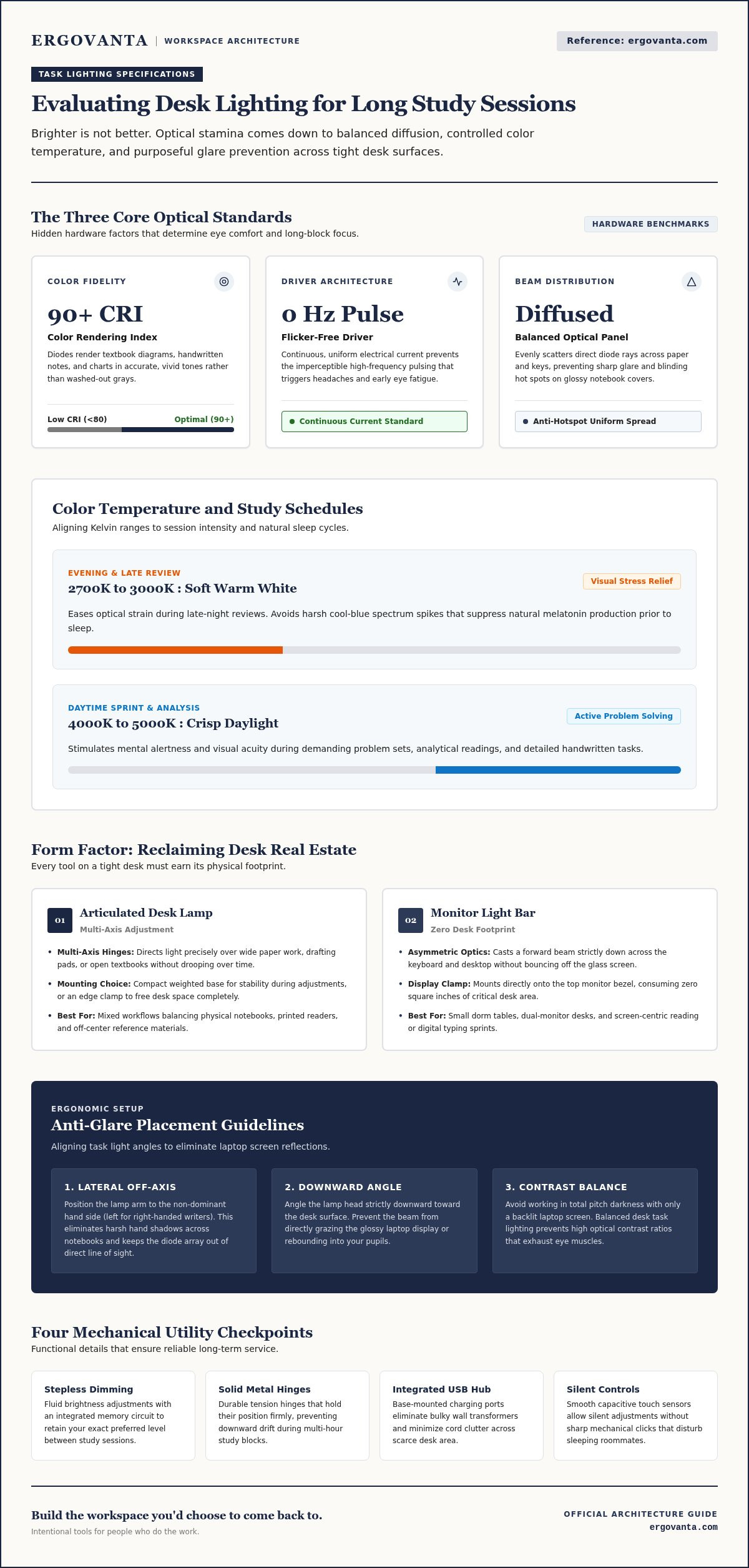
Light temperature controls how alert you feel. Crisp daylight tones between 4000K and 5000K stimulate attention during daytime reading and dense problem sets. In contrast, softer warm white light between 2700K and 3000K eases visual stress during late-night reviews without suppressing melatonin before bed. The best desk lamp for students includes variable temperature settings, giving you control to align your light with your study schedule.
Color Rendering and Optical Flicker
Two hidden specs dictate whether a light supports real focus:
- Color Rendering Index (CRI): Look for a rating of 90 CRI or higher. High-CRI diodes render textbook charts, biology diagrams, and handwritten notes in accurate, vivid tones rather than washed-out grays.
- Flicker-free LED drivers: Cheap lights pulse imperceptibly at high frequencies, triggering unexplained headaches and fatigue. Quality diodes provide continuous, uniform current.
- Diffused lenses: An intentional diffusion panel scatters the beam evenly, eliminating blinding hot spots on glossy notebook covers and smooth desk surfaces.
Core Features to Evaluate in a Student Desk Lamp
Every object on a student desk needs to earn its square inches. Gimmicks like cycling rainbow LEDs or wobbly built-in pencil cups look novel in photos, but they offer zero utility during a six-hour research sprint. Choosing the best desk lamp for students means focusing on mechanical reliability, durable metal components that won't droop, and controls that respond cleanly to how you actually work.
Adjustable Brightness and Dimming Controls
Stepless dimming gives you exact control over lighting intensity, letting you match task illumination against shifting ambient daylight. Preset steps are equally practical when the jumps are distinct, moving seamlessly from a subtle evening background glow to an intense beam for fine print. A built-in memory setting saves your preferred brightness between study sessions, sparing you from fiddling with controls every time you sit down.
Articulation, Reach, and Base Footprint
Dorm surfaces are notoriously cramped. If a lamp takes up half your writing area, it gets in the way of your notebooks and laptop. Multi-axis metal hinges let you position the light head directly over reading materials without creeping downward over time. A compact, weighted base keeps the fixture stable during adjustments, while edge-mounted clamps free up desktop real estate entirely. Directing light at precise angles aligns with OSHA guidelines on desk lighting to prevent harsh reflections across laptop screens.
Integrated Ports and Cable Management
Outlets are rarely positioned where you need them in shared student housing. Onboard USB ports turn the lamp base into a functional power hub, eliminating bulky wall adapters and tangled charging cords from your work surface. Silent touch switches let you cycle through modes without noisy clicks that disturb sleeping roommates. If you need help configuring light placement around tight shelving or dual-monitor setups, you can always reach out to our team for practical workspace advice.
Traditional Desk Lamps vs. Monitor Light Bars for Dorm Desks
A standard college dorm desk rarely measures more than 40 inches across. Between a laptop, an external monitor, charging cables, and an open binder, usable surface area disappears almost immediately. Deciding on the best desk lamp for students often means settling a fundamental hardware debate: do you anchor a traditional articulated arm to your tabletop, or mount a dedicated light bar directly atop your display?
Neither tool is universally superior. The right choice comes down to whether your academic routine lives on a digital screen or across physical pages.
The Case for Monitor Light Bars in Tight Spaces
Monitor light bars solve the spatial crunch of cramped dorm quarters by floating entirely above the work surface. Because they clip securely onto the top bezel of your display, they occupy zero desk footprint. Their primary technical advantage is an asymmetric optical pathway: the LEDs cast light downward and forward across your keyboard and desk mat without reflecting light directly back off the glass panel. For computer science majors, digital researchers, and essay writers whose work is primarily screen-based, a monitor light bar offers clean, distraction-free illumination that keeps the desk clear.
When an Articulated Desk Lamp Wins
Light bars have one clear limitation: their beam is permanently tethered to the front of your screen. If your studies involve hand-drawn chemistry diagrams, physical calculus proofs, architectural drafting, or thick medical textbooks, a freestanding articulated lamp remains indispensable.
A quality swing-arm lamp gives you practical freedom that a fixed light bar cannot match:
- Directional reach: You can pull the lamp head across your desk to illuminate a wide sketchpad, then fold it away when typing.
- Off-axis positioning: Angling the lamp head lets you wash adjacent wall space in soft, indirect glow, softening the high-contrast contrast of working in a dark room.
- Modular setups: Articulated lamps pair naturally alongside considered ergonomic desk accessories, helping you organize notebooks, writing tools, and device stands without fighting rigid lighting boundaries.
If your workload is evenly split between laptop typing and handwritten analysis, an articulated desk lamp provides the physical agility you need to keep your focus sharp.
How to Position Your Desk Lamp to Eliminate Screen Glare
Poor placement ruins good hardware. Even the best desk lamp for students turns into an annoyance if the bare bulb shines into your eyes or reflects off a glossy laptop screen. Achieving clean lighting isn't about trial and error. It requires setting deliberate physical angles that illuminate your notebook while keeping your display crisp and readable.
Step-by-Step Geometry for Glare-Free Study
Positioning your lamp correctly takes three quick adjustments:
- Hand dominance placement: Set the lamp on the opposite side of your writing hand (on your left if you are right-handed). This simple move prevents your forearm from casting harsh shadows across your notes while writing.
- Perpendicular angle: Direct the beam downward at roughly a 45-degree angle pointing strictly away from your screen. The light path should hit your desk mat and keyboard, never bouncing straight back into your eyes from the laptop panel.
- Height calibration: Position the lower lip of the shade slightly below your sitting eye level. You should see illuminated pages on your desk, not the exposed LED diodes inside the fixture.
Balancing Task Light with Room Lighting
Working in a pitch-black room with a single intense spotlight pointed at your book accelerates optical fatigue. When you glance up from brightly illuminated white pages into complete darkness, your pupils constantly contract and expand to adapt. That repeated muscular effort leaves your eyes tired and irritable after just an hour.
You can solve this by softening the surrounding contrast. Rather than turning on harsh ceiling tubes, tilt an articulated study light slightly toward an adjacent wall or corner. Bouncing a fraction of the warm light creates soft ambient fill behind your laptop, neutralizing heavy contrast without washing out the text on your screen. Equipping your desk deliberately with the best desk lamp for students means shaping the whole visual field, not just creating a harsh circle of light.
Equipping Your Study Desk with Purpose-Built Lighting
The workspace shapes the work. Equip it deliberately. Your desk isn't just a flat table where books pile up; it's the operational hub of your academic semester. Cheap plastic lamps with stiff goosenecks tend to rattle loose after midterm exams, leaving you propping up drooping armatures with sticky notes. Investing in purpose-built lighting cuts out that friction, letting you settle into multi-hour study sessions without mechanical distractions.
Durable Materials Built for Daily Movement
Student desks see real use. Between late-night shifts, shared dorm room rearranging, and end-of-semester moves, flimsy desk lamps simply don't hold up. The best desk lamp for students relies on machined metal hinges, durable tension springs, and a counterbalanced base that won't wobble when you redirect the light head. When you reach out to adjust your beam midway through a problem set, the arm should move smoothly and stay put. You can browse purpose-built designs crafted from enduring materials in the Ergovanta desk lamps collection.
Building a Workspace You Choose to Return To
A functional study area works as an ecosystem. Lighting is the visual anchor, but it performs best alongside tools that support physical stamina during marathon reading blocks. Pairing directional lighting with supportive seating accessories and monitor risers from Ergovanta education solutions keeps your posture natural and your tabletop organized.
Focus improves when you eliminate clutter and keep only the small objects that earn their place on your desk:
- A balanced task light: Directs clean illumination across active notes without spilling bright glare into the rest of the room.
- Dedicated device elevation: Keeps your laptop screen aligned with your natural line of sight.
- Clear cable routing: Prevents charging wires from tangling around textbook stands and lamp bases.
Workspaces shouldn't feel like an afterthought, nor do they need to look like anyone else's. Finding the best desk lamp for students is about giving yourself a quiet, intentional space made for the work ahead, built so well you actually look forward to sitting down each day.
Build a Study Space That Works as Hard as You Do
Long study sessions shouldn't end in headaches, eye fatigue, or fighting harsh screen glare. Finding the best desk lamp for students isn't about buying the brightest bulb on the shelf. It comes down to intentional balance: controlling beam angles, dialing in flicker-free LED components, and picking a footprint that preserves your usable surface area.
Every tool on your tabletop should earn its spot through daily utility. When you select fixtures engineered for purposeful function with durable materials, you eliminate daily friction and make long study blocks significantly more comfortable. Thoughtful ergonomic designs are built for the people who do the work every day, turning a standard dorm desk into a dependable space you choose to return to.
Frequently Asked Questions
How many lumens does a student need for studying at a desk?
For standard textbook reading and typing, 450 to 800 lumens is the target range. If your coursework includes architectural sketching, fine illustration, or detailed lab drawings, scale up to 1,000 to 1,500 lumens. Rather than locking into fixed brightness, look for dimmable controls that let you dial back the output as natural daylight fades across your work surface.
Is warm light or cool white light better for studying late at night?
Warm light between 2,700K and 3,000K is much better for late-night study blocks. Cooler blue-white tones keep you alert during the afternoon, but they suppress melatonin and trick your brain into staying awake past midnight. Choosing the best desk lamp for students with tunable color modes allows you to shift from a crisp daytime white to an amber evening hue that protects your sleep cycle.
Can a desk lamp cause eye strain if placed incorrectly?
Yes, improper lamp placement causes rapid visual fatigue. Positioning a light directly in front of your face creates harsh optical reflections on glossy paper and laptop displays. Pointing the bulb toward your eyes also causes direct glare, while setting it on your dominant hand side casts distracting shadows across your notebook. Keep the shade angled downward and slightly below eye level to keep your visual field comfortable.
Are monitor light bars better than traditional desk lamps for small dorms?
Light bars work better if your study routine is almost entirely laptop-based and your desk has zero spare surface space. They clamp onto the display bezel and illuminate keyboards without throwing glare on the glass. However, if you regularly spread out spiral notebooks, sketchpads, or thick textbooks, an articulated desk lamp gives you the physical reach to cover wider areas beyond the screen.
What is the ideal Color Rendering Index (CRI) for a reading lamp?
Look for a Color Rendering Index (CRI) of 90 or higher. While a score of 80 is acceptable for basic reading, a 90+ CRI renders text, color-coded notes, and textbook illustrations with natural clarity and contrast. Diodes with high color fidelity prevent the dull, muddy tones that cause you to lean forward and squint during long study sessions.
Can I use a student desk lamp to illuminate both physical books and a laptop?
Yes, provided the lamp offers multi-axis articulation or a flexible swing arm. The best desk lamp for students lets you position the head to the side of your laptop, aiming the beam downward across open notebooks without washing out your display. Pairing an adjustable lamp with a laptop stand also raises your screen so task light can pass underneath to illuminate your keyboard.
How do I stop my desk lamp from reflecting off my computer screen?
Set the lamp to the side of your monitor rather than behind or directly facing it. Angle the light head downward at roughly 45 degrees, making sure the beam points straight at your desk mat instead of the display panel. Lower the fixture head so the exposed diodes sit just below your seated eye line, keeping direct glare out of your screen and peripheral view.
Disclaimer
Ergovanta publishes these guides to help people set up better workspaces. Product recommendations reflect what we sell. Specifications, prices and availability are accurate at the time of writing and may change. Nothing here is medical, ergonomic or professional advice; if you have a specific health concern about your workstation, speak to a qualified professional.
From the catalog