September 26, 2026
Best Headphone Stands for a Clean, Organized Desk
The best headphone stand for a desk is the one that fits your headphones, your available space, and the way you use your desk. A clamp-on hanger can free up the desktop, while a tabletop stand keeps headphones visible and close at hand. Neither is automatically better. The right choice depends on where you can put it and how you reach for your headphones each day.
It’s easy to focus on appearance and miss the practical details. Will the stand feel stable when you lift your headphones? Does its support shape suit their headband? Will the base compete with your keyboard, notebook, or cup? A stand earns its place when it solves a real problem without creating another one.
Use this checklist to compare headphone stands by fit, footprint, stability, and daily routine. You’ll see how tabletop stands, clamp-on hangers, and integrated options differ, and what to check about placement and product details. The goal is simple: keep your headphones accessible, reduce desk clutter, and make your setup easier to use.
Key Takeaways
- The best headphone stand for a desk suits your headphones, usable space, and everyday habits.
- Measure the spot you plan to use, then compare it with the stand’s listed dimensions.
- Check how the stand supports your headphones and whether its base or placement works in your setup.
- Compare storage styles by asking what each option would free up, and verify listed features rather than assuming them.
- Use your own headphones and desk measurements to make a practical choice.
Why the Best Headphone Stand for a Desk Depends on Your Setup
A headphone stand gives your headphones a consistent place between uses, where they’re easy to reach and less likely to compete with your notes, keyboard, or other desk items.
The best headphone stand for a desk depends on whether that spot suits your headphones and your routine. Headphones come in different forms, including over-ear and on-ear designs, so check their shape and how they rest before choosing a stand. Headphones offers a basic overview of these types. A stand is optional, not a desk requirement. If you already have a storage habit that works, there’s no need to add another object.
For a quick look at how different stands are presented, watch this overview:
When a Headphone Stand Earns Its Place
Notice what happens during an ordinary work session. Do you put on your headphones for calls, take them off to focus, then reach for them again later? If they repeatedly end up beside your mouse or on top of a notebook, a designated spot can make them easier to find and keep the desk more orderly. The benefit is straightforward: one less small item without a home.
Placement matters, too. Put the stand somewhere you can reach without shifting other essentials. Ergovanta also carries monitor and laptop stands for people arranging their desk around screens and daily use.
When a Stand May Not Suit Your Desk
If your surface is already full, your headphones live in a drawer or bag, or you prefer putting them away, a desk stand may add clutter instead of reducing it. Ask whether you need a reliable landing spot or simply like the look of one. Both are valid preferences, but only the first solves a storage problem.
Try your current routine before buying. If your headphones already have a convenient home, keep it. If they keep migrating across the desk, a stand may be a useful addition. Choose for the space and habits you have, not an imagined desk that stays empty all day.
How to Compare Headphone Stands for Fit, Stability, and Desk Space
A stand can look right online and still feel awkward beside your keyboard. Compare the details that affect fit, then check the product’s listed dimensions against the space you can spare. Leave room to lift the headphones on and off, not just enough room for the stand itself.
A good fit depends on both headphone geometry and available desk space. Use this comparison to identify what to check:
| Factor | What to check | Why it matters |
|---|---|---|
| Footprint | Listed width and depth compared with your usable desk area | A stand shouldn’t crowd the space you use for daily tasks. |
| Base stability | Base shape and how the stand is intended to sit | Consider whether it may shift when you place or lift your headphones. |
| Headphone fit | Support shape and contact points compared with your headband | The resting area should suit the shape of your headphones. |
| Placement | Reach, nearby cables, and room to pick up and replace headphones | A stand is more useful when its location suits your routine. |
Check Headphone Fit Before Choosing a Stand
Look at your headband’s shape and width, then compare them with the stand’s stated support area. Product photos or specifications may show exactly where the headphones rest. Check whether that contact point appears suited to your design instead of assuming one shape fits every pair. If compatibility or support details aren’t listed, treat them as unknown and verify them before buying.
Assess Footprint and Stability on Your Desk
Measure the intended spot, including the space your hands need to lift the headphones on and off. Compare that usable area with the listed dimensions, and consider the base shape and placement. A stand may fit on paper but still feel in the way beside a keyboard or catch on a cable. Mayo Clinic’s guidance on an ergonomic desk setup also recommends keeping frequently used items within easy reach.
Ergovanta sells headphone stands. Check current product information for dimensions and compatibility details. If you need clarification, contact Ergovanta with your fit questions before choosing.
Which Headphone Stand Style Makes Sense for Your Desk?
Start with the problem you want to solve, not the product category. A freestanding stand gives headphones a visible place on the desk. A clamp-on hanger can attach to a desk edge, while an integrated stand may combine headphone storage with another function, such as charging or USB connections. Each approach has trade-offs. The best headphone stand for a desk solves a real storage need without making your setup harder to use.
| Desk condition or routine | Option to consider | Question to investigate |
|---|---|---|
| You want headphones visible and close at hand | Freestanding stand | Where can it sit without interrupting regular desk tasks? |
| Desk surface is limited | Clamp-on hanger | Can it attach to your desk, and will that placement stay accessible? |
| You’re already trying to consolidate accessories | Integrated stand | Do its listed functions replace something you already use? |
| You use headphones occasionally | Existing storage, such as a drawer | Is your current storage convenient enough? |
Freestanding Stands and Desk Placement
A freestanding design offers a clear, easy-to-remember landing spot. The trade-off is that it uses desk surface. Check the product dimensions, then picture your usual movements around it: reaching for a mouse, opening a notebook, or moving a cup. If its position interrupts those tasks, the stand may feel like one more thing to work around.
Clamp-on and integrated options may suit different constraints, but don’t assume every design fits every desk or meets every need. Confirm attachment requirements and listed functions in the product information. Missing details are questions to resolve, not reasons to guess.
Match the Choice to Headphone Use
If you reach for headphones throughout the day, prioritize a storage spot that’s easy to access and remember. For occasional use, compare a stand with storage you already have in the room. On a shared desk, consider whether the location will work for different people and tasks or need to move regularly.
Keep the decision practical. A stand doesn’t automatically make a desk more orderly; it helps when it gives headphones a useful, consistent home. If your current routine already does that, there’s no need to add another object. Let the job determine the style, then check the product details before choosing.
A Simple Checklist for Choosing the Right Desk Headphone Stand
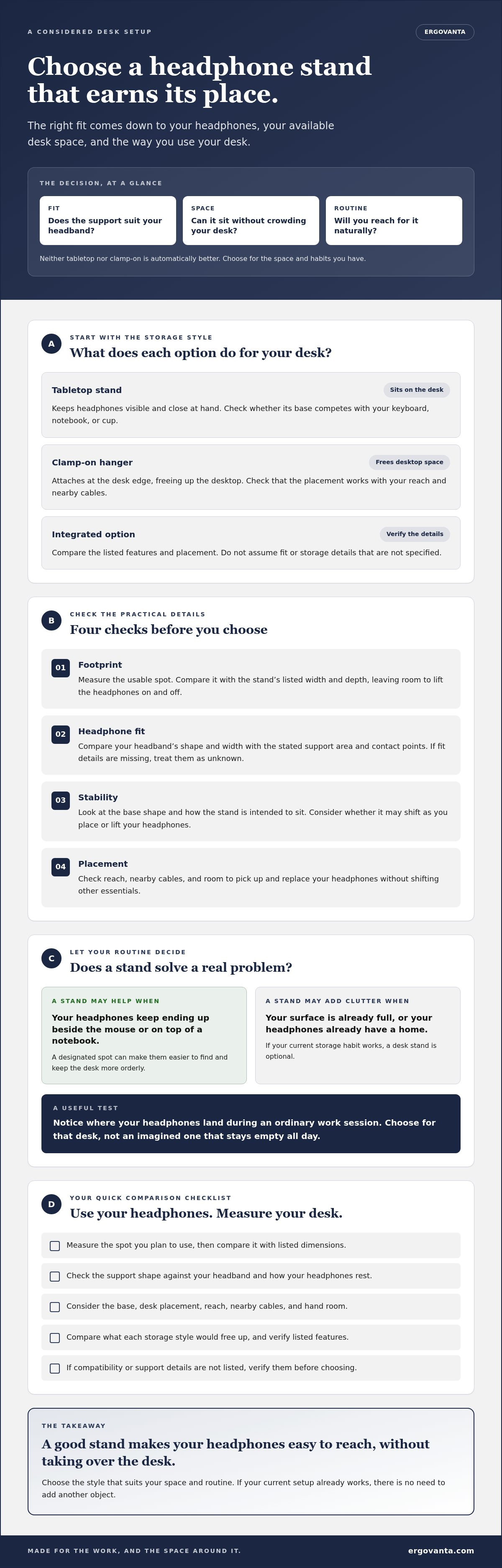
Use your own headphones and desk as the reference, not a product photo styled for an unusually empty surface. The best headphone stand for a desk should address a real storage need, fit the space you have, and work with how you use your headphones. Run through these checks before ordering.
Five Checks to Make Before You Buy
- Identify the need. Note your headphone type, where you want to store it, and how often you use it. If it already has a convenient home, a stand may not add much.
- Measure the space. Measure the usable area where the stand would go. Include room to place and lift the headphones, not just the stand’s footprint.
- Check the fit. Compare your headphones’ headband shape and width with the product’s stated support area. Review photos and specifications, and note unanswered compatibility questions.
- Compare stability. Review the listed base or attachment details, if provided. Consider whether the placement works with nearby cables, devices, and the way you reach for your headphones.
- Review product details and terms. Check the description, dimensions, materials, and care guidance where available. Read the retailer’s policies before ordering, and don’t assume details that aren’t stated.
A simple note can keep the comparison grounded: headphone type, intended location, available footprint, and how often you use your headphones. Compare those details with each product’s verified information. If a key measurement or fit detail is missing, verify it rather than filling in the blank yourself. Ergovanta’s tech device accessories collection is one place to browse related desk items.
Place the Stand Where It Supports Your Routine
Choose a spot you can reach without moving items you use more often. Trace nearby cable paths and notice how the stand might sit beside your keyboard, screen, or other devices. A spot that looks tidy but blocks a familiar movement is probably not the right one.
For a shared desk, consider whether the location still works when someone else uses the space or the setup changes. If you’re planning other desk items, the workspace essentials collection can help you explore what else might earn a place. Decide what your routine needs first, then choose objects that fit it.
Build a Desk Setup That Works, Starting With the Right Headphone Stand
The choice doesn’t need to be complicated. Compare each option against the same practical criteria: does it suit your headphones, fit the space you can spare, seem stable in its intended position, and work with how you use your desk? The best headphone stand for a desk is the one that earns its place in your routine, not the one with the longest feature list.
Review Your Shortlist Before Deciding
Put your shortlisted options side by side and check each against the same questions. Consistent criteria make it easier to see what fits your needs and what’s simply appealing in a product photo.
- Fit: Does the available product information show how your headphones rest on the stand?
- Footprint: Do the listed dimensions fit your measured desk space, with room to pick up and replace your headphones?
- Stability: Are the base or placement details clear enough for you to judge how the stand will sit in your setup?
- Use: Will the proposed location make your headphones easy to reach without interrupting regular desk tasks?
Separate confirmed details from open questions. A product description may list dimensions or materials, but if fit, stability, or care guidance isn’t specified, don’t treat it as confirmed. Check the retailer’s product information and policies before ordering. Avoid choosing on rankings or popularity alone; neither tells you whether a particular stand fits your headphones and desk.
Consider the rest of your setup, too. If you’re arranging screen space alongside smaller desk accessories, Ergovanta also offers monitor and laptop stands. Focus on what your space needs instead of adding objects just because they belong to the same category.
Ask Ergovanta About Available Options
Ergovanta sells headphone stands, but check current options and product details before deciding. If a listing leaves a question unanswered, ask about the available stands and confirm the details that matter to your shortlist, such as fit information, dimensions, or listed materials.
Choose with your own measurements and routine in mind. Build the workspace you’d choose to come back to.
Choose the Stand That Fits Your Everyday Setup
The right headphone stand doesn’t need the most features or the biggest footprint. It needs to suit your headphones, fit the space you measured, and work in the place you’ll use it. That’s how to find the best headphone stand for a desk: match product details to your setup instead of relying on assumptions or appearance alone.
Before deciding, compare shortlisted options using the same checks: headphone fit, footprint, stability, and your daily routine. Confirm dimensions and other relevant details in the product information, and ask about anything unclear. If your current storage already works, skipping a stand is a perfectly good choice. The point is to make your space work better, not to give every accessory a desk-sized address.
Ergovanta sells headphone stands. Ask about current options and product details as you narrow down your choice.
Choose with intention, keep what earns its place, and build a workspace you’ll be glad to return to.
Frequently Asked Questions
Do I need a headphone stand for my desk?
No, a headphone stand is optional. It can be useful if your headphones often end up in different places or compete with other items for desk space. If you already store them in a drawer, bag, or another convenient spot, a stand may not add much. Start with your routine and consider buying one if a dedicated, easy-to-reach place would solve a real storage problem.
How do I choose the right headphone stand for my headphones?
Compare your headphones’ headband shape and width with the stand’s stated support area. Check product photos and specifications to see where the headphones rest, and confirm the stand fits your available desk space. The best headphone stand for a desk suits both your headphones and your setup. If product details don’t confirm compatibility, verify it with the retailer before ordering.
Will a headphone stand take up much desk space?
That depends on the stand’s design and dimensions. Check the listed width and depth, then compare them with the usable area on your desk. Leave enough room to lift the headphones on and off, and consider nearby items such as your keyboard, notebook, or cables. If surface space is tight, compare a tabletop stand with storage options that use a different placement, where product details are clear.
Are freestanding headphone stands stable?
Stability depends on the specific stand and how it sits on your desk, so don’t assume all freestanding designs behave the same way. Review product details and images for information about the base and how the headphones rest. Consider whether the stand may shift as you pick up or replace your headphones. If stability information isn’t provided, ask the retailer rather than treating an unclear detail as a guarantee.
Can a headphone stand fit different types of headphones?
Some stands may suit more than one headphone shape, but compatibility isn’t universal unless the product information confirms it. Compare your headphones’ headband with the stand’s support area and contact points. Over-ear and on-ear designs can rest differently, so review product images and specifications. If the fit isn’t clear for your particular pair, check with the retailer before choosing.
Where should I put a headphone stand on my desk?
Choose a spot that’s easy to reach and doesn’t interrupt tasks you do often. Check how the stand fits beside your keyboard, screen, and other regularly used items, and note whether cables run through the same area. Leave room to place and lift your headphones comfortably. The most practical location is the one that works with your routine, not simply the one that looks neat in a photo.
What should I check before buying a headphone stand online?
Review the product description, listed dimensions, materials, and any available care or headphone-fit guidance. Compare the measurements with your desk and check where the headphones will rest. Read the retailer’s policies, too. Separate confirmed details from unanswered questions, and contact the retailer to verify anything important that isn’t specified. Don’t assume a stand includes features or fits your headphones unless the product information says so.
Disclaimer
Ergovanta publishes these guides to help people set up better workspaces. Product recommendations reflect what we sell. Specifications, prices and availability are accurate at the time of writing and may change. Nothing here is medical, ergonomic or professional advice; if you have a specific health concern about your workstation, speak to a qualified professional.
From the catalog