August 24, 2026
How to Hide Desk Cables: A Guide to Intentional Routing

The workspace shapes the work. Equip it deliberately. You are deep into a project when a stray movement of your foot snags a tangled nest of wires, nearly dragging your monitor to the floor. It is a jarring reminder that a cluttered environment is a distracted one. We have all dealt with the visual noise of cords, the dust that gathers in the tangles, and the frustration of hunting for a plug that should be right there. You want a surface that feels intentional and ready for the task at hand.
Managing your space is about reclaiming your focus through considered routing. You will learn how to hide computer cables and wires on a desk by selecting tools that earn their place. This guide shows you how to build a streamlined environment that respects your time and your safety. We will preview the latest 2026 standards for USB4 and Power Delivery 3.1, ensuring your setup is as functional as it is clean. From using monitor stands as routing channels to maintaining OSHA-compliant pathways, you are about to build a workspace you would choose to come back to.
Key Takeaways
- Move power strips and heavy bricks off the floor using under-desk trays to eliminate trip hazards and clear your physical path.
- Equip your desktop with small objects like cable clips and ties that earn their place by grouping wires according to their destination.
- Learn how to hide computer cables and wires on a desk by adapting your routing strategy to your specific room layout and desk frame.
- Approach cable management as an ongoing ritual of order; review your routing every time you add or remove a piece of gear.
- Focus on intentionality rather than perfection to build a workspace that is functional, safe, and ready for the work.
The Workspace Shapes the Work: Why Cable Management Matters
The workspace shapes the work. Equip it deliberately. When your desk is a chaotic web of tangled cords, you aren't just losing physical real estate; you're losing mental bandwidth. Every stray wire in your peripheral vision acts as a micro-distraction. It is a subtle drain on your energy that compounds over an eight-hour day. Learning how to hide computer cables and wires on a desk is more than a weekend project; it is a way to equip your space for the long haul. Managing these connections through intentional cable management is a clear act of professional ownership. It signals that your work matters enough to be considered.
Visual Noise and the Cost of Distraction
Peripheral clutter competes for your attention during periods of deep work. Your brain is a processing engine that naturally scans its environment for order. A tangle of black rubber and frayed ends is a pattern of disorder that your mind must constantly work to ignore. When you master how to hide computer cables and wires on a desk, you remove these visual hurdles. This allows your focus to remain on the screen or the page where it belongs.
There is a tangible psychological benefit to a clean start. Walking into a room that feels "made for the work" sets a different tone for the day than walking into a mess. This isn't about looking like a magazine spread. It is about building a space that supports your focus rather than taxing it. By choosing workspace essentials that earn their place, you create a sanctuary for productivity that feels personal and functional.
Safety and Accessibility in Your Space
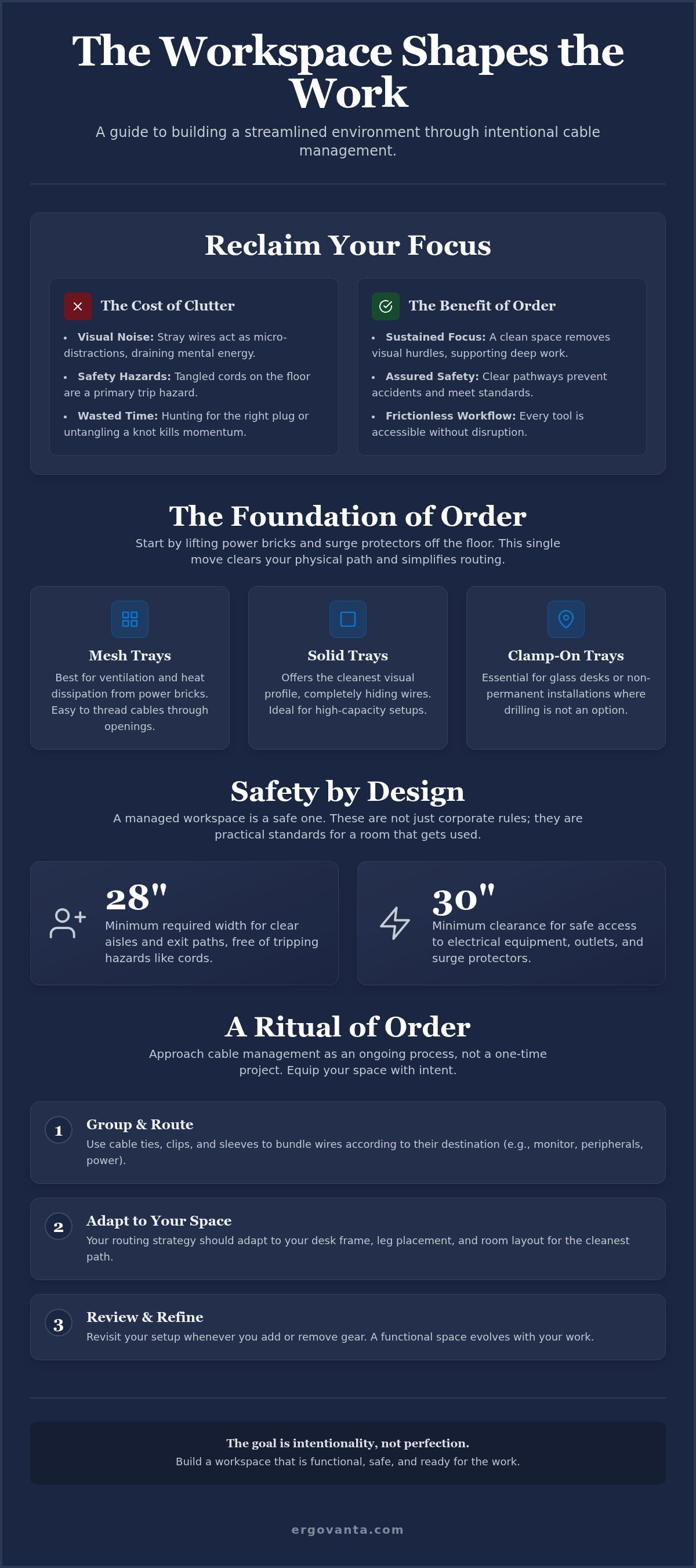
Safety is a baseline requirement for any functional workspace. OSHA regulations for general office safety mandate that aisles and passageways must be kept clear of obstructions, specifically tripping hazards like computer cords. If your exit path is less than the required 28 inches wide because of a pile of wires, you have a safety problem. Electrical equipment also requires a 30-inch clearance for safe maintenance. These aren't just corporate rules; they are practical standards for a room that gets used.
A managed workspace means your feet don't tangle in cords every time you shift in your chair. It means you don't accidentally unplug your primary monitor in the middle of a critical call. However, hiding cables shouldn't mean burying them. The best systems keep wires out of sight but remain easy to reach for troubleshooting. Whether you are swapping to a new USB4 2.0 cable for faster data transfer or checking a connection, the process should be frictionless. You are building an environment where every object has a purpose and a path.
The Foundation of Order: Under-Desk Infrastructure
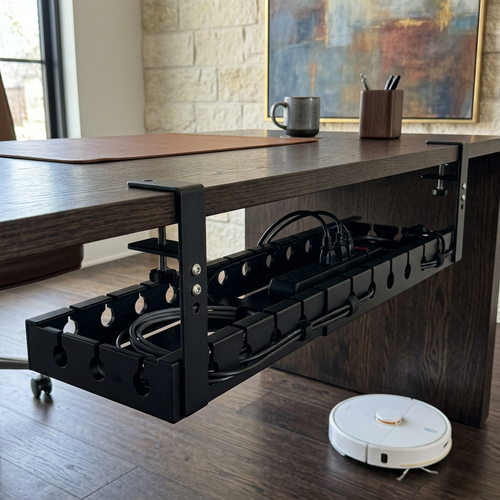
The foundation of order starts where gravity ends. If your power bricks and surge protectors are resting on the floor, they are collecting dust and creating a trip hazard. Learning how to hide computer cables and wires on a desk begins with lifting this infrastructure into a dedicated under-desk tray. This move clears your physical path and simplifies the routing process for every device you own. By moving the heavy lifting off the carpet, you transform a chaotic tangle into a managed hub. Adhering to workstation safety guidelines means keeping your footwell clear; an intentional under-desk setup ensures your feet never snag a critical connection.
Selecting a Cable Management Tray
Your choice of tray dictates the long-term success of your routing. Mesh trays are lightweight and offer excellent airflow, which is vital for high-wattage power bricks that generate heat. Solid metal trays provide a cleaner visual profile and higher weight capacity for heavy-duty setups with multiple monitors. If you are in a rental or prefer not to modify your furniture, choose a "no-drill" clamp-on tray. These secure firmly to the desk edge without leaving permanent marks. When you build your setup, look for workspace essentials that match the length and depth of your desk to ensure the tray can handle your entire cable load.
- Mesh Trays: Best for ventilation and easy cable threading.
- Solid Trays: Best for hiding the bulk of the wires from every angle.
- Clamp-on Options: Essential for glass desks or non-permanent installations.
Positioning Your Power Strip
Mount your surge protector first. It is the central nervous system of your workspace. By securing the power strip directly to the underside of the desk or nesting it inside your tray, you create a single point of entry for power. Place the strip near the rear edge of the desk. This positioning keeps the power cables for your monitors and computer as short as possible, reducing the amount of slack you need to manage. It also keeps the bulky "wall wart" adapters tucked away from your knees.
Always leave one or two outlets accessible. While the goal is to hide the "permanent" wires for your main gear, you will occasionally need to plug in temporary tech like a camera battery charger or a specialized tool. An intentional layout accounts for these moments of change. If you have questions about which tools best fit your specific desk frame, feel free to reach out to our team for guidance on building a space that works as hard as you do.
Desktop Wire Management: Choosing Tools That Earn Their Place
The surface of your desk is where the work happens. Equip it with tools that deserve to be there. Most people treat the top of their desk as an afterthought, letting wires sprawl across the wood like an invasive species. Learning how to hide computer cables and wires on a desk requires a shift in perspective. You aren't just hiding things; you are creating a considered path for every connection. This approach ensures your desktop remains a sanctuary for focus rather than a reminder of unfinished chores.
Start by grouping your cables by their destination. All monitor cables should follow a single path. All peripheral wires should follow another. When you bundle wires, you reduce visual noise and make it easier to identify a specific cord when something needs to be swapped. Use monitor arms or dedicated risers to create natural routing channels that lift wires off the desk surface entirely. This keeps the area directly in front of you clear and ready for the task at hand.
Velcro Ties vs. Plastic Zip Ties
Plastic zip ties are a commitment. They are for permanent installations inside walls, not for a desk that moves and grows. We all know the reality: you will likely buy a new peripheral, a different keyboard, or a specialized macro pad next week. Cutting a plastic tie every time you want to move a mouse cord is wasteful and frustrating. Choose reusable Velcro ties instead. They are intentional tools that respect the fact that your workspace is alive. They allow you to add or remove gear in seconds, maintaining the ritual of order without the plastic waste. Reusable ties are simply more considered for a space that evolves with your career.
Cable Sleeves and Channels
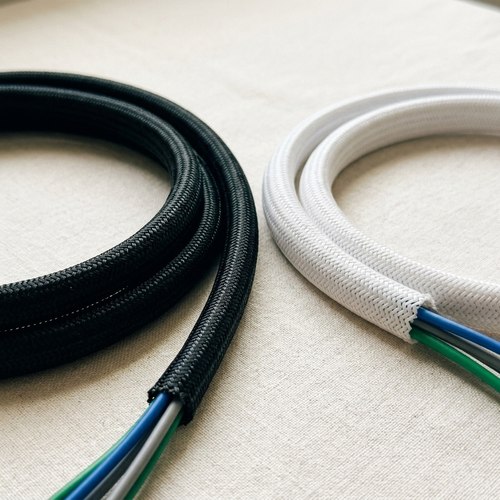
When your cables must travel from the desk to the under-desk tray we discussed earlier, use a cable sleeve to create a clean "waterfall" effect. This turns five or six individual wires into one cohesive column, preventing that messy spiderweb look behind your computer. For the equipment that stays on the surface, route your wires along the back of monitor and laptop stands. These stands often feature integrated clips or hollow pillars designed specifically to keep wires out of your direct sightline.
For the single, stray wires that don't belong in a bundle, like a phone charger or a microphone cable, use small adhesive clips. These are the small objects that earn their place by keeping specific connectors exactly where you need them, preventing them from sliding off the back of the desk. If you are running high-speed USB4 2.0 cables alongside power cords, try to keep them grouped but slightly separated to minimize interference. This level of detail ensures your space is not just clean, but technically sound and made for the work.
Routing Strategies for Different Desk Layouts
The layout of your room dictates your routing strategy. Build it accordingly. Whether your desk is pushed against a window or floating in the center of the room, the goal remains the same: a workspace that feels intentional and ready for work. Understanding how to hide computer cables and wires on a desk requires looking at your furniture as a framework for your tech. If you treat the desk frame as a highway for your data and power, the wires disappear into the architecture of the room.
Managing the Wall-Facing Setup
Wall-facing desks are the most common configuration and offer the easiest path to a clean surface. You can hide the bulk of your cable management behind the desk frame itself. Attach dedicated cable channels to the back edge of the desk to keep wires invisible from a side profile. Use the desk legs as a vertical path for cables to reach the wall outlet. This creates a clean line that follows the furniture silhouette.
Be intentional about spacing. Ensure there is at least an inch of breathing room between the desk and the wall to avoid pinching cables. Pinched wires aren't just a mess; they are a safety risk and can lead to data loss or power failures. By using adhesive clips along the underside of the desk, you ensure that even the wires traveling to the wall follow a considered, deliberate route.
The Floating Desk Challenge
A floating desk in the center of a room is a statement of ownership, but it requires a more disciplined approach. Without a wall to hide behind, every wire is a potential eyesore. When you are figuring out how to hide computer cables and wires on a desk that sits in the middle of a room, the "umbilical" cord method is your best tool. Bundle all power and data cables into one sleek, opaque sleeve that follows a single desk leg down to a floor outlet. This single column looks like part of the desk design rather than a stray tangle.
Minimize physical connections wherever possible. Choosing wireless peripherals for your keyboard and mouse significantly reduces desktop clutter. High-quality tech and device accessories can often consolidate multiple wires into a single hub, meaning you only have one main cable to hide. For those using standing desks, remember to leave enough slack in your umbilical bundle to account for the full range of vertical movement. A workspace that snags or pulls when you change positions is not yet finished.
Maintaining Your Space: A Ritual of Order
Building your workspace is not a one-time event; it is an ongoing ritual. You don't just solve the problem of how to hide computer cables and wires on a desk and walk away forever. As your work evolves, your tools will too. Every time you add a new microphone, a specialized keypad, or a secondary monitor, you face a choice. You can let the new wire disrupt your order, or you can take three minutes to integrate it into your existing routing. This constant refinement is what keeps a space functional for the long term. A managed desk is a space you will choose to come back to every morning because it removes the friction of technical disorder.
Label both ends of your cables. It sounds like a minor detail, but it is a massive time-saver during troubleshooting. When you are under the desk trying to figure out which USB-C cable belongs to which device, a simple tag makes the difference between a five-second fix and twenty minutes of frustration. This level of intentionality ensures that your setup remains easy to modify. You are building a system that serves you, rather than one you have to fight against every time a connection fails.
The 10-Minute Workspace Audit
Perform a monthly audit of your space. Tighten any Velcro ties that have loosened and clear the dust that naturally accumulates around electronics. When you audit how to hide computer cables and wires on a desk, you ensure your initial effort doesn't degrade over time. This is also the time to identify "ghost cables." We all have them: the charger for a phone you no longer own or the HDMI cable still plugged into the tray but connected to nothing on the surface. Removing these artifacts is essential for keeping your routing considered. A workspace that grows with your work shouldn't be weighed down by the ghosts of past projects.
Integrating Lighting and Style
The final touch in an intentional workspace is the atmosphere. Proper lighting does more than illuminate your notes; it defines the boundaries of your focus. Use task lamps to create a dedicated zone for deep work. A well-placed light bar can highlight the clean, wire-free surface of your desk while allowing the managed bundles behind your monitor to retreat into soft shadows. This creates a visual hierarchy that keeps your eyes on the task and away from the infrastructure.
This isn't about hiding a mess. It is about using style to support your function. When your space is properly equipped, it doesn't just look better; it feels ready. You have built an environment that respects your time and your focus. The goal was never just to follow safety standards or clear a path; it was to build a room that actually gets used. Equip it deliberately, maintain it regularly, and do the work that matters.
Equip Your Space for the Work Ahead
The workspace shapes the work. Mastering how to hide computer cables and wires on a desk is a foundational step in building a room that gets used. By lifting infrastructure off the floor and selecting small objects that earn their place, you have moved past simple organization. You've built a considered environment where every connection has a path and every device has a purpose. This intentionality ensures your desk remains a sanctuary for productivity rather than a source of distraction.
Order is not a static state; it's a ritual. Whether you're managing a floating desk or a wall-facing setup, your space now supports your focus rather than draining it. We provide functional tools with a minimalist aesthetic and peer-supported ergonomic guidance because we believe your environment should work as hard as you do. These objects are made specifically for the people who do the work.
Take ownership of your layout today. A managed desk is just the beginning of a more intentional way to work. Build the space you deserve.
Frequently Asked Questions
How do I hide cables on a desk that is in the middle of a room?
Use a single, clean umbilical cord. Bundle your power and data lines into a sleek cable sleeve and route it down the leg closest to your floor outlet. This turns a potential mess into a considered design element. For a desk in the center of the room, minimizing the number of physical connections is key. Wireless peripherals help keep the surface clear while the sleeve handles the heavy lifting.
What are the best tools for under-desk cable management?
The most effective tools are those that earn their place through function. Start with a sturdy cable management tray to house your power strip and bricks. Combine this with reusable Velcro ties for bundling and adhesive clips for routing single wires along the desk frame. These tools allow you to build a system that is both hidden and accessible. Avoid permanent plastic ties; they aren't made for a workspace that grows.
Can I manage cables on a standing desk without them pulling?
You can manage cables on a standing desk by incorporating a service loop. This is simply a deliberate amount of slack left in your cable bundle to account for the desk's full vertical range. Secure the bundle to the underside of the desk and the lower part of the leg. This ensures that when the desk rises, the wires move freely without tension or the risk of accidentally unplugging your gear.
Is it better to use a cable tray or a cable sleeve?
It isn't a matter of which is better; it is about where they are used. A cable tray is the foundation; it holds the heavy power strips and bricks under the desk. A cable sleeve is for the waterfall, the section where wires travel from the desk to the floor. When learning how to hide computer cables and wires on a desk, you will likely need both to create a truly streamlined environment.
How do I organize my power bricks so they are not on the floor?
Move power bricks off the floor by mounting them to the underside of your desk. You can use a cable management tray to nestle them alongside your surge protector or use heavy-duty adhesive strips for a more minimalist look. This clears your footwell and prevents dust buildup. Keeping these components off the floor is a practical step in building a workspace that feels intentional and ready for the work.
Should I use wireless accessories to reduce cable clutter?
Wireless peripherals are an excellent way to reduce surface clutter. By switching to a wireless mouse and keyboard, you eliminate the two most visible wires on your desktop. This simplifies the process of how to hide computer cables and wires on a desk because you have fewer lines to route. While you still need power for your monitor and computer, removing peripheral wires makes the remaining management much easier to handle.
How can I hide cables on a glass desk where everything is visible?
Hiding cables on a glass desk requires using the furniture's metal frame as a shield. Route your wires along the underside of the support rails using adhesive clips that match the frame's color. Since the surface is transparent, your routing must be exceptionally disciplined. Bundle wires tightly and keep them tucked directly behind the frame pieces. This ensures the infrastructure remains invisible from most sitting and standing angles in the room.
What is the easiest way to label my computer wires?
The easiest way to label wires is by using dedicated cable tags or simple tape at both ends of every cord. Mark each tag with the device name, such as Main Monitor or Webcam. This ritual of order saves significant time when you need to troubleshoot a connection or swap out gear. It is a small, considered detail that makes your workspace feel truly yours and professionally managed.
Disclaimer
Ergovanta publishes these guides to help people set up better workspaces. Product recommendations reflect what we sell. Specifications, prices and availability are accurate at the time of writing and may change. Nothing here is medical, ergonomic or professional advice; if you have a specific health concern about your workstation, speak to a qualified professional.
From the catalog