July 11, 2026
Light for the Work: Why a Monitor Light Bar Earns Its Place

Your desk lamp is likely stealing space it hasn't earned. If you spend serious hours at a desk, the room around it matters more than you think, yet most lighting solutions create as many problems as they solve. A monitor light bar isn't just another accessory; it's a functional tool designed to reclaim your desk surface while fixing the physics of screen glare.
Squinting through late-night sessions and dealing with nagging headaches shouldn't be part of your process. We know that an intentional workspace is the foundation for getting things done. Discover how to equip your desk with lighting that reduces eye strain and keeps your surface clear for the tasks that matter. We'll look at why asymmetrical light is essential for focus and how to choose the objects that earn their place in a space made for the work.
Key Takeaways
- Moving your light source off the desk surface allows you to reclaim valuable space for the tools that actually matter.
- Learn how the asymmetrical design of a monitor light bar eliminates screen glare and reduces the eye fatigue that often cuts work sessions short.
- Understand how to use adjustable Kelvin settings to match your lighting to your specific task and your internal clock.
- Discover why every object in your workspace must earn its place through purposeful function and considered design.
- Equip your space with integrated tools that feel like a permanent part of your environment rather than temporary fixes.
Clearing the Surface: The Functional Logic of Monitor Light Bars
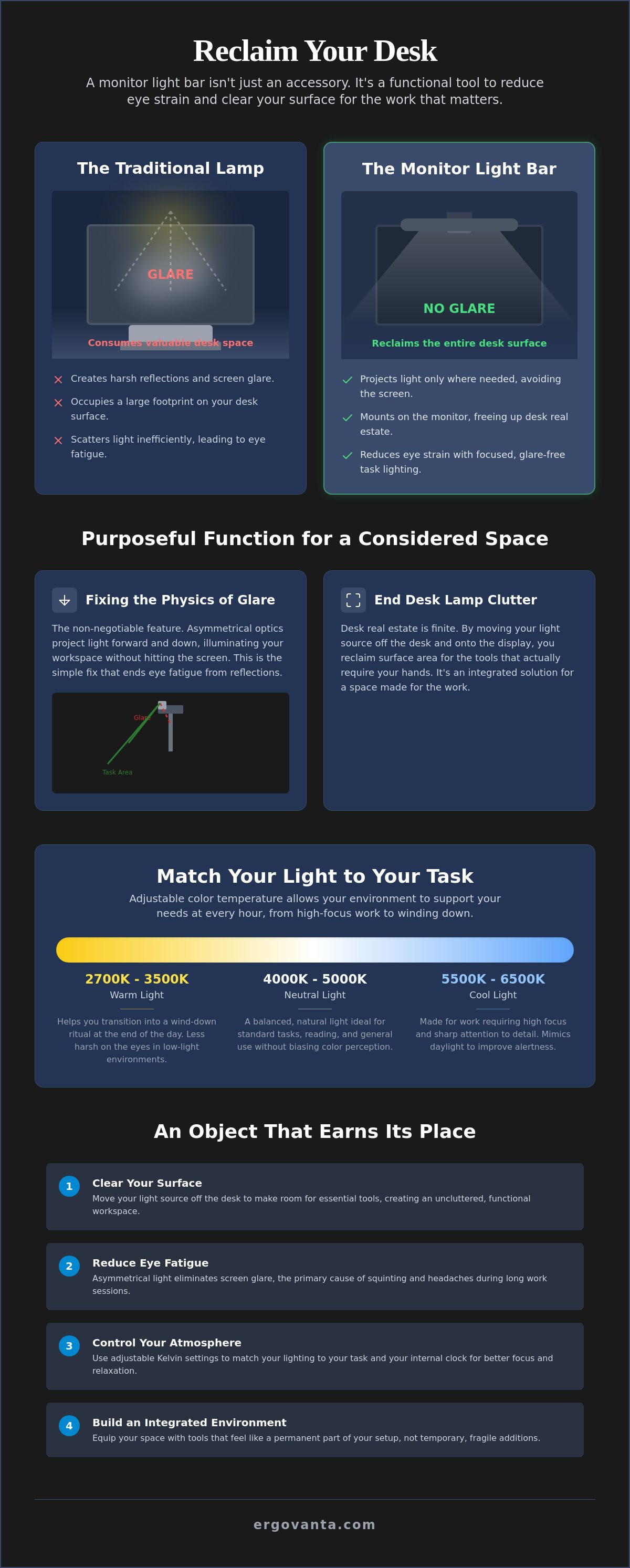
The workspace shapes the work. Equip it deliberately. If you spend serious hours at a desk, every square inch of your surface matters. Traditional lamps often fail the test of usefulness because they demand a footprint they haven't earned. By moving your light source off the desk and onto your display, a monitor light bar reclaims your surface area for tools that actually require your hands, like notebooks, tablets, or hardware. This is the core logic of effective Task lighting: placing light exactly where it's needed without adding clutter.
To see how different models handle these requirements, watch this comparison:
The End of Desk Lamp Clutter
Desk real estate is finite. Traditional lamps take up the room you need for your monitor and laptop stands or external peripherals. A monitor light bar utilizes the space your screen already occupies. It's a considered way to build a workspace that feels integrated rather than cluttered. You aren't just adding another object; you're replacing a bulky one with a tool that stays out of the way. It allows you to build a room that actually gets used.
Fixing the Physics of Glare
Standard overhead or desk lights create harsh reflections on your screen. This glare leads to the squinting and eye fatigue that often cuts work sessions short. Unlike a standard bulb that scatters light in every direction, light bars use asymmetrical optics. They project a dedicated light path downward to hit your keyboard and documents while avoiding the glass of your monitor. It's a simple fix for a common physics problem. It ensures your focus stays on the work, not on the strain.
Selecting Your Setup: Optics, Atmosphere, and Intentionality
Equipping your space is a personal process. It's about choosing the small objects that earn their place through purposeful function rather than just filling a gap. When selecting a monitor light bar, the decision should be anchored in how you actually feel during those long stretches at the desk. It isn't just about adding more light; it's about adding the right light. A considered choice here transforms a generic desk into a workspace you'd choose to come back to. The materials should feel solid and purposeful. The object should feel like it belongs in the room, not like a temporary plastic clip-on.
Color Temperature and the Work
Light quality dictates the atmosphere of your room and your ability to focus. Most quality light bars offer an adjustable color temperature range from 2700K to 6500K, allowing you to match the light to your internal clock. Cooler light, typically between 4000K and 6000K, is made for the work that requires high focus and sharp attention to detail. As the day ends, shifting to a warmer setting around 3000K helps you transition into a wind-down ritual. This intentionality ensures your environment supports your needs at every hour, making the space one that gets used effectively.
Why Asymmetrical Optics Matter
The non-negotiable feature for any serious setup is asymmetrical optics. Cheaper alternatives often scatter light in all directions, causing it to bleed onto the screen and create the very glare they claim to fix. A well-designed monitor light bar keeps the light on the desk surface where your hands are, not on the monitor glass. Standard workstation ergonomic guidelines emphasize that task lighting must be positioned to avoid glare; asymmetrical optics solve this without you having to think about it. If you're ready to build a more intentional environment, you might consider exploring our curated lighting to find tools that fit your specific workflow.
Building a Permanent Environment: Installation and Integration
Installing your gear isn't a chore; it's a way of claiming your space. If you spend serious hours at a desk, the way you integrate your tools determines whether you'll actually want to sit there on a Tuesday morning. Equip your space with tools that feel integrated, not temporary or fragile. A monitor light bar shouldn't feel like an afterthought clipped onto a screen; it should feel like an extension of the hardware itself. Placement is vital. You want the light to hit your work surface without obstructing your line of sight or getting in the way of other tools like webcams or microphones. The room around the desk matters more than you think for long-term productivity. It's the difference between a desk you tolerate and a workspace you've built deliberately.
Cable Management and Power
A clean setup reduces the mental friction of starting the work day. Tangled wires are the junk drawers of the desk world; they don't belong in a space made for the work. Use tech device accessories to keep the power cord out of sight. Most bars draw power via USB, so routing the cable along the monitor arm or stand keeps the visual noise to a minimum. When the cords disappear, the focus remains on the tasks at hand.
The Final Workspace Layout
Pair your light bar with other workspace essentials for a cohesive environment. It's about building a room that supports the work you do every day. Check the full lighting collection to find objects that earn their place. When your light, your tools, and your surface all work together, the space becomes a personal environment of focus. You aren't just buying a monitor light bar; you're finishing a room that gets used for the long haul. Build it once, build it right, and get back to the work.
Equip Your Space Deliberately
The workspace shapes the work. If you spend serious hours at a desk, the room around it matters more than you think. A monitor light bar earns its place by solving the physics of screen glare while reclaiming the surface area traditional lamps often steal. It's about more than just visibility; it's about building a permanent environment where you can focus without the distraction of eye strain or unnecessary clutter. By selecting tools with asymmetrical optics and adjustable color temperatures, you're investing in a space that supports your internal clock and your daily workflow.
Every object on your desk should be there because it serves a purpose. When you integrate your lighting into your hardware, you remove the friction that comes with a disorganized setup. This isn't about status; it's about the functional advantage of a room that is made for the work you do every day. At Ergovanta, we provide considered tools for intentional spaces. We're for the people who do the work, supporting desk setups across the United States with objects that serve a purposeful function. Build a workspace that works for you. Reach out to us. It's your space. Make it one you choose to come back to.
Common Questions About Intentional Lighting
Does a monitor light bar cause screen glare or reflections?
No, provided the bar utilizes asymmetrical optics to direct light strictly downward. This specific design ensures the light path illuminates your keyboard and documents without ever hitting the monitor glass. It effectively fixes the physics of glare that traditional lamps often create. By focusing the light where your hands are, you maintain a clear view of your screen without the nagging reflections that lead to headaches.
Can I use a monitor light bar with a curved screen or ultrawide monitor?
Yes, most light bars are designed to sit securely on curved and ultrawide displays. The mounting clips are usually weighted or adjustable to accommodate the thicker backs of these screens. For curved monitors, the monitor light bar provides a balanced light path that covers the entire desk width. It's an efficient way to equip a large workspace without occupying the desk real estate needed for your other tools.
How does a light bar compare to a traditional desk lamp for eye strain?
A light bar offers more consistent, glare-free coverage than a desk lamp, which often creates harsh shadows and uneven pools of light. Because the monitor light bar sits directly above your workspace, it creates a balanced environment that reduces the contrast between your bright screen and a dark desk surface. This balance is what prevents the eye fatigue that often ends a productive session early. It's about choosing the small objects that actually earn their place.
What is the best brightness level for a home office light bar?
The standard recommendation for general office tasks is an illuminance level between 300 and 500 lux. For detailed or technical work, aiming for the higher end of that range (500 lux) provides the clarity required for focus. Most intentional setups benefit from an adjustable bar that lets you match the brightness to your room's ambient light. This ensures your eyes don't have to work harder than necessary to constantly adjust between your display and your physical documents.
From the catalog