October 10, 2026
Monitor Light Bar for Desk: How to Choose the Right Fit
The best light for your desk might not sit on it. A monitor light bar for desk lighting can free up surface space and direct light toward your work area, but only if it fits your screen and suits the way you work. A curved display, a wide monitor, or an awkward mounting edge can turn a tidy idea into one more thing to adjust.
It makes sense to want useful light without screen glare, dim corners, or another object crowding your desk. A light bar and a desk lamp solve the lighting problem differently: one sits above the screen, while the other gives you more freedom to direct light around your space. Neither is automatically the right choice.
This guide compares both options and walks through the details that matter before you choose: monitor shape and width, mounting clearance, light placement, and desk space. You’ll also see how screen-focused task lighting can work alongside ambient light, so you can build a setup that feels considered, comfortable, and yours.
Key Takeaways
- A monitor light bar for desk lighting can keep a lamp base off your work surface, but screen fit and placement matter.
- Check your display’s shape, width, and mounting area before choosing a light bar. Compatibility depends on the specific design.
- Compare a light bar with a desk lamp by how you use your desk, where you need light, and how much room you want to keep clear.
- Consider brightness controls and light direction, then check for reflections from your usual sitting position.
- Use screen-focused task lighting alongside ambient light, such as blue variants of the Atlas, Button, or Enoki lamps.
What Does a Monitor Light Bar Do for Your Desk?
A monitor light bar is a screen-mounted task light that directs illumination toward the desk, not a replacement for the room’s overall lighting. It sits along the top edge of a display and aims light at the work surface below, such as your keyboard, notebook, or drawing area. The point is to light the places where close-up desk tasks happen while leaving the desktop free of a lamp base.
Think of it as one layer in a considered setup. A monitor light bar can serve the work directly in front of your screen, while ambient light fills out the space around you. The principles of lighting help explain why these roles differ: task lighting focuses on a particular activity, while general lighting supports the room as a whole. A bar won’t necessarily light a shelf, a second workstation, or the far side of a shared table.
How is a monitor light bar different from a desk lamp?
A monitor light bar attaches to the top of your display, while a desk lamp stands on the desktop or another nearby surface. That changes both the footprint and the direction of light. A bar keeps its base off the desk and typically points light down toward the work area. A lamp takes up space for its base, but you can position it independently of the monitor.
Picture a compact study desk with a keyboard, notebook, and little room to spare. A bar may leave more of that surface available. On a larger desk, a lamp can sit beside a sketchbook or another task away from the screen. Neither setup guarantees a reflection-free view. The result depends on the display, light position, and how you use the space, so check the effect from your usual sitting position.
Who may find a monitor light bar useful?
A monitor light bar for desk use may suit anyone who wants focused light near the screen without giving up space to a lamp base. That could mean studying in a shared room, working from home at a compact desk, editing or drawing beside a monitor, or keeping a hot-desk setup easy to clear. The useful question isn’t what job you do. It’s where your hands, notes, and other close-up tasks tend to be.
Your room and screen arrangement matter, too. If the room already has even general light, a bar may add a closer pool of task lighting. In a dim room, it won’t necessarily light the wider surroundings, so another layer may help. A ceiling light can contribute to room-wide illumination, while a desk lamp offers a separate source you can position near a particular task. For two monitors, consider where the light needs to fall and how the displays are arranged. Choose the setup that earns its place in your space, rather than adding a light because it looks tidy in someone else’s photo.
How Monitor Light Bars Work: Fit, Light Direction, and Controls
A monitor light bar rests above the display and directs its beam down toward the desk. The light’s angle matters: a well-aimed beam lights your work area without sending unnecessary light straight toward your eyes or screen. That’s the intention, not a guarantee. Screen reflections depend on the display’s surface, the bar’s position, your viewing angle, and the light in the room.
Separate the checks that apply to any setup from details that vary by model. Look at your monitor’s top edge, nearby accessories, and where the beam lands. Then use the product specifications to confirm fit, mounting, controls, and adjustments. A broad claim that a bar fits “most monitors” won’t tell you whether it fits yours.
What should you check about mounting and monitor fit?
Start with the shape of the screen housing, not just its width. Compare your monitor’s top edge and rear profile with the bar’s mounting design. A curved screen, narrow bezel, webcam, or clip-on accessory may affect how a mount sits or whether it can rest securely. Don’t assume that a clamp or counterweight arrangement works across every display.
Check the product’s compatibility guidance for your monitor type, especially if it has a curved profile or unusual attachments along the top. Look for any required surface shape or clearance behind the screen. If the specifications don’t address a feature your monitor has, don’t treat general fit language as a promise. The right match sits steadily without blocking a webcam or interfering with how you adjust the display.
Which light controls and adjustments matter day to day?
Controls shape whether a light is easy to live with. Compare the listed brightness adjustments and color-temperature options, if offered, then consider where those controls sit. A control on the bar, a wired switch, or a separate remote each creates a different routine. Choose an arrangement you can reach without shifting your screen or interrupting a task.
Think about when you use the light, too. You might want a quick brightness change as daylight fades, or a different light tone for reading notes than for screen-focused work. Don’t assume dimming, color adjustment, automatic sensing, or remote control is standard. Confirm each feature in the individual product details. If light tone is part of your evening routine, the Society of Behavioral Medicine discusses the effects of blue light on sleep, a useful distinction when considering screen settings and room lighting.
Once the bar is mounted, sit in your usual position and check the screen for reflections. Adjust the light’s placement or angle if the product allows it, then notice whether the keyboard and nearby work surface are lit as intended. For a separate ambient layer, consider blue desk lighting accents alongside the screen-focused task light.
Monitor Light Bar vs. Desk Lamp: Which Suits Your Setup?
Both can light your work. The difference is where the light starts, how much desk space it uses, and whether you need to move it around. Use this comparison to picture each option in your own setup, not an imaginary perfectly empty desk.
Consideration
Monitor light bar
Desk lamp
Placement
Mounted along the top of a display.
Placed on the desk or another nearby surface.
Desktop footprint
No lamp base on the work surface, though the mount occupies space at the screen.
Needs room for its base, with placement depending on the lamp’s design.
Task coverage
Concentrated around the monitor and nearby work area.
Can be directed toward a notebook or another nearby task.
Adjustment needs
Fit and beam position depend on the screen, mount, and available adjustments.
Position depends on the lamp and the space around it.
Neither option is best for every desk or task. A monitor light bar for desk use may suit screen-centered work and a desktop you’d rather keep clear. A lamp may make more sense when your work moves between a display, a notebook, and other spots. Either choice still needs sensible placement. Screen reflections depend on the monitor, mounting arrangement, and light adjustment, rather than disappearing by magic.
When is a monitor light bar the better fit?
Choose a bar if you mainly need light around the display and want to preserve desk space for a keyboard, notes, or tools. It can be a considered fit for a compact workstation where a lamp base would claim useful territory. First, make sure the monitor’s top edge and shape work with the mount. The bar lights a task area, not the whole room.
When does a desk lamp make more sense?
A desk lamp gives you more freedom to place light beside a book, sketchpad, or work that shifts around the desk. Some designs let you reposition the light, though the available movement depends on the lamp itself. That flexibility comes with a footprint to plan for. If a lamp suits your routine, explore desk lamps for your workspace.
Try a quick layout test before deciding. Mark where your screen, keyboard, and most-used paper materials sit. If the light needs to stay near the monitor and the top edge supports a compatible mount, a bar may fit. If you need to move light between tasks or direct it away from the screen, a lamp may be easier to place. Your work pattern gets the deciding vote.
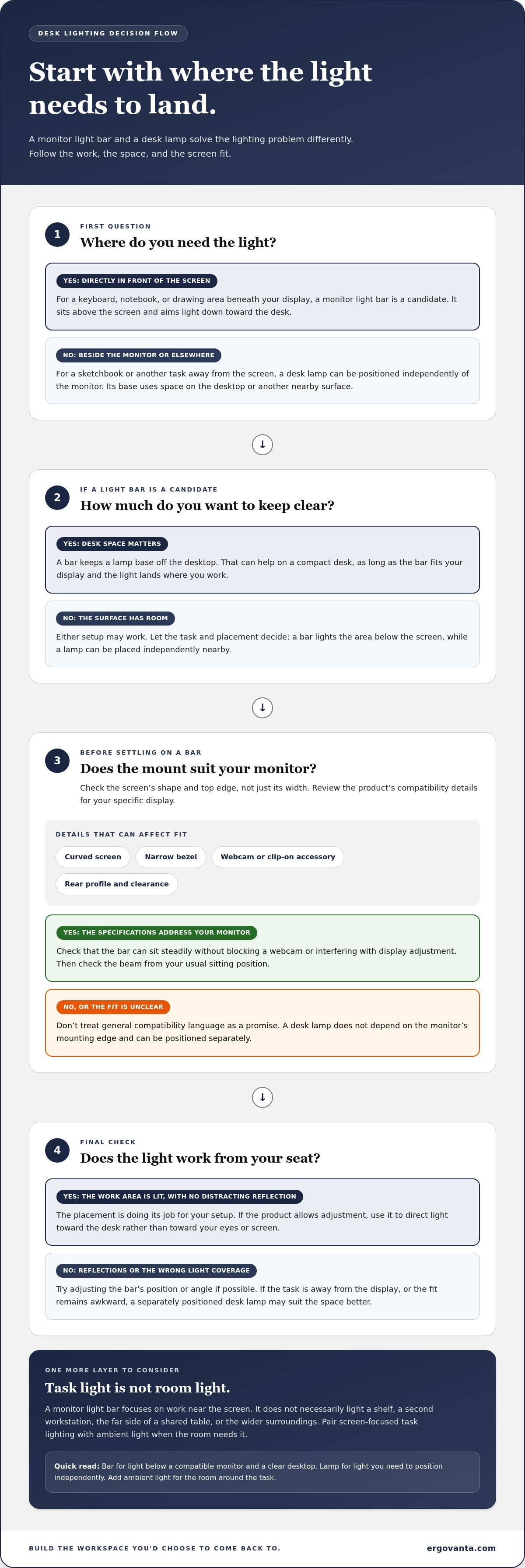
How to Choose a Monitor Light Bar for Your Desk
Choose in the order that prevents the most avoidable regret: start with what you do, then see whether the light fits your screen and routine. A monitor light bar for desk use should match the actual display setup, not just look neat in a product photo.
- Define the task. Decide whether you mainly type, read from paper, draw, or switch between tasks. A screen-centered setup has different needs from a desk where notes and creative materials spread out. Room lighting and the hours you work also matter: they help you judge where extra task light would be useful.
- Inspect your screen. Note its shape, top-edge design, webcam position, and number of displays. Treat single, dual, curved, and ultrawide arrangements as distinct configurations. A bar suited to one display may not span or mount appropriately across another arrangement. For dual screens, consider where the light needs to land and whether a bar can sit securely on the display you use most.
- Compare light controls. Look for the brightness controls and color settings actually specified for each model. Think about how you’ll use them: controls within easy reach may be useful if you adjust the light during the day, while a setting you rarely change may matter less. Don’t assume dimming or color adjustment is included unless the product details say so.
- Confirm the mounting fit. Compare the manufacturer’s compatibility guidance with your exact monitor configuration. Check the shape of the top edge and any webcam or attachments that could interfere with the mount. Curved and ultrawide monitors deserve particular attention. Broad wording such as “fits most monitors” is not a substitute for product-specific guidance.
- Assess the desk layout. Look at where the keyboard, notes, and other tools sit, then consider where the light will fall. Review the listed beam direction and available adjustments. Glare-control claims describe a design intention, not a guaranteed result for every screen, position, and room. After positioning the bar, check for reflections from your usual seat.
Keep the common missteps in view. Don’t assume every curved or ultrawide screen will work with the same mount. Don’t treat advertised glare control as a promise that reflections can’t occur. And don’t choose by appearance alone; a tidy-looking light still has to suit your monitor and the work on your desk.
If you’re still weighing task lighting against other ways to light your space, compare options in the desk lighting collection. Choose the light that fits how your desk gets used.
Build a Blue Desk Lighting Setup Around Your Monitor
Give each light a clear role. A monitor light bar provides task lighting near the screen; a separate lamp can add light elsewhere on the desk or contribute to the room’s atmosphere. Layering them lets you address practical needs first, then bring in color and character. A blue lamp is a companion to monitor lighting, not a substitute for the bar.
Start by noticing what feels missing. Is the area around your keyboard the priority, or would you rather add a light source to a darker corner of the desk? Keep the monitor light focused on the work surface, then place a complementary lamp where its light and shape make sense for your layout. Leave room for the things you use every day. Desk accessories should earn their spot, not make the desk feel like a display shelf.
Choose a blue desk lamp for surrounding light
Blue variants of Atlas and Button offer distinct ways to add a lamp to your setup. Atlas is a touch-controlled accent lamp, giving you a simple interaction point as part of the desk arrangement. Button is a blue ambient table lamp, suited to a supporting lighting role rather than screen-focused task lighting. For more options, compare the desk lamp selection with the space you have and the kind of light you want nearby.
Placement makes the difference between a useful layer and a crowded surface. Try setting a table lamp to the side of the monitor, rather than directly where you need room for notes or a keyboard. Notice how it works with the existing room light and your monitor bar. A small shift can make the lighting feel intentional without asking every lamp to do the same job.
Add a cordless accent for flexible placement
The blue Enoki is a cordless table lamp, not a monitor light bar. Its supplied description lists USB Type-C charging and about eight hours of light per charge. That makes it a distinct option when you want an accent lamp without positioning it as the main light for screen work. Keep the roles clear: the bar lights the task area, while Enoki adds a separate point of light to your desk.
Build around the way your desk is actually used. If the screen and keyboard are the center of your work, keep task lighting there. If you also want a colored accent or ambient lamp, choose a spot that adds to the setup without getting in the way. The result doesn’t need to match anyone else’s desk. It needs to feel considered and useful to you.
Make Your Desk Lighting Yours
Good workspace choices don’t need to happen all at once. Treat the monitor light bar for desk setup as one decision in a space you can keep adjusting. Notice how the desk feels during an ordinary work session, then decide what deserves to stay. The right arrangement is less about copying a perfectly styled setup and more about making the hours at your desk feel intentional.
Before adding another object, ask what you want your space to do for you. A useful lamp, a clear surface, or a small accent can each change how the desk feels without turning it into a project with no finish line. Build around your habits, keep what earns its place, and let the setup evolve with you. Your preferences may shift as your tasks, room, or routines change. That’s not a flaw in the plan. It’s a reason to keep the plan yours.
Choose one thoughtful change, then give it room to become part of your routine. A workspace that feels like yours is worth coming back to.
Frequently Asked Questions
Will a monitor light bar fit a curved monitor?
It depends on the bar’s mount and the monitor’s exact shape. Find your monitor’s model specifications and compare any stated curvature or housing requirements with the light bar’s product details. Also look at the surface behind the top edge: a housing that slopes or changes depth may affect where the mount rests. That small check is more useful than judging compatibility from a product photo.
Can a monitor light bar cause glare on the screen?
It can, particularly if light reflects toward your viewing position. If reflections appear, try changing one variable at a time, such as the monitor’s tilt, the bar’s position, or another nearby light. That helps identify what’s causing the reflection instead of adjusting everything at once. Recheck with the screen at the brightness and angle you typically use, since a setup that looks fine on a blank screen may feel different during work.
Is a monitor light bar better than a desk lamp?
Neither is the better choice for everyone. Think about whether your lighting needs stay in one place or shift as your work changes. Someone who switches between a monitor and paper tasks might prefer the option that’s easiest to adapt to that routine, or use both for separate purposes. The useful measure is whether the light supports the way you work without adding a placement chore you’ll resent.
Do monitor light bars work with dual monitors?
Some setups may work well, but the arrangement matters. Note whether the screens are the same size and height, and whether they meet at an angle or sit in a straight line. Those details affect where a bar can sit and where its light falls. Look for product guidance that addresses your particular configuration, then consider whether lighting one screen or the shared work area is your priority.
How do you install a monitor light bar?
Use the instructions for your specific model, since mounting and power arrangements can differ. Before setup, plan where the cable will run so it won’t snag when you adjust the monitor or move a sit-stand desk. Leave enough slack for the screen’s normal movement, but keep the cable out of the area where your hands or desk items go. Once set up, check that the display still moves as you expect.
Can you use a monitor light bar with a webcam?
Often, but the camera’s position can affect both the mount and your video framing. If your webcam sits above the screen, check a call preview after arranging the light and camera. Look for an unexpectedly cropped frame, a blocked lens, or a change in how your face appears against the room. A webcam placed separately from the monitor may give you more freedom to position each accessory.
Does a monitor light bar replace room lighting?
No. It can help with the work area in front of the screen, but it won’t necessarily suit activities elsewhere in the room. For example, you may still need separate lighting to read a shelf label, sort materials beside the desk, or share the room with someone doing another task. Think about what happens outside the monitor’s immediate area before relying on a bar as your only light source.
Disclaimer
Ergovanta publishes these guides to help people set up better workspaces. Product recommendations reflect what we sell. Specifications, prices and availability are accurate at the time of writing and may change. Nothing here is medical, ergonomic or professional advice; if you have a specific health concern about your workstation, speak to a qualified professional.
From the catalog