August 10, 2026
Monitor Light Bars: Build a Focused Workspace Without the Glare

Article by
George
George is the founder of Ergovanta. He spent years on Wall Street, first as an investment banker and then as a private equity investor. The work took him into the home and corporate offices of other bankers, private equity investors, venture capitalists, hedge fund managers, and Fortune 500 executives across a wide range of industries. The longer he spent in those workspaces, the clearer the pattern got: the rooms people actually wanted to return to were never the biggest or the best funded. They were the ones built on purpose. Ergovanta turns that into pieces anyone can put in their own room, whatever the work is. He works out of New York City, mostly on lighting and the small objects that decide whether a desk gets used.
The traditional desk lamp is a relic of a paper-only world. It occupies valuable desk surface and throws light exactly where it isn't needed, creating the harsh screen glare that leads to headaches and fatigue. Monitor light bars offer a more considered approach. By mounting directly to your display, they provide asymmetrical lighting that illuminates your workspace without washing out your screen or causing unnecessary eye strain.
You've likely felt the frustration of a cluttered desk where a lamp base competes for space with your keyboard and documents. It's a common friction point for anyone who spends serious hours at a desk. We agree that your space should be built for the work, not for managing the tools that sit on it. This article explains how to use monitor light bars to reclaim your desk and reduce tension through intentional design. We'll look at the specific features that matter, from high color rendering to wireless controls, so you can equip your space with a tool that earns its place.
Key Takeaways
- Standard desk lighting often creates shadows or screen glare; discover how asymmetric optical design solves this by directing light only where it is needed.
- Reclaim your desk surface by choosing monitor light bars that mount directly to your screen, removing the need for a traditional lamp footprint.
- Equip your setup with the right hardware by understanding the specific requirements for curved screens and varying monitor thicknesses.
- Build an intentional workspace that reduces eye strain and fatigue by integrating lighting into a considered ergonomic system.
Why your desk setup needs intentional lighting
The workspace shapes the work. Equip it deliberately. Most desk setups rely on standard room lighting that wasn't designed for screen-heavy tasks. This overhead light often creates harsh shadows across your keyboard or bounces off your display. It's a persistent distraction that leads to squinting and eye fatigue. Understanding how monitor backlights work helps clarify why external lighting must be intentional; your screen is already a light source, and adding poorly aimed room light just creates visual noise.
To see how these tools perform in a real-world environment, watch this comparison:
The problem with traditional desk lamps
Traditional desk lamps were made for a world of paper and ink. When you bring them into a modern digital setup, they often create more problems than they solve. The light frequently reflects directly off the monitor glass, creating a "hot spot" that washes out contrast and obscures your work. You end up constantly adjusting the lamp head or shifting your posture to avoid the reflection. It's a subtle tax on your concentration that adds up over a long session.
Beyond the glare, these lamps are physically intrusive. They require a bulky base plate that clutters your surface and limits where you can place your tools. They create a concentrated pool of light in one corner while leaving the rest of your desk in deep shadow. It's an inefficient use of space that fails to support a focused workflow or a clean, minimalist aesthetic.
Defining the monitor light bar
A monitor light bar is a horizontal LED fixture designed to clip onto the top of your display frame. It solves the physical clutter problem by using the monitor itself as a mounting point, keeping your desk surface clear for the objects that earn their place. The core of this tool is asymmetric optics. Instead of a wide, circular beam, it directs light downward at a specific angle. This intentional design ensures that your eyes don't have to constantly adjust between a bright screen and a dark desk.
This creates a "cut-off" zone that illuminates your documents and keyboard while preventing light from hitting the monitor glass. A monitor light bar is a task lighting tool that provides a clear view of your physical workspace without causing screen reflection. By choosing considered lighting, you build a setup that is personal, functional, and made for the work.
How screen bars solve the glare problem
Glare isn't just a minor annoyance; it's a physical strain that forces your eyes to work harder than necessary. When light from an overhead fixture or a standard lamp hits the glass of your display, it creates what experts call veiling glare. This wash of light reduces the contrast of the pixels, making text harder to read and images appear washed out. Choosing intentional tools to reduce eye fatigue is a fundamental step in building a workspace that supports long-term focus. Quality monitor light bars solve this by controlling exactly where the light goes and, more importantly, where it doesn't.
Understanding asymmetric lighting
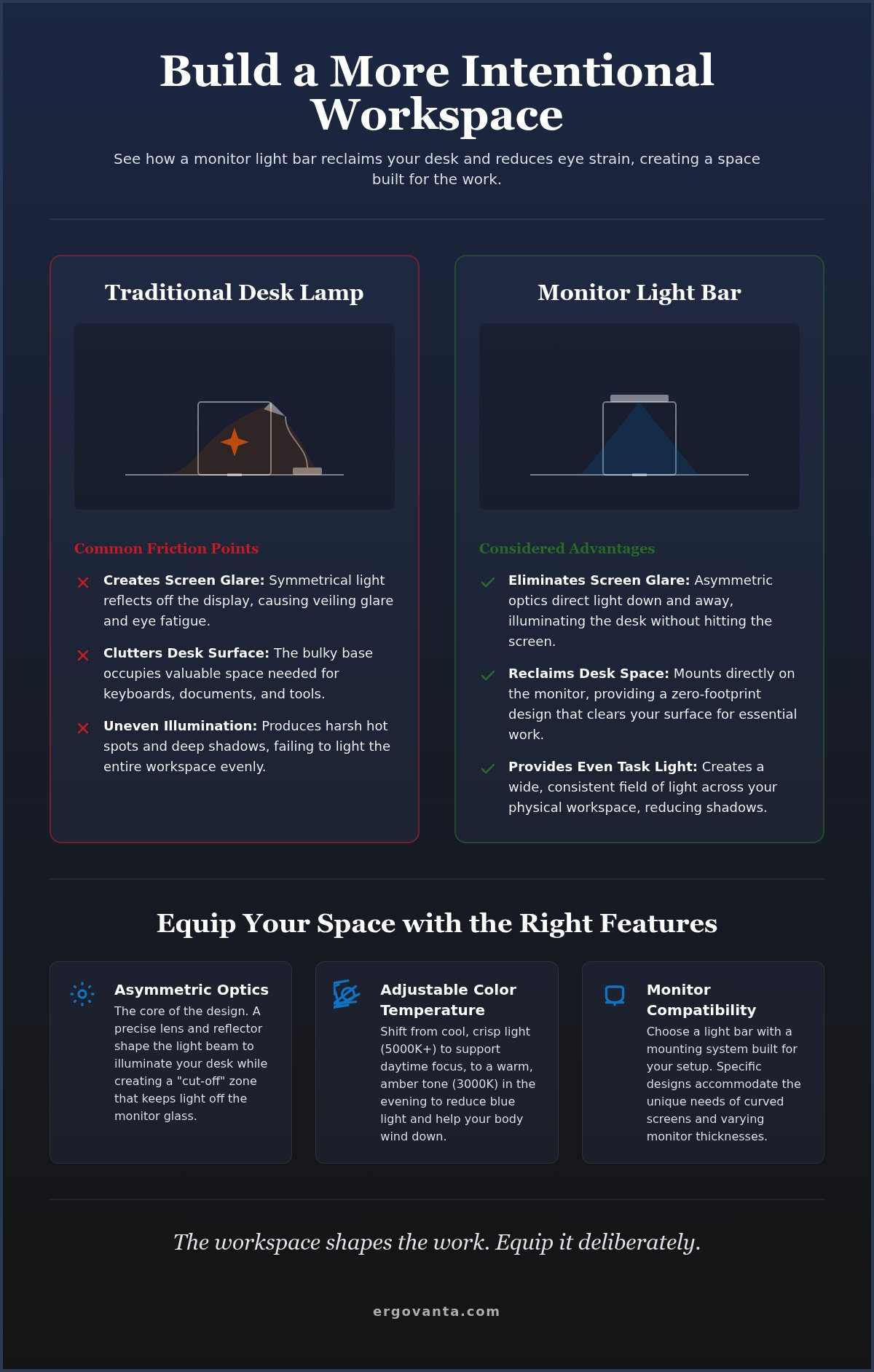
Standard desk lamps are symmetric. They cast light in a wide, circular beam that spreads in all directions. This design is fine for reading a book, but it's detrimental to a digital workflow because the light inevitably spills onto the monitor. Monitor light bars utilize asymmetric optical engineering to fix this. Inside the bar, a precise reflector or lens shapes the light into a directed beam that exits at a 45-degree angle. This creates a sharp "cut-off" zone. The beam illuminates your keyboard and documents with clarity while leaving the monitor surface in the dark. It's a considered approach that ensures your physical workspace is bright without compromising your digital view.
Color temperature and focus
Light is more than just visibility; it's about how you feel while doing the work. Most monitor light bars feature adjustable Correlated Color Temperature (CCT), allowing you to shift between cool and warm tones. During the day, a cooler setting (5000K or higher) mimics natural daylight. This crisp, blue-toned light supports alertness and helps you stay engaged during deep-work sessions. As the sun sets, switching to a warmer, amber tone (around 3000K) reduces blue light exposure. This shift helps your body naturally transition away from the intensity of the workday. It's a simple way to make your desk feel less like a corporate station and more like a personal sanctuary.
Every object on your desk should earn its place through purposeful function. A light bar earns its spot by staying out of your line of sight while fixing the glare issues that traditional lamps ignore. If you have specific questions about how these fixtures interact with your desk depth or monitor height, get in touch to discuss your setup.
Comparing light bars and traditional desk lamps
The workspace shapes the work. Equip it deliberately. Choosing between a traditional lamp and a monitor light bar isn't just a matter of style; it's about how you manage the limited real estate on your desk. Every object should earn its place. While traditional lamps have served for decades, they carry a physical cost in the form of a footprint. A monitor light bar reclaims that space by mounting directly to your hardware, leaving your surface open for the tools you use most.
Functionality is the primary driver here. Traditional lamps throw light in a wide, symmetric cone. This often results in light hitting the screen glass, forcing you to adjust the lamp head or your own posture to see clearly. Monitor light bars use asymmetric optics to direct light exactly where it's needed: the desk. This design prevents the glare that leads to fatigue during long sessions. If you're working in a tight space or a minimalist setup, the integration of a light bar feels more like a feature of the monitor than an external accessory.
Portability is another factor to consider. A heavy lamp is a permanent fixture, but a light bar is easy to move. You can unclip it in seconds if you transition between monitors or move from a home setup to a hybrid office station. It provides a consistent lighting environment wherever you work, ensuring your eyes don't have to relearn a new space every time you change locations.
When to choose a desk lamp
Lamps remain useful when your work extends beyond the screen. If you spend significant time sketching on a drafting table, reviewing large physical blueprints, or doing tactile work away from your display, the adjustable arm of a desk lamp is a clear advantage. They offer a more traditional look that works well in multipurpose rooms or non-tech workspaces. If your workflow requires high-intensity light in a specific corner of the room, you might explore our collection of considered lamps to find a classic solution that fits your aesthetic.
When the light bar wins
For the digital-first professional, monitor light bars are the superior choice. They are essential for those who experience eye strain from the high contrast of a bright screen in a dark room. On small desks, the zero-footprint design is vital for organization. They are also the best option for complex display setups. A single light bar can provide even coverage across an ultrawide monitor or a dual-screen configuration without the clutter of multiple lamp bases. It's a tool made for the work you do today, designed to stay out of the way while you do it.
Choosing the right light bar for your monitor
Selection is about geometry. Not every clamp fits every frame. The thickness of your monitor determines whether you need a spring-loaded clip or a gravity-based counterweight system. Most monitor light bars draw power via USB-A or USB-C directly from your display. This allows you to use the monitor as a hub, which keeps your cable management clean and eliminates the need for another power brick taking up space on your floor or power strip. It is a small detail that helps a tool earn its place by simplifying your setup rather than complicating it.
Compatibility with curved and ultrawide screens
Curved displays require a specific approach to lighting. Because the screen wraps around your field of vision, a standard straight bar might catch the corners of the panel or cast light unevenly. Ultrawide monitors also benefit from longer fixtures that can provide consistent coverage across a wider desk surface. When equipping a curved screen, look for mounts designed with a taller arc or specific spacers. These ensure the bar clears the top of the monitor without putting pressure on the fragile edges of the display panel. It's about finding a fit that respects the hardware you already own.
Features that earn their place
The best tools are the ones you don't have to constantly fiddle with. Ambient light sensors enable auto-dimming, allowing the bar to adjust its brightness as the sun moves across your room. This keeps your workspace illumination consistent without manual intervention. If you prefer a minimalist desk, wireless controllers are a significant functional upgrade. These puck-style remotes allow you to adjust color temperature and brightness from anywhere on your desk, keeping the area around your monitor free of extra wires.
For creators and designers, the Color Rendering Index (CRI) is a non-negotiable metric. A high CRI of 90 or above ensures that the colors of physical documents, sketches, or samples on your desk look accurate and vivid. Some high-performing models even reach a CRI of 98, providing light quality that rivals natural galleries. This level of intentionality ensures your workspace is made for the work you actually do, providing clarity where it matters most.
Equip your space for the long hours
The workspace shapes the work. Equip it deliberately. When you spend eight to ten hours a day at a desk, every friction point becomes a drain on your energy. Monitor light bars are often the first step in moving away from a generic office setup toward a room that actually gets used and feels like yours. This isn't about following a trend; it's about building an intentional system where every object earns its place through daily utility. By addressing the quality of your lighting, you're making a choice to support your focus rather than just tolerating your environment.
The minimalist advantage
Removing a bulky lamp base creates immediate physical freedom. By shifting your light source to the top of your display, you open up space for other workspace essentials that require a flat surface, such as a tactile notepad or a dedicated sketching area. Minimalism is not about having less; it's about ensuring that what remains on your desk has a clear, functional purpose. A clear desk leads to a clear mind during complex tasks, allowing you to focus on the problem at hand rather than the clutter surrounding it. It's the difference between a space that feels crowded and one that feels prepared.
Next steps for your build
Building a better workspace is an iterative process. Start by assessing your current lighting during different times of the day. Identify where glare occurs on your screen and where shadows fall on your physical documents. Consider how a new lighting solution will interact with your existing monitor and laptop stands. A light bar that clips to the top of a raised display provides a different angle of illumination than one sitting on a low-profile stand. You want these tools to work in harmony, creating a cohesive ergonomic system that supports your posture and your vision.
Every decision you make for your desk setup should focus on how you feel during the final hour of your workday. If you're still squinting or shifting your posture to avoid reflections, your system isn't finished yet. We help people build environments that support their specific workflow rather than a corporate ideal. If you're ready to move beyond standard lighting and want to discuss your custom workspace needs, reach out to us. We'll help you equip a space you'll choose to come back to.
Equip your workspace for clarity
The workspace shapes the work. Equip it deliberately. By integrating monitor light bars into your setup, you solve the persistent problem of screen glare while reclaiming the physical real estate traditional lamps consume. It's a shift toward a more intentional environment where every object earns its place through utility and considered design. You've seen how asymmetric optics protect your vision and how the right mount respects the geometry of curved or ultrawide displays.
Your desk is more than a surface; it's the foundation for your daily output. Creating a space that feels like yours requires moving past generic office standards and choosing tools made for the work you actually do. We provide boutique ergonomic expertise and functional objects designed for the long hours, supported by national shipping across the US. Take ownership of your environment and build a setup that rewards your focus instead of draining your energy.
A well-lit desk is a sanctuary for productivity. Start building the workspace you'd choose to come back to every single day.
Frequently Asked Questions
Can a monitor light bar damage my screen?
A properly designed light bar will not damage your display. Quality models use gravity-based counterweights or padded clips that rest on the bezel rather than the glass itself. This ensures there is no direct pressure on the liquid crystals or the fragile panel edges. It's a tool made for the hardware it sits on. Just ensure you don't over-tighten any manual clamps if your specific model uses them.
Is a light bar better for my eyes than a regular lamp?
Monitor light bars are superior to traditional lamps for digital work because they eliminate screen reflection. While a regular lamp casts light in all directions, creating a veiling glare on your screen, a light bar uses asymmetric optics to direct light only onto your desk. This prevents your eyes from having to work harder to see through the glare, significantly reducing tension during long work sessions.
How do I mount a light bar on a curved monitor?
Mounting on a curved monitor requires a fixture with a specific arc or a taller mount. Standard straight bars can sometimes catch the corners of a curved screen or cast uneven shadows. Choose a model with a specialized clamp or a spacer that allows the light to clear the curve of the panel. This ensures the light path remains unobstructed and the mount doesn't pinch the screen edges.
Do monitor light bars work with webcams?
Most light bars occupy the same physical space as a webcam, but they can coexist. Some models feature a flat top designed specifically to hold a camera; others require you to offset the webcam slightly to one side. If you use a monitor arm, you might have more flexibility to mount your camera independently. Check the physical depth of the bar's top surface before committing to a specific lighting setup.
What is the best color temperature for a desk light bar?
The ideal temperature depends on the time of day and the nature of the work. For daytime focus and alertness, set your bar to a cool 5000K or 6500K to mimic natural daylight. When you're winding down in the evening, shift to a warmer 2700K or 3000K. This reduces blue light exposure and creates a calmer atmosphere in your space, supporting your body's natural rhythm during late sessions.
Does a monitor light bar require a separate power outlet?
Most monitor light bars are designed to run off a standard USB-A or USB-C port. You can plug them directly into your monitor's USB hub or your computer, which keeps your cable management streamlined. This eliminates the need for another bulky power brick on your floor or power strip. It's a considered design choice that helps the tool earn its place by simplifying your workspace setup.
Will a light bar fit on a laptop screen?
Standard light bars are generally too heavy and bulky for laptop hinges. The weight can cause the screen to tilt backward or put unnecessary stress on the delicate hinge mechanism. If you work primarily on a laptop, look for smaller, lightweight bars designed specifically for thinner panels. For a fixed desk setup, we recommend using a monitor stand to raise your display to eye level before adding external lighting.
How does a monitor light bar reduce eye strain?
These tools reduce strain by balancing the contrast between your bright screen and the surrounding room. Working in a dark room with only a glowing monitor forces your pupils to constantly adjust, leading to fatigue. A light bar provides consistent task lighting across your desk without reflecting off the screen glass. This creates a comfortable visual environment that allows you to stay focused for the long hours without headaches.
Disclaimer
Ergovanta publishes these guides to help people set up better workspaces. Product recommendations reflect what we sell. Specifications, prices and availability are accurate at the time of writing and may change. Nothing here is medical, ergonomic or professional advice; if you have a specific health concern about your workstation, speak to a qualified professional.
From the catalog