July 19, 2026
Smart Desk Lamp with USB Port: Build a More Intentional Workspace

A cluttered desk isn't a badge of honor; it's a distraction you haven't dealt with yet. If you spend serious hours at a desk, you've likely felt the frustration of fighting for outlet space while squinting under a flickering, low-quality bulb. Your workspace shapes the work, and the objects you choose to put in it should earn their place. Equipping your space with a functional desk lamp with usb port is a simple way to reclaim your surface area and your focus.
We agree that your tools should work as hard as you do without the flimsy builds or the mess of tangled cords. This article will show you how to select a lamp that simplifies your setup through intentional design and reliable integrated charging. We will cover the specific LED qualities that prevent eye strain, the wattage requirements for your devices, and how to find a lamp made for the work that stays exactly where you need it. By the end, you'll know how to build a workspace you actually want to come back to.
Key Takeaways
- Learn how a desk lamp with usb port earns its place by clearing cord clutter and supporting your focus.
- Look for at least 2.1A or 10W of power to ensure your devices charge as fast as you work.
- Choose a lamp with a Color Rendering Index (CRI) of 90 plus to keep colors natural and protect your eyes.
- Position your light on the opposite side of your dominant hand to keep shadows off your pages.
- Equip your space as a complete system by pairing intentional lighting with monitor arms and desk mats.
Why Intentional Lighting and Integrated Charging Matter for the Work
The workspace shapes the work. Equip it deliberately. If you spend serious hours at a desk, every object on that surface either supports your focus or fractures it. A desk lamp with usb port isn't just a light source; it's a piece of task lighting that functions as a dedicated power hub. By integrating adjustable LED technology with accessible charging, you transform a single-use object into a multi-purpose utility that earns its place on your desk.
Building a workspace with intentionality means choosing tools that solve more than one problem. When you consolidate your light and your power, you make a conscious decision to simplify your environment. This shift from a basic lamp to a considered tool reflects a commitment to the work itself. It's about creating a space where you don't have to go hunting for a wall outlet or untangle a knot of cords just to keep your phone alive during a deep work session.
To better understand how a high-quality light can change your daily rhythm, watch this helpful video demonstration:
The Problem with Cable Clutter
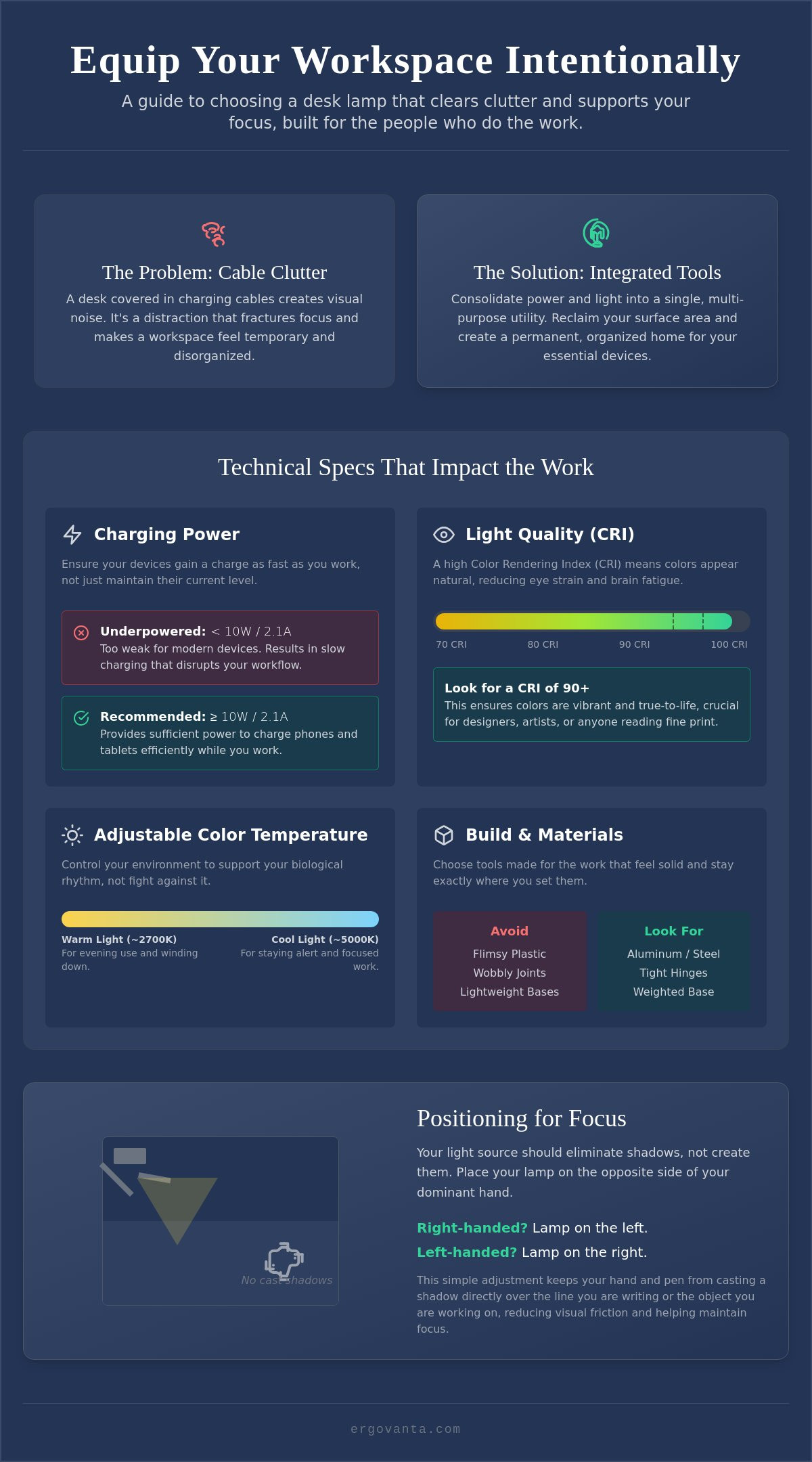
Cables for phones, tablets, and earbuds create visual noise that disrupts your ability to think clearly. A desk covered in white and gray plastic snakes feels temporary and disorganized. Integrated USB ports provide a permanent home for your essential devices, keeping them within reach but out of your way. When your phone has a specific spot to charge on your lamp base, it stops being a loose item that migrates across your desk, allowing you to reclaim your surface area for the tasks that actually matter.
Light Quality as a Productivity Tool
Poor lighting is a quiet drain on your energy. Flickering bulbs and harsh glares cause eye fatigue, which inevitably shortens the time you can effectively spend at your desk. Considered lamps allow you to adjust the color temperature to match your needs. You can use cool white light to stay alert during a deadline or switch to warmer tones when you're winding down for the evening. This level of control ensures your environment supports your biological rhythm rather than fighting against it. Using a desk lamp with usb port that offers these adjustments is a practical step toward building a room that gets used every single day.
How to Choose the Right Desk Lamp for Your Space
If you spend serious hours at a desk, the tools you choose to place there matter more than you think. Selecting a desk lamp with usb port requires looking past the silhouette to the actual utility of the device. You aren't just buying a light; you're equipping your space with a power hub and a visual aid. To build a setup that actually works, you must evaluate technical specifications with the same intentionality you bring to your projects.
Start with the charging capability. Many generic lamps offer underpowered ports that barely maintain a battery's current percentage. For modern smartphones and tablets, look for a port that delivers at least 2.1A or 10W of power. This ensures your devices actually gain a charge while you work. Beyond power, consider the quality of the light itself. Aim for a Color Rendering Index (CRI) of 90 plus. High CRI values ensure that colors appear natural and vibrant, which is essential for maintaining proper lighting and reducing the eye strain that often ends a work session early.
Technical Specs That Actually Impact the Work
CRI isn't just a number for spec sheets; it's a fundamental requirement for designers, artists, and anyone who spends hours reading fine print. When colors are rendered accurately, your brain doesn't have to work as hard to process visual information. Accessibility is equally vital. Verify the port placement before you buy. A port located on the back of a light base might seem sleek, but if you have to knock over your coffee or lean across your monitor to reach it, the lamp hasn't earned its place. Look for front-facing or side-mounted ports that keep your cables managed and your movements minimal.
Materials and Build Quality
The workspace should be a personal environment for doing the work, not a collection of flimsy plastic. Avoid lamps that wobble or creak when you adjust the arm. Instead, look for considered materials like aluminum or weighted steel bases that feel solid and stay exactly where you set them. A lamp made for the work should have a footprint that is stable without consuming unnecessary surface area. You can explore our collection of workspace essentials to see how weighted, intentional design changes the feel of a desk. If you need help deciding which specifications fit your specific layout, you can always reach out to us for guidance.
Equipping Your Workspace with Tools That Earn Their Place
A single object rarely solves every problem on its own. To build a workspace you'd choose to come back to, you must view your desk lamp with usb port as one component of a larger, interconnected system. When you pair considered lighting with monitor stands and desk mats, you create a cohesive environment where every tool has a purpose. This systemic approach ensures your desk remains a place for doing the work rather than a landing pad for random objects.
Practical placement is the first step in equipping your space effectively. Position your lamp on the opposite side of your dominant hand. If you're right-handed, the light should come from the left to minimize the shadows cast across your pages while you write or sketch. Use the integrated port to establish a permanent home for your phone. By giving your device a dedicated spot to charge, you stop the habit of letting it wander across your desk. As USB-C becomes the standard for most devices, having this accessible power source means one less cable reaching for a distant wall outlet.
Integrating Lighting with Ergonomics
Lighting should be layered to be effective. Relying on a single overhead bulb creates harsh glares and deep shadows that tire your eyes quickly. Combine your desk lamp with a monitor light bar to create a balanced, ergonomic setup. This layering provides focused task lighting where you need it most while filling the surrounding area with soft, ambient light. You can browse ergonomic comfort tools for your desk to see how these elements work together to support long hours of focus.
The Ritual of the Workspace
The rooms that get used are the ones that feel intentional. A lamp with a dimming feature or a timer can do more than just provide light; it can signal the beginning and end of your work day. Dimming the lights at 5:00 PM is a physical cue to your brain that the deep work is done. Equip your space with objects that earn their place through both function and the way they make you feel about the room. If you're ready to build a better setup, shop our full range of lighting solutions to find the tools made for the work you do.
Build a Workspace You'd Choose to Come Back To
The workspace shapes the work. Equip it deliberately. You've seen how a desk lamp with usb port serves as more than just a light source; it's a tool that clears physical clutter and protects your focus. By prioritizing high CRI values and reliable charging speeds, you ensure your space supports the serious hours you spend at your desk. Lighting isn't an afterthought; it's a fundamental part of the room that gets used every day.
At Ergovanta, we provide a curated selection of tools that earn their place in your workspace. Our considered designs are made for the people who do the work, focusing on purposeful function and long-term utility. We offer national shipping across the United States to help you build a setup that feels entirely yours. Your environment is a personal choice. When you equip it with intentionality, you create a space that feels functional, grounded, and ready for the next project.
Equip your desk with lighting made for the work.
Frequently Asked Questions
Will a desk lamp charge my phone as fast as a wall outlet?
Most integrated ports won't match the speed of a high-wattage fast-charging wall block, but they're sufficient for maintaining your battery during the work day. A standard desk lamp with usb port typically offers between 5W and 12W of power. While this is slower than a dedicated 20W fast charger, it's a reliable way to keep your phone at 100% without the mess of extra cords reaching for a distant outlet.
Check the output rating on the lamp's base or spec sheet before you buy. If you need to charge a tablet or a newer smartphone quickly, look for a lamp that specifies a 2.1A output or higher. For most people doing the work, the convenience of a dedicated desk-level port outweighs the slightly longer charging time.
What is the difference between a USB-A and USB-C port in a desk lamp?
The difference lies in the connector shape and the potential power delivery. USB-A is the older, rectangular port found on many legacy accessories and standard charging cables. USB-C is the smaller, rounded connector that's becoming the universal standard for modern devices. USB-C ports often support higher wattage, which means they can charge your gear more efficiently than older versions.
Equipping your space with a lamp that features both ports is a smart way to stay flexible. Since many new devices now ship with USB-C cables, having that port directly on your desk helps you avoid using bulky adapters. It's a more intentional choice for a workspace built to handle both current and future technology.
Do USB ports in lamps work when the light is turned off?
Yes, in most considered designs, the USB port remains active as long as the lamp is plugged into a wall outlet. You don't need to have the LED light on to charge your devices. This allows the lamp to function as a permanent power hub for your workspace, even when you've finished your work for the day and turned off the light.
This feature is particularly useful for charging your phone or earbuds overnight. It ensures your devices are ready for the next morning without adding unnecessary light to the room. Always verify this in the product manual, as some budget-focused models may tie the port's power directly to the light switch.
How do I know if the LED bulb in a desk lamp is replaceable?
You can determine this by checking if the lamp is described as having an "integrated LED" or a standard socket. Most modern, slim lamps use integrated LEDs that are built directly into the frame to allow for a more streamlined footprint. These are not user-replaceable, but they're typically rated to last between 25,000 and 50,000 hours, which covers many years of daily use.
If you prefer a lamp where you can swap the bulb yourself, look for a model with a traditional screw-in socket. These lamps allow you to choose your own bulb, though they often have a bulkier design. For a workspace where you want the light to stay exactly where you set it, an integrated desk lamp with usb port is often the more solid and reliable choice.
From the catalog