June 2, 2026
Smart Desk Lamp with Wireless Charging: Equipping Your Workspace for Focus

A desk cluttered with cables is a tax on your focus. If you spend serious hours at a desk, you know the frustration of a phone dying mid-session or the physical strain of poor lighting during a late-night push. It is difficult to stay intentional when your workspace feels like a disorganized collection of gadgets rather than a place made for the work. A smart desk lamp with wireless charging earns its place on your desk by solving these two problems at once, merging light quality with power management.
We agree that the tools you choose should work as hard as you do. You will learn how to select a lamp that eliminates the cable hunt and protects your eyes from fatigue. With the release of the Qi2.2 standard in May 2026, wireless charging now delivers up to 25W of power, making it a reliable tool for keeping your devices ready without the mess. This article covers how to evaluate light modes, smart integration like Matter support, and charging speeds to help you build a more streamlined workspace. Let's look at how to equip your space with more intention.
Key Takeaways
- The workspace shapes the work. Learn why every object on your desk must be considered and earn its place to support your focus.
- A smart desk lamp with wireless charging streamlines your setup by replacing tangled cables with a single, intentional tool for light and power.
- Discover how to use adjustable color temperatures to match your current task, from cool light for deep work to warm tones for evening sessions.
- Build a more balanced environment by positioning your lamp to avoid shadows and pairing it with tools like monitor arms to create layers of light.
The Role of Lighting and Power in a Considered Workspace
The workspace shapes the work. If you spend eight hours a day at a desk, the environment around you dictates your output. Equip it deliberately. A smart desk lamp with wireless charging isn't just a gadget; it's a piece of equipment designed to handle two of the biggest distractions: poor visibility and dead batteries. By combining adjustable LED technology with Qi-standard charging, you create a system that supports focus rather than interrupting it.
Lighting is about more than just seeing your keyboard. It sets the atmosphere for the specific task at hand. Effective Task lighting directs focus where it's needed while reducing the shadows that cause your brain to work harder than necessary. When you integrate charging into the lamp base, you remove the physical clutter of tangled cords. This creates the mental clarity required for deep work. These are the small objects that earn their place on a desk made for the work.
To see how these features work together in a real setup, watch this breakdown:
Why Integrated Charging Matters
Searching for a cable is a minor friction that breaks your flow. When your smart desk lamp with wireless charging has a dedicated spot for your phone, you know exactly where it belongs. This intentional placement keeps your device in view but out of the way. It also serves a secondary purpose: it helps prevent mindless scrolling by giving the phone a "home" that isn't in your hand. Using one plug for two essential functions is a simple way to build a more streamlined desk.
The Impact of Light Quality on Performance
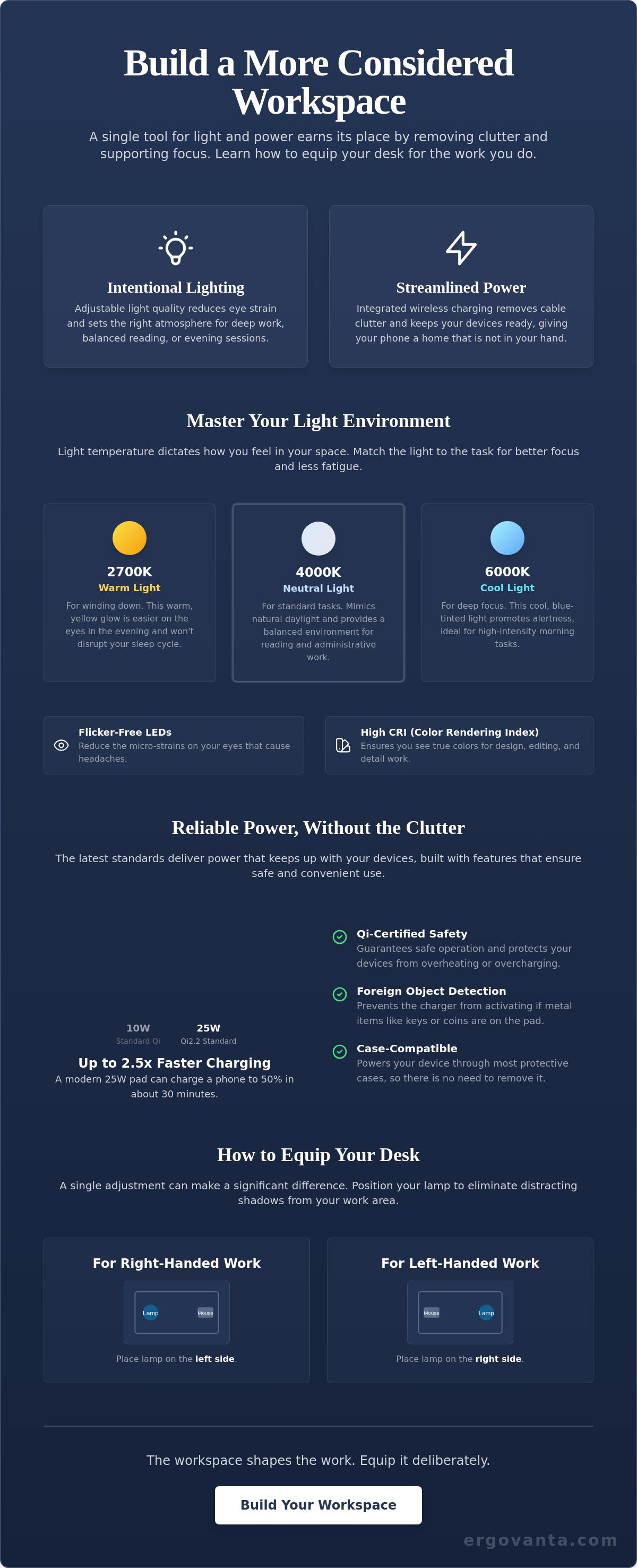
Low-quality light leads to mid-afternoon fatigue. For creators, the Color Rendering Index (CRI) is a vital metric. A high CRI ensures you see true colors, which is essential for editing, design, or any detail-oriented task. Pair this with flicker-free LEDs to reduce the micro-strains on your eyes that cause headaches. You can further equip your space by choosing lamps that offer adjustable color temperatures, ensuring the light matches the time of day and the intensity of the work.
Choosing a Smart Desk Lamp: Utility Over Clutter
Every object on your desk should earn its place. Avoid the trap of "multi-functional" gadgets that add noise instead of utility. A lamp with a built-in speaker might seem convenient, but it's often a distraction from the work. Focus on tools that excel at their core functions. A smart desk lamp with wireless charging should provide high-quality light and reliable power without adding unnecessary clutter. Look for solid builds and considered materials that feel like they were made for long-term use.
Understanding Light Modes and Kelvin Ratings
Light temperature dictates how you feel in your space. Use 6000K (cool blue light) for high-alert morning tasks when you need maximum focus. Switch to 4000K for standard administrative work: it mimics natural daylight and feels balanced for reading. When you're ready to wind down, 2700K provides a warm yellow glow that won't disrupt your sleep cycle. Being able to toggle these modes allows you to equip your desk for different stages of the day.
Wireless Charging Compatibility and Safety
Efficiency matters. When you choose a smart desk lamp with wireless charging, prioritize charging wattage to ensure your devices stay ready. While older pads offer 10W, the latest Qi2.2 standard (released in May 2026) provides up to 25W of power. This can charge a phone to 50% in about 30 minutes. Ensure the charger is Qi-certified for safety and includes foreign object detection. This feature prevents overheating if keys or coins accidentally touch the pad. Check that the charger is case-compatible so you don't have to strip your phone every time it needs juice. If you have questions about specific setup requirements, reach out to us directly for more information.
Building Your Desk Setup: Integrating Smart Lighting
The workspace shapes the work. Equip it deliberately. If you spend serious hours at a desk, the room around it matters more than you think. Positioning is the first step toward a considered setup. Place your smart desk lamp with wireless charging on the opposite side of your dominant hand. This prevents your arm from casting shadows across your workspace while you write or move objects. It's a small detail, but it's one that earns its place by removing a constant, minor friction.
Lighting should never exist in a vacuum. A single, harsh light source creates high contrast that tires the eyes. Instead, build layers of light. Use monitor stands to lift your screen, which allows light to flow underneath and across the desk surface. This creates a balanced environment where every tool has its own space. When you choose objects you'd choose to come back to every day, the room starts to feel like yours.
Creating a Cohesive Workspace
A balanced room requires more than just a desk lamp. Combine your task lighting with floor lamps to fill the corners of the room and soften the overall atmosphere. This layering helps define the boundaries of your work hours: when the desk lamp is on, the focus is internal. Integrating a smart desk lamp with wireless charging also simplifies your workspace essentials. By removing the need for extra phone cables, you clear the physical and mental clutter that often blocks deep work.
The Ergovanta Approach to Lighting
We build tools for the people who do the work. Our focus is on clean lines and purposeful function rather than unnecessary flair. Every item in our lighting collection is selected because it serves a clear purpose in a high-use environment. Equip your space with objects that respect your time and your focus. Build a workspace that feels intentional, grounded, and ready for the task at hand.
Equip Your Space for the Work Ahead
The workspace is more than a surface; it's the environment where you spend your most productive hours. Choosing a smart desk lamp with wireless charging is an intentional decision to prioritize both your physical comfort and your mental focus. By selecting tools that offer adjustable color temperatures and high charging speeds, you eliminate the small frictions that lead to midday fatigue. You don't need more gadgets; you need better equipment that handles the basics of light and power with precision.
Every object on your desk should earn its place. We've discussed how layering light and managing cables can transform a room into one that supports deep work. Ergovanta provides a curated selection of functional lighting designed specifically for the people who spend serious hours at a desk. If you're ready to build a space you actually want to come back to, equip your desk with considered lighting today. Your work is worth the investment in a better environment. Build it deliberately.
Common Questions About Workspace Lighting
Will a wireless charging desk lamp work with my phone case?
Most lamps work with standard plastic, silicone, or TPU cases up to 5mm thick. You should avoid using metal cases, magnetic rings, or credit card holders on the back of your phone, as these will block the Qi-standard connection. If your case is particularly thick or rugged, it might slow the charging speed or prevent a connection entirely. Intentionality in your setup means choosing accessories that work together without constant friction.
Does wireless charging on a lamp heat up the desk surface?
Wireless charging generates a small amount of heat, but it is concentrated between the internal charging coil and your device rather than the desk. It won't damage your desk surface or leave marks. This is why choosing a considered smart desk lamp with wireless charging is important: these tools include safety sensors like foreign object detection. These sensors stop the power flow if the unit detects something other than a compatible device, protecting both your desk and your phone.
What is the best color temperature for a desk lamp when working at night?
The best color temperature for evening work is between 2700K and 3000K. This warm, amber-toned light reduces blue light exposure, which helps your brain transition away from work mode when the session ends. Using a smart desk lamp with wireless charging allows you to toggle between cool light for morning focus and warm light for night review. It's about building a room that adapts to your needs at every hour of the day.
Is LED lighting better for my eyes than traditional desk bulbs?
LED lighting is better for your eyes because it is flicker-free and produces much less glare than traditional incandescent or halogen bulbs. High-quality LEDs also offer a better Color Rendering Index (CRI), which means you see objects and text with more clarity. This reduces the micro-strains that lead to headaches and fatigue during long sessions. Equip your space with tools made for the work to keep your focus sharp and your eyes rested.
From the catalog