August 17, 2026
Smart Desk Lamps with Wireless Charging: Equip Your Space for Intentional Work

The workspace shapes the work. Equip it deliberately. You shouldn't have to choose between a clear desk and a charged device. A smart desk lamp with wireless charging earns its place by solving for both light quality and power management simultaneously. It replaces the tangle of cables with a single, considered object. Build a space that supports your focus rather than distracting from it. Every item on your desk should serve a purposeful function. The rooms that get used are the ones built with intention.
You probably know the frustration of a workspace cluttered with extra cords or the dull headache that follows a late-night session under poor lighting. It's time to move past generic tools that don't meet your requirements. Learn how to select a desk lamp that integrates light and power to build a more intentional workspace. We will explore how to identify high-quality lighting with a CRI of 90 or more, the benefits of the latest 15W Qi2 charging standards, and how Matter-certified smart features help you maintain a streamlined environment. Equip your space with objects made for the work.
Key Takeaways
- Learn how a smart desk lamp with wireless charging earns its place by replacing messy cables with a single, considered power source.
- Discover why light quality matters for focus, specifically focusing on a CRI of 90 or higher and adjustable color temperatures.
- Build a more efficient workspace by evaluating the footprint of your tools and choosing a lamp that respects your desk real estate.
- Equip your system for better visual comfort by learning the best positioning to eliminate screen glare and shadows.
The Role of Integrated Power in Your Workspace
The workspace shapes the work. Equip it deliberately. A functional desk relies on two fundamental pillars: consistent light and reliable power. When these elements are scattered, focus breaks. A smart desk lamp with wireless charging serves as the anchor for these needs. It combines adjustable LED illumination with a power pad built directly into the base. This is not merely a light; it's a tool made for the work. By integrating these functions, you create a space that supports your output rather than distracting from it.
Intentionality starts with the objects you choose to keep within reach. A desk lamp that only provides light is an incomplete tool. In a modern environment, your devices require constant readiness. Choosing a lamp that integrates the Qi wireless charging standard ensures that your phone stays powered without the need for additional clutter. This approach turns a static object into a responsive workstation. It allows you to focus on the task at hand while your hardware prepares for the next one.
Reducing Desktop Friction
Clutter creates mental friction. When your surface is a tangle of cables, your ability to engage in deep work suffers. One cord should do the work of three. By integrating power into your lighting, you reclaim physical space and mental clarity. Small objects must earn their place in your environment. A lamp that charges your phone while illuminating your notes is a highly considered addition to your workspace essentials. This streamlined setup removes the visual noise that often leads to procrastination. It builds a surface that feels organized and ready for use.
The Evolution of the Desk Lamp
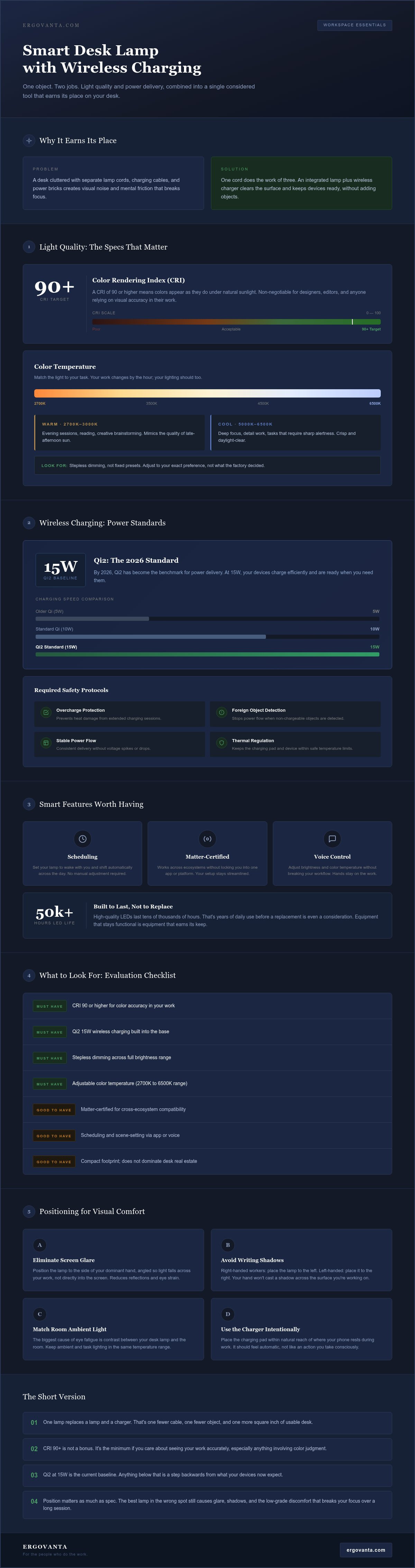
Lighting has evolved from simple bulbs to integrated workstations. We no longer just need to see; we need to stay connected. Standards in 2026 require more than a basic glow. The market has moved toward universal protocols like Qi2, which provides a baseline charging speed of 15W for efficient power delivery. This shift toward intentional power placement means your tools are always ready when you are. Your lamp is now a critical part of your digital ecosystem. It supports high-fidelity work by providing flicker-free light alongside the reliable energy your devices demand. Equip your space with tools that reflect this modern requirement for efficiency and order.
Technical Specs That Matter: Light Quality and Charging Speed
The workspace shapes the work. Equip it with technical precision. To build a space that truly supports your focus, you must look beyond the aesthetic of a smart desk lamp with wireless charging and examine the hardware inside. A considered tool provides more than just visibility; it offers visual accuracy and reliable energy delivery.
Decoding Light Temperature
Light temperature, measured in Kelvin (K), dictates the atmosphere of your space. Matching the light to your specific task prevents eye strain and maintains your energy levels throughout the day. You shouldn't have to settle for a single, static setting when your work changes by the hour.
- Warm light (2700K to 3000K): This range mimics the evening sun. It is ideal for winding down, reading, or creative brainstorming after a long day.
- Cool light (5000K to 6500K): This provides a crisp, daylight-like environment. These temperatures are built for high-focus tasks that require maximum alertness.
Look for lamps that offer stepless dimming. This feature allows you to adjust the intensity exactly to your preference rather than settling for fixed presets. It ensures your lighting is always intentional and made for the work you are doing at that moment.
Understanding Wireless Power
Reliable charging is about more than just a connection; it is about efficiency. By 2026, the Qi2 standard has become the benchmark for power delivery. It provides a baseline of 15W, which is a significant step up from older 5W or 10W chargers. This speed ensures your devices are ready when you need them. When you equip your desk with a smart desk lamp with wireless charging, verify that it includes safety features like overcharge protection and foreign object detection. These protocols protect your hardware from heat damage and ensure a stable power flow.
For creators and professionals, the Color Rendering Index (CRI) is a non-negotiable spec. A CRI of 90 or higher ensures that colors appear as they do under natural sunlight. This accuracy is vital for designers, editors, or anyone who relies on visual fidelity. You can find more details on the technical specs for light quality through the U.S. Department of Energy. Additionally, consider the LED lifespan. High-quality LEDs are designed to last for tens of thousands of hours. This means your equipment stays functional for years, supporting a more sustainable workspace. If you need help determining which specifications best fit your setup, you can reach out to our team for advice on building your ideal environment.
Choosing a Lamp That Earns Its Place
The workspace shapes the work. Equip it deliberately. Your desk is a finite surface where every square inch matters. A smart desk lamp with wireless charging should not just sit there; it must earn its place by being the most functional object within your reach. Before you buy, evaluate how you actually use your space. Are you drafting blueprints, writing code, or managing a household? The answer determines the physical form your lamp should take.
Real estate is the primary trade-off. If you work on a compact desk, a lamp with a wide base might be too intrusive. Conversely, if you have a sprawling standing desk, you might prioritize a lamp with a long, adjustable neck to cast light over a larger area. Consider the range of motion carefully. Fixed stems offer a minimalist silhouette but limit your control. Adjustable necks allow you to direct light exactly where you need it, which is essential for avoiding screen glare. Build your setup around your movement, not the other way around.
Function Over Status
Avoid lamps cluttered with unnecessary gimmicks. You don't need a light that flashes in sync with your music if you are trying to write a report. Focus on tactile quality. The buttons should feel intentional and the materials should withstand daily use. A considered choice made of metal or wood beats a plastic, fast-fashion accessory every time. These are the small objects that earn their place because they don't break after six months of work.
Matching the Tool to the Task
Your specific output dictates your requirements. If you are a creator, prioritize the high CRI mentioned in the previous section to ensure visual accuracy. For those focused on administrative work, the convenience of the charging pad might be the priority. Hybrid workers often need the most versatility. Look for desk lamps that offer multiple modes, allowing you to switch from high-energy cool light for spreadsheets to a softer, warm glow for late-night emails. Equip your space with a tool that adapts to the intensity of your day. The rooms that get used are those where the tools are perfectly matched to the person doing the work.
Integrating Your Lamp into a Functional System
The workspace shapes the work. Equip it deliberately. A smart desk lamp with wireless charging is most effective when it functions as part of a larger, intentional system. It is not enough to simply place a light on your desk. You must consider how that light interacts with your screens, your posture, and your other tools. A well-integrated lamp reduces visual noise and physical clutter, creating a surface where you can actually do the work.
Positioning is the first step in building this system. To avoid shadows while writing, place the lamp on the side opposite your dominant hand. For digital tasks, ensure the light source is positioned to eliminate screen glare. Glare is a subtle thief of focus; it causes micro-adjustments in your posture as you squint to see through reflections. By placing the light source at a height that illuminates the desk without entering your direct line of sight, you protect your eyes and your back. Cable management is equally vital. Route the lamp's main power cord along the rear of your desk or through a grommet to maintain a clean, considered look.
Lighting and Ergonomics
Lighting affects how you feel throughout the day. Poorly placed light sources lead to eye fatigue, which often causes you to lean forward or slouch. This breakdown in posture is why lighting is a core part of ergonomics. When you pair your lamp with monitor laptop stands, you create a balanced environment. Your screen stays at eye level while the lamp provides the necessary contrast to reduce the strain of a glowing monitor. This combination ensures your space is built for long hours of focus without the physical toll of a disorganized setup.
The Power System
Your lamp should function as a central hub for your tech device accessories. A considered smart desk lamp with wireless charging simplifies your daily routine by providing a predictable, reliable home for your most-used hardware. The integrated charging pad is the primary anchor, but many designs also include secondary ports for other workspace essentials. Use these ports to manage items like headphones or tablets, keeping the rest of your desk clear. Maintaining a clutter-free zone around the charging pad is essential. It ensures that the snap-to-charge convenience of current Qi standards remains effortless. When every device has a designated place to draw power, you eliminate the frantic search for cables. Your desk remains a sanctuary of productivity rather than a storage unit for cords.
Equip Your Space with Ergovanta Lighting
The workspace shapes the work. Equip it deliberately. At Ergovanta, we believe that your environment is not a corporate template but a personal sanctuary of productivity. Our collection of desk lamps is designed for the people who do the work. We focus on the small objects that get used every day because these are the items that truly define your experience at the desk. When an object earns its place, it becomes a catalyst for your best output.
A smart desk lamp with wireless charging should be more than a gadget. It must provide a purposeful function. This is the core of our name: ergo from the Ancient Greek for purposeful function, and vanta for advantage. We don't build tools for status; we build tools for the work. By selecting objects that integrate light and power, you are making a considered choice to remove friction from your day. You are building a space that supports your focus rather than distracting from it.
Considered Design for Modern Work
Your space deserves materials that earn their place. We prioritize metal, wood, and glass because they offer a tactile quality that plastic cannot match. These materials withstand daily use and age with your career. Our minimalist aesthetics ensure that your lighting never distracts from the task at hand. Instead, it supports it by providing the clarity you need to finish the job. A clean silhouette allows your mind to stay on the work, not the clutter.
This design philosophy extends beyond lighting. Our tech device accessories are made to complement your lamp, creating a cohesive and streamlined environment. When your phone stand, monitor arm, and desk lamp all work together, the result is a room that feels intentional. It is a space built by you, for you. Every item is chosen because it serves a specific, useful role in your daily routine.
Final Considerations for Your Build
Start with the light, stay for the power. An intentional purchase is always better than a quick fix. When you choose equipment deliberately, you are building a workspace you'd actually choose to come back to. It isn't about having the most expensive setup; it's about having the right setup for your specific requirements. A smart desk lamp with wireless charging that matches your footprint and your light needs is an investment in your own comfort.
Equip your space with tools that respect your time and your focus. Whether you are managing a hybrid schedule or a dedicated home studio, the goal remains the same. Every object on your desk should earn its spot. By choosing lighting that aligns with your needs, you are setting the stage for better work. Build your space with intention. The rooms that get used are the ones that are built for the work.
Build Your Workspace with Intention
The workspace shapes the work. Equip it deliberately. By choosing a smart desk lamp with wireless charging, you replace desktop clutter with a single, considered object that provides both high-fidelity light and reliable power. It's about more than aesthetics; it's about creating a surface where you can actually do the work without the distraction of a tangled power cord or the dull headache of poor lighting.
We've explored how technical standards like a CRI of 90 or higher and 15W Qi2 charging speeds turn a simple lamp into a critical workstation hub. Every item on your desk should earn its place through purposeful function. Ergovanta provides objects made for the work, ensuring that every design supports your specific requirements. We offer national US shipping on all workspace essentials to help you build a setup you'd choose to come back to.
Your environment is a reflection of the intentionality you bring to your day. Build a setup that respects your focus and supports your routine. The rooms that get used are the ones built for the work.
Frequently Asked Questions
Does wireless charging work through a phone case?
Wireless charging typically works through cases that are less than 5mm thick. You should avoid cases made of metal or those with magnetic attachments; these interfere with the induction process. Standard silicone, plastic, or leather cases are generally compatible with a smart desk lamp with wireless charging. If your case is exceptionally thick or contains a battery pack, you may need to remove it to ensure a stable and efficient power connection.
Will a smart desk lamp charge my phone even when the light is off?
Yes, the charging pad operates independently from the LED illumination. Your phone will continue to receive power as long as the lamp is connected to a wall outlet. This design ensures that you can charge your devices overnight or during the day without needing the light active. It is a considered feature for maintaining a streamlined desk setup where the lamp serves as a constant power hub regardless of your current lighting needs.
What is the best light temperature for late-night work sessions?
Warm light between 2700K and 3000K is best for late-night work. This temperature mimics the evening sun and helps reduce eye fatigue as you wind down. Cooler, blue-toned light can disrupt your sleep cycle by suppressing melatonin production. Using a lamp with adjustable settings allows you to transition from high-focus daylight modes to a softer glow. This intentional shift supports your well-being while you finish your final tasks for the day.
Are LED desk lamps better for eye strain than traditional bulbs?
LED lamps are significantly better for eye strain because they provide flicker-free, directional light. Traditional incandescent or fluorescent bulbs often produce a subtle pulse that causes headaches and fatigue over time. Modern LEDs also allow for stepless dimming and color temperature adjustments. This flexibility means you can match the light intensity to your environment. Equip your space with high-CRI LEDs to ensure visual clarity and reduce the physical toll of long hours at the desk.
Can I charge multiple devices at once with a smart lamp?
Most smart lamps are designed to charge one device wirelessly on the base pad. However, many models also include integrated USB-A or USB-C ports to support secondary devices like tablets or headphones. This makes a smart desk lamp with wireless charging a central hub for your tech device accessories. By using the built-in ports, you can power multiple items while keeping your desk surface clear of unnecessary wall adapters and extra power strips.
How long do the LED bulbs in these lamps typically last?
Integrated LED sources typically last between 25,000 and 50,000 hours of active use. If you use your lamp for eight hours every day, the light source could remain functional for over fifteen years. Unlike traditional bulbs, LEDs don't burn out suddenly; they slowly dim over a very long period. This durability makes them a highly considered investment for your space. You are choosing equipment that is made for the work and built to last.
Does the wireless charger work with both iPhone and Android devices?
The charger is compatible with any device that supports the universal Qi standard, including both iPhone and Android hardware. Modern smartphones from 2026 and earlier are built with this technology as a standard feature. Whether you use a Samsung Galaxy, a Google Pixel, or an iPhone, the induction pad will deliver power reliably. This interoperability ensures that your workspace remains functional even if you switch devices or share the space with others who use different hardware.
What happens if my phone gets hot while charging on the lamp?
Slight heat is a normal byproduct of the induction process, but your lamp should include built-in safety protocols. High-quality charging pads feature foreign object detection and overcharge protection to prevent excessive temperature spikes. If the device becomes too hot, the lamp will automatically reduce the power flow or stop charging entirely to protect your phone's battery. Ensure your device is centered on the pad to maintain the most efficient and coolest charging connection possible.
Disclaimer
Ergovanta publishes these guides to help people set up better workspaces. Product recommendations reflect what we sell. Specifications, prices and availability are accurate at the time of writing and may change. Nothing here is medical, ergonomic or professional advice; if you have a specific health concern about your workstation, speak to a qualified professional.
From the catalog