June 25, 2026
Task Lighting Solutions for Home Office: Equip Your Space for the Work

If you spend serious hours at a desk, the light around it matters more than you think. Most people treat a lamp as an afterthought, but the workspace shapes the work. Equip it deliberately. You likely know the feeling of stinging eyes and a heavy forehead after four hours of staring at a screen in a poorly lit room. It's hard to stay intentional when you're squinting against monitor glare, which is why finding the right task lighting solutions for home office setups is about more than just visibility: it's about focus.
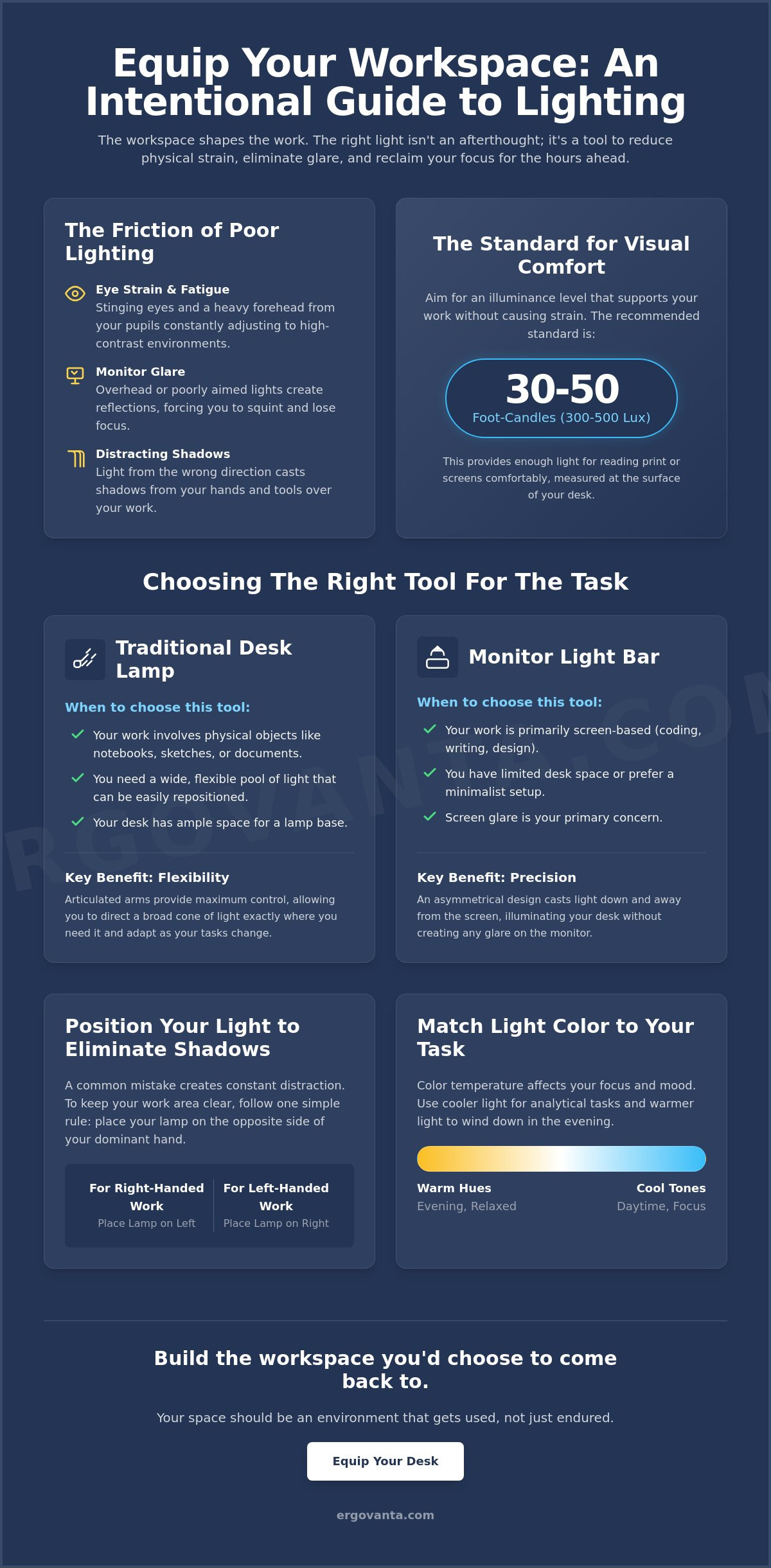
Build a workspace that supports the work rather than fighting against it. We'll show you how to build a setup that meets the 30 to 50 foot-candle standard recommended for visual comfort, helping you reduce physical strain and reclaim your focus. We'll look at how to layer your light, choose the right color temperatures, and place your equipment so your desk remains clear and your eyes stay fresh until the job is done. Your space should be an environment that gets used, not just a place where you endure the hours.
Key Takeaways
- Stop the friction of eye strain by understanding how intentional lighting supports the way you actually use your desk.
- Evaluate various task lighting solutions for home office setups, comparing the reach of traditional desk lamps with the streamlined profile of monitor light bars.
- Learn to position your light source opposite your dominant hand to eliminate distracting shadows and keep your focus on the task at hand.
- Understand how to use specific color temperatures, from cool focus tones to warm evening hues, to make your room more usable at any hour.
- Equip your desk with considered tools that earn their place by providing the right light for the specific work you do every day.
The Role of Intentional Lighting in Your Workspace
The workspace shapes the work. Equip it deliberately. If you spend serious hours at a desk, the room around it matters more than you think. Most people treat lighting as an afterthought, relying on a single ceiling fixture that was never meant for deep focus. Overhead lights often fail because they create a wash of light that results in harsh glares on your monitor or shadows across your notepad. To understand the basics of a better setup, we should look at what is task lighting? Simply put: it is functional illumination directed exactly where the work happens.
Integrating intentional task lighting solutions for home office setups means choosing objects that earn their place on your desk. It's not about cluttering your space with gear; it's about selecting tools that solve the specific friction of eye strain. When you build a workspace with purpose, you ensure that every light source is considered for its utility and how it makes the room more usable for the long haul.
To better understand how these choices impact your desk, watch this helpful video:
Understanding Eye Strain and Focus
High contrast is a quiet productivity killer. When you have a bright screen sitting in a dark room, your pupils are forced to constantly adjust, leading to that heavy, stinging fatigue by mid-afternoon. Modern LED solutions help solve this by offering light stability. Unlike older bulbs that might have a subtle, rhythmic pulse, quality LEDs minimize "flicker." This is a rapid pulsing that you might not notice consciously, but your brain definitely feels it as a source of stress. By providing a steady, stable glow, these tools allow you to stay focused without the physical drain of a jittery light source.
Lux is the specific measurement of light reaching your work surface.
Comparing Task Lighting Solutions: Lamps vs. Light Bars
Every object on your desk should earn its place. If a tool isn't actively helping you do the work, it's just clutter. When evaluating task lighting solutions for home office use, the choice typically falls between a traditional desk lamp and a monitor light bar. While floor lamps are useful for creating indirect ambient light, they generally lack the focused intensity required for deep work. You need a tool that directs light exactly where your eyes need it most, whether that is on a physical notebook or your keyboard.
When to Choose a Traditional Desk Lamp
Traditional desk lamps remain the anchor of a focused workspace for good reason. They are the ideal choice if your day involves more than just a screen. If you spend time sketching, reading physical documents, or working with hardware, you need the wide, adjustable pool of light a lamp provides. Look for models with articulated arms. This flexibility helps you follow ergonomic lighting placement standards, ensuring you can shift the light to eliminate shadows on your work surface as your posture changes throughout the day.
The Case for Monitor Light Bars
For those with a minimalist setup or limited desk real estate, monitor light bars are a considered alternative. These tools clip directly to the top of your monitor, saving valuable space for your mouse and keyboard. They utilize an asymmetrical optical design that directs light downward at a specific angle. This prevents the light from hitting the screen directly, which eliminates the screen glare that often plagues traditional setups. It's a clean, efficient solution for tech-heavy workflows where you want the light to be felt but not necessarily seen.
Choosing the right equipment depends entirely on your specific ritual of work. If you aren't sure which solution fits the layout of your room, you can always reach out to us for a second opinion on equipping your space. Build the desk you actually want to sit at, not just the one you have to use.
Equipping Your Desk: A Guide to Placement and Intensity
Placement is as intentional as the tool itself. Even the best task lighting solutions for home office setups can fail if they are positioned poorly. A common mistake is placing a lamp on the same side as your dominant hand. If you are right handed, place your light source on the left side of your desk. This simple shift eliminates the shadows cast by your hand as you write or take notes. It keeps your workspace clear and your focus uninterrupted.
You should also be wary of what's happening behind you. Avoid placing bright lights directly behind your chair, as these will inevitably create distracting reflections on your monitor. Instead, aim for a layered approach. Combine your focused task light with softer ambient sources to balance the room. This prevents your eyes from having to work too hard to adjust between a bright desk and a dark corner.
Finding the Right Color Temperature
Think of light in terms of its temperature, measured on the Kelvin (K) scale. You don't need to be a scientist to get this right. For morning deep work, use "cool" light between 4000K and 5000K. This mimics daylight and helps you stay alert. When the day starts to wind down, shift to "warm" tones between 2700K and 3000K. This amber glow signals to your brain that the work is finishing. Equipping your space with workspace essentials that offer adjustable temperatures allows your room to adapt to your specific daily ritual.
Managing Glare and Shadows
If you can see the bulb of your lamp in your peripheral vision, it's too high. Lower the head of the lamp or tilt the shade until the light source is shielded from your direct line of sight. To soften the overall feel of the room without adding clutter, consider using wall lights. By bouncing light off the walls, you create a soft, indirect fill that removes harsh shadows from the corners of the room. A well-lit room is one you choose to come back to. Build a setup that feels like yours by choosing objects that earn their place through purposeful function.
Build a Workspace That Supports the Work
The room around you dictates the quality of the hours you put in. Lighting isn't a decoration; it's a tool. By choosing considered task lighting solutions for home office setups, you're making a direct investment in your own focus. You now know how to position your light to kill distracting shadows and how to use color temperature to signal the start and end of your day. Whether you choose the wide reach of a desk lamp or the clean profile of a monitor light bar, the goal is the same: build a space you actually want to spend time in.
We design tools for the people who do the work. Our simple, intentional designs earn their place on your desk by solving the physical friction that slows you down. If you're ready to stop squinting and start building a more functional environment, we can help you find the right fit. Take ownership of your environment today. When your space is made for the work, the work itself feels more intentional and more sustainable.
Equip your workspace with considered lighting solutions
Frequently Asked Questions
What is the best color temperature for a home office?
Cool white light between 4000K and 5000K is best for daylight focus. It mimics natural morning light and helps you stay alert during deep work sessions. If you work into the evening, switch to a warmer 2700K to 3000K setting. This warmer glow helps your eyes relax and signals that the work day is ending. Equip your space with adjustable bulbs to manage this transition effectively.
How do I stop my computer screen from reflecting my desk lamp?
Position your light source so it doesn't have a direct line of sight to the glass of your monitor. If you use a desk lamp, keep the head lower than your screen and angled toward your documents. For a more streamlined fix, monitor light bars use asymmetrical optics to project light downward, ensuring zero reflection on the screen itself. This keeps your workspace clear and prevents the stinging fatigue caused by constant glare.
Can I use a floor lamp as my main task light?
Floor lamps are rarely enough for focused tasks because the light source is too far from the desk. While they work well for ambient fill, effective task lighting solutions for home office setups require a concentrated beam on your work surface. You need roughly 30 to 50 foot-candles of light for visual comfort. A floor lamp usually disperses light too widely to meet this specific requirement, leading to unnecessary eye strain.
Do monitor light bars actually protect your eyes?
Monitor light bars protect your eyes by balancing the contrast between your bright screen and a dark room. They illuminate your keyboard and workspace without throwing light directly onto the monitor, which eliminates the reflections that cause squinting. By providing a stable, flicker-free light source, these bars reduce the physical load on your eyes during long hours at the desk. They are a considered choice for any minimalist setup.
From the catalog