May 8, 2026
Choosing a Monitor Stand: A Considered Guide

Your workspace is a physical manifestation of your professional identity. Settling for a cluttered desk or a monitor that forces you to slouch is a subtle concession of power. You already understand that chronic neck tension and a disorganized surface are more than minor annoyances. They are persistent drains on your mental focus and executive presence. Selecting a quality monitor stand for desk isn't merely an ergonomic choice; it's a strategic commitment to your professional clarity.
Discover how to eliminate "tech neck" and reclaim your desk surface for high-level thinking. This guide reveals how to achieve the precise 10-20 degree downward gaze recommended by 2026 ergonomic standards to ensure your physical health matches your ambition. We preview the shift from basic office accessories to high-grade, single-piece construction that reflects a quiet refined aesthetic. Learn how to transform your office into a sanctuary of productivity that feels both powerful and perfectly organized.
Key Takeaways
- Preserve your cervical health by aligning your screen to the precise neutral gaze level for sustained mental clarity.
- Invest in a quality monitor stand for desk that balances robust hardware support with a refined, minimalist footprint.
- Eliminate visual clutter by utilizing integrated cable management and discreet storage solutions beneath your riser.
- Cultivate a sophisticated environment by coordinating your ergonomic tools with high-end executive accessories.
- Audit your hardware weight and base depth to ensure your foundation provides absolute stability and professional power.
The Science of Elevation: Why Your Monitor Height Matters
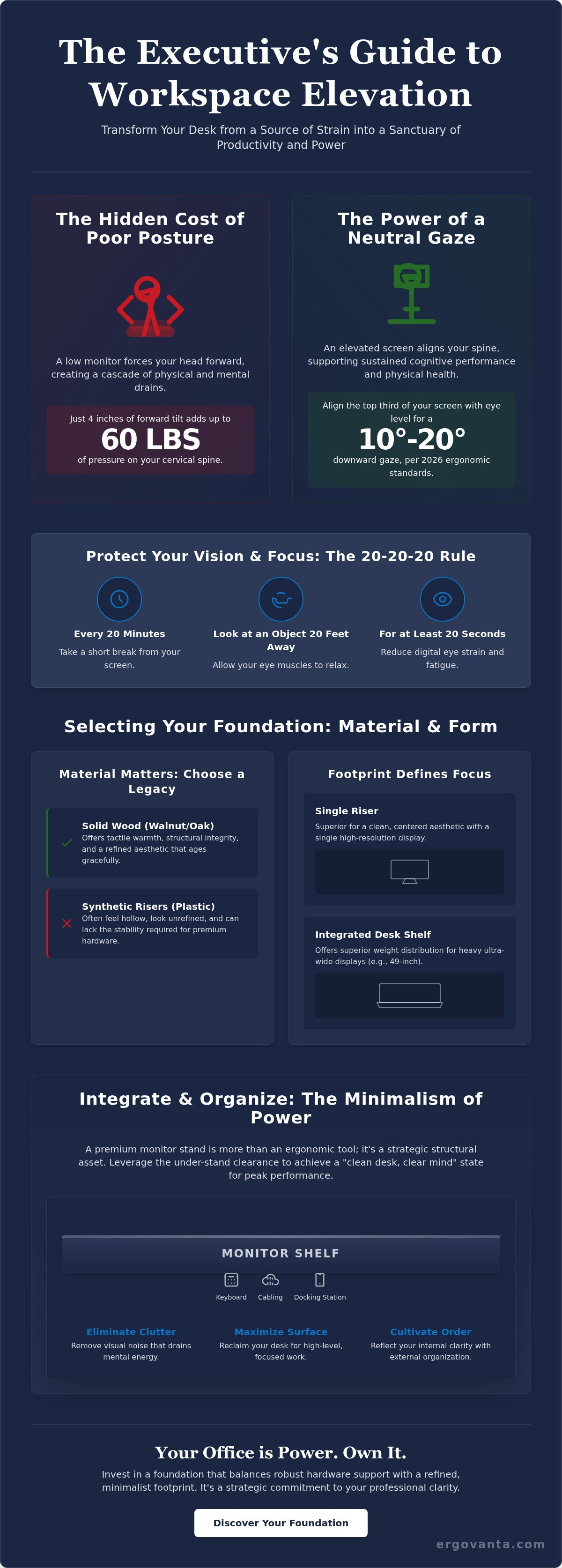
Your physical posture dictates your professional output. A quality monitor stand for desk is far more than a simple riser; it is a precision instrument for cervical spine health. When a screen sits below eye level, your head naturally tilts forward. This misalignment creates a cascade of hidden costs. It restricts blood flow to the brain and induces mental fatigue that drains your focus by mid-afternoon. True professional control begins with the neutral gaze principle. Your eyes should naturally strike the top third of your screen. This alignment ensures your neck remains in a powerful, balanced position that supports sustained cognitive performance.
Combatting Tech Neck with Eye-Level Alignment
Precision is the hallmark of an executive setup. Research indicates that just 4 inches of forward head tilt can add up to 60 pounds of pressure on your cervical spine. This is the physical equivalent of carrying a heavy suitcase on your neck for eight hours a day. Modern Monitor mount technology allows for the micro-adjustments needed to negate this strain. To protect your vision and focus, adopt the 20-20-20 rule: every 20 minutes, look at an object 20 feet away for 20 seconds. Elevating your hardware is the first step toward total ergonomic mastery.
The Aesthetic of Authority: Elevating Your Professional Brand
Your workspace is your inner drive made visible. An elevated screen creates an immediate psychological sense of professional dominance over your daily tasks. It signals to peers and clients that you prioritize discipline and precision in every detail. This curated foundation acts as the cornerstone of a sophisticated executive essentials collection. When you look up at your work, you aren't just protecting your posture. You're adopting the physical stance of a leader. Your office is power. Own it.
Selecting Your Foundation: Materials, Form, and Function
Building an executive workspace requires more than intuition; it demands engineering. Before selecting a monitor stand for desk, you must audit your hardware with precision. Measure the total weight of your display and the depth of its base. Stability is the silent guardian of your expensive technology. A wobbling screen is a distraction you can't afford. Integrate your choice into a holistic ergonomic setup to ensure every element of your desk supports peak performance.
Solid Wood vs. Synthetic Risers
Plastic is disposable. Solid wood is a legacy. Synthetic materials often feel hollow and look unrefined in a high-stakes professional environment. In contrast, monitor and laptop stands crafted from quality walnut or oak offer tactile warmth and structural integrity. These natural materials age gracefully. They develop a unique character that reflects your years of professional growth and ambition. Choose materials that inspire your best work.
Single Riser or Integrated Desk Shelf?
Footprint defines your focus. A minimalist single stand is superior for those who value a clean, centered aesthetic. It provides a dedicated pedestal for a single high-resolution display. However, ultra-wide monitor users require broader support. An integrated desk shelf offers superior weight distribution for heavy 49-inch displays. It also creates a wide architectural plane that unifies your workspace and simplifies your visual field. This choice dictates the rhythm of your daily operations.
Evaluate your storage needs to maximize surface efficiency. High-end risers provide specific under-stand clearance to tuck away a mechanical keyboard or a docking station. This hidden storage is essential for maintaining mental clarity during complex projects. It ensures your primary workspace remains a sanctuary of focus rather than a graveyard of peripherals. If you need assistance tailoring your foundation to a specific hardware configuration, you can consult with our design specialists for personalized guidance.
Integrating Your Workspace: Beyond the Riser
A high-end monitor stand for desk offers more than just physical elevation; it provides a strategic structural void. Use this space. Leverage the clearance beneath the riser to conceal high-performance docking stations and chaotic cabling. This act of concealment removes the visual noise that frequently drains mental energy. By hiding the technical infrastructure of your setup, you allow your mind to focus entirely on high-level strategy. Your workspace should be a reflection of your internal order.
The Minimalism of Power: Clearing Digital and Physical Clutter
Clarity is a decisive competitive advantage for the modern leader. The "clean desk, clear mind" philosophy is a fundamental requirement for sustained executive performance. Pair your solid wood or metal stand with curated decor to soften the sharp, corporate edge of your technology. Coordinate these selections with quality ergonomic accessories to establish a cohesive design language. This disciplined approach to organization signals an uncompromising commitment to excellence and professional poise.
Lighting Your Elevated Setup
Precision lighting serves as the final layer of a sophisticated executive suite. Strategically place lighting around your monitor stand to eliminate harsh screen glare and mitigate ocular fatigue during extended sessions. Ambient lighting is essential for maintaining a sense of quiet refined and focus. It ensures your environment remains a sanctuary of productivity even after sunset. Proper illumination prevents the eye strain that can compromise your decision-making clarity in the final hours of the day.
Your office is power. When the final task is complete, an organized desk allows for a seamless transition into refined evening rituals. Utilize your streamlined surface to plan the next day's objectives with a sense of calm authority. By integrating every element of your desk into a single, purposeful system, you create an environment that validates your professional efforts and supports your personal growth. Elevate your environment to match your ambition.
Master Your Workspace Environment
Your physical environment is the ultimate foundation of your professional influence. You've learned that precise eye-level alignment isn't just a matter of comfort; it's a strategic requirement for sustained executive focus. By selecting a high-grade monitor stand for desk, you transition from a reactive posture to a stance of total professional control. A quality foundation does more than support your hardware. It serves as a lasting testament to your commitment to excellence.
Eliminating visual clutter through smart integration allows your mental energy to remain where it belongs: on high-stakes decision-making. Ergovanta offers boutique ergonomic design and quality solid wood options specifically designed for the modern executive who refuses to compromise on style. Your office is power. Own it by refining every detail of your daily sanctuary.
Elevate your workspace with Ergovanta's curated Monitor Stands
Step into a new era of professional clarity and physical vitality. Your future self will thank you for the discipline you show today.
Frequently Asked Questions
What is the ideal height for a monitor stand on a desk?
The top edge of your display should sit at or slightly below eye level. This specific placement facilitates a natural downward gaze of 10 to 20 degrees as recommended by 2026 ergonomic standards. Proper height ensures you maintain a neutral posture. This prevents the chronic neck tension and physical fatigue associated with poor screen alignment.
Can a monitor stand hold an ultrawide or curved monitor?
Quality stands are engineered to support the substantial weight and unique dimensions of curved hardware. Most 49 inch ultrawide displays weigh between 25 and 35 pounds. A robust monitor stand for desk with a broad base ensures these heavy screens remain stable. This stability is crucial for maintaining focus during high-stakes professional tasks.
Do I need a monitor stand if I have an adjustable chair?
Adjustable chairs manage your lower body alignment, but they can't fix a screen that sits too low on a fixed desk surface. Raising your chair to align with a low monitor often forces your feet off the floor. This compromises circulation. A dedicated stand provides the independent height adjustment needed to keep your feet flat and your eyes level simultaneously.
What is the difference between a monitor riser and a monitor arm?
A riser is a static pedestal that offers a clean aesthetic and functional under-shelf storage. A monitor arm provides dynamic movement through gas-spring technology for frequent depth and tilt adjustments. Executives often choose risers for their sophisticated, permanent presence. They integrate seamlessly with high-end office decor to create a sense of quiet refined.
Is wood or metal better for a heavy professional monitor?
Solid wood and high-grade metal both offer the structural integrity required for heavy hardware. Solid walnut provides a tactile, quality warmth that synthetic materials can't replicate. Industrial metal provides a sharp, modern appearance. Both materials ensure your setup remains rigid and vibration-free. Choose the material that best reflects your professional identity and office design language.
How does a monitor stand improve productivity in a home office?
Physical elevation creates a psychological boundary between your professional and personal life. Reclaiming 15 to 20 percent of your desk surface allows for better organization of your executive essentials. A monitor stand for desk reduces the cognitive load caused by visual clutter. This streamlined environment directly improves your daily output and supports sustained mental clarity.
From the catalog