September 14, 2026
Essential Home Office Setup for Content Creators
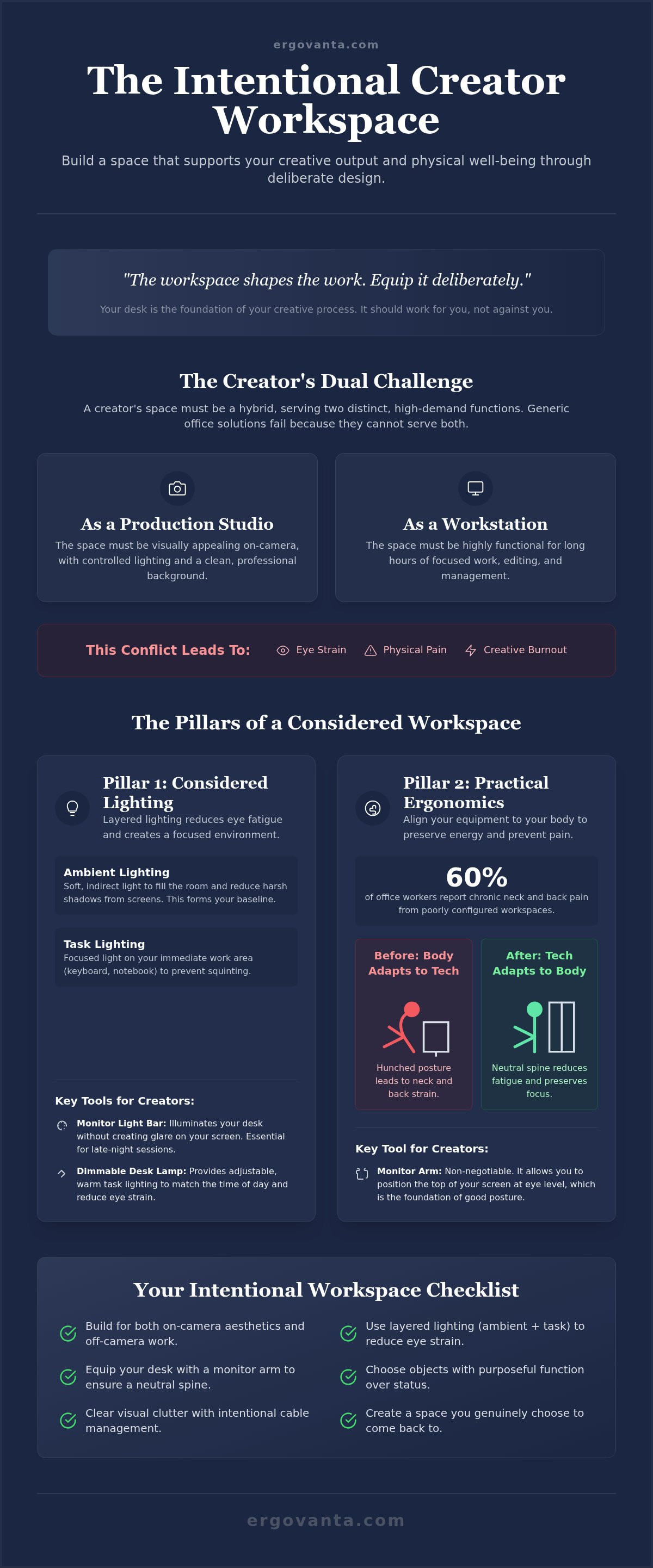
The workspace shapes the work. Equip it deliberately. Your desk is not just a place where you sit; it's the foundation of your entire creative process. You likely spend eight plus hours every day navigating complex timelines, scripts, and exports. If you finish those long sessions with a stiff neck or strained eyes, your environment is working against you. Visual clutter and inconsistent lighting do more than just look messy; they actively drain the mental focus required for high-level production.
You can build a home office setup for content creators that feels like a personal sanctuary rather than a corporate obligation. This guide shows you how to equip a workspace that supports both your creative output and your physical well-being through intentional design. We will examine the specific objects that earn their place in a creator's room, including monitor arms that correct your posture and lighting tools that define your mood. It is time to create a space you actually choose to come back to, built for the work you do every day.
Key Takeaways
- Build a home office setup for content creators that serves as both a production studio and a high-intensity workstation.
- Equip your space with lighting designed for eye health and focus, acknowledging that your environment matters as much as your camera quality.
- Learn to identify the tools that earn their place on your desk by prioritizing purposeful function over status-driven gear.
- Clear the visual clutter with intentional cable management to ensure your workspace remains a sanctuary for creativity.
- Master the physical requirements of long workdays by understanding how considered ergonomics can reduce strain during 8 plus hour sessions.
Defining the home office setup for content creators
The workspace shapes the work. Equip it deliberately. A home office setup for content creators is unique because it demands a hybrid identity. It must function as a high-intensity workstation for editing and a professional production studio for filming. This isn't about status or corporate identity; it's about ownership. You are building a space that supports your specific creative rhythm, ensuring that the environment works for you instead of against you. An effective home office setup for content creators bridges the gap between a sterile office and a cluttered bedroom.
The history of the Small office/home office (SOHO) shows a shift from simple utility to specialized environments. For creators, this means every object on the desk should have a purposeful function, a concept we call the "ergon." If an item doesn't provide a clear advantage to your workflow or your physical comfort, it doesn't earn its place. Intentionality is the guardrail against the burnout and physical strain that often accompany long production cycles. When you focus on the ergon, you stop buying gear for the sake of having it and start building a workspace made for the work.
The dual-purpose nature of creator spaces
Your space has to balance on-camera aesthetics with off-camera productivity. It's easy to focus on how the background looks for a video, but if the setup causes chronic neck pain during a six-hour editing session, it has failed. A considered environment leads to consistent output because it removes the small frictions that stall creativity. We are moving away from unplanned, makeshift desks toward workspaces that are intentional. When you own the design of your room, it becomes a sanctuary you choose to come back to, supporting your body through eight plus hour workdays.
Why generic office solutions fail creators
Standard office furniture often misses the mark for creative work. A typical desk lacks the depth required to mount cameras, key lights, and multiple monitors while leaving room for your hands to move. Generic lighting might be fine for basic tasks, but it creates harsh shadows on camera and causes significant eye strain during late-night exports. You need workspace essentials that handle heavy tech stacks without feeling like a crowded cubicle. Using tools like monitor stands and laptop stands allows you to reclaim your desk surface. This intentional approach ensures your equipment supports your body rather than forcing your body to adapt to the equipment.
Lighting and ergonomics: the pillars of a considered workspace
The workspace shapes the work. Equip it deliberately. For a home office setup for content creators, lighting and ergonomics are the silent partners of productivity. They dictate how long you can stay in the flow before physical fatigue forces a break. Most creators focus on the light hitting their face for the camera, but the light hitting the desk is what preserves your focus. A considered home office setup for content creators prioritizes eye health and physical comfort as much as it does video resolution.
Ergonomics is often discussed in clinical metrics, but for the person doing the work, it's simply about how you feel. Your body isn't static. You shift, lean, and reach during a long edit. Building your setup around how you actually move prevents the chronic neck and back pain reported by approximately 60% of office workers in 2026 ILO research. When you align your equipment to your body, you preserve the mental energy needed for high-level creative output.
Layered lighting for creators
Effective lighting is built in layers. You need task lighting to define your immediate work area and ambient lighting to soften the room. Using desk lamps allows you to create visual depth while reducing the harsh glare reflecting off your screens. This is vital for editors who spend hours staring at high-contrast timelines. Monitor light bars serve a specific ergon: they illuminate your keyboard without adding reflections to the monitor. This minimizes eye fatigue during late-night sessions. Equip your space with warm, indirect light to maintain a sanctuary feel, making the room a place you choose to inhabit.
Ergonomic supports for long-form work
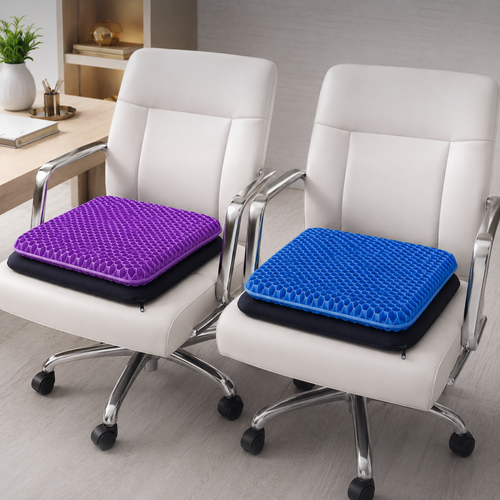
Small objects earn their place when they solve physical friction. Monitor arms are non-negotiable for maintaining a neutral spine. They allow you to position the top line of text at eye level, which directly reduces neck tension and preserves your creative stamina. If you use a secondary screen, laptop stands align that display with your primary line of sight to prevent repetitive twisting. Seat cushions and foot rests support your circulation during 8 plus hour workdays. When your feet are flat and your lower back is supported, you can focus on the export rather than the ache in your shoulders. If you need help selecting tools that fit your specific workflow, contact us to discuss building your space.
Choosing objects that earn their place: gear versus essentials
The workspace shapes the work. Equip it deliberately. In a home office setup for content creators, it is easy to confuse high-priced gear with work essentials. A camera is a tool for your output, but it does nothing for your physical stamina or mental clarity during a ten-hour edit. The real advantage comes from the points where your body touches the workspace: the chair, the desk surface, and the supports that hold your technology. Your home office setup for content creators should be a reflection of your workflow, not a collection of status symbols. Every object on your desk must have a purposeful function, or ergon, or it should be removed to clear space for the work that matters.
Build with fewer, better things. A minimalist approach isn't about having nothing; it's about having exactly what you need to do the job. Status gear often provides diminishing returns, whereas work essentials provide a consistent advantage every hour you sit at the desk. Invest in the interface. When you prioritize the tools that support your physical body, you are investing in the longevity of your career. Selecting high-quality materials like wood and metal over cheap plastic ensures your setup earns its place for years to come.
The trap of the aesthetic setup
Many "Instagrammable" desks fail the test of real-world use. They look clean in a still photo but lack the durability and utility required for high-intensity production. Plastic stands wobble under the weight of professional monitors, and shallow desks don't leave enough room for a proper keyboard and mouse layout. Prioritize material quality. A desk built with solid materials provides a stable foundation for your gear and feels better to touch. You can find workspace essentials that prioritize intentional design over temporary trends. When your space is made for the work, it remains functional long after the "aesthetic" of the week has changed.
Tools that provide the Vanta advantage
In the etymology of our name, Vanta represents the advantage. High-quality monitor mounts provide a literal and metaphorical advantage by reclaiming your desk surface and aligning your work to your eyes. There is a profound psychological benefit to an organized, intentional desk. It reduces the cognitive load of visual clutter, allowing you to focus entirely on the creative task at hand. Choose accessories that grow with you. As your career advances and your tech stack changes, your foundational tools should remain relevant. When you build a home office setup for content creators with this mindset, your environment becomes a sanctuary of productivity rather than a source of distraction.
Practical organization: managing tech and cables for a clean setup
The workspace shapes the work. Equip it deliberately. Cable management is the difference between a production studio and a cluttered mess. In a home office setup for content creators, the sheer volume of tech, from XLR cables to high-speed USB lines, can quickly overwhelm your desk. Visual clutter is a distraction that drains the mental energy required for creative work. A considered organization strategy ensures that your environment remains a sanctuary where you can focus on the screen rather than the tangle of wires beneath it.
Organize your space by frequency of use. Keep your most essential tools, such as your audio interface and primary controller, within immediate reach. Secondary tools should be tucked away or stored on dedicated stands to prevent surface clutter. Using monitor arms allows you to reclaim valuable desk real estate. By lifting your screens, you create room for tablets, note-taking, or mixing boards. Every object on the desk should earn its place by supporting your natural workflow without obstructing your movement.
Creator-specific cable management
Managing a creator's tech stack requires more than just zip ties. Routing your XLR, USB, and power cables through cable management trays keeps the top of your desk clear and professional. If you use a standing desk, you must account for "slack." Ensure your cable runs have enough length to move through the full range of the desk's height without pulling on your ports. This intentional routing provides a sense of clarity. When the cables are hidden, the room feels more like a studio and less like a storage unit, which directly improves your mental focus during long editing sessions.
Optimizing screen and device placement
Think of your desk in terms of the "Golden Triangle." This is the area between your monitor, your microphone, and your audio interface. These three points should be aligned with your natural reach to minimize wasted movement. Using monitor stands creates valuable storage space underneath the screen for small everyday objects or hard drives. Equip your desk with dedicated stands for headphones and phones. These small objects earn their place by keeping your workspace streamlined. When your tech is aligned with your workflow, your home office setup for content creators becomes a high-intensity workstation that supports your body and your craft.
Equip your space: the final steps to a functional creator studio
The workspace shapes the work. Equip it deliberately. Your home office setup for content creators is a long-term project that requires constant refinement. It begins with the foundation: the desk and chair that support your body through every export and edit. Without a solid base, even the most expensive camera won't save your workflow from the distractions of physical discomfort. Once the foundation is set, you can begin adding the layers of lighting and ergonomic tools that earn their place. This is an ongoing process of refinement rather than a one-time purchase.
The intentional audit
Build a room that you actually want to come back to every morning. To achieve this, you must audit your space regularly. Identify friction points: a cable that always tangles, a light that causes a glare at 3 PM, or a monitor that sits too low. If an object no longer serves the work, remove it. We recommend the "One In, One Out" rule for desk accessories. This discipline ensures your studio remains a sanctuary of focus even as your channel or business grows. Maintaining an intentional environment prevents your tech stack from becoming a source of stress. It's about keeping the room useful and uncluttered.
Making it yours
A functional studio doesn't have to be sterile. You can make it yours by adding faux plants or personal decor that provides visual relief without creating distraction. These small objects earn their place by softening the industrial feel of a high-intensity workstation. Lighting also plays a dual role here. Beyond its ergonomic function, it sets the "mood" for different types of content. You might need bright, cool light for a technical tutorial and warm, indirect light for a late-night edit. This flexibility is what makes a home office setup for content creators feel like a personal studio rather than a corporate cubicle.
Equip your space with purpose. This isn't about following a trend or chasing a specific aesthetic. It's about personal ownership. When you build a workspace made for the work, you are creating a source of advantage for your career. We return to the etymology of our name: ERGO for purposeful function and VANTA for advantage. This is for the people who do the work.
Equip your studio for the long term
The workspace shapes the work. Equip it deliberately. Building an effective home office setup for content creators is about more than just buying the latest gear; it's about equipping a space that supports your physical well-being and creative focus. You've learned that a considered environment starts with the foundation of ergonomic supports and layered lighting. Every object on your desk should earn its place through purposeful function, providing a clear advantage during those long production hours that define your craft.
By organizing your tech stack and auditing your space regularly, you transform a cluttered room into a professional studio. This intentional approach ensures your workspace remains a sanctuary you actually choose to come back to every morning. We build these tools for the people who do the work, focusing on the small details that bridge the gap between minimalist style and functional utility. Your environment is a source of influence on your output. Equip it with the tools that respect your time and your body.
Take ownership of your space today. When your room is made for the work, the work becomes more sustainable and fulfilling. We look forward to helping you build the foundation for your next project.
Frequently Asked Questions
What is the most important part of a home office setup for content creators?
The foundation of your workspace is the most critical element. While high-end cameras capture the output, the desk and chair support the person doing the work. A considered home office setup for content creators prioritizes physical stamina over status-driven gear. If your furniture causes fatigue, your creative focus will suffer. Select pieces that allow your body to remain in a neutral position, ensuring you have the endurance to complete long production cycles without strain.
How do I choose the right lighting for a creator workspace?
Choosing the right lighting involves layering different sources to reduce eye strain and improve video quality. Use a monitor light bar to illuminate your workspace without creating screen glare. Complement this with desk lamps for localized task lighting. Aim for warm, indirect light to maintain a sanctuary feel. This approach prevents the harsh shadows and headaches often caused by standard overhead fixtures, allowing you to edit for hours in a comfortable, intentional environment.
Are monitor arms really necessary for content creators?
Monitor arms are essential for reclaiming desk real estate and maintaining proper posture. They allow you to position your screen so the top line of text is at eye level, which is a key requirement for reducing neck tension. By lifting the monitor off the desk surface, you create space for secondary tools like audio interfaces or note-taking tablets. This flexibility is vital for creators who need to adjust their setup between filming and editing.
How can I manage all the cables in my creator setup?
Effective cable management requires a dedicated system to route power and data lines away from your work surface. Use under-desk cable management trays to house power strips and excess cord length. For standing desks, remember to leave enough slack for the full range of motion. Hiding these wires reduces visual clutter, which directly improves your mental clarity. A clean setup ensures that your technology supports your workflow rather than becoming a source of daily frustration.
What is the best way to reduce neck pain while editing?
The most effective way to reduce neck pain is to bring your workspace to your eyes rather than leaning toward your tools. Use monitor stands or laptop stands to ensure your screens are positioned at a height that keeps your neck in a neutral position. Align your secondary devices with your primary line of sight to minimize repetitive twisting. When your body is supported, you preserve the creative stamina needed for eight plus hour workdays.
How much space do I actually need for a professional creator setup?
The quality of your space is more important than the total square footage. A home office setup for content creators requires enough depth to accommodate cameras, lights, and monitors without feeling cramped. Most creators find that a standard room provides ample space if they use monitor arms and stands to reclaim vertical real estate. Focus on equipping the room with objects that earn their place, ensuring every square inch serves a purposeful function.
Is a minimalist setup better for creative focus?
A minimalist approach often leads to better creative focus by removing the cognitive load of visual clutter. This isn't about having an empty room; it's about building with fewer, better things. When you equip your space with intentional tools, you create an environment that feels like a sanctuary. Removing unnecessary objects allows you to concentrate entirely on the work. This disciplined design philosophy ensures that your workspace remains a place of high-level, consistent production.
How do I balance aesthetics with ergonomics in my home office?
You don't have to choose between a room that looks good and one that feels good. Balance aesthetics with ergonomics by selecting tools made from high-quality materials like wood and metal. These materials provide the durability needed for professional work while fitting a considered, personal style. Add faux plants or sculptural accent pieces to soften the technical environment. When your setup is built for the work, the functionality naturally creates its own intentional aesthetic.
Disclaimer
Ergovanta publishes these guides to help people set up better workspaces. Product recommendations reflect what we sell. Specifications, prices and availability are accurate at the time of writing and may change. Nothing here is medical, ergonomic or professional advice; if you have a specific health concern about your workstation, speak to a qualified professional.
From the catalog