August 21, 2026
The Workspace Shapes the Work: Choosing a Wooden Desktop Monitor Stand

The workspace shapes the work. Equip it deliberately. Most people spend their days hunched over a screen that sits too low, surrounded by flimsy accessories that feel temporary. This isn't just an aesthetic issue; it's a physical one. A wooden desktop monitor stand is not a status symbol. It's a structural tool for a room that gets used. It solves the clutter of small objects and provides a permanent anchor for your most important tools.
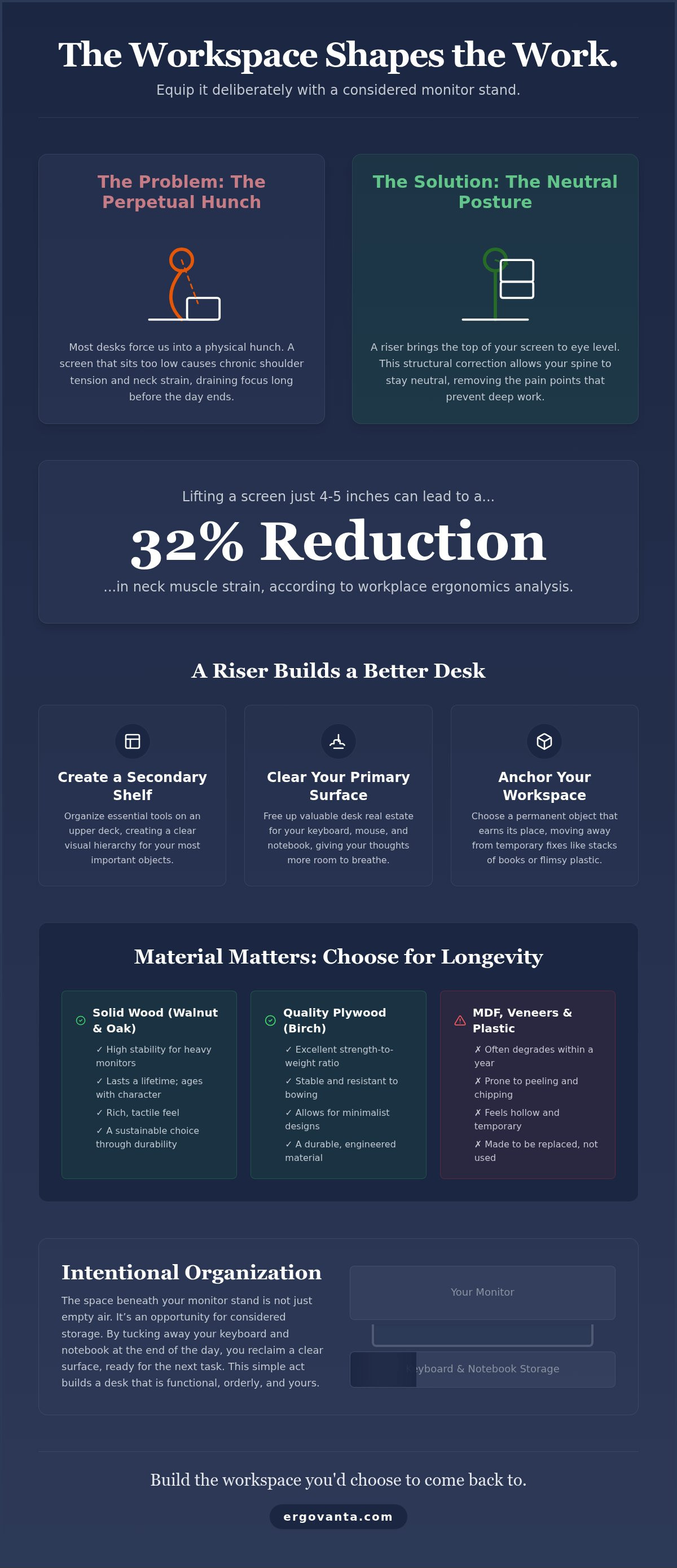
You already know the feeling of a desk that fights against you. Chronic shoulder tension and a crowded surface make it difficult to focus on the task at hand. Analysis from ergonomics consultants suggests that lifting a screen just four to five inches can reduce neck muscle strain by up to 32 percent. This guide helps you choose a stand that balances purposeful function with a sense of personal ownership. We will explore how to select the right materials, create hidden storage for your keyboard, and build a space you actually choose to come back to.
Key Takeaways
- Understand how bringing your screen to eye level eliminates the persistent neck tension that often ruins a long workday.
- Learn why choosing a solid wooden desktop monitor stand is a commitment to a permanent workspace rather than a temporary plastic fix.
- Get practical advice on measuring your desk real estate to ensure your riser fits your specific monitor and keyboard setup perfectly.
- Discover how to use the space beneath your riser for intentional organization, including cable management and hidden storage for notebooks.
- Equip your space with considered objects that earn their place and make your desk a room you actually choose to come back to.
Why Your Screen Height Dictates Your Productivity
The workspace shapes the work. Equip it deliberately. Most of us work on surfaces designed for paper, not pixels, and this mismatch forces us into a perpetual hunch. When your monitor sits too low, your body compensates by rounding the shoulders and dropping the chin. This is physical friction. It drains your focus long before the workday ends. Building a space that works for you starts with acknowledging how these physical constraints dictate your output.
A wooden desktop monitor stand serves as a structural correction for this common desk failure. It is a riser designed to bring the top of your screen to eye level, allowing your spine to stay neutral. Analysis from workplace ergonomics consultants shows that adding just four or five inches of height can reduce neck muscle strain by up to 32 percent. This isn't about following clinical rules for the sake of it. It's about removing the literal pain points that prevent you from staying in flow.
Stop relying on temporary fixes. Stacks of old hardcover books or shipping boxes might solve the height issue, but they add visual noise to your space. They feel like a workaround. A considered object, however, feels permanent. It earns its place on your desk because it solves a problem without demanding attention. When you move away from cardboard and toward a solid wooden desktop monitor stand, you are choosing to build a workspace that is made for the work.
The Relationship Between Eye Level and Focus
When you look down at a screen, your brain spends unnecessary energy managing physical discomfort. Achieving a neutral neck position is essential for long periods of deep work. It allows you to forget your body and focus entirely on the task at hand. Beyond the ergonomic benefits of monitor stands, these risers create a secondary shelf on your desk. This layout clears the primary surface for your keyboard and mouse, giving your thoughts more room to breathe.
The Small Objects That Earn Their Place
We build our workspaces with tools that are intentional. There is a clear distinction between a gadget and a considered object. A gadget is a temporary distraction; a considered object is an essential part of your setup. By choosing a stand made from real wood, you are acknowledging the hours you actually spend at your desk. You are equipping a room that gets used. Your space shouldn't feel like a generic corporate station. It should feel like yours, anchored by objects that are as functional as they are durable.
Solid Wood vs. Plywood: Understanding Your Desk Materials
The materials you choose for your desk are a statement of intent. A wooden desktop monitor stand isn't just a riser; it’s a commitment to a space that lasts. While many mass-market options use MDF or plastic "wood-look" laminates, these materials often degrade within a year. They peel at the edges and feel hollow under the weight of a heavy screen. Choosing real wood means equipping your desk with a tool that earns its place over time. It is about building a workspace you actually want to inhabit.
Solid Walnut and Oak are the standards for a workspace built for longevity. Walnut offers a deep, rich grain that grounds a setup, while Oak provides a brighter, more resilient texture. These hardwoods are dense enough to support large monitors without bowing. This structural integrity is vital when following OSHA guidelines for monitor placement, as a stable base ensures your screen stays exactly where it needs to be for a neutral posture. If you aren't sure which grain best suits your current desk, you can always message us for a recommendation on matching your existing furniture.
Plywood and bentwood offer a different advantage. High-quality birch plywood uses cross-laminated layers to create immense strength without the bulk of solid lumber. Bentwood techniques allow for sculptural, minimalist designs that feel light on the desk but provide a permanent anchor for your hardware. Avoid MDF and cheap veneers at all costs. These temporary materials are the opposite of intentional design; they are made to be replaced, not to be used.
The Longevity of Solid Wood
Natural materials age with the user. A solid wooden desktop monitor stand develops a character that plastic cannot replicate. It feels permanent. Unlike temporary accessories that end up in a landfill when they chip or crack, solid wood is resilient. It is an intentional choice for a room that gets used every day. By choosing solid materials, you are opting for sustainability through durability.
Texture and Tone in the Workspace
The tactile experience of your desk matters. When you reach for a notebook or adjust your keyboard, the feel of a real wood finish provides a sense of grounding. We recommend a matte finish over high-gloss coatings. Matte surfaces diffuse light, reducing the glare that can distract you during deep work. Matching the grain and tone of your riser to your desk surface creates a cohesive environment that feels built for the work rather than just a place where work happens.
Selecting the Right Riser for Your Specific Monitor Setup
Measuring your desk is the first step in building a functional workspace. Don't eyeball it. A wooden desktop monitor stand must fit both the base of your screen and the available real estate on your surface. If your desk is shallow, a bulky riser will push your monitor too close to your eyes, causing a different kind of strain. For a standard single monitor setup, a 20-inch riser is usually the right tool. It provides enough surface area for the screen while clearing enough space underneath to tuck away a keyboard or a laptop when the workday ends.
Weight capacity is equally vital. If you use a heavy 27-inch or 32-inch display, you need a stand built from materials that won't sag. As discussed in previous sections, solid wood is the intentional choice here. It offers the structural integrity required to support significant weight without bowing over time. A flimsy riser is a temporary fix; a solid wooden desktop monitor stand is a permanent anchor for your hardware. Before you buy, confirm that the dimensions of the stand's top surface exceed the width and depth of your monitor's base for total stability.
The Desk Shelf Approach for Dual Screens
If you work with two monitors, a single small riser won't suffice. You need a "desk shelf" approach. This involves using a wider riser that bridges the gap between both screens, creating a unified look for complex tech setups. This setup isn't just about height; it's about organization. A longer shelf allows you to manage the space underneath more effectively, providing a dedicated home for two keyboards, a tablet, or a laptop dock. It turns a cluttered desk into a room that feels used and organized.
Ultrawide Considerations
The specific needs of 34-inch and 49-inch curved monitors require a different perspective. These screens have a wider center of gravity and often a much larger footprint. When equipping your space for an ultrawide, centering the weight is critical to prevent the wood from bowing over months of use. You need a stand with a deep surface and reinforced legs. Explore our monitor and laptop stands to find a riser that can handle the scale of these larger displays. Choosing the right size ensures your setup remains stable and your focus remains on the work.
How to Integrate a Monitor Stand into a Functional Desk
A wooden desktop monitor stand is only as good as the organization it enables. If your desk is a maze of tangled wires and scattered notebooks, the height of your screen won't save your productivity. The goal is to build a system where every object earns its place. By using the riser as an anchor, you can define specific zones for your tools. This reduces the visual noise that often leads to cognitive fatigue during long hours of deep work. It turns a generic surface into a room that gets used.
Cable management is the first hurdle in any setup. Use the space behind and under your riser to route power cords and display cables. This keeps the primary surface clear for your mouse and keyboard. When the workday ends, the space beneath a wooden desktop monitor stand becomes a garage for your peripherals. Tucking your keyboard and mouse out of sight is a physical ritual that signals the transition from work to rest. It reclaims your desk for other uses; like journaling or sketching, without the clutter of tech in your way.
Lighting the Work
Your riser must work in harmony with your light sources. If you use a monitor light bar, ensure the height of the stand doesn't cause the light to cast a shadow over your keyboard area. For those who prefer desk lamps, place them to the side to create a balanced glow across the wooden surface. Proper illumination prevents eye strain and makes the natural grain of the wood a focal point. You can find considered lighting for your space that complements the organic texture of a wooden riser while providing the functional clarity needed for detailed tasks.
Managing the Peripherals
A functional desk is a workspace you'd choose to come back to. This means your mouse, notebook, and phone stand need a permanent home. Positioning these items in relation to the riser creates a predictable environment. You shouldn't have to search for a pen or a charger in the middle of a meeting. Pair your wooden riser with tech accessories like wireless chargers or headphone stands to keep your most-used items within reach but off the main workspace. This intentionality is the opposite of corporate identity. It is about building a space that feels like yours.
Equipping Your Space with Considered Objects
The workspace shapes the work. Equip it deliberately. Building a space you choose to come back to is an act of personal ownership. It is the opposite of a generic corporate identity where every desk looks identical and every chair feels temporary. When you choose a wooden desktop monitor stand, you are making a decision about how you want to feel during the hours you spend at your desk. You are moving away from friction and toward a setup that supports the people who do the work.
Intentionality starts with evaluating the objects that currently occupy your surface. If a tool doesn't earn its place through purposeful function or durability, it is likely just visual noise. Your desk should not be a collection of random tech gadgets; it should be a curated environment where every item has a reason for existing. By removing the flimsy plastic risers and temporary cardboard fixes discussed in previous sections, you create a permanent anchor for your workflow. This shift in perspective turns a standard office into a personal sanctuary of productivity.
The Ergovanta Philosophy
Our approach is rooted in two core ideas: Ergon and Vanta. Ergon, from the Ancient Greek, refers to purposeful function. Vanta is the advantage gained from a well-built environment. Together, they represent the belief that your physical setting is a source of influence over your output. We focus on the rooms that actually get used, providing tools that are made for the work. You can Shop our workspace essentials to find objects that balance this functional requirement with a clean, minimalist design language.
Start with the Foundation
A complete desk rebuild can feel overwhelming, so start with the foundation. The monitor stand is often the first step because it addresses the most immediate source of ergonomic friction: your posture. By bringing your screen to eye level, you solve the physical strain that ruins focus. From there, you can equip your space one intentional object at a time, adding considered lighting or cable management as your needs evolve. This isn't about buying a lifestyle; it's about building a functional toolset for your career.
Evaluate your current setup today. Look for the points of friction where your desk fights against your comfort. Whether it's a monitor that sits too low or a surface cluttered with small objects, identify what needs to change. Build your space deliberately. Equip it for the work you intend to do, and create a room that you actually choose to inhabit day after day.
Equip Your Desk for the Work Ahead
A workspace isn't a static backdrop; it's a tool that either supports or hinders your progress. By choosing a solid wooden desktop monitor stand, you solve the persistent physical friction of a low screen while reclaiming the surface area needed for deep focus. This isn't about chasing a specific aesthetic. It's about building a room that gets used by someone who values their time and physical health. We've explored how solid wood construction provides a permanent anchor that temporary materials simply cannot match. You now have the framework to select a riser that fits your specific monitor size and organizational needs. These considered choices transform a generic desk into a personal sanctuary where work feels less like a chore and more like a craft. Your desk should be a place you choose to come back to every morning. Start building it deliberately.
Take ownership of your environment today. When your physical space is intentional, your work follows suit. Equip your desk for the hours you actually spend there and find the advantage of a well-built room.
Frequently Asked Questions
Is a wooden monitor stand better than a metal or plastic one?
A wooden desktop monitor stand offers superior durability and a tactile warmth that metal or plastic lacks. While plastic feels temporary and flimsy, solid wood is a permanent material that ages with the user. It provides a grounded, intentional feel to your surface. Metal stands can often feel cold and clinical; wood creates a room that feels like yours. Choosing wood is a commitment to a workspace you actually want to inhabit for the long term.
Will a monitor stand help with my neck pain?
Raising your screen to eye level is a direct way to reduce the physical friction caused by looking down. When you hunch over a low monitor, your neck and shoulders carry unnecessary tension. Analysis from workplace ergonomics consultants suggests that lifting a display by just four to five inches can reduce neck muscle strain by up to 32 percent. This change allows for a neutral posture, helping you stay in deep work without the distraction of physical discomfort.
How much weight can a wooden desktop monitor stand actually hold?
Solid wood stands are built to support heavy 27-inch and 32-inch displays without bowing. High-quality solid walnut or oak risers can typically handle significant weight, often exceeding the requirements of even the largest modern monitors. In contrast, cheap MDF or plastic-look laminates often sag under the pressure of a single heavy screen. Always check the specific weight capacity of your stand to ensure it provides a permanent, stable anchor for your hardware.
Can I use a monitor stand with a laptop instead of a monitor?
You can absolutely use a monitor stand as a laptop riser to bring your screen to a healthier viewing height. This setup requires an external keyboard and mouse to keep your wrists at a comfortable angle. Using a wooden desktop monitor stand for your laptop allows you to tuck the keyboard underneath when you are finished working. It is an effective way to reclaim desk space and build a functional, organized environment on a smaller surface.
Does a wooden stand require special maintenance or cleaning?
Cleaning a wooden stand is straightforward and requires no specialized chemicals. Use a soft, dry cloth for regular dusting to maintain the natural grain. If you need to remove a spill, a slightly damp cloth followed immediately by a dry one is sufficient. Avoid using harsh household cleaners or excessive water, as these can damage the finish over time. A well-maintained wooden stand earns its place on your desk by lasting for decades.
What is the ideal height for a monitor riser?
The ideal height for most people is between four and five inches. The goal is to position the top third of your screen at or slightly below eye level. This alignment allows your head to remain balanced over your shoulders. If your riser is too tall or too short, you will still experience ergonomic friction. Setting the correct height is a foundational step in equipping a space that works for you rather than against you.
Will a 42-inch stand fit on a standard 60-inch desk?
A 42-inch stand fits comfortably on a standard 60-inch desk, leaving approximately nine inches of open space on either side. This "desk shelf" approach is excellent for dual-monitor setups or ultrawide screens. It provides a massive amount of storage space underneath for keyboards, notebooks, and docks. Before you buy, measure your desk real estate to ensure the stand doesn't interfere with your lamp placement or other essential objects you use daily.
How do I stop my wooden monitor stand from sliding on the desk?
Most high-quality wooden stands include cork or rubber pads on the feet to prevent sliding. If your stand doesn't have them, adding small adhesive bumpers is a simple fix. These pads protect your desk surface from scratches and ensure the riser stays in place, even when you are adjusting your monitor. A stable stand is a requirement for a workspace that feels permanent and intentional. It ensures your hardware remains secure while you work.
Disclaimer
Ergovanta publishes these guides to help people set up better workspaces. Product recommendations reflect what we sell. Specifications, prices and availability are accurate at the time of writing and may change. Nothing here is medical, ergonomic or professional advice; if you have a specific health concern about your workstation, speak to a qualified professional.
From the catalog