August 22, 2026
Under Desk Cable Management Ideas: Build a Workspace That Works for You

What if the biggest obstacle to your focus isn't your workload, but the chaotic tangle of wires competing for your attention beneath your feet? The workspace shapes the work. Equip it deliberately. You likely spent time choosing the right desk, only to have the floor become a magnet for dust and a source of visual anxiety. It's frustrating to deal with cables that snag on your feet or the constant fear of unplugging the wrong device during a critical task. Your space should feel like a place you choose to come back to, not a storage unit for neglected cords.
Stop hiding the mess and start building a workspace that feels intentional. This guide offers practical under desk cable management ideas to help you transform a cluttered floor into a streamlined, considered environment. You'll learn how to equip your desk with tools that earn their place, using a methodical three-zone framework to organize everything from bulky power adapters to your daily charging cables. We'll show you how to route your tech deliberately, ensuring easy access to power while maintaining the clean, personal workspace you deserve.
Key Takeaways
- Understand why under desk cable management ideas are about more than just hiding wires; they are about clearing the path for the work that matters.
- Equip your space with the right foundation by using under-desk trays and anchors that earn their place through purposeful function.
- Build a systematic routing plan using a three-layer framework to manage everything from heavy power bricks to daily charging cables.
- Learn how to adjust your setup for standing desks by identifying pivot points and creating slack loops to keep your equipment secure at any height.
- Integrate your lighting and desktop objects into your cable plan to ensure every small item has its place in a considered, intentional room.
The Workspace Shapes the Work: Rethinking Under Desk Cable Management
The workspace shapes the work. Equip it deliberately. For many, the area under the desk is a forgotten wasteland of tangled power bricks and dust-covered USB cords. This isn't just an aesthetic problem. Every stray wire is a micro-distraction, contributing to a cognitive load that quietly drains your energy. Under desk cable management is the intentional process of routing and securing these cords to reclaim your floor space and your focus. When exploring under desk cable management ideas, the priority should always be functionality over mere concealment.
We build workspaces to support our best work. Order isn't about status or looking like a catalog; it's about clearing the path so you can actually think. A considered environment feels like a sanctuary of productivity. When you aren't worried about snagging a foot on a power strip or accidentally unplugging your second monitor, you can commit fully to the task at hand. The goal is to build a space you choose to come back to every morning.
The 10-Minute Cable Audit
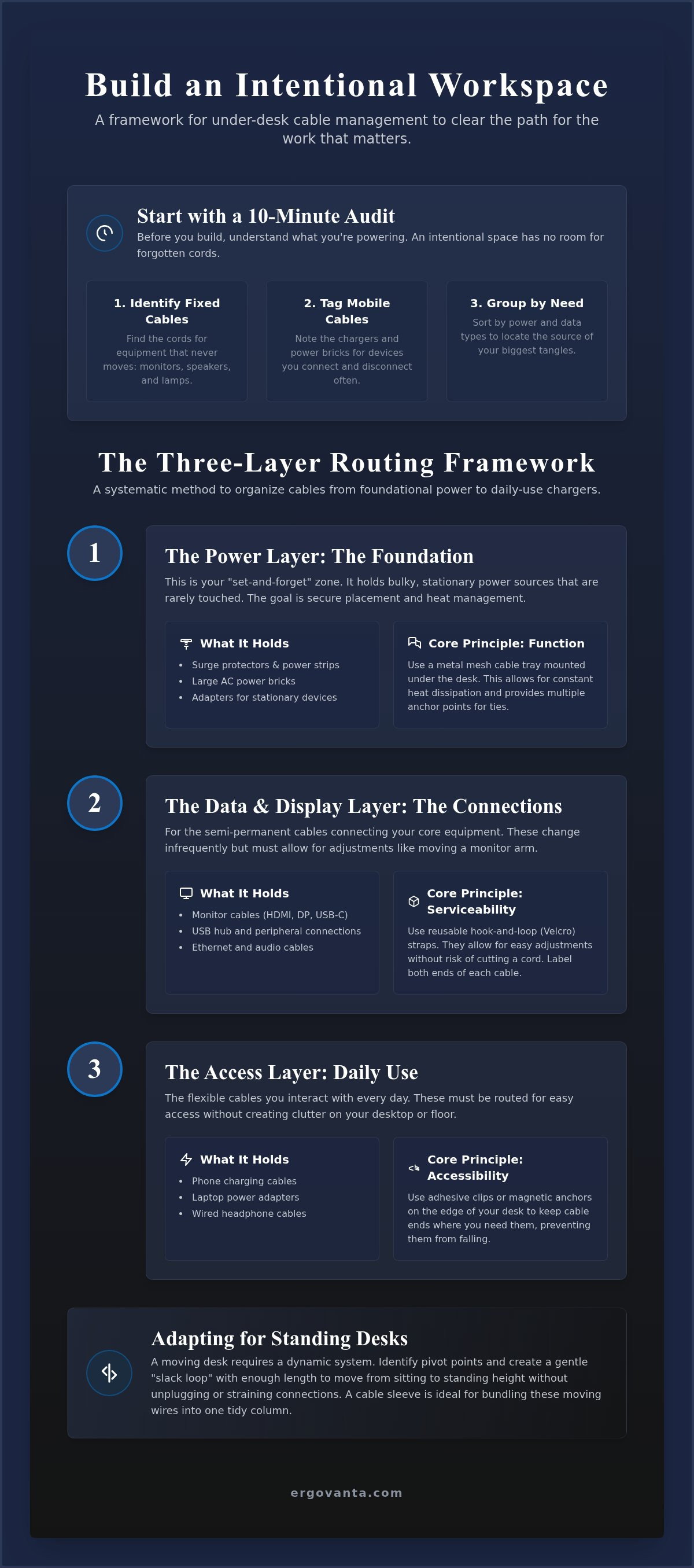
Before you buy new tools, you need to understand what you're actually powering. Unplug everything that hasn't been used in the last month. You'll likely find chargers for devices you no longer own or "just in case" cables that have done nothing but collect dust. This audit is the foundation for all your under desk cable management ideas. Follow these steps to categorize your gear:
- Identify fixed cables: These are for your monitor, desktop lamps, or speakers. They stay put for months.
- Identify mobile cables: Your phone charger or laptop power brick needs more flexible routing.
- Group by requirement: Sort devices by power needs and data connection types to see where your biggest tangles live.
Serviceability: The Secret to a Long-Term Build
A workspace is a living thing. Your setup will change, and your cable management should be ready for it. Avoid the temptation to use permanent zip ties that require scissors and a steady hand to remove. Instead, use Velcro straps or reusable ties. They allow for quick adjustments without the risk of slicing into a cord. Serviceability ensures your build stays functional even as your equipment evolves.
- Label both ends: Mark every cable to prevent the "unplug and pray" method when you need to swap a device.
- Leave breathing room: Always leave a small amount of slack near the connection points.
- Allow for movement: Tight cables are prone to failure and make it impossible to adjust a monitor arm or shift a laptop stand.
Essential Tools for Your Build: From Trays to Anchors
Equip your space with tools that earn their place. Building an intentional workspace means choosing equipment that lasts rather than temporary fixes that fail under the weight of a power strip. While it's tempting to use whatever is lying around, a considered build relies on specific hardware made for the work. These tools aren't just about hiding wires; they are about creating a system that stays out of your way. When you choose the right gear, you're investing in a room that actually gets used.
Choosing the Right Cable Management Tray
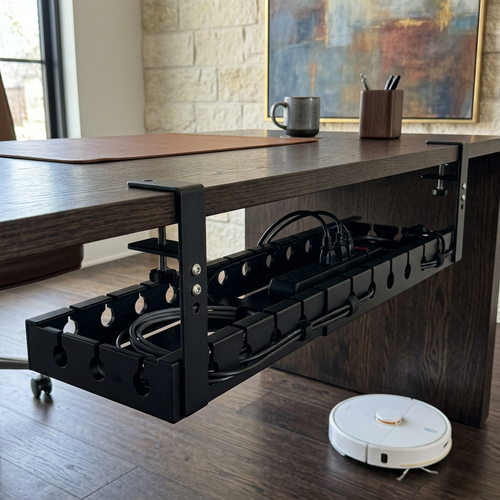
Under-desk trays are the foundation of any considered cable system. When reviewing under desk cable management ideas, the tray is your most critical decision. Metal mesh trays are a favorite for a reason: they allow for constant heat dissipation and provide infinite points for hook-and-loop attachments. Solid raceways offer a cleaner visual profile by hiding everything inside, though they can make quick cable swaps more difficult. Before you buy, measure your surge protector. Most standard units need a tray at least 4 to 5 inches wide to sit flat. You can explore workspace essentials to find the right base for your specific desk.
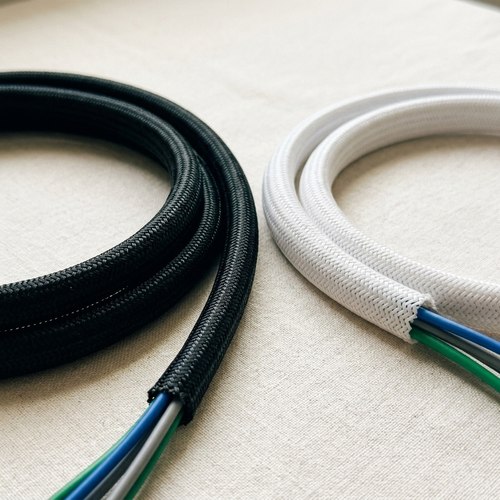
Adhesive clips and magnetic anchors solve the problem of wandering tech. We've all reached for a charging cable only to find it's slipped behind the desk. Magnetic anchors keep those ends exactly where you left them. For bundles of wires moving from the desktop to the floor, cable sleeves are the best way to maintain a clean look. They wrap around multiple cords, turning a chaotic mess into a single, intentional line. This prevents the "nest" effect where dust builds up in a tangle of loose wires.
Small Objects That Make a Difference
Velcro straps are far superior to plastic zip ties. They don't require tools to adjust and won't bite into your cable insulation. Using Velcro makes your build serviceable, allowing you to swap out a monitor or laptop charger without starting from scratch. Weighted cable blocks are another smart addition, keeping your phone and laptop chargers from sliding away the moment you disconnect. These small objects earn their place by solving the minor frustrations that break your focus.
If your desk isn't against a wall, a cable spine is an excellent choice. It guides wires to the floor in a modular, vertical column that feels like a part of the desk's design. This is especially useful for maintaining a clean floor and desktop in open-concept rooms. If you're building a new setup and need advice on specific hardware for your desk material, feel free to reach out to our team to discuss your build.
A Systematic Routing Method: The Three-Layer Framework
Equip your desk deliberately. Don't approach your setup as a series of random wires to be hidden. Instead, follow a logical flow from the wall to your fingertips. By using a three-layer framework, you ensure that your under desk cable management ideas stay organized even when you add new gear. This method prioritizes serviceability, meaning you can swap a cable without tearing the whole system apart. It's about building a foundation that supports the way you actually work, rather than just tucking a mess out of sight.
Step 1: Mount the Power Center
The surge protector is the anchor of your workspace. Secure it directly to the underside of your desk or within a tray using screws or heavy-duty mounting tape. This keeps the heaviest part of your setup off the floor and away from your feet. When you start plugging things in, prioritize the largest power bricks. These bulky adapters dictate how much room remains in your tray, so mapping them out early prevents overcrowding later. A secure power center ensures that nothing dangles or puts unnecessary strain on your device ports.
Step 2: Route the Heavy Data Lines
Monitor cables and Ethernet lines are the data highway of your build. Route these along your monitor arms or through dedicated channels to keep them taut and out of sight. It's best to keep data lines separate from power cords to prevent signal degradation. Electromagnetic interference happens when the electrical current in a power cord creates a magnetic field that disrupts the data flow in nearby cables. By routing these in their own path, you maintain a clean signal and a cleaner look.
Step 3: Secure the Daily Essentials
The final layer covers the items you touch every day. Mouse, keyboard, and phone charging cables should only appear on the surface where they are actually needed. Use adhesive anchors or weighted blocks to keep cable ends from sliding away when they aren't plugged in. Always check that your ports remain accessible. A workspace is only effective if it's one of those rooms that get used, so don't sacrifice function for a perfectly hidden wire. Ensure you have enough slack to move your keyboard or pull a charger toward you without tension or snagging.
Dynamic Adjustments: Solutions for Standing Desks
The workspace shapes the work. Equip it deliberately. A standing desk is a dynamic tool, and your equipment should support that agility. Movement adds a layer of complexity to under desk cable management ideas, requiring a plan that accounts for vertical travel. Identify the pivot point where cables transition from the moving underside of your desk to the stationary wall outlet. This is the junction where most setups fail. By focusing on this transition, you build a workspace that remains functional at every height, ensuring your tech is never at risk of a sudden disconnect.
Calculating the Slack Factor
Raise the desk to its maximum height before securing any floor-to-desk cables. This is a non-negotiable step. If you secure your wires while the desk is low, you'll likely snap a connector or pull a monitor off its stand when you stand up. Ensure the power strip cable has enough length to reach the outlet at full extension with a few inches to spare. Avoid tension on the ports at all costs. Constant pulling damages the internal components of your laptop or monitor over time, leading to hardware failure.
The "One Cable Down" Philosophy
Aim for a single vertical line to reduce visual noise. The one cable down philosophy suggests that all your wires should bundle into a single fabric sleeve or a modular spine, leaving only one main power cord visible leading to the wall. This approach makes the workspace feel intentional and personal, rather than a cluttered lab of exposed plastic. Fabric sleeves provide a softer look, while cable spines offer a structured, architectural feel that protects your wires from being pinched in the desk's lifting mechanism.
Before you tighten the final Velcro strap, test the full range of motion. Watch the slack loop carefully as the desk descends to ensure it doesn't get caught between the desk legs or crushed against the wall. A truly intentional build is one that works in every configuration, providing the same level of order whether you are sitting for a deep-work session or standing for a quick call.
The Finished Space: Integrating Lighting and Desktop Essentials
Cable management is the final step in building a workspace you choose to come back to. It's the connective tissue that turns a collection of hardware into a unified environment. While earlier steps focused on the heavy power bricks and hidden trays, the final layer involves the objects you interact with every day. When you integrate your desktop essentials into the routing plan, you eliminate the final traces of visual friction. These under desk cable management ideas aren't just about utility; they are about finishing the room so it feels intentional and ready for use.
Lighting and Tech Integration
Lighting is often an afterthought in cable routing, yet a stray lamp cord can ruin a clean desktop. Route your lamp cords through the same channels as your monitor lines to maintain a consistent flow. If you use a monitor arm, use its internal clips to hide both the power and data wires, clearing the footprint of your screen entirely. This creates space for a monitor or laptop stand, which provides extra topographic space to tuck away small USB hubs or docking stations. Explore our collection of desk lamps to find lighting solutions designed with intentional routing in mind.
By clearing the "under-monitor" real estate, you create a dedicated zone for small everyday objects. Desk shelves and risers allow you to hide the "messy" parts of tech, such as external hard drives or headphone amplifiers, while keeping them within arm's reach. This layered approach ensures that your under desk cable management ideas extend to the very surface where your hands rest, preventing the desktop from becoming a catch-all for loose wires and peripheral clutter.
The Ergovanta Advantage
Our approach is rooted in the belief that your space should support the work you do. The name Ergovanta combines the Ancient Greek ergon, meaning purposeful function, with vanta, a reference to the advantage a well-equipped environment provides. We build for the people who do the work. Every accessory we offer is made to earn its place on your desk through durability and considered design. A workspace is more than a place to complete tasks; it is a space you own and build to your specific needs.
Small, considered objects earn their place when they serve both function and style. When your cables are managed, your lighting is set, and your tech is positioned correctly, the environment becomes a catalyst for focus. This isn't about achieving a specific status or following a corporate template. It is about personal ownership. Use these tools to finalize a build that feels like yours, supporting your best work every time you sit down.
Build the Workspace You Choose to Come Back To
The workspace shapes the work. Equip it deliberately. You've now seen how to audit your hardware, establish a three-layer routing framework, and account for the dynamic movement of a standing desk. These under desk cable management ideas aren't just about aesthetics; they are the foundation of a considered environment that actually gets used. By clearing the visual noise and physical tangles, you reduce cognitive load and reclaim the focus required for your best work.
Ergovanta builds for the people who do the work. We focus on functional designs and considered materials like wood, metal, and felt to ensure every accessory earns its place. With nationwide shipping on all ergonomic tools, we're here to help you finish your build. Your space is personal. It should feel like yours through intentionality and ownership rather than following a corporate template.
Your environment is a sanctuary of productivity. Start small, route with purpose, and build a setup that you'll choose to come back to every day.
Frequently Asked Questions
How do I hide cables under a desk without a tray?
Use adhesive mounting squares and Velcro straps to secure cables directly to the underside of the desk surface. This minimalist approach requires careful planning to ensure wires don't sag over time. You can also use J-channel raceways that stick to the back of the desk legs to guide wires toward the floor. It's a functional way to keep the area clear without adding the bulk of a full metal tray.
What is the best way to manage cables on a standing desk?
The most effective method is using a cable spine or a flexible fabric sleeve to house the vertical bundle. You must raise the desk to its maximum height before securing any ties to ensure there is enough slack for movement. This prevents tension on your ports and keeps the wires from snapping. Focus on a single pivot point where the cables transition from the moving desk to the stationary wall outlet.
Are adhesive cable clips safe for finished wood desks?
Most modern adhesive clips use non-permanent bonds that are safe for finished wood if removed correctly. Always test a small, inconspicuous area first to ensure the finish doesn't lift. If you're hesitant about adhesives, consider screw-in anchors or weighted cable blocks that sit on the desktop. These small objects earn their place by providing stability without risking the integrity of your desk material.
How do I stop my power bricks from falling out of the tray?
Secure power bricks using heavy-duty Velcro straps or specialized mounting tape inside the tray. Many under desk cable management ideas fail because heavy adapters shift when the desk moves. By anchoring the bricks directly to the tray's mesh or solid base, you ensure they stay put. This is especially important for standing desks where movement can cause loose items to rattle or slide out of place.
Should I use zip ties or Velcro for cable management?
Choose Velcro every time. Zip ties are permanent and can easily damage cable insulation if over-tightened. Velcro is reusable, adjustable, and gentler on your gear. It supports a serviceable build, allowing you to swap a monitor or laptop charger without cutting plastic ties and starting over. In a workspace you choose to come back to, flexibility is just as important as order.
How do I organize cables if my desk is in the middle of the room?
Use a vertical cable spine or a floor-to-desk snake to guide all wires through a single, structured column. This turns a messy bundle into a deliberate design element. Combine this with a single power strip mounted under the desk so that only one main power cord travels to the floor. This one cable down approach keeps the room feeling intentional and prevents your workspace from looking like a server room.
Can cable management prevent my computer from overheating?
Yes, proper organization improves airflow around your hardware and power adapters. Tangled nests of wires act as insulation and trap dust, which can cause power bricks to run hotter. By using mesh trays and routing cables away from exhaust fans, you allow for better heat dissipation. This is a practical way to equip your space for long-term performance while protecting your investment in tech tools.
How often should I redo my cable management setup?
You should only need to redo your setup when you significantly change your hardware or desk layout. If you build with serviceability in mind using under desk cable management ideas like Velcro and labeled ends, minor swaps take minutes. Perform a quick 10-minute audit every few months to remove any tech that no longer earns its place. A considered workspace stays functional as long as you maintain its intentionality.
Disclaimer
Ergovanta publishes these guides to help people set up better workspaces. Product recommendations reflect what we sell. Specifications, prices and availability are accurate at the time of writing and may change. Nothing here is medical, ergonomic or professional advice; if you have a specific health concern about your workstation, speak to a qualified professional.
From the catalog