August 23, 2026
Vertical Monitor Stands: A Guide to Intentional Screen Stacking in 2026

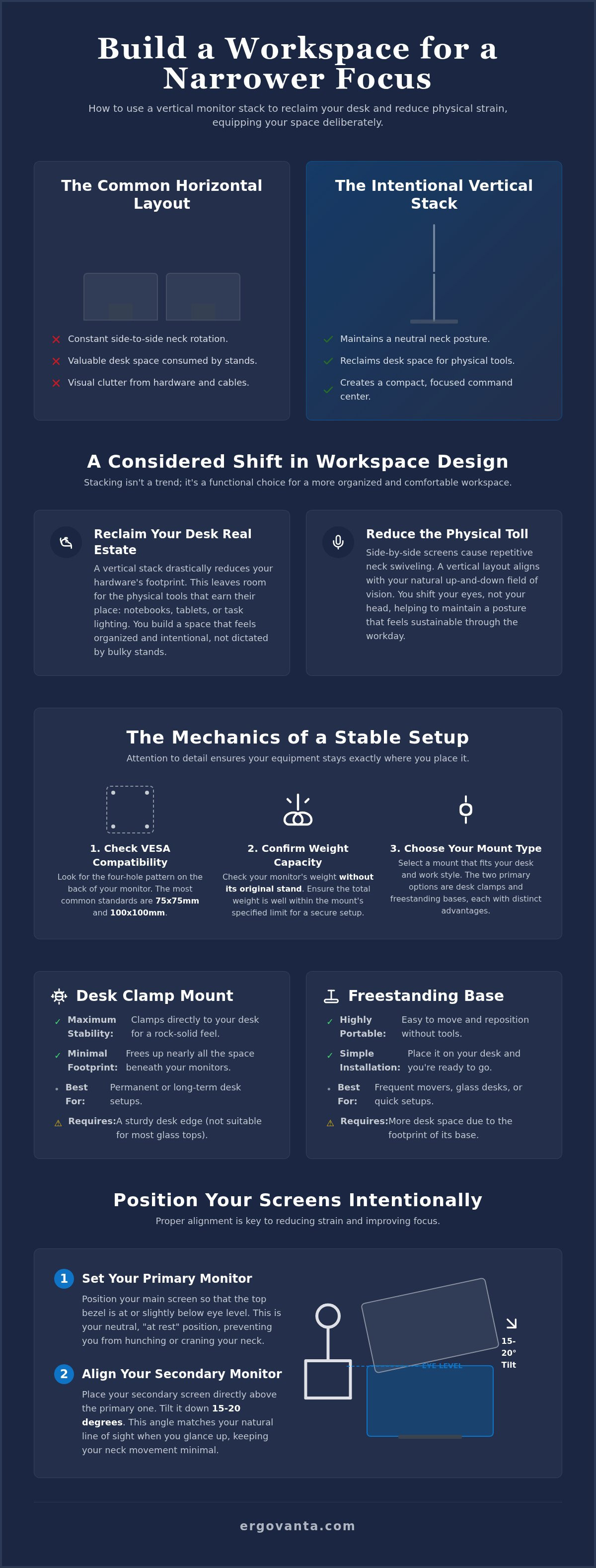
A wider desk often leads to a narrower focus. When your screens are spread across your horizontal field of vision, the constant side-to-side swiveling does more than just break your concentration; it creates a physical strain that lingers long after you've logged off. You've likely dealt with the frustration of a stiff neck and a desk surface so cluttered with cables and bulky bases that there's no room for a simple notebook or tablet. It's difficult to feel in control of your work when your hardware dictates your posture.
The workspace shapes the work. Equip it deliberately. By integrating a vertical monitor stand into your setup, you can reclaim your desk real estate and align your digital tools with your natural line of sight. We'll show you how to build a workspace that feels personal and functional by mastering the art of intentional screen stacking. This guide explores how to choose the right gear and organize a layout that reduces visual clutter while making room for the physical tools that actually earn their place on your desk.
Key Takeaways
- Learn how stacking screens vertically frees up your desk for notebooks, tablets, and the physical tools that earn their place.
- Identify the critical hardware requirements for a secure setup, focusing on VESA compatibility and weight capacity to keep your gear stable.
- Compare the stability of a desk clamp against the portability of a freestanding vertical monitor stand to find the right fit for your furniture.
- Master the intentional placement of your screens by setting your primary monitor at eye level and adjusting the top tilt to reduce neck strain.
- Build a workspace that feels personal and functional, moving away from visual clutter toward a considered environment made for the work.
Why vertical stacking makes sense for your space
The workspace shapes the work. Equip it deliberately. Most setups default to a horizontal layout because it's the path of least resistance. However, spreading your digital life across a wide, flat plane often forces your body into awkward positions. A vertical monitor stand offers a different approach by allowing you to stack one screen above another. This shift isn't about following a trend; it's about reclaiming control over your immediate environment. By integrating a vertical monitor stand, you move from a reactive setup to an intentional one, ensuring your tools serve your needs rather than the other way around.
When you stack vertically, you create a more compact command center. This layout is ideal for those who need multiple displays but refuse to sacrifice their entire desk surface to hardware. It turns your workspace into a place you actually want to come back to, emphasizing function over sheer screen real estate.
To better understand how this setup looks in practice, watch this unboxing of a vertical mounting solution:
Reclaiming your desk real estate
Desk space is a finite resource. A traditional side-by-side configuration often uses two separate bases or a wide-spanning arm that consumes the back of your desk. Stacking screens vertically leaves room for the physical tools that actually earn their place, such as notebooks, tablets, or specialized lighting. By reducing the hardware footprint, you build a space that feels organized and intentional. This smaller footprint allows you to keep your primary task directly in front of you while secondary information, like chat apps or system monitors, stays just a glance away. It is about considered placement that supports focus rather than distracting from it. When your desk isn't buried under plastic and cables, the room feels like it belongs to you again.
Reducing the physical toll of the workday
Side-by-side monitors often lead to repetitive neck rotation. Over an eight-hour session, these small, constant swivels add up to significant strain. Vertical stacks align your screens with your natural vertical field of vision. Instead of turning your head, you simply shift your eyes. Think about how your body feels at the end of the day. If you're dealing with a tight neck or shoulders, your setup is likely the culprit. Most modern displays follow the VESA Mounting Interface Standard, making it simple to swap a standard base for a vertical mount. This adjustment ensures your primary screen stays at a neutral height while the secondary display sits comfortably above, helping you maintain a posture that feels sustainable and relaxed.
The mechanics of vertical mounting: VESA and weight
Building an intentional workspace requires more than just choosing the right desk. It involves understanding how your hardware interacts with the tools that support it. Moving from stock bases to a vertical monitor stand is a transition that demands attention to detail. You aren't just stacking screens; you're engineering a stable environment where your equipment stays exactly where you placed it. The workspace shapes the work, so you must equip it with a focus on stability and purposeful function. Don't guess at compatibility; measure it to ensure your setup feels secure and reliable from the first hour to the last.
Understanding VESA standards for your screens
Most modern displays rely on a standardized interface to connect with external mounts. Look for the four-hole pattern on the back of your monitor. These holes follow the VESA Mounting Interface Standard. For a vertical monitor stand, the most common patterns are 75x75mm or 100x100mm. Before you commit to a mount, confirm your monitor isn't a "stand-only" model. Some ultra-thin panels or older budget displays lack these mounting holes entirely. If you don't see the pattern, you might need a specialized adapter, or the screen may not be suitable for stacking. A considered setup starts with identifying these small but vital hardware details.
Weight and height limits for a stable setup
Weight is the most critical variable in a vertical stack. When calculating your needs, check the weight of your screens without their original stands. Manufacturers usually list "net weight" or "weight without stand" in the technical specifications. A heavy-duty mount prevents the monitor sag that often plagues poorly constructed alternatives. If the mount isn't rated for your specific hardware, the top screen will slowly dip. This ruins the alignment of your screens and forces you to constantly readjust your gear, which breaks your focus. Stability is the foundation of a room that gets used.
Height is equally important for maintaining a neutral posture. The vertical pole must be tall enough to allow the bottom monitor enough clearance so the top monitor sits comfortably above it. If you use 32-inch screens, you'll need a much taller pole than someone using 24-inch displays. Proper height ensures you can follow the University of Minnesota ergonomic setup guide, which suggests keeping the top of the primary screen at or slightly below eye level to reduce strain. Equip your space with a monitor stand designed for the work you do. If you're unsure which mount fits your specific desk or display weight, you can contact our team for guidance on building your setup.
Comparing freestanding bases and desk clamp mounts
Every object in your workspace should earn its place. When selecting a vertical monitor stand, the mounting mechanism is just as important as the screens it holds. Your desk material and how you use the room will dictate whether a clamp or a base is the more considered choice. The goal is to equip your space with hardware that provides stability without adding unnecessary visual clutter. A secure mount ensures that once you find the perfect alignment, your screens stay there, allowing you to focus entirely on the work at hand.
The C-clamp: Stability without the footprint
The C-clamp is the standard for most intentional setups. By gripping the edge of the desk, it clears the most surface area for your keyboard, mouse, and other physical tools. Most high-quality clamps are designed to fit desks between 0.5 and 3 inches thick. This mounting style allows you to strictly follow ergonomic principles for monitor placement by providing a rigid foundation that won't wobble during intense typing or editing sessions. However, check your desk material before committing. While solid wood and metal are ideal, particle board or hollow-core desks may require a reinforcement plate to distribute the concentrated pressure and prevent damage.
Freestanding bases for flexible workspaces
A freestanding vertical monitor stand is the preferred option for glass desks or temporary setups where clamping isn't an option. There is no drilling or clamping required: you simply place it and go. This is ideal for those who frequently rearrange their workspace or work from a shared table that cannot be modified. To ensure the setup is safe, look for weighted steel or tempered glass bases. These heavy foundations are necessary to prevent the "top-heavy" tipping risk that comes with stacking two large displays. While a base takes up more surface area than a clamp, it still offers a significantly more organized footprint than using two individual factory stands.
For those seeking a permanent, ultra-stable mounting point, a grommet mount is the third path. This requires a pre-drilled hole in the desk but offers the most secure connection possible. It's a "set it and forget it" solution for a dedicated office where the layout is unlikely to change. Ultimately, the best mount is the one that fits your specific desk and helps you build a room that gets used. Whether you choose the sleek profile of a clamp or the mobility of a base, ensure the hardware supports your workflow without becoming another source of distraction. Stability is a requirement for a space you'd choose to come back to.
How to set up your vertical monitor stack intentionally
The workspace shapes the work. Equip it deliberately. Once you've chosen your vertical monitor stand, the physical assembly is only the beginning. The real value lies in the alignment. Rushing this final stage often results in a setup that feels "almost right" but causes subtle, nagging irritation throughout the workday. Don't settle for "good enough." Spend the extra fifteen minutes adjusting the tension and height. A considered workspace is one where the hardware effectively disappears, leaving only you and the tasks that matter. When every screen is exactly where it needs to be, you can focus on building something meaningful without the distraction of a poorly fitted setup.
Adjusting for the perfect eye level
Posture is a feeling, not just a clinical metric. Your primary monitor should sit directly in your line of sight. Your eyes should naturally hit the top third of this bottom screen while you're sitting in a relaxed, neutral position. This placement ensures you aren't constantly looking down, which prevents the neck strain that often comes with unmounted setups. The top screen is reserved for secondary tasks: communication apps, music players, or reference materials. Tilt this upper monitor slightly downward to reduce glare from overhead lighting and keep the content within your natural vertical field of vision. Avoid the habit of "tucking" your chin to see the bottom display. If you find yourself shifting your entire torso to read a line of code or a spreadsheet, your screens haven't earned their place yet.
Managing cables with intentionality
Visual clutter is mental clutter. It's hard to feel organized when your desk is a web of black plastic and copper. A vertical monitor stand offers a unique advantage here, as it provides a single vertical axis to hide the "rat's nest" of power and data lines. Most high-quality stands include integrated clips or a hollow center pole designed for this exact purpose. Use them. Route every cable down the spine of the mount to maintain a clean, streamlined profile. However, intentionality requires balance. Don't pull the cables so tight that they restrict movement. Leave enough slack so the monitors can tilt, swivel, or rotate without tension. A clean, wire-free setup removes the background noise of a messy desk, allowing you to build a space you actually choose to come back to.
Building a workspace that earns its place
The workspace shapes the work. Equip it deliberately. A desk is more than a surface for your computer; it is the environment where your best ideas take form. Building a setup that works for you requires looking past corporate templates and generic aesthetics. It demands a focus on purposeful function, or "ergon." When every object earns its place, the result is a room you actually choose to come back to. A vertical monitor stand is a significant step in this process, but it is ultimately just one part of a larger, considered environment made for the work you do.
We don't believe in building spaces for status or following trends that don't serve a practical need. Instead, we focus on the small objects that provide a clear advantage in your daily ritual. Whether you are coding, editing, or managing a team, your physical surroundings should support your focus rather than drain it. By choosing tools based on intentionality, you create a workspace that feels personal and functional.
The rooms that get used
Your space should reflect your specific needs, not a one-size-fits-all office standard. Intentionality in your setup leads to better focus and a more natural flow throughout the day. When you equip your desk with tools that have a clear purpose, you remove the friction that usually leads to distraction. A room that gets used is a room where the layout has been considered from every angle, from the height of the screens to the placement of the lighting. This isn't about creating a perfect image; it's about building a sanctuary of productivity where you feel in control. When you stop fighting your environment, the work becomes the primary focus.
The Ergovanta advantage
The name Ergovanta is rooted in the philosophy of "purposeful function" (ergon) and "advantage" (vanta). We provide the tools that give you a functional edge in your workspace. Our focus is on the people who do the work, ensuring that every piece of gear we offer is made to be used, not just looked at. You can explore our range of monitor and laptop stands to start your own build and see how a vertical monitor stand can transform your spatial awareness. For those looking to go further, check out our workspace essentials to find the considered objects that help you build a more intentional desk. Your workspace is yours to build. Equip it with the tools that earn their place.
Equip your space for the work ahead
The workspace shapes the work. Equip it deliberately. Transitioning to a vertical monitor stand is more than a hardware change; it's a considered choice to prioritize focus over visual clutter. You now understand how to align your screens with your natural field of vision, reclaim your desk real estate for physical tools, and ensure your gear is secure using proper VESA standards. This setup moves you away from a reactive environment and toward an intentional one that supports your daily ritual.
At Ergovanta, purposeful function (ergon) is at the core of every design. We build for the people who do the work, focusing on the small objects that earn their place through utility and reliability. Every setup is unique, and yours should be a space you choose to come back to every morning. With free shipping on national orders, equipping your desk with the right tools is a straightforward step toward a more functional workday.
Your desk is the foundation of your productivity. Make it yours.
Common Questions About Vertical Monitor Stacking
Is a vertical monitor stand good for coding and programming?
Vertical stacking is excellent for development. It allows you to keep your primary codebase at eye level while shifting terminals or documentation to the upper screen. This layout reduces the constant side-to-side scanning that often breaks a programmer's flow. By using a vertical monitor stand, you build a narrow, focused field of vision. It's an intentional way to manage complex data without sacrificing desk space for your physical tools.
Can I stack two 32-inch monitors vertically?
You can stack two 32-inch screens if your mount has a tall enough vertical pole. Most standard stands are built for 24 to 27-inch displays; you must verify the height specifications before you equip your space. Ensure the total weight of both panels stays within the mount's rated capacity. A heavy-duty setup prevents the bottom monitor from being crowded and allows the top screen to tilt comfortably for better viewing angles.
Will a C-clamp monitor mount damage my wooden desk?
Most C-clamps won't damage a solid wood desk if they have integrated padding. However, concentrated pressure can sometimes leave a mark on softer woods like pine or on thin veneers. To protect your surface, consider using a steel reinforcement plate to distribute the weight. This small, considered addition ensures your desk remains a space you'd choose to come back to, even if you decide to rearrange your hardware later.
What is the difference between a vertical stand and a dual monitor arm?
A vertical monitor stand uses a single center pole to stack screens one above the other. Dual monitor arms typically use articulated wings to place screens side-by-side. The vertical approach is made for the work that requires focus, as it keeps your desk footprint minimal. While side-by-side arms offer more horizontal flexibility, stacking is more intentional for reclaiming desk real estate and reducing repetitive neck rotation throughout the workday.
Do I need a special monitor to use a vertical stand?
You don't need a specialized monitor, but your screens must be VESA compatible. Most displays feature a four-hole pattern on the back (usually 75mm or 100mm) that allows them to bolt onto the mount. Check your monitor's specifications to ensure it isn't a "stand-only" model. If the holes are missing, the screen wasn't designed for mounting. Always verify the weight of the panel without its original factory stand to ensure stability.
How do I prevent my top monitor from sagging or tilting down?
Sagging is usually caused by loose tension bolts at the tilt hinge. Most mounts include a hex key to tighten these joints. If the screen continues to dip, your monitor might exceed the weight limit of the stand. Building a stable stack requires hardware that earns its place by supporting the actual weight of your screens. Tighten the bolts until the screen stays put but can still be adjusted with a firm, intentional movement.
Is it better to have the larger monitor on the top or the bottom?
Place your largest or highest-resolution monitor on the bottom. This screen should be your primary workspace, positioned directly at eye level to maintain a neutral posture. The top screen is for secondary reference materials that don't require constant attention. Putting the larger screen on the bottom creates a more stable center of gravity for the mount and ensures your most important work remains in your natural field of vision.
Disclaimer
Ergovanta publishes these guides to help people set up better workspaces. Product recommendations reflect what we sell. Specifications, prices and availability are accurate at the time of writing and may change. Nothing here is medical, ergonomic or professional advice; if you have a specific health concern about your workstation, speak to a qualified professional.
From the catalog