August 19, 2026
Wooden Monitor Stands: Build a Workspace That Earns Its Place

The objects on your desk should earn their keep. Most don't. A flimsy plastic riser that wobbles when you type is a distraction you haven't invited; it's a compromise you've simply accepted. Your workspace shapes the work, so equip it deliberately. Adding a considered wooden monitor stand is the first step toward a desk that feels permanent.
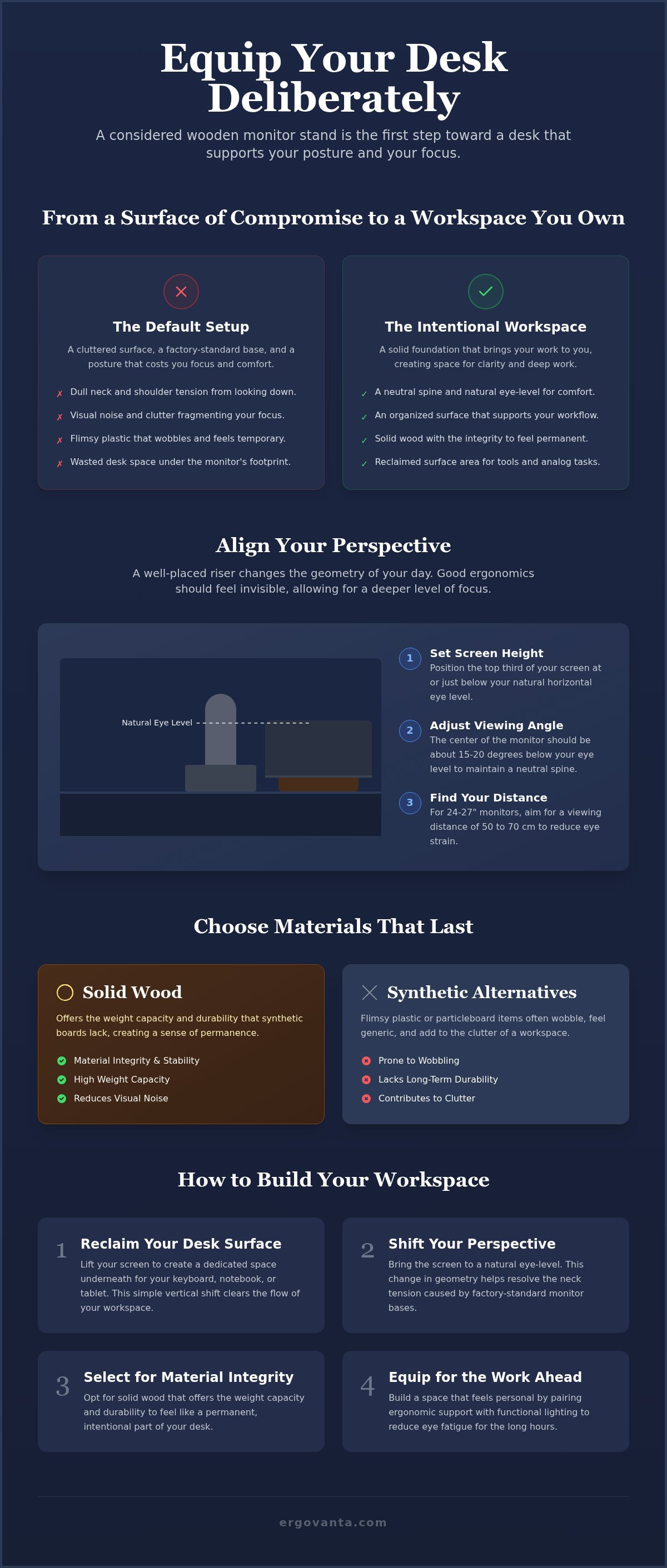
You likely know the dull ache of neck tension that sets in by mid-afternoon. It's the physical cost of staring down at a screen for hours on a cluttered surface. You deserve a desk that supports your posture and your focus. A well-placed riser changes the geometry of your day by bringing your work to a natural eye-level, reducing the strain on your body.
Discover how to choose materials that last and how to organize your surface to clear the visual noise. We will review ergonomic standards for comfort and the material integrity needed to build a workspace you'd choose to come back to.
Key Takeaways
- Equip your desk with intentional tools to reclaim your surface and clear the visual noise that disrupts your work.
- Shift your perspective by bringing your screen to eye level; this change in geometry helps resolve the neck tension caused by factory-standard monitor bases.
- Select a wooden monitor stand for its material integrity, opting for solid wood that offers the weight capacity and durability synthetic boards lack.
- Measure your setup with precision to ensure your stand accommodates both your monitor base and the other small objects that earn their place.
- Build a workspace that feels personal and functional by pairing ergonomic support with lighting that reduces eye fatigue for the work ahead.
Reclaim Your Desk Surface with Intentional Design
The workspace shapes the work. Equip it deliberately. When your desk is a catch-all for random cables and half-finished coffee cups, your focus is fragmented. You aren't just working at a desk; you are working within a system you've built. Every object on that surface should earn its keep through daily utility and material integrity. A wooden monitor stand acts as a physical boundary for your screen, marking the territory where the actual work happens while pushing the clutter to the periphery.
Building a workspace you'd choose to come back to requires a shift in how you view your equipment. Most factory-standard monitor bases are designed for shipping efficiency, not for your specific routine. They take up valuable real estate without giving anything back. By introducing a considered riser, you reclaim the footprint of your monitor and transform it into usable space. It's about moving from a desk that just happens to you to a desk that you own.
To better understand how a well-built stand can change your setup, watch this helpful video:
Defining the Purpose of a Desk Riser
A riser is more than a shelf; it's an organizational anchor that dictates the flow of your surface. Beyond the ergonomic benefits of proper height, a riser creates a tiered system for your tools. A wooden monitor stand is a tool for visual clarity that separates your primary focus from the rest of your desk. By lifting the screen, you create a dedicated space underneath for your keyboard, a notebook, or a tablet. This simple vertical shift clears the flow of your workspace, allowing you to tuck away distractions when you need a clear surface for analog thinking.
Why Intentionality Matters in Your Space
Avoid filling your desk with objects that don't serve the work. Many spaces feel cluttered because they are filled with generic corporate standards or flimsy plastic items that wobble when you type. These things don't feel like yours. Building a space with intentionality means choosing workspace essentials that reflect how you actually use the room. When you equip your space with pieces made for the work, the room becomes a sanctuary of productivity. It's about finding the small objects that earn their place and discarding the ones that just take up room. Your desk should be a reflection of your own requirements, not a template from a catalog.
Align Your Perspective: The Ergonomics of Eye Level
Physical comfort is the foundation of long-term focus. If you've spent four hours looking down at a screen, you know the specific, dull ache that settles into your shoulders. It's a signal from your body that your setup is failing you. A considered wooden monitor stand fixes this by changing the geometry of your desk. Instead of leaning toward the screen, you bring the screen to you. This simple adjustment changes how you interact with your tasks; you move from a defensive, hunched posture to one that feels open and capable.
Finding the Natural Line of Sight
Your eyes should rest naturally on the top third of the screen. According to OSHA guidance, the center of your monitor should sit approximately 15 to 20 degrees below your horizontal eye level. This isn't just about metrics; it's about avoiding the "hunch" that comes from low-set monitors. When your screen is too low, your head tilts forward, putting unnecessary weight on your neck. A riser helps you maintain a neutral spine. You'll notice the relief immediately when your head and neck are balanced over your torso. For monitors between 24 and 27 inches, aim for a viewing distance of 50 to 70 cm from your eyes to keep the focus sharp without straining.
The Sensory Impact of Ergonomics
Good ergonomics should feel invisible when you're working correctly. You shouldn't be thinking about your posture while you're deep in a project. Proper placement reduces the urge to fidget or shift constantly in your chair. When your screen is at the right height, your body stops looking for a comfortable position because it's already found one. This silence in your physical state allows for a deeper level of focus. It's about building a workspace that respects your body's limits so you can push your work's boundaries. Explore our ergonomics and comfort collection to find the tools that help you build this foundation.
The goal is to build a space that works as hard as you do. When your physical needs are met, your mental energy is free to focus on the work ahead. A wooden monitor stand provides a stable, permanent base that doesn't wobble or shift like plastic alternatives. It anchors the screen and the person behind it. If you're unsure which setup fits your specific desk dimensions or monitor weight, reach out to us for guidance on equipping your space with the right tools for the job.
Choose Materials That Last: Solid Wood vs. Synthetic Alternatives
The materials you choose dictate the longevity of your setup. Material integrity isn't just about aesthetics; it's about structural performance over years of daily use. A wooden monitor stand needs to handle the static load of your screen without bowing or losing its shape. Most synthetic alternatives, such as particleboard or medium-density fiberboard (MDF), are composite materials held together by resins. Over time, these materials often sag, especially under the weight of modern ultrawide displays. Solid wood earns its place by offering a higher weight capacity and a sensory warmth that mass-produced synthetics cannot match.
The Integrity of Solid Wood
Equip your space with materials that age with the work. Solid walnut or oak provides a stable foundation that feels permanent and considered. According to 2026 design trends, natural wood with distinct character and rich grain has become the preferred anchor for intentional workspaces. These aren't just shelves; they are unique pieces where no two grain patterns are identical. Choosing solid wood is a decision for those who value material honesty. It ensures your desk feels like a personal sanctuary rather than a corporate template. Darker tones like black walnut are particularly effective for adding depth to a room without cluttering the visual field.
Comparing Wood to Plastic and Metal
Plastic risers are often temporary solutions that lack the density required to dampen vibrations. If your desk moves when you type, a lightweight plastic stand will amplify that wobble in your monitor. Metal stands provide strength, but they can feel cold and industrial in a personal room. They lack the tactile comfort and "give" that makes a workspace feel habitable. If you do opt for a synthetic wood alternative, verify that it meets TSCA Title VI standards for formaldehyde emissions, as mandated by the EPA. However, for a setup that feels truly built for the long term, explore the options in our wood material collection. Solid timber doesn't just hold your equipment; it grounds your entire surface.
Material choice is about how an object feels after a year of daily utility. A wooden monitor stand made from solid timber maintains its structural integrity and doesn't chip at the edges like laminate. When you build with materials that last, you stop worrying about replacements and focus on the work that matters. It's about finding the small objects that earn their place through honesty and durability.
Sizing Your Setup for Function and Flow
The workspace shapes the work. Equip it deliberately. A wooden monitor stand should support your tools without crowding the surface. Before selecting a riser, measure the physical base of your monitor. Most users overlook the footprint of the stand itself, assuming it will fit any shelf. If the monitor base overhangs the edges of the wood, you risk instability and a cluttered visual field. A precise fit ensures the stand feels like a permanent part of the desk rather than an afterthought.
Consider the width of your desk. You need room for peripheral items like desk lamps or speakers to ensure your workflow remains uninterrupted. A considered setup leaves space for the small objects that earn their place. Depth is equally vital. If your stand is too deep, it pushes your keyboard too close to the edge of the desk. For most adults, a standard desk height of 28 to 29 inches requires enough room to maintain a 90-degree elbow angle while typing. Ensure your stand doesn't force you into a cramped position that compromises your focus.
Stands for Ultrawide and Dual Monitors
Larger screens require wider bases to prevent tipping or overhang. If you use an ultrawide monitor or a dual-screen configuration, a single long desk shelf is often more effective than two separate risers. It creates a unified visual line and provides a stable foundation for the extra weight. Always check the weight ratings of the timber. Solid wood stands are built for the load, but you must ensure the dimensions match the span of your equipment. A stand that is too narrow for a dual setup creates a sense of imbalance that distracts from the task at hand. You want a surface that anchors the screens securely, providing a sense of quiet confidence in your setup.
Small Desks and Minimalist Footprints
Compact stands work best for laptops or 24 inch displays. When working with limited real estate, keep the footprint small to preserve open space for writing or analog tasks. A minimalist wooden monitor stand provides the necessary eye-level height without dominating the desk. This allows you to build a workspace that feels personal even in a tight corner. By choosing a stand with a slim profile, you maintain the flow of your surface. Explore our monitor and laptop stands for size options that fit your specific footprint.
Equip Your Space for the Work Ahead
The workspace shapes the work. Equip it deliberately. A wooden monitor stand serves as the first step in building a cohesive environment where every object earns its place through daily utility. By lifting the screen, you don't just gain ergonomic benefits; you gain a secondary tier of organization. Use the void created underneath the stand to hide cables or store tech accessories that usually clutter the primary surface. This simple act of tucking away the non-essential clears the visual noise that often disrupts deep focus. It's about creating a space that feels permanent, considered, and entirely yours.
Integrating Lighting and Tech
Focus requires more than just a clear desk; it requires the right atmosphere. Lighting is the second half of the ergonomic equation. Position a desk lamp to complement the height of your monitor, ensuring the light source doesn't reflect off the screen. This reduces eye fatigue during long sessions. Explore our lighting collection for considered options that match the material integrity of your setup. Keep tech accessories within reach but out of the primary visual path to maintain an uninterrupted flow.
The Ritual of the Workspace
An organized desk signals to the mind that it's time to focus. The objects you choose should facilitate your output rather than distract from it. When you equip your space with a wooden monitor stand, you are making a claim on your environment. Take ownership through intentional placement. This ownership-anchored approach transforms the desk into a sanctuary of productivity that you'd choose to come back to every morning. It's the difference between a place where you sit and a room made for the work.
Build a space you choose to come back to. It's not about following a corporate template; it's about building a space that feels personal and functional. By carefully selecting the small objects that earn their place, you build a foundation for long-term productivity. The ritual of starting your day at a desk that is already organized and ready for the work ahead provides a sense of quiet confidence. You stop fighting your environment and start working within it. Take ownership of your surface, equip it with materials that last, and prepare yourself for the work ahead.
Equip Your Desk for the Long Term
The workspace shapes the work. Equip it deliberately. By choosing a wooden monitor stand, you are making a commitment to both your physical comfort and the material integrity of your setup. Solid wood construction ensures lasting utility; it's a foundation that won't sag or wobble as your projects grow. Remember that a considered height adjustment is the difference between mid-afternoon tension and sustained focus.
Ergovanta tools are designed for the people who do the work. We offer national shipping on all workspace essentials to help you build a space you'd choose to come back to every morning. When your environment is intentional, your work follows suit. Take ownership of your surface and discard the temporary solutions that no longer serve you.
Your desk should be a sanctuary of productivity that feels entirely yours. Start building the setup you deserve today.
Frequently Asked Questions
How high should a wooden monitor stand be?
The ideal height depends on your specific eye level when seated with a neutral spine. OSHA guidelines suggest the center of your screen should sit approximately 15 to 20 degrees below your horizontal line of sight. Most stands provide between 3 and 5 inches of lift. The goal is to bring the screen to you so you don't tilt your head. A considered wooden monitor stand provides this fixed height to keep your posture stable.
Can a wooden stand hold a 49 inch ultrawide monitor?
Yes, provided the stand is built from solid timber and has a wide enough footprint to distribute the weight. Large 49 inch ultrawide screens place significant pressure on a central point. Solid wood, such as walnut or oak, has the material integrity to support these static loads without bowing over time. Always verify the specific weight capacity of the riser and ensure the stand's length exceeds the width of your monitor's base.
What is the difference between a desk shelf and a monitor stand?
A monitor stand is typically sized for a single screen, while a desk shelf is a longer riser designed to span a larger portion of your desk. A wooden monitor stand focuses on vertical height for one device. A desk shelf provides a broader surface to organize multiple tools, such as speakers, lamps, or dual monitors. Both serve to clear the flow of your surface by creating usable space underneath.
Do I need a monitor stand if I have an adjustable chair?
Yes, because your chair height should be set based on your relationship to the floor and desk, not the screen. You should adjust your chair so your feet are flat and your elbows maintain a 90-degree angle to the desk surface. If your monitor remains too low after this adjustment, you will still end up hunching. A riser allows you to fix your screen height independently of your seating position.
How do I clean and maintain a solid wood monitor stand?
Wipe the surface regularly with a dry or slightly damp microfiber cloth to remove dust and skin oils. Avoid harsh chemical cleaners that can strip the natural finish or cause the grain to swell. If the wood feels dry after a year of use, a light application of furniture-grade oil can restore its sensory warmth. Keeping the wood away from direct heat sources helps prevent warping or cracking over the long term.
Will a wooden monitor stand scratch my desk surface?
Not if the stand is equipped with protective padding on the base. Most considered designs include cork, felt, or rubber feet to create a soft boundary between the wood and your desk. This prevents sliding and protects against scratches on delicate surfaces like glass or polished timber. If your stand lacks these, you can add adhesive felt pads to ensure your equipment earns its place without causing any surface damage.
Is solid wood better than wood veneer for a monitor riser?
Solid wood is superior for both longevity and structural performance. Veneer is merely a thin layer of wood glued over particleboard; it can peel or chip at the edges with daily use. Solid wood offers material honesty and the integrity required to handle heavy screens without sagging. It ages gracefully, developing character as you work. Choosing solid timber is an intentional decision for a workspace built for the long term.
Disclaimer
Ergovanta publishes these guides to help people set up better workspaces. Product recommendations reflect what we sell. Specifications, prices and availability are accurate at the time of writing and may change. Nothing here is medical, ergonomic or professional advice; if you have a specific health concern about your workstation, speak to a qualified professional.
From the catalog