September 24, 2026
Best Lighting for a Conference Room: Professional Guide
A conference room is no longer just a place to sit; it's a broadcast studio where your team needs to look and feel their best. The workspace shapes the work, so you must equip it deliberately. Harsh overhead panels that cause afternoon headaches or heavy shadows during hybrid calls aren't just annoying; they're obstacles to clear communication. We agree that a room that washes out faces or creates screen glare is a room that isn't working hard enough for you.
This guide shows you how to find the best lighting for a conference room by layering fixtures for both the people at the table and the lenses on the wall. Discover how to position pendants and wall lights to eliminate glare, support natural video feeds, and keep teams alert. We will walk through selecting durable, purposeful fixtures that fit your layout and meet technical standards like IES RP-1-20. You'll learn to build a meeting space made for focused, intentional work that serves every participant, whether they are in the room or joining from a screen.
Key Takeaways
- Layer ambient, task, and accent fixtures to prevent the harsh shadows and eye fatigue common with single overhead sources.
- Target a color temperature between 3500K and 4000K to find the best lighting for a conference room that keeps teams alert and focused.
- Position lighting to eliminate screen glare and under-eye shadows, ensuring remote participants see a clear, natural video feed.
- Map your fixtures to the specific footprint of the room to choose between linear pendants, recessed lights, or wall sconces.
- Equip your space with durable, considered fixtures that are built for the work rather than just matching corporate trends.
The Three Essential Lighting Layers of a Functional Conference Room
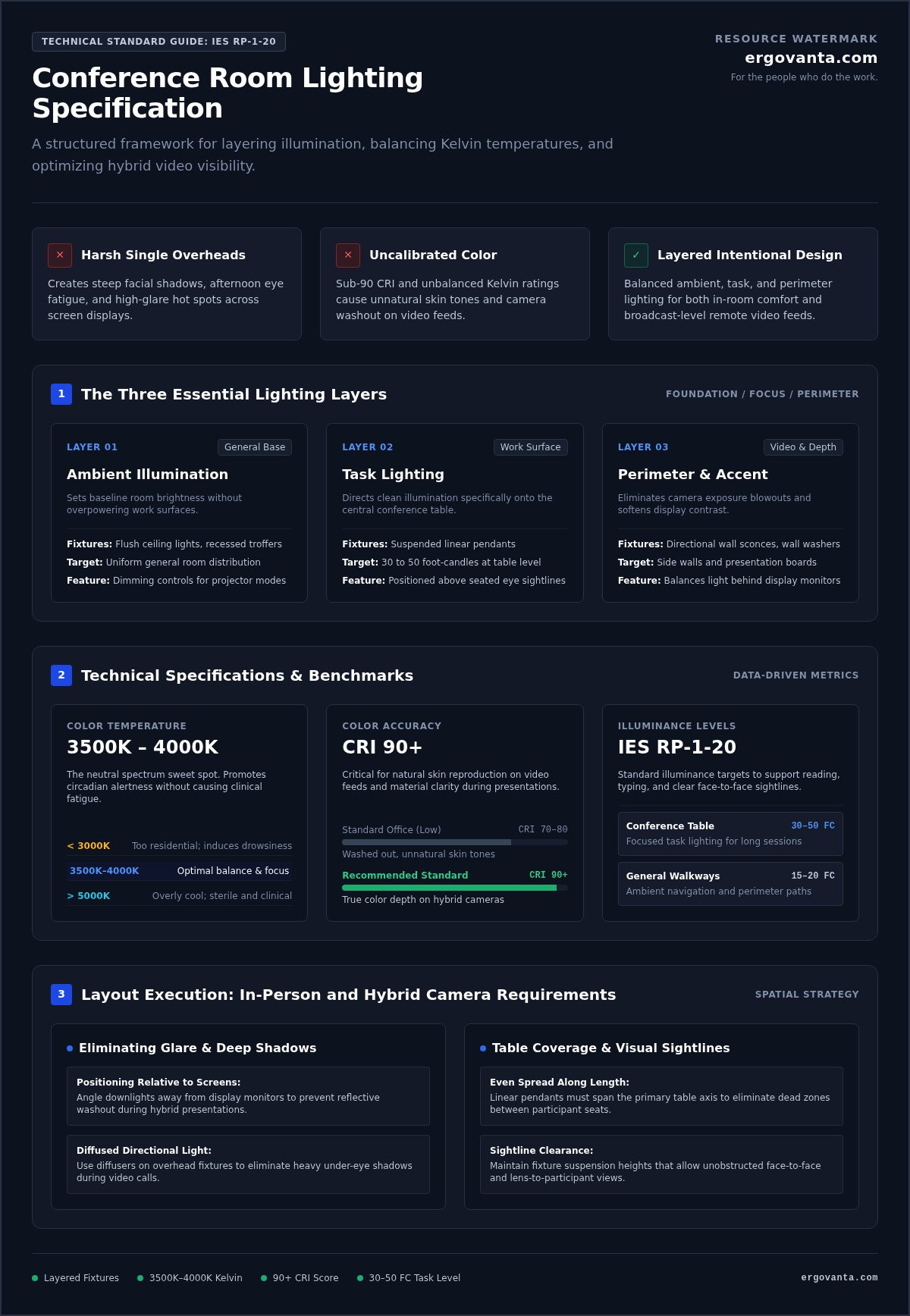
Lighting isn't just about visibility; it's about endurance. Relying on a single overhead source is a shortcut to harsh shadows and quick eye fatigue. To find the best lighting for a conference room, you must think in layers. A flat, one-dimensional light source makes a room feel like a sterile clinic rather than a space for collaboration. By layering your light, you build a considered environment where the objects earn their place and the room actually gets used. This intentionality ensures that the physical setting supports the work rather than distracting from it.
Ambient Illumination: Setting the Foundation
Ambient lighting sets the baseline room brightness without overpowering your working surfaces. These diffuse fixtures eliminate dark corners and reduce the stark contrast that makes eyes strain during long sessions. Flush ceiling lights or recessed troffers distribute general brightness evenly across the floor plan. If you equip the space with dimming capabilities, you can quickly adjust the mood between high-energy collaborative work and focused projector presentations. A steady baseline of light ensures the room feels open and ready for the day's first meeting.
Task Lighting for the Conference Table
Task lighting directs clean illumination specifically onto the central conference table. This is where the work happens. Pendants suspended directly above the table provide direct, focused light that keeps eyes on the task at hand. When you choose your lighting fixtures, pay attention to suspension height. Proper placement keeps sightlines clear across the table for all seated teammates. An even spread along the table length prevents dark dead zones between seats, ensuring every participant has the same functional advantage during a long workshop.
Perimeter and Accent Lighting
Perimeter and accent lighting solve the visual problems that cameras often struggle with. Illuminating side walls softens the contrast between bright display screens and surrounding drywall. Directional wall lights highlight presentation boards and architectural details cleanly; this adds necessary depth to the room. This approach follows the principles of Architectural lighting design, which balances human needs with the physical space. A balanced perimeter helps cameras adjust exposure naturally without blowing out backgrounds during hybrid calls. It makes the room feel intentional, providing the best lighting for a conference room that exists for both in-person and remote teams.
Color Temperature, CRI, and Lumens: Getting the Metrics Right
Metrics are the invisible tools of a functional workspace. They decide if your team stays sharp at 3:00 PM or starts checking the clock. Choosing the best lighting for a conference room requires looking past the fixture's shape and into the data it emits. When you equip a room with the right technical specs, you remove the friction that causes fatigue and miscommunication.
Finding the Sweet Spot in Kelvin Ratings
Kelvin (K) measures the color temperature of your light. Warm white under 3000K feels too residential; it triggers the brain to wind down, leading to afternoon drowsiness. Conversely, cool white above 5000K creates a sterile, unwelcoming environment reminiscent of a hospital. For a space built for focus, target a neutral range between 3500K and 4000K. This range supports natural circadian alertness throughout long work sessions without making the room feel clinical. It provides a balanced white light that aids focus and keeps the energy steady.
Why CRI Matters for Video and Face-to-Face Meetings
The Color Rendering Index (CRI) reveals how accurately light exposes natural skin tones and materials. Low CRI sources make skin appear dull, washed out, or strangely green on camera. Aim for a CRI score of 90 or higher to maintain clarity. High CRI fixtures ensure remote participants see true, healthy skin tones, making hybrid communication feel more human. Accurate color rendering also improves legibility for printed materials, prototypes, and material samples. If you aren't sure how these metrics apply to your specific floor plan, reach out to us for a layout review.
Calculating Foot-Candles and Lumens for the Space
Brightness is measured in lumens, but the effect on your table is measured in foot-candles. According to the IES RP-1-20 standard, conference tables require 30 to 50 foot-candles for comfortable reading and focused tasks. General room walkways need only 15 to 20 foot-candles of ambient brightness. To calculate your needs, multiply the target foot-candles by the room's square footage to find the total lumen requirement. This intentional math ensures the best lighting for a conference room is neither blinding nor dim. Equip your space based on these verified standards to build a room that serves the people who do the work.
Eliminating Glare and Shadows for In-Person and Hybrid Video Calls
A camera lens is less forgiving than the human eye. It captures every harsh reflection and unflattering shadow that your brain usually filters out. If you want the best lighting for a conference room, you must account for how digital sensors process light. Top-down lighting that casts heavy shadows beneath eyes and noses ruins video communication. It makes participants look tired and distracts from the message. Build a space where the technology feels invisible by addressing these optical hurdles deliberately. The goal is to equip a room that looks as good on a remote screen as it does from the head of the table.
Positioning Lights to Prevent Screen and Table Glare
Direct reflections on presentation screens or whiteboard surfaces disrupt critical team meetings. Avoid placing bare bulbs or direct downlights directly opposite large video monitors. The goal is to keep the screen clear and legible for everyone in the room. Angle your directional fixtures so the light bounces away from seated viewers and presentation surfaces. Choose wide, frosted diffusers on all overhead fixtures to disperse point-source glare. This considered approach ensures that even a polished conference table doesn't become a mirror that blinds the camera. Matte table finishes and diffused lenses are small objects that earn their place by keeping the focus on the work rather than the light source.
Softening Facial Shadows on Video Feeds
Video calls require more than just brightness; they require balance. Vertical illumination from wall fixtures fills in the deep shadows created by overhead ceiling lights. Positioning your primary light slightly in front of seated participants flatters facial features and ensures eyes are visible. This prevents the "raccoon eye" effect that happens when light only comes from above. Balanced ambient lighting keeps camera sensors from overcompensating and darkening faces against a bright background. Equip the space with intentional diffuse sources to balance faces evenly across the table. When you build a meeting room this way, remote participants see a clear, natural feed. This creates a functional environment that feels personal for everyone involved. For more layout tips, you can explore our workspace guides to see how different fixtures interact in a shared space.
By eliminating these distractions, you ensure the best lighting for a conference room is one that people forget is even there. It allows the team to focus on collaboration without the physical strain of squinting at a glare-filled screen or struggling to see a teammate's expression through heavy shadows. Intentionality in placement is the difference between a room that feels like a storage closet and a room made for the work.
How to Choose and Position Fixtures for Common Room Layouts
The workspace shapes the work. Equip it deliberately by mapping your furniture layout before selecting fixtures. The best lighting for a conference room scales with your table size and room volume. If the proportions are wrong, the room feels disjointed and the light becomes a distraction rather than a tool. A considered layout ensures that every person at the table has the same functional advantage, regardless of where they sit.
Step one requires mapping the conference table footprint against the room perimeter. Step two involves matching fixture shape to table geometry to ensure balanced light across every seat. In step three, verify that suspension cords don't block sightlines to presentation displays or video cameras. Finally, step four incorporates supplemental perimeter lights to complete the working space. This four-step process creates an environment made for the work that happens within it.
Lighting Rectangular versus Round Conference Tables
Table geometry dictates your fixture choice. Long rectangular tables demand linear suspension lights or multiple evenly spaced pendant lights to ensure the ends of the table aren't left in the dark. A good rule of thumb is to ensure the fixture length covers roughly two-thirds of the total table length. For round and square tables, a single centered, wide-diameter fixture functions best. This creates a focal point that draws the team together, providing an even spread of light that feels intentional and balanced.
Mounting Heights and Line of Sight
Height is a matter of both ergonomics and visibility. Maintain at least 34 to 40 inches between the table surface and the fixture bottom. This clearance provides enough light spread while keeping the hardware out of your direct field of vision. Verify that seated team members have clear visibility of wall-mounted video displays. You don't want a pendant light blocking the bottom half of a presentation. Check sightlines for standing presenters as well; this prevents head contact or blinded vision during a high-energy pitch.
Integrating Auxiliary Floor and Wall Units
Main overhead lights often leave corners in shadow, making a room feel smaller and less welcoming. Add slim floor lamps in these shadowy areas to bring a soft, warm perimeter balance to the space. Use wall sconces to highlight whiteboards and architectural elements without occupying valuable floor space. Select matching finishes for all your lighting to keep the visual design clean, quiet, and cohesive. When the small objects earn their place, the entire room feels complete.
Equipping a Purpose-Built Meeting Room with Intentional Lighting
The workspace shapes the work. Equip it deliberately. A meeting room should feel comfortable, focused, and ready for real collaboration every day. It's not about status or corporate identity; it's about building a space you'd choose to come back to. The best lighting for a conference room is a system that supports the team doing the work without calling attention to itself. When you equip the room with fixtures made from durable materials, you ensure the space stays functional even as decor trends change.
Streamline your daily operations by connecting dimmers and scenes to simple wall controls. A cohesive setup relies on balanced light that works for the people in the room. By focusing on intentionality and personal ownership of the space, you create an environment where the tools earn their place and the room actually gets used.
Material Choices and Durability for High-Use Spaces
High-traffic office use demands fixtures that can take a hit. Solid metal, aluminum, and dense acrylic components withstand daily wear easily. Avoid exposed, delicate glass that collects visible dust and demands constant maintenance. Instead, choose durable matte finishes. They eliminate distracting fingerprint smudges and harsh reflective glare, keeping the room looking clean throughout the week. These are the small objects that earn their place by being reliable day after day.
Controls and Dimming Made Simple
Complex systems create barriers to productivity. Install intuitive wall sliders or push-button scene controllers that anyone can understand instantly. Program distinct presets for interactive brainstorms, video conferences, and presentation slide reviews. Reliable hardwired controls eliminate the wireless connectivity headaches that often happen during critical client meetings. A simple, hardwired interface ensures the room stays functional even when the network is down.
Building an Outfitted Space with Ergovanta
Finding the best lighting for a conference room means selecting pieces curated for rooms where serious work gets done. Equip your workspace with considered pieces built to last across years of meetings. Build a cohesive setup using balanced lighting that supports your team's specific needs. If you are outfitting a larger office, review our dedicated options through Ergovanta corporate outfitting for business spaces. We focus on helping you create a space that is personal and functional, ensuring your meeting room doesn't feel like everyone else's.
Build a Workspace Made for Collaboration
A meeting room succeeds when it balances the needs of the people at the table with the lenses on the wall. Finding the best lighting for a conference room comes down to intentional layering and matching fixtures to your layout geometry. When you eliminate glare and soften harsh shadows, you build an environment where hybrid collaboration feels natural and effortless.
Our national catalog covers ceiling lights, floor lamps, and wall sconces designed for clean daily use. We offer purposeful lighting fixtures built to last, backed by dedicated business and corporate outfitting support for team spaces. You don't need complex enterprise overhauls to create a functional room; you just need considered choices that serve the people who do the work.
Take ownership of your environment and build a workspace your team chooses to come back to every day.
Frequently Asked Questions
What is the best color temperature for a conference room?
Target a range between 3500K and 4000K for neutral white light. This specific color temperature keeps teams alert without the sterile, clinical feel of higher Kelvin ratings. Warm light under 3000K often triggers drowsiness during long sessions; conversely, light above 5000K can feel harsh. Neutral light supports the body's natural circadian rhythm, making it the best lighting for a conference room designed for sustained focus and collaboration.
How many lumens do I need for a standard conference room?
You need approximately 30 to 50 foot-candles on the primary table surface according to IES RP-1-20 standards. To calculate the total lumens required, multiply this target by the room's square footage. For example, a 200 square foot room typically requires 6,000 to 10,000 lumens distributed across all fixtures. This ensures the space is equipped for detailed tasks like reading printed documents without causing eye fatigue during long meetings.
How high should lighting fixtures hang above a conference table?
Maintain a distance of 34 to 40 inches between the table surface and the bottom of the fixture. This height provides an even spread of light across the work surface while keeping the hardware out of your direct line of sight. It is vital to verify that suspension cords do not block visibility to wall-mounted displays or cameras. Building a space with proper mounting heights ensures everyone at the table has a clear view.
Can poor conference room lighting affect video call quality?
Yes, poor lighting creates harsh shadows and washes out faces on camera sensors. Top-down lighting often casts deep shadows under the eyes, which distracts from the conversation. The best lighting for a conference room uses vertical illumination from wall lights to fill in these gaps. High-quality fixtures ensure that remote participants see a clear, natural feed. When you equip the room intentionally, you remove the visual friction that makes hybrid meetings feel disconnected.
What is the best lighting to prevent screen and monitor glare?
Use fixtures with wide, frosted diffusers to disperse light and prevent point-source glare on digital screens. Avoid placing bare bulbs or direct downlights opposite large monitors. Angle directional wall lights so the beam bounces away from screens and seated participants. Matte finishes on tables and considered fixture placement keep reflections off your displays. This setup ensures that presentation materials remain legible and teams stay focused on the information being shared in the room.
Why is CRI important when choosing conference room lighting?
The Color Rendering Index (CRI) determines how accurately a light source reveals true colors. A CRI of 90 or higher is recommended to ensure skin tones look natural on video calls and printed materials appear as intended. Low CRI sources can make skin look dull or green, which ruins the professional feel of hybrid meetings. Choosing high CRI fixtures is a deliberate way to build a functional environment where every detail is rendered clearly.
Should conference rooms use dimmable lighting?
Yes, dimmable lighting allows you to adapt the space for different types of work throughout the day. You might need full brightness for a detailed workshop but lower levels for a digital presentation to improve screen contrast. Intuitive wall controls or preset scenes make these adjustments simple for anyone in the room. Reliable hardwired dimmers provide consistent function without the connectivity issues of wireless systems, ensuring the room is always ready for the work.
Disclaimer
Ergovanta publishes these guides to help people set up better workspaces. Product recommendations reflect what we sell. Specifications, prices and availability are accurate at the time of writing and may change. Nothing here is medical, ergonomic or professional advice; if you have a specific health concern about your workstation, speak to a qualified professional.
From the catalog