June 23, 2026
Common Work From Home Posture Mistakes and How to Equip a Considered Workspace

A 2026 study found that 83% of remote developers now suffer from forward head posture after five years of working from home. The workspace shapes the work; equip it deliberately. If you spend serious hours at a desk, the physical environment around you dictates your focus more than you realize. Chronic neck tension and lower back stiffness are often the direct results of common work from home posture mistakes rather than a lack of personal discipline.
It's frustrating when your body gives out before your to-do list is finished. You deserve a setup that works as hard as you do. This article identifies the habits draining your energy and teaches you how to build a workspace that supports the work. We will preview practical fixes for small spaces and look at the considered objects that help you stay intentional throughout the day. It is time to stop fighting your furniture and start doing the work in a space made for it.
Key Takeaways
- Stop the "Laptop Lean" by using a stand to bring your screen to eye level; your neck will notice the difference immediately.
- Break the kitchen chair trap by adding intentional support to your seating to prevent slouching and lower back stiffness.
- Anchor your posture with a foot rest to eliminate the habit of dangling feet or perching on the edge of your seat.
- Identify common work from home posture mistakes and learn to equip a space that actually supports the work you do.
- Use desk lamps to create intentional light; this reduces eye strain and stops the reflexive leaning that ruins your alignment.
The Cost of an Unconsidered Workspace: Why Posture Fails at Home
The workspace shapes the work. Equip it deliberately. If you spend serious hours at a desk, the physical environment around it matters more than you think. Most common work from home posture mistakes stem from a lack of intentionality. We often opt for the convenience of the couch or the kitchen table, but convenience has a high physical cost. When your furniture isn't made for the work, your body has to compensate for the lack of support.
The kitchen chair trap is a primary culprit. These chairs were designed for dining, not for long stretches of deep focus. Without proper support, slouching is inevitable. This static positioning leads to stiffness that drains your focus. To combat this, many people are looking toward the benefits of Active sitting and integrated movement to keep the body engaged while they work.
To better understand how your environment affects your alignment, watch this breakdown of common desk habits:
Neutral posture is a state where your space supports your body without conscious effort. It's about building a setup that allows you to focus on the task rather than the tension in your shoulders. The cost of a laptop-on-thighs setup is real: a 2026 Workplace Health Review revealed that 90% of office workers now show signs of scapular dysfunction. Equip your space with intentional support to avoid these long-term issues.
The Psychology of the Desk
A cluttered or poorly lit desk often leads to "turtling," where you subconsciously lean into the screen to compensate for poor visibility or distractions. Your workspace should be a room you actually choose to come back to. When the environment is considered, your focus follows. Small objects that earn their place can help ground your attention and keep your posture from collapsing as the day goes on.
Ergo vs. Vanta: Purposeful Function in Action
We believe in purposeful function. "Ergo" is derived from the Ancient Greek word for action in pursuit of a goal. "Vanta" is the advantage you gain when your space is built specifically for the work you do. Correcting common work from home posture mistakes isn't about status; it's about personal ownership. It is about equipping yourself with a physical setting that provides a personal advantage every time you sit down to work.
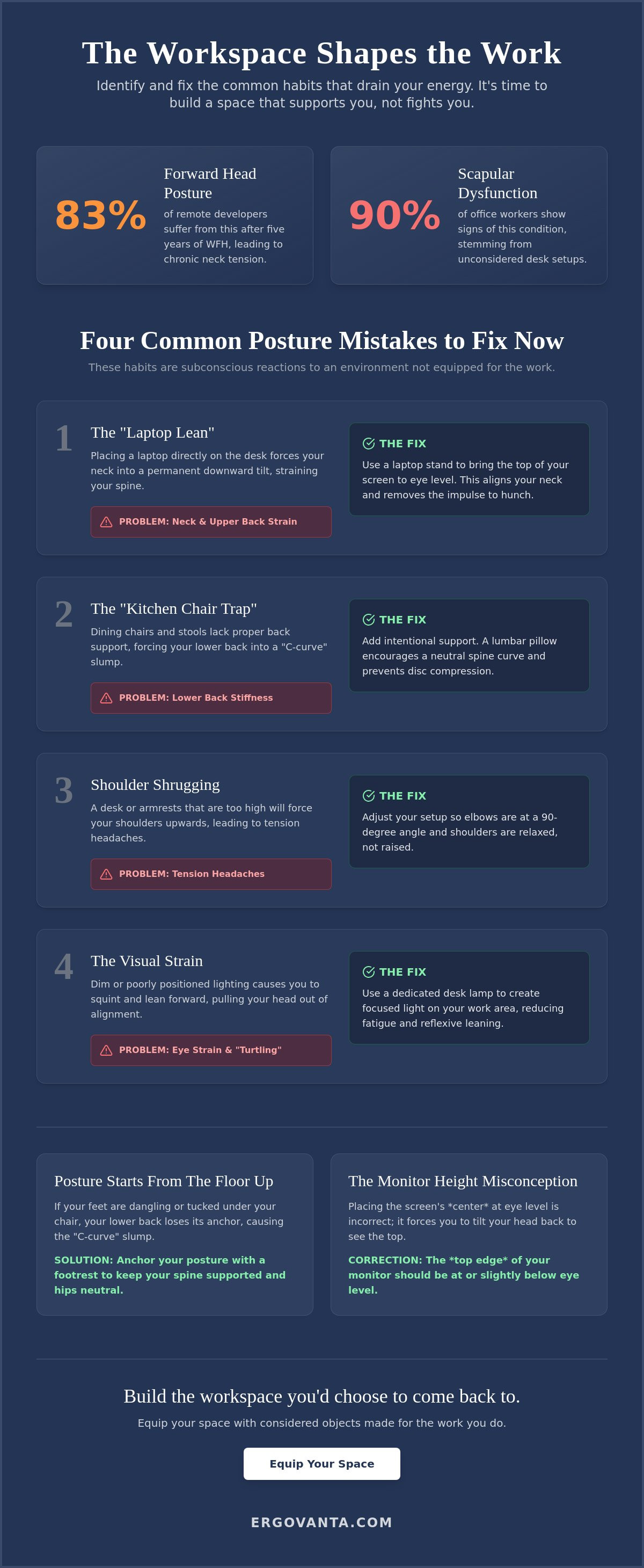
Four Common Work From Home Posture Mistakes to Fix Now
Identifying your habits is the only way to break them. Most common work from home posture mistakes aren't deliberate choices; they're subconscious reactions to an environment that hasn't been equipped for the work. When your tools don't meet your body where it is, your spine and muscles adapt in ways that eventually cause pain. Following a set of Ergonomics Dos and Don'ts can help you spot these patterns before they become chronic issues.
- The Laptop Lean: Placing your laptop directly on the desk surface forces your neck into a permanent downward tilt.
- The Perch: Sitting on the edge of your chair without back support creates constant tension in your core and hip flexors.
- Shoulder Shrugging: High desk surfaces or poorly placed mice force your shoulders toward your ears; this leads to tension headaches.
- The Visual Strain: Dim lighting makes you squint and lean forward, pulling your head out of neutral alignment to see the screen clearly.
The Monitor Height Misconception
A frequent error is placing the center of the screen at eye level. This actually causes you to tilt your head back to see the top of the browser. The top of your screen should be at eye level so your gaze naturally falls slightly downward without moving your neck. You can build this alignment by using monitor arms and laptop stands to bring the work to your level.
Lower Body Neglect
Posture starts from the floor up. If your feet are dangling or tucked under your chair, your lower back loses its anchor. This leads to the "C-curve" slump that ruins focus and compresses your discs. Equip your space with lumbar pillows and foot rests to reclaim neutral alignment and keep your spine supported. If you're unsure which objects best fit your specific desk setup, reach out to us for guidance on building a space that works as hard as you do.
Equip Your Space: Building the Intentional Desk
Building a workspace is about more than just buying a chair. It is about selecting the small objects that earn their place. Many common work from home posture mistakes are solved not by total renovations, but by intentional additions. Lighting is a prime example. Poor visibility often causes you to hunch forward; using desk lamps to illuminate your tasks reduces the reflexive need to lean in. When you equip your space with workspace essentials that encourage movement, you transform a static desk into a dynamic environment.
A room that gets used is one that feels intentional. Integrating considered decor isn't about aesthetics alone; it is about creating a space where you choose to spend serious hours. Faux plants or a well-placed vase can ground the room, making the environment feel less like a temporary fix and more like a dedicated space for the work. For those looking to refine their setup, following expert ergonomic workstation tips can provide a clear roadmap for lasting change.
Small Objects, Large Impact
A simple monitor riser or a tech accessory can change your entire seated angle. You don't need to purchase generic bundles that include items you'll never use. Instead, build your setup piece by piece. Equipping your space deliberately allows you to address specific physical needs as they arise. This ensures every object on your desk has earned its place through function and utility.
The Final Goal: A Space for the Work
Build the Room That Supports Your Work
The workspace shapes the work. You've identified the specific habits that drain your focus and learned how to bring intentionality back to your desk. Fixing common work from home posture mistakes is not about following a rigid set of clinical rules; it is about building a space where you can do your best work without a hidden physical cost. It is purposeful function in action. Every small adjustment, from your lighting to your foot placement, acts as a catalyst for a more productive and sustainable day.
Your environment is your foundation. When you choose objects that earn their place, you stop fighting your furniture and start focusing on your output. We believe in creating tools for the people who do the work. Don't settle for a makeshift setup that leaves you stiff and distracted at the end of the day. Take ownership of your physical setting and build a room you actually choose to come back to. If you are ready to move beyond temporary fixes, equip your space with considered ergonomic tools today. Your body and your work will notice the difference.
Frequently Asked Questions
Is it bad to work from the couch occasionally?
Working from the couch is acceptable for short, transitional tasks, but it isn't a setting made for the work. Soft surfaces lack the resistance needed to support your spine; this leads to rounded shoulders and lower back strain that drains your energy. If you must work away from your desk, use a firm cushion for support and limit your session to thirty minutes to avoid the physical fatigue that comes from unconsidered environments.
How high should my computer monitor actually be?
Your monitor should be positioned so your eyes naturally hit the top third of the screen when you are sitting upright. This height ensures you aren't tilting your head up or down to read, which protects the small muscles in your neck from strain. Using a stand to achieve this alignment is a simple way to fix one of the most common work from home posture mistakes without needing a completely new desk setup.
Do I really need a foot rest if my chair is adjustable?
You need a foot rest when your chair must be raised to reach a fixed desk height, leaving your feet unsupported. Even with an adjustable chair, your feet must sit flat to anchor your posture and stabilize your pelvis. A considered foot rest bridges the gap between your seat and the floor. This addition prevents common work from home posture mistakes that occur when your lower body is left to dangle without a solid base.
How does lighting affect my sitting posture?
Lighting dictates how close you sit to your screen by influencing your visual comfort. When a room is too dark or has harsh glares, you will subconsciously lean forward to compensate for the strain on your eyes. This movement pulls your spine out of its intentional alignment and causes you to "turtle" into your monitor. Using an adjustable desk lamp allows you to direct light exactly where it's needed, helping you maintain a healthy distance from your work.
From the catalog