August 14, 2026
Desk Lamps: A Guide to Equipping Your Workspace for Focus

The workspace shapes the work. Equip it deliberately. Most people accept eye fatigue and screen glare as inevitable parts of a long shift, but these are often just symptoms of an unconsidered environment. You don't need more hours; you need a space that stops fighting your eyes. Choosing the right desk lamps is about more than just visibility; it is about reclaiming your focus from the physical distractions of poor lighting and cluttered surfaces.
We agree that a desk should be a sanctuary of productivity, not a collection of bulky bases and harsh shadows. You deserve a setup that feels personal and intentional rather than one that mimics a sterile corporate office. This guide will teach you how to choose and position lighting that supports your specific tasks while reducing physical strain. We will show you how to build a clear, focused workspace by selecting objects that earn their place through purposeful function. This is for the people who do the work.
Key Takeaways
- Understand why task lighting is a specific tool for focus rather than just a general light source for the room.
- Compare the flexibility of traditional desk lamps against the space-saving utility of monitor light bars to see which fits your workflow.
- Learn how to use color temperature and the Color Rendering Index (CRI) to reduce eye fatigue during long sessions.
- Apply the "opposite hand" rule and strategic positioning to eliminate distracting shadows and screen glare.
- Equip your space with intentional lighting choices that earn their place by supporting the work you actually do.
Lighting the Work: Why the Desk Lamp Still Earns Its Place
The workspace shapes the work. Equip it deliberately. For many, a desk is just a surface until the light hits it. Relying on overhead bulbs is a common mistake; they're designed to illuminate floor space, not documents or keyboards. When you choose specific desk lamps, you aren't just adding a fixture. You are defining the territory where your best thinking happens. It is about moving from a passive environment to an active, intentional one.
The psychological shift is real. Turning on a dedicated lamp serves as a sensory signal that the day’s distractions are over. It’s a ritual of ownership. You aren't just sitting in a room; you're building a station made for the work. This intentionality is what separates a cluttered table from a true workspace. By focusing light exactly where it’s needed, you tell your brain exactly where to look. It’s a simple tool that provides a significant advantage for anyone spending serious hours at a desk.
The Purpose of Task Lighting
At its core, task lighting is about functional precision. It provides high-intensity light exactly where you need it, which reduces the harsh contrast between a bright monitor and a dark room. This balance is vital for eye comfort. It also creates a visual "zone of focus" that helps your brain stay locked into the task. It supports the small objects that earn their place on your desk, making the entire setup feel considered and ready for use.
Moving Beyond General Room Light
General room lighting often fails the person at the desk. Because overhead lights are usually positioned behind or directly above you, they often cast your own shadow across your work surface. You end up squinting to see through the gloom you’ve created. This physical strain is unnecessary and counterproductive. Equipping a desk is different from lighting a room; it requires a tool you can control. Explore our lighting collection to find tools built for your specific workspace needs.
Owning your space means choosing tools that work for you, not against you. Desk lamps allow you to adjust the angle and intensity to suit your personal comfort. When your lighting is intentional, the physical strain disappears, leaving more room for the work that matters. It’s the difference between working in a space and building a space that works.
Choosing the Right Tool: Task Lamps vs. Monitor Light Bars
Selecting the right lighting is about more than just lumen count. It’s about how much space you have and how you use it. When you build your workspace, you generally face a choice between two distinct tools: traditional desk lamps or monitor light bars. Both earn their place, but they serve different workflows and desk depths. One offers a tactile, sculptural presence, while the other disappears into your technology to save room for other tools.
The footprint of your lighting matters. A base-heavy lamp requires a dedicated patch of real estate on your desk surface. In contrast, a light bar clips to the top of your screen, occupying zero surface area. If you find yourself constantly moving items to make room for your work, the light bar is the intentional choice for a crowded desk. However, if your surface is deep and you value the ability to swing light over a physical notebook, a lamp with an adjustable arm provides the flexibility you need.
When to Choose a Traditional Desk Lamp
Classic desk lamps remain the standard for a reason. They are the ideal choice for anyone whose work isn't confined to a screen. If you spend your hours sketching, reading physical documents, or writing in a journal, you need light that moves with you. These fixtures provide a sculptural element that defines the aesthetic of your space. When browsing for lamps, look for models with multiple points of articulation. This allows you to direct light exactly where it’s needed, supporting proper workstation lighting by reducing shadows on your physical tasks.
The Case for Monitor Light Bars
Monitor light bars are a considered solution for the tech-heavy desk. They solve the specific problem of screen glare by directing light downward at a precise angle, ensuring no light bounces off the monitor into your eyes. This design saves valuable real estate for workspace essentials like your keyboard, mouse, or tablet. For a minimalist setup, a light bar is the most efficient way to equip your desk without adding visual clutter. It’s a tool made for the work of today: clean, functional, and out of the way.
Deciding between these tools depends on your specific monitor setup and desk depth. A shallow desk almost always benefits from a light bar, while a deep, expansive desk can handle the presence of a traditional lamp. If you're unsure which tool fits your specific workflow, reach out to us for more help equipping your space. Building a workspace you choose to come back to starts with getting the fundamentals right.
Beyond Brightness: The Features That Matter for Long Hours
The workspace shapes the work. Equip it deliberately. Most people choose desk lamps based on how they look on a shelf, but the real test happens at 3:00 PM when the afternoon slump hits. Lighting isn't just a binary choice between dark and light. It's about the quality of the photons hitting your desk. If your light is harsh or flickers, you'll feel it in your temples long before the day is done. This is why we focus on the small objects that earn their place through purposeful function.
Flicker-free technology is a silent requirement for any considered setup. Cheaper LEDs often pulse at a frequency that's invisible to the eye but exhausting for the brain. This leads to headaches and a general sense of fatigue that you might mistake for a lack of coffee. When you consult the OSHA workstation evaluation checklist, you'll see that adjustable light levels are a core part of a functional environment. A lamp that doesn't dim or move is a tool that isn't doing its job. Build your space with features that respect your biology.
Color Temperature and the Work Cycle
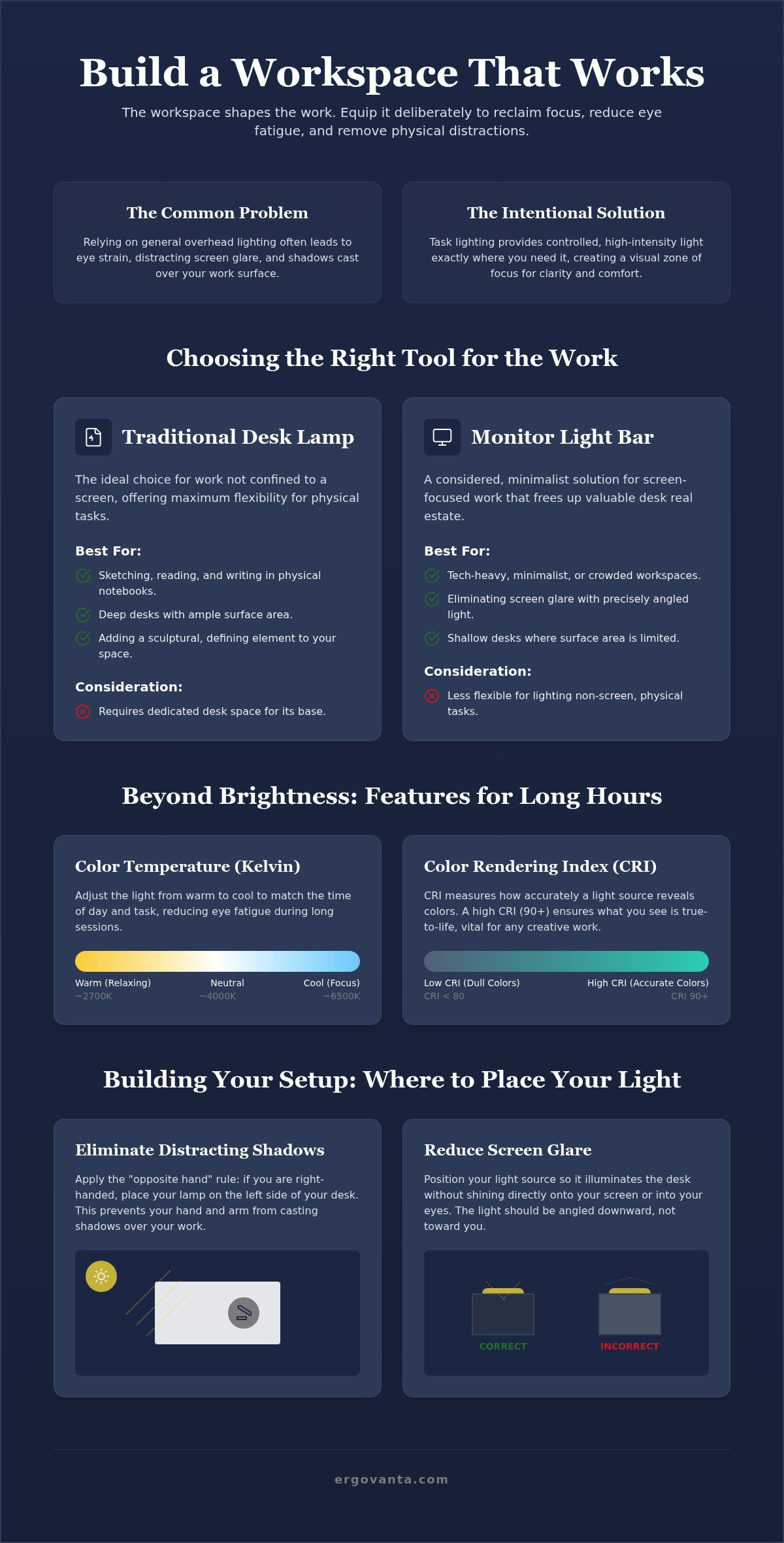
Color temperature is measured in Kelvin (K), and it dictates the mood of your space. Cooler light, ranging from 4000K to 5000K, mimics daylight. It's blue-toned and designed for high-alert morning sessions. Use it when you need to be sharp. As the day ends, your needs change. Warmer light, between 2700K and 3000K, helps your body signal that it's time to slow down. Choosing desk lamps with adjustable Correlated Color Temperature (CCT) allows you to build a workspace that evolves with your day. It’s an intentional way to manage your focus without fighting your natural rhythm.
Why High CRI Matters for Creators
Color Rendering Index (CRI) measures how accurately a light source reveals colors compared to natural sunlight. If you've ever looked at a design and felt it looked "off" under your desk light, low CRI is likely the culprit. Light with a low CRI makes a room feel flat and clinical. For designers, artists, or anyone who cares about the objects in their space, aim for a CRI of 90 or higher. This ensures that the colors on your screen and the textures of your desk materials look exactly as they were meant to be seen. You can find high-quality options in our lighting collection that prioritize this level of clarity. This is about equipping your space with tools that earn their place by supporting the work you actually do.
Building Your Setup: Where to Place Your Light for Clarity
The workspace shapes the work. Equip it deliberately. Once you've selected your desk lamps, the next step is placement. A poorly positioned light is just a distraction with a cord. To build a space that supports focus, you must consider how light interacts with your physical movements and your screen. It is about more than just visibility; it is about creating an environment that feels considered and ready for the task at hand.
Shadows are the enemy of clarity. Follow the "opposite hand" rule to keep your work surface clear. If you write with your right hand, place your lamp on the left side of your desk. This prevents your hand from casting a shadow over your notebook or documents. It is a simple, intentional adjustment that makes a significant difference during long sessions. Additionally, manage your cables using clips or trays to keep your surface organized. An intentional desk is one where every object, including the power source, earns its place without adding clutter.
Avoiding the glare zone is equally vital. Position the lamp head so the light does not bounce off your monitor and back into your eyes. Screen glare is a primary cause of eye fatigue and physical strain. Keep the light source to the side and slightly behind the plane of the screen. This directs the beam toward your keyboard or papers without creating a distracting "hot spot" on the monitor glass. By controlling the angle, you own the clarity of your workspace.
Positioning for Ergonomics
Light placement directly affects your posture and head tilt. If a lamp is too low, you might find yourself hunching to see under the shade. If it is too high, the bulb might shine directly into your eyes, causing you to squint. Aim for a lamp head height that sits just below your eye level. You can use monitor stands to lift your screen, which often creates more room on the desk surface for your lighting setup. This allows you to maintain a neutral posture while keeping your work surface fully equipped for the day.
Light Layering for a Balanced Room
Task lighting alone can be harsh in a dark room. A single bright lamp creates high contrast, which forces your eyes to work harder as they move between the light and the shadows. Layer your light to build a more balanced environment. Combine your desk lamps with floor lighting to fill the corners of the room with a soft, ambient glow. You can also use wall lights to provide a gentle wash of light on the surfaces behind your desk. This layering makes your space feel comfortable at any hour, ensuring the room gets used just as much as the desk itself.
Equipping Your Space with Ergovanta Lighting
The workspace shapes the work. Equip it deliberately. At Ergovanta, we believe that every object on your desk must earn its place through purposeful function. This is especially true for desk lamps. A lamp is more than a light source; it is a tool that defines your focus and protects your health during long hours. We build lighting for the people who do the work, focusing on utility and intentionality rather than corporate status or empty trends.
Our collection reflects a range of work styles and aesthetic preferences. From the industrial clarity of metal to the refined texture of glass, we offer tools that fit into the rooms that actually get used. We don't design for showrooms. We design for the WFH professional, the creator, and the person who stays late to get the job done. Every piece is a catalyst for your personal success because it removes the physical distractions of a poorly lit environment.
The Ergovanta Approach to Design
Our design philosophy is anchored in our name. ERGO is derived from the Ancient Greek "ergon," which translates to purposeful function. VANTA is a coined word representing the advantage a well-equipped space provides. This is the Ergovanta advantage. When you choose our desk lamps, you are opting for a tool that has been considered from every angle. We prioritize clean lines and durable materials that integrate seamlessly into your existing setup.
This approach ensures that your lighting supports your focus without becoming a distraction itself. Whether you are browsing our modernist styles or looking for something from our artisan selection, you are investing in a tool made for the work. We understand the holistic needs of a professional. You need a space that handles the intensity of a morning deadline and the quiet ritual of a late-night project. Our lighting is built to bridge that gap.
Take the Next Step for Your Space
Workspaces are not all the same. Yours should not feel like everyone else’s. Building a workspace you choose to come back to requires a departure from generic solutions. It requires a commitment to personal ownership and intentionality. Take the time to evaluate what your specific tasks require. Do you need the flexibility of an adjustable arm, or the space-saving efficiency of a monitor light bar? Your setup should be a direct reflection of how you choose to work.
Stop accepting eye fatigue and cluttered desks as part of the job. You have the power to equip your environment for clarity and comfort. By selecting objects that earn their place, you build a sanctuary of productivity that is uniquely yours. This is for the people who do the work. Don't wait for a corporate office to define your environment. Reach out to equip your space today and start building with intention.
Build a Workspace Made for the Work
Lighting is the invisible tool that defines your focus. Choosing the right desk lamps is the first step toward reclaiming your clarity from eye fatigue and screen glare. You now understand how color temperature manages your work cycle and how precise placement eliminates the physical strain of shadows. These aren't just aesthetic choices; they're the fundamentals of a considered environment that respects your biology.
Our approach at Ergovanta is rooted in the concept of ergon, or purposeful function. We provide a distinct advantage for the people who do the work by offering a curated selection of lighting. Whether you prefer clean modernist lines or the unique texture of artisan glass, every piece is made to earn its place on your desk. Your workspace should be a personal sanctuary of productivity that you'd choose to come back to every day.
It's time to equip your space with the intentionality your work deserves. Own your environment and let the focus follow.
Frequently Asked Questions
Is an LED desk lamp better than an incandescent one?
LED desk lamps are better because they consume about 75% less energy and produce almost no heat compared to incandescent bulbs. This keeps your space cool and comfortable during long hours. LEDs also support flicker-free technology and adjustable color temperatures. These features are essential for building a setup that respects your eyes and your electricity bill while providing reliable function.
How many lumens do I need for a desk lamp?
You typically need between 400 and 500 lumens for standard office tasks. This level of brightness provides enough clarity for reading and typing without causing excessive glare on your desk surface. If your work involves intricate details like drafting or crafts, consider desk lamps that offer 800 lumens or more. Choosing a dimmable model allows you to equip your workspace for varying light levels throughout the day.
What is the best color temperature for working at a computer?
The best color temperature for computer work is a cool white between 4000K and 5000K. This range helps you maintain focus and alertness during the morning and afternoon. However, you should switch to a warmer 3000K light in the evening to reduce blue light exposure. Finding a lamp with adjustable settings helps you build a workspace that adapts to your natural daily rhythm and supports your work cycle.
Can a desk lamp help reduce eye strain?
A lamp reduces eye strain by providing consistent light that minimizes the harsh contrast between a glowing screen and a dark room. Most strain comes from your eyes constantly adjusting to different brightness levels. By adding intentional task lighting, you create a balanced environment that feels more considered. This simple addition helps you own your space while protecting your physical comfort over time.
Where should a desk lamp be placed to avoid shadows?
Position your light on the side of the desk opposite your dominant hand. If you are right-handed, place the lamp on the left. This "opposite hand" rule ensures that your arm and hand don't cast shadows across your notebook or documents while you write. It is an easy way to equip your desk for maximum clarity and reduce the need for constant head tilting or squinting.
What is a monitor light bar and do I need one?
A monitor light bar is a lighting fixture that sits on top of your monitor to save surface real estate. It directs light downward to illuminate your keyboard area without reflecting off the screen glass. These are excellent for shallow desks where traditional lamps might feel bulky. They are a considered choice for anyone looking to build a clean, tech-focused setup with zero monitor glare.
How do I choose a lamp style that fits my desk setup?
Select a style that aligns with the materials already present in your room. If your desk features clean lines and tech, a modernist metal fixture is a functional fit. If you prefer a more tactile environment, an artisan glass piece adds a personal touch. Focus on choosing objects that earn their place by reflecting your intentionality rather than just following a temporary corporate trend.
Are adjustable arms necessary for a good work lamp?
Adjustable arms are necessary if your work requires you to move between different physical tasks. They allow you to swing the light over a book or pull it closer for detailed work. This flexibility ensures your light is always made for the work you are doing at that moment. Without an adjustable arm, you are forced to move your body to suit the lamp, which leads to poor posture.
Disclaimer
Ergovanta publishes these guides to help people set up better workspaces. Product recommendations reflect what we sell. Specifications, prices and availability are accurate at the time of writing and may change. Nothing here is medical, ergonomic or professional advice; if you have a specific health concern about your workstation, speak to a qualified professional.
From the catalog