August 4, 2026
Ergonomic Desk Accessories: Equip Your Workspace for Serious Work

The workspace shapes the work. Equip it deliberately. If you spend serious hours at a desk, the objects around you matter more than you think. You likely moved to a standing desk to improve your day, yet you still face neck fatigue or the visual noise of messy cables. A desk is more than a surface; it is an environment for focus. Choosing the right ergonomic desk accessories is how you reclaim your space from the physical strain and clutter that interrupt your flow.
We agree that your workspace should feel intentional rather than accidental. You need a setup that supports the effort you put in without demanding a physical toll by the afternoon. This guide will show you how to build a setup made for the work. We will look at considered tools like monitor arms and foot rests that solve for comfort and clarity, helping you create a space you actually choose to come back to.
Key Takeaways
- Reduce leg fatigue during long hours by treating the transition between sitting and standing as a deliberate workflow.
- Equip your setup with considered ergonomic desk accessories to solve for neck strain and keep your screen at eye level.
- Clear the visual clutter that taxes your focus by mounting hardware and reclaiming your desk surface for the work.
- Build a room that supports your focus through intentional lighting layers that balance task-specific brightness with ambient comfort.
Supporting the Body During Serious Work Hours
The workspace shapes the work. When you spend eight hours a day at a desk, the transition between sitting and standing becomes a core part of your process. It isn't just about avoiding a sedentary lifestyle; it's about maintaining focus. To do that, you need to understand the principles of human factors and ergonomics. These principles show that physical ease is a functional requirement for anyone who does the work.
Equipping your space with the right ergonomic desk accessories means looking at the foundations first. Your feet and lower back often take the brunt of a long session, even if you have a standing desk. Small adjustments in foot positioning or lumbar support can be the difference between a productive afternoon and a distracted one. When you choose your ergonomic desk accessories, start with the tools that support your posture from the ground up.
To better understand how these tools fit into a functional setup, watch this breakdown:
Active Standing and Foot Comfort
A dedicated foot rest or massage board is one of those small objects that earn their place quickly. When standing, your legs can fatigue if you stay static. A massage board encourages micro-movements that keep blood flowing during deep creative blocks. When sitting, a foot rest helps you maintain a neutral spine by keeping your knees at the correct angle. You can build a better foundation by exploring ergonomic comfort tools designed for the work.
Support for the Seated Intervals
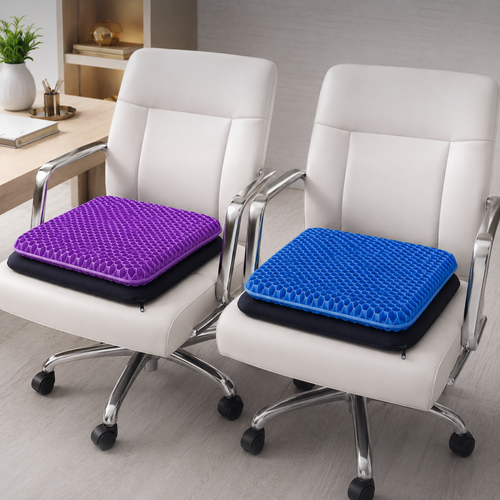
No one stands for eight hours straight. The seated intervals of your day are just as important as the time spent on your feet. If your chair doesn't provide specific support, a considered lumbar pillow or seat cushion can make a standard chair feel like it was made for the work. These aren't soft extras; they are intentional tools that prevent the lower back strain that usually ends a productive session early. Equip your chair deliberately to ensure your body stays supported throughout the full arc of your day.
Organizing the Technical Layer for Clarity
Visual clutter is a tax on your focus. When your surface is a mess of tangled cords and scattered hardware, your brain spends energy processing the noise instead of the work. Equip your technical layer deliberately. A clean desk isn't about minimalism for its own sake; it's about creating a space where you can think. By mounting your hardware and routing your cables, you reclaim the physical and mental room needed for serious output. Choosing the right ergonomic desk accessories allows you to build a system that stays out of your way.
Monitor and Laptop Positioning
Position your screen at eye level to prevent the chronic neck strain often called tech neck. If you're constantly looking down at a laptop, you're inviting fatigue that will cut your workday short. Monitor arms are superior to static stands because they offer the flexibility required for a standing desk. They allow you to shift your screen height as you change positions, ensuring you always maintain the proper posture. For a detailed breakdown of ideal angles, the Mayo Clinic ergonomic workspace setup guide offers a solid baseline. Build your display setup with considered monitor and laptop stands that earn their place by keeping your screens exactly where they need to be.
Cable Management and Power
Cable management trays are the invisible backbone of a functional setup. Without them, the transition between sitting and standing becomes a liability for your hardware. Under-desk trays hide the "spaghetti" of power bricks and cords, keeping the floor clear and the desk surface open. An intentional desk is one where every cable has a home. To keep your essential devices ready without adding to the mess, integrate wireless chargers and phone stands into your workflow. These small objects keep your tools within reach but off the main work area. If you're unsure which cable solutions best fit your specific desk dimensions, feel free to reach out to us for guidance on building a cleaner space.
Creating a Room That Gets Used
The room around the desk matters more than you think. If you spend serious hours at a desk, the environment beyond your monitor edge dictates how long you can stay focused. A space that feels cold or purely utilitarian eventually becomes a place you want to avoid. To build a workspace you choose to come back to, you must consider the atmosphere of the entire room. Integrating the right ergonomic desk accessories into a broader environmental plan ensures that your space supports your eyes and your mood as much as your posture.
While following OSHA's ergonomic guidelines helps prevent physical strain, personalizing your environment is what sustains your mental energy. Equip your room with objects that reflect your own taste rather than standard corporate requirements. When the room feels intentional, the work feels more like a choice and less like a chore.
Lighting for Focus and Mood
Lighting should be layered to be effective. You need task lighting for the work and ambient lighting for the rest of the room to prevent high-contrast shadows that cause eye fatigue. Desk lamps provide directed light where you need it most without creating distracting screen glare. For those who find themselves finishing projects after sunset, monitor light bars are small objects that earn their place by illuminating the desk surface without taking up valuable room. Build a room you want to return to with curated lighting solutions that balance functional brightness with a calm atmosphere.
Considered Decor and Greenery
Intentional decor bridges the gap between a sterile office and a personal workspace. Faux plants are a practical choice for busy professionals who want the visual benefit of greenery without the maintenance schedule. These aren't just "desk extras"; they are considered tools for making a room feel lived-in and used. Small objects like vases or figurines add a layer of personality that makes the desk feel like yours. When you equip your space with these final touches, you aren't just decorating: you are finishing a setup made for the work.
Build a Space Made for the Work
The workspace shapes the work. Equip it deliberately. We have explored how supporting your body through active movement and clearing the visual noise of technical clutter creates a foundation for deep focus. By layering task lighting and selecting objects that earn their place, you move from a generic desk to a personal environment that sustains your energy through long hours.
Choosing the right ergonomic desk accessories is an intentional act of ownership. We believe in the principles that define our name: Ergo, for purposeful function in action, and Vanta, for the advantage a well-equipped space provides. These tools are designed for the people who do the work, ensuring that your physical surroundings support the effort you put in every day.
Your setup shouldn't feel like a chore or a compromise. It should be a place where you feel capable, supported, and clear-headed. Build the workspace you would choose to come back to. Contact Ergovanta. Start equipping your space for the long term today.
Frequently Asked Questions
What are the most essential accessories for a new standing desk?
The most essential ergonomic desk accessories for a new setup are a monitor arm and a foot rest. These two tools solve the most common pains of a standing desk: neck strain from low screens and leg fatigue from static standing. A monitor arm allows for precise eye-level positioning as you move. A foot rest supports your circulation during seated periods. Together, they build a foundation made for the work.
Do I really need an anti-fatigue mat or a foot rest for a standing desk?
You need dedicated foot support to prevent the physical toll of standing on hard surfaces for hours. A foot rest or massage board encourages micro-movements that keep your legs active and your blood flowing during deep focus sessions. Without this support, you will likely find yourself shifting awkwardly or cutting your standing intervals short. It is a considered addition that helps you stay at the desk longer without the distraction of foot pain.
How do I manage cables on a desk that moves up and down?
Manage moving cables by using under-desk trays and flexible cable sleeves with enough slack for the full range of motion. These accessories keep your power bricks and cords organized as the desk travels between sitting and standing heights. An intentional setup ensures that no cable is pulled tight or snagged during the transition. By hiding the technical layer, you clear the visual clutter that often taxes your focus during serious work hours.
Are monitor arms better than simple monitor stands for ergonomics?
Monitor arms are superior because they provide the adjustability required for a hybrid workflow. Unlike simple stands, an arm lets you change the height, tilt, and depth of your screen to match your exact posture as it shifts throughout the day. This flexibility is vital when you move between different positions. It also clears the footprint of a traditional stand, leaving more room on your desk for the objects that actually earn their place.
From the catalog