August 25, 2026
Ergonomic Mistakes to Avoid: Build a Workspace That Works for You
A well-engineered chair does not guarantee a pain-free workday. You might invest in the best equipment available and still find yourself hunched over a screen by noon, battling chronic neck and shoulder tension. The workspace shapes the work. If your setup feels like a series of compromises, you're likely overlooking the subtle ergonomic mistakes to avoid at your desk. These friction points often hide in plain sight, from the height of your monitor to the way light hits your work surface.
We agree that your desk should be a place you actually enjoy returning to, not a source of physical or mental fatigue. It's time to stop working around your furniture and start making it work for you. You deserve a setup that feels natural and supports the serious hours you spend at your station. This guide will help you identify the hidden stressors in your current environment and show you how to equip a space with intentionality. We'll explore how to build a personalized setup that reduces strain and provides the purposeful function needed for your best work.
Key Takeaways
- Learn why a default setup creates invisible friction and how to redefine your workspace as a tool for purposeful function.
- Identify the common ergonomic mistakes to avoid at your desk, starting with how monitor height dictates your spinal alignment.
- Solve the atmospheric mistake of harsh lighting by equipping your space with intentional light sources that reduce eye strain.
- Avoid the statue trap of static posture by understanding the balance between sitting, standing, and movement.
- Shift from a one-time purchase mindset to an ongoing process of refining your space with small objects that earn their place.
The invisible friction of a default workspace
The workspace shapes the work. Equip it deliberately. Most people inherit a desk setup by accident. You find a flat surface, pull up a chair, and hope for the best. This is the "default" trap. It's a setup designed for an average that doesn't actually exist. When you work in a space that wasn't built for you, you encounter invisible friction. This friction isn't just a physical annoyance; it's a constant drain on your energy. One of the most common ergonomic mistakes to avoid at your desk is assuming that if a setup looks like an office, it will function like one.
Real ergonomics is about more than adjustable levers. The word comes from the Ancient Greek ergon, meaning purposeful function. At Ergovanta, we believe in combining that function with a personal advantage. It's about removing the barriers between you and the task at hand. Instead of following rigid corporate standards, the goal is to build a space you'd choose to come back to every morning. When your environment is considered, the work feels lighter.
Why your space matters more than your title
We need to reject the idea that a thoughtful desk is a perk reserved for certain tiers of workers. You don't need a specific job title to justify a setup that doesn't hurt. Whether you are a student, a creator, or a freelancer, the work you do deserves a dedicated station. A space made for the work improves focus because it removes the need to constantly readjust. It's about intentionality. Every object should earn its place. When you equip your space with items you've actually chosen, you take ownership of your day. You aren't just occupying a desk; you're using a tool.
The cost of ignoring the small things
Minor discomforts are quiet thieves. A slight squint from poor lighting or a monitor that sits just two inches too low might seem trivial at 9:00 AM. By 4:00 PM, these small things have accumulated into chronic distractions. This is where cognitive ergonomics comes into play. If your body is busy managing physical strain, your brain has less energy for decision-making and creativity. Ergonomics is for anyone spending serious hours at a desk. By identifying the ergonomic mistakes to avoid at your desk early, you turn your workspace into a sanctuary for productivity rather than a source of fatigue.
Monitor height and the eye level mistake
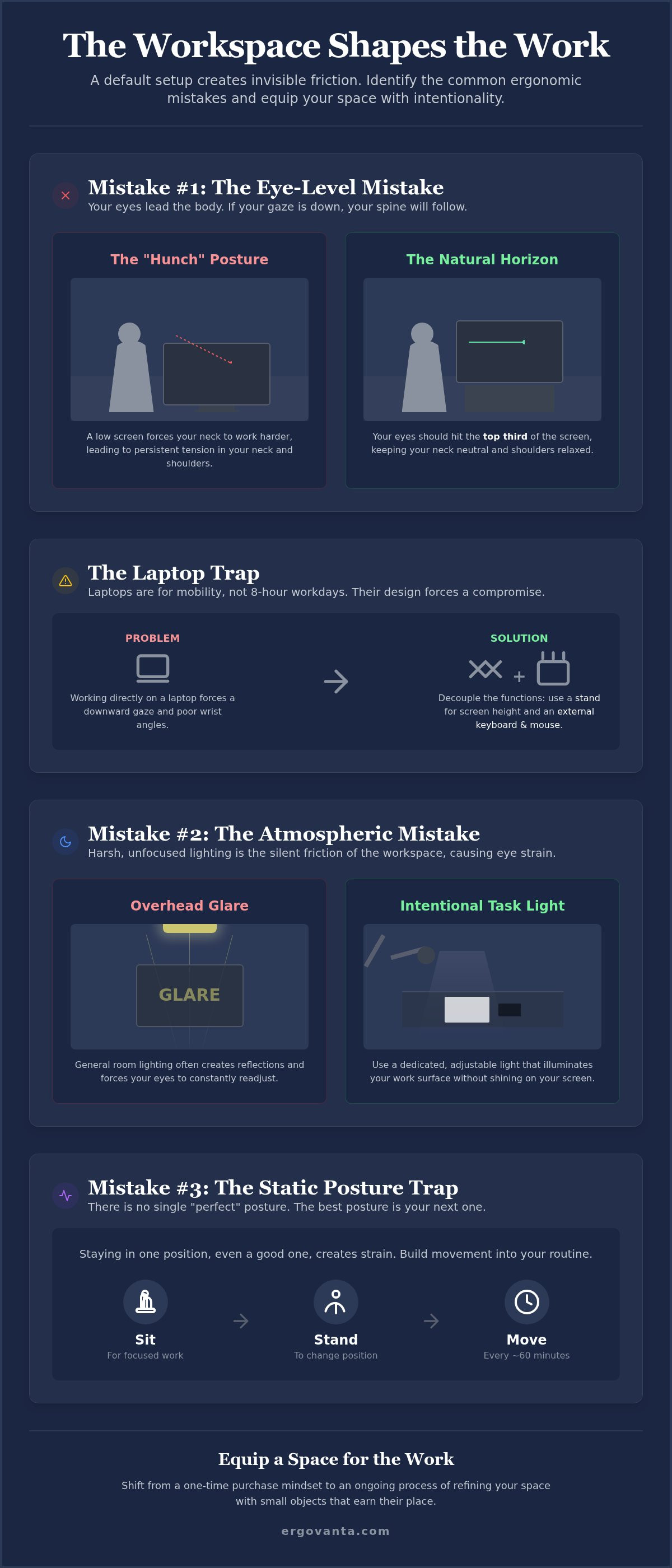
Your eyes lead the body. If your gaze is fixed downward, your spine will inevitably follow. This creates the "hunch," a rounded-shoulder posture that leads to persistent tension. Placing your screen too low is one of the primary ergonomic mistakes to avoid at your desk. It forces your neck to work harder than it needs to. Achieving proper office ergonomics starts with aligning your monitor to your natural horizon. When the screen is at the right height, your neck remains neutral; your shoulders drop, and the physical cost of a long session decreases.
A considered desk riser or monitor arm is an essential tool, not an extra. These objects earn their place by removing the physical friction of a poorly positioned screen. By bringing the work to you, rather than leaning into the work, you maintain a posture that feels natural. This intentionality in your setup prevents the slow accumulation of fatigue that often ends a productive day early.
Finding your natural horizon
A simple test reveals if your setup is working. Sit comfortably and look straight ahead. Your eyes should naturally hit the top third of your screen. If you're looking at the middle or bottom of the display, your monitor is too low. For fixed setups, monitor stands provide a stable, intentional base that supports your screen and your posture. If your work style is more dynamic, a monitor arm offers the flexibility to shift the screen as your task changes. These are tools for eye-level intentionality, designed for the people who do the work.
The laptop trap and how to escape it
Laptops are designed for mobility, not for eight-hour workdays. The connected screen and keyboard force a compromise: either your wrists are at the wrong angle or your neck is. Working directly on a laptop for extended periods is a recipe for neck strain. To escape this trap, you must decouple the device's functions. Use a laptop stand to bring the screen to eye level. This simple corrective changes how the space feels immediately. However, once the laptop is raised, the built-in keyboard becomes unusable for healthy typing. You must equip your desk with an external keyboard and mouse to keep your arms in a functional, neutral position.
Building a setup that works for you is a process of small, deliberate choices. If you need help selecting the right tools to solve your specific layout challenges, get in touch with us to discuss your workspace needs.
Lighting and the atmospheric mistake
Lighting is the silent friction of the workspace. Most people treat it as an afterthought, yet bad lighting is a primary productivity killer. It manifests as persistent headaches, dry eyes, and constant squinting. One of the most overlooked ergonomic mistakes to avoid at your desk is relying solely on harsh overhead fluorescent lights. These lights are built for general floor coverage, not for the specific, high-intensity tasks you perform. Relying on them creates a flat, uninspired environment that drains your mental energy long before the workday ends.
The solution is to equip your space with layers of light. Task lighting helps define your work area and reduces the contrast between a bright screen and a dark room. When you are identifying ergonomic hazards in your current setup, look for shadows and glare. If you have to lean forward to see a document or tilt your head to avoid a reflection, your lighting is working against you. By balancing ambient light with focused desk lamps, you build a space that supports your eyes and your focus.
Layering light for focus
Effective lighting creates a pool of focus. This intentional lighting anchors your attention to the task at hand and signals to your brain that it is time for deep work. For those with limited desk real estate, monitor light bars are a considered choice. They illuminate your keyboard and documents without casting glare on the screen. The temperature of your light also matters. While cool blue light can help with morning alertness, warm light is better for late-night sessions. It feels more natural and is less likely to disrupt your sleep patterns after you finish for the evening.
Managing glare and natural light
Natural light is a powerful tool for maintaining your circadian rhythm, but it must be managed. Position your desk perpendicular to windows whenever possible. Facing a window directly creates high contrast that tires the eyes, while having a window behind you often leads to distracting screen reflections. These reflections are subtle ergonomic mistakes to avoid at your desk because they force you into awkward, non-neutral postures just to read your display. Small, intentional adjustments to your layout earn their place by making the room more usable throughout the entire day. A space that is lit correctly is a space you'll actually enjoy returning to.
Static posture and the movement gap
The body is built for motion, not for maintenance. One of the most persistent ergonomic mistakes to avoid at your desk is falling into the "Statue Trap." We often assume that if we can just find the perfect alignment, we should freeze there for eight hours. This is a mistake. Static load acts as a physical tax on your circulatory system and your muscles. Even a well-aligned spine becomes a source of tension when it's denied movement. Your workspace should be a place of activity, not a gallery of still-life poses.
Standing desks are often positioned as the universal cure for a sedentary day, but standing all day is just as taxing as sitting. It simply shifts the strain to your lower back and legs. The goal isn't to replace one static position with another; it's to bridge the movement gap. You need a setup that encourages you to shift, lean, and move through the room as the work requires. When movement is easy, focus remains steady.
The rhythm of a used room
A used room has a pulse. A helpful framework for maintaining this pulse is the 20-8-2 rule. For every half hour of work, spend 20 minutes sitting, 8 minutes standing, and 2 minutes moving or stretching. This rhythm prevents the slow onset of mental fatigue and physical stiffness that often derails a productive afternoon. Your space should make this transition feel effortless. If moving to a standing position requires a complex reorganization of your desk, you won't do it. Equip your environment so that movement feels like a natural part of your workflow, not a disruption to your focus.
Support where it counts
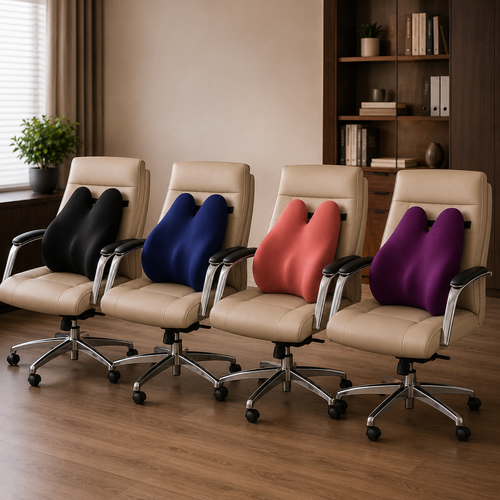
When you are in a seated position, small correctives provide the purposeful function your body needs. Using lumbar pillows and cushions can transform a standard chair into a station that actually supports your lower back. These aren't just for comfort; they are tools that earn their place by maintaining the natural curve of your spine. Similarly, foot rests are vital for those whose feet don't sit flat on the floor. They help maintain a neutral pelvic tilt, which prevents you from slouching forward to compensate for a lack of stability. There is a profound psychological benefit to working in a space that supports your physical needs. It signals that the work you do is worth the intentionality you put into the environment.
Equipping a space for the work
Ergonomics is not a finish line. It is an ongoing process of refinement. Many people treat their desk as a static museum of office supplies, but your needs change as your work evolves. One of the greatest ergonomic mistakes to avoid at your desk is the "set it and forget it" mindset. You don't just buy a chair and call the problem solved. You build a setup that feels uniquely yours through constant adjustment and intentionality. The goal is to remove the friction that stops you from doing your best work, one small correction at a time.
The rooms that get used are the rooms that are built for the person, not the persona. Instead of trying to mimic a corporate showroom, focus on the small objects that earn their place. This approach ensures that your environment supports your physical health and your mental clarity. When you equip your space with items that solve specific problems, like eye strain or lower back tension, you create a sanctuary that supports the serious hours you spend at your station. This is where ergon (purposeful function) meets vanta (advantage).
The intentional desk audit
The workspace shapes the work. Equip it deliberately. Start by performing a thorough audit of your current environment. Look at every item sitting on your desk and ask a simple question: does this help or hinder the work? Clutter is more than a visual mess; it creates significant mental drag. If an object doesn't have a specific function or doesn't contribute to a sense of order, it is likely just an obstacle. Removing these distractions allows you to focus on workspace essentials that offer both utility and a considered aesthetic. Every tool should have a reason for being within reach.
Building for the long term
Building a workspace is an investment in your future output. It's tempting to follow short-term trends, but buying for quality and function is always the better strategy. Reject the idea that your setup is a reflection of status. Instead, view it as a toolkit designed for the people who do the work. When you choose objects that are made for the work, you're choosing durability and reliability over novelty. This philosophy ensures that your space remains functional and inviting for years to come. Your desk should be a place you choose to come back to, not a place you are forced to occupy. Build your considered workspace with Ergovanta and start working with the advantage you deserve.
Build the workspace you'd choose to come back to
The workspace shapes the work. Equip it deliberately. Creating a functional station isn't a one-time purchase; it's a process of intentional refinement. By addressing the subtle ergonomic mistakes to avoid at your desk, you move beyond a default setup and build a space that works for you. Whether it's adjusting your monitor to your natural horizon or layering task lighting to reduce eye strain, these small changes remove the invisible friction that drains your energy during long sessions.
Ergovanta exists for the people who do the work. Our considered selection of tools focuses on purposeful function and personal advantage. We believe your desk should be a sanctuary of productivity, not a source of chronic tension. Every object in your room should earn its place by supporting the serious hours you spend at your station. It's time to stop compromising and start building a workspace that feels like yours.
Take ownership of your environment. Build a space that supports your physical needs and reflects the intentionality you bring to your work every day. You spend serious hours here; make them count.
Frequently Asked Questions
What is the most common ergonomic mistake at a desk?
The most common ergonomic mistake to avoid at your desk is placing your monitor too low. This error forces your neck into a persistent downward tilt, creating the "hunch" that leads to chronic shoulder tension. Instead of leaning into the work, you should equip your space so the work comes to you. Aligning your screen to your natural horizon is the first step in building a setup that feels natural and personalized.
How high should my monitor be for proper ergonomics?
Your eyes should hit the top third of your screen when you are sitting in a neutral position. This ensures you aren't constantly tilting your head up or down, which preserves spinal alignment. If your monitor doesn't have a built-in height adjustment, use a monitor stand or a desk riser to achieve this level of intentionality. It's a simple corrective that immediately reduces the physical cost of a long work session.
Are standing desks actually better for your back?
Standing desks are only better if they are used to facilitate movement. Standing in one place for eight hours is just as taxing as sitting, as it puts excessive pressure on your lower back and legs. The goal is to bridge the movement gap by alternating between positions. Use a standing desk to find a rhythm that keeps your body engaged, such as the 20-8-2 rule, rather than treating it as a static solution.
How can I make my desk more ergonomic on a budget?
You can build a more considered space without a total overhaul by focusing on small objects that earn their place. Start with simple correctives like a lumbar pillow for your chair or a foot rest to improve your pelvic tilt. These items provide purposeful function at a lower cost than a new desk. Auditing your lighting and clearing clutter are also effective ways to reduce mental drag and physical strain on a budget.
What kind of lighting is best for a home office?
The best lighting for a home office is layered and intentional. Avoid relying solely on harsh overhead fixtures, which are a common atmospheric mistake. Instead, combine ambient light with focused task lighting like desk lamps or monitor light bars. This setup reduces eye strain and helps define your pool of focus for deep work. Use warm light for late sessions to support your circadian rhythm and make the room feel like a place you enjoy.
Do I really need a monitor stand if I have a laptop?
Yes, because working directly on a laptop forces a compromise between your neck angle and your wrist position. This is the "laptop trap." By using a laptop stand, you bring the screen to eye level and protect your posture. You must equip your desk with an external keyboard and mouse to keep your arms in a functional position. This setup ensures your device supports the work you do without causing physical strain.
How often should I change my position while working?
You should aim to change your position every 30 minutes to avoid the "Statue Trap." Static posture is a silent productivity killer that leads to muscle fatigue and reduced focus. Following a rhythm like the 20-8-2 rule (20 minutes sitting, 8 minutes standing, 2 minutes moving) keeps your body active. Your workspace should encourage this movement, making it easy to shift between tasks without losing your creative momentum or physical comfort.
Can a lumbar pillow help with lower back pain at work?
A lumbar pillow is a vital tool for maintaining the natural curve of your spine while you work. Most standard chairs don't provide enough lower back support, leading to slouching and discomfort. By adding a considered cushion, you provide the physical support needed for long work sessions. This small object earns its place by reducing the pressure on your spinal discs and helping you maintain a posture that feels natural and sustainable throughout the day.
Disclaimer
Ergovanta publishes these guides to help people set up better workspaces. Product recommendations reflect what we sell. Specifications, prices and availability are accurate at the time of writing and may change. Nothing here is medical, ergonomic or professional advice; if you have a specific health concern about your workstation, speak to a qualified professional.
From the catalog