September 1, 2026
Ergonomic Products: Build a Workspace You'll Love

What if the tools meant to help you work were actually the ones making you want to leave your desk? Most of us have accepted chronic neck strain and cluttered, plastic-heavy environments as the inevitable cost of a long shift. You shouldn't have to choose between a setup that supports your body and a room that feels like yours. Finding ergonomic products that don't ruin your decor is often the hardest part of building a functional home office.
The workspace shapes the work. Equip it deliberately. You deserve a setup that reduces physical fatigue through considered equipment and intentional design. We'll show you how to build a space you'll love by selecting the small objects that earn their place, from monitor stands to supportive seating. This guide covers how to equip your environment for the long haul without sacrificing your personal style. It's time to build a workspace for the people who do the work, creating an area you'll choose to come back to every day.
Key Takeaways
- Learn how ergonomics translates to purposeful function, ensuring your tools are made for the work you actually do.
- Discover how just 4 inches of screen elevation can stop chronic neck pain and help you reclaim your desk surface.
- Identify how intentional lighting choices reduce eye strain and mental fatigue during long hours at your desk.
- Build a personalized setup by choosing ergonomic products that interact directly with your body for better support.
- Equip your space with considered objects that earn their place, giving you a functional advantage without sacrificing your personal style.
Understanding Ergonomic Products: Purposeful Function for the Work
The word ergonomics often carries the weight of HR handbooks and clinical checklists. It feels like a chore rather than a choice. To reclaim the concept, look at its roots. The term comes from the Ancient Greek ergon, meaning purposeful function. When you view your space through this lens, you stop looking for furniture and start looking for function. Understanding Ergonomics isn't about following a set of rigid rules; it's about making sure your tools fit your specific way of working.
Standard office furniture is built for a generic body that doesn't exist. It assumes everyone is the same height, has the same reach, and works the same way. Ergonomic products represent a shift in thinking. Instead of forcing your body to adapt to a stiff chair or a low desk, you equip your space with tools that adapt to you. This transition from standard to considered equipment is what turns a generic room into a functional workspace.
To better understand this concept, watch this helpful video:
Why Intentional Equipment Matters
A poorly equipped space doesn't just look messy; it feels heavy. You know the feeling: the dull ache in your shoulders after two hours or the way you have to squint as the sun hits your screen. Most people treat these as problems to fix with a quick stretch. Instead, try building a foundation that prevents the fatigue before it starts. Every object in your space should serve a specific purpose. If a tool doesn't actively support your focus or your posture, it's just taking up room. By choosing ergonomic products that earn their place, you're investing in your ability to stay at the desk without the physical tax.
Moving Beyond the Clinical Aesthetic
There's a common misconception that gear built for your body has to look like it belongs in a physical therapy office. You've seen the type: grey plastic, mesh everything, and enough levers to fly a plane. It's often ugly. It ruins the vibe of a home office. But functionality doesn't have to be clinical. You can find equipment made from solid materials like walnut wood and metal. These objects provide the same support as their plastic counterparts but feel personal. Your workspace can be a sanctuary of productivity that still looks like a room in your home. Ergonomic products are tools that earn their place by supporting the body during deep work.
The Foundation of an Intentional Setup: Eye Level and Support
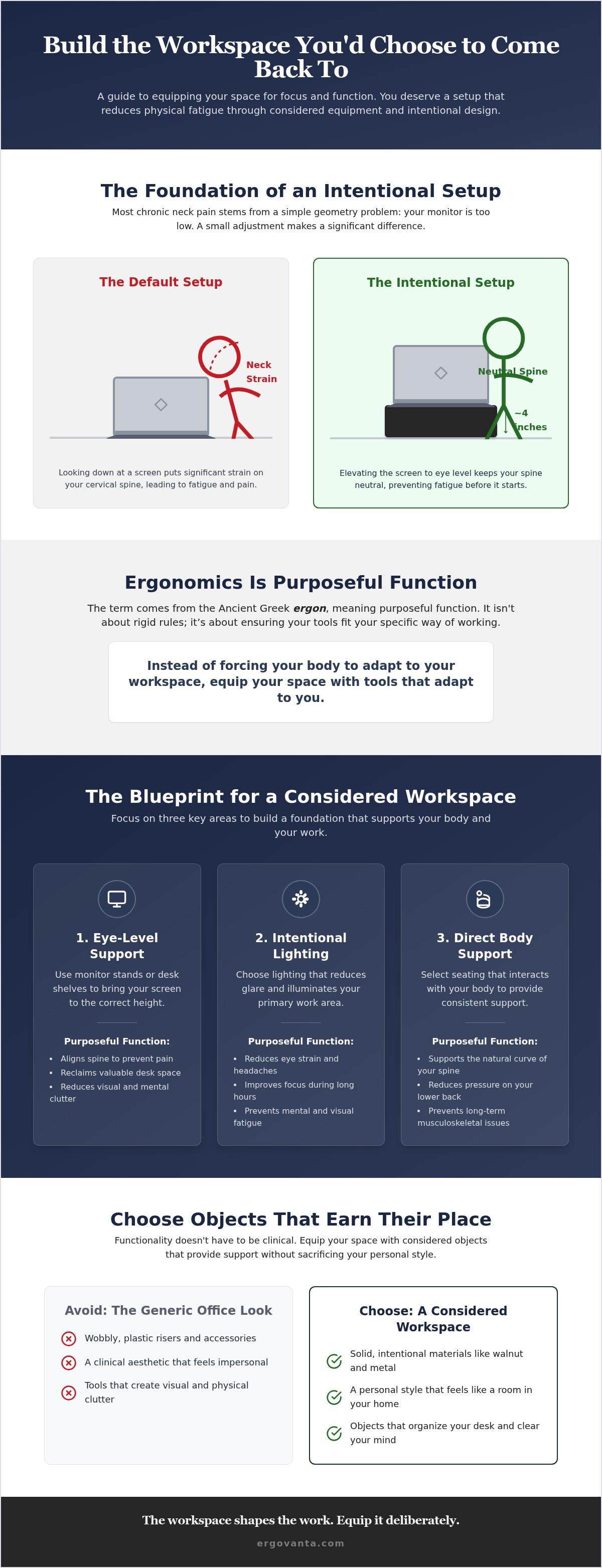
The workspace shapes the work. Equip it deliberately. Most people don't realize that chronic neck pain often stems from a simple geometry problem: your monitor is too low. When you spend hours looking down at a screen, you're putting significant strain on your cervical spine. By adding approximately 4 inches of height, you bring the screen to eye level. This small adjustment keeps your spine neutral and prevents the fatigue that usually sets in by midday. Choosing the right ergonomic products isn't about buying gadgets; it's about building a foundation that respects your body's mechanics.
This approach is central to preventing musculoskeletal disorders that often arise from repetitive strain and poor posture. When your screen is at the correct height, your shoulders drop, your chin stays level, and your focus sharpens. It's a fundamental change that makes the desk a place you'd choose to stay rather than a place you're forced to be.
Choosing a Monitor Stand That Earns Its Place
A monitor stand should do more than just lift a screen. It should organize the chaos on your desk. While plastic risers are common in corporate offices, they often lack the stability required for a serious setup. A walnut monitor stand provides a solid, intentional surface that won't wobble during deep work. These pieces are made for the work, offering space underneath to tuck away keyboards, notebooks, or hard drives. This helps create a clean, organized desk surface that reduces mental clutter. If you need even more room for tech and accessories, a desk shelf offers a broader surface to keep everything within sight but out of the way, ensuring your primary reach zones stay clear.
Seating and Physical Comfort
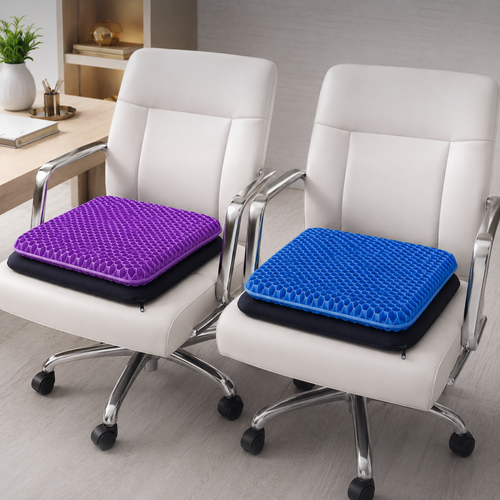
Think about how your body feels after four hours at a desk. If you're shifting in your seat or leaning forward to see your screen, your setup isn't doing its job. You don't necessarily need an entirely new chair to fix this. Often, adding lumbar pillows and seat cushions provides the specific support your lower back needs to stay upright without constant effort. These are the small objects that earn their place by directly improving how you feel. Don't overlook your feet, either. A foot rest helps maintain proper circulation and keeps your knees at a comfortable angle, preventing that restless feeling in your legs. It's about creating a setup that feels like yours and supports long sessions without the physical tax. If you're building a new space and need help choosing the right pieces for your specific needs, you can always reach out to us for guidance.
Lighting and Atmosphere: Equipping for Visual Clarity
Lighting is a primary ergonomic factor that many people overlook. We spend hours staring at glowing rectangles while the room around us stays dim. This creates a harsh contrast that forces your eyes to work overtime. Proper illumination isn't just about seeing your notes; it's about reducing eye strain and the mental fatigue that follows a long day of focus. When your environment is lit intentionally, you don't have to fight against glare or shadows. A well-lit space is a space that gets used.
While general room lighting provides a baseline, it rarely meets the specific needs of deep work. You need to distinguish between ambient light and task lighting. Ambient light fills the room, while task lighting targets the area where the work happens. Following OSHA's ergonomic guidelines means ensuring that your field of vision has balanced light levels. This prevents the "cave effect" where your screen is the only source of light, which is a common cause of headaches and blurred vision.
The Role of the Desk Lamp
Equipping your desk with dedicated desk lamps allows you to highlight the work exactly where it's needed. The best tools for this job feature adjustable arms and dimmable settings. These aren't just features; they're requirements for different tasks. You might need full brightness for reviewing physical documents but a softer glow for late-night typing. This flexibility ensures your eyes aren't constantly straining to compensate for shadows. Monitor light bars are another considered choice. They sit on top of your screen to cast light downward onto your keyboard, effectively reducing screen glare and saving desk real estate. These small objects earn their place by solving specific problems without adding clutter.
Building Atmosphere with Floor and Wall Lights
A functional workspace shouldn't feel like a sterile lab. You can build an atmosphere that you'll choose to come back to by using wall lights and floor lighting to fill the corners of the room. This reduces the sharp contrast between your monitor and the surrounding walls, which is much easier on your eyes over several hours. Warm, considered lighting also has a psychological benefit. It makes the room feel personal and intentional rather than just a place where you happen to have a computer. When the room feels inviting, the work feels less like a burden. When you equip your space with ergonomic products that address both physical support and visual clarity, you create an environment made for the work.
How to Build Your Workspace: A Step-by-Step Selection Guide
The workspace shapes the work. Equip it deliberately. Building an intentional environment isn't about following a corporate checklist or buying everything at once. It's about a logical selection process that puts your needs first. Don't aim to replicate a generic office; build a space that is yours. By focusing on the small objects that earn their place, you turn a room into a functional sanctuary for productivity. This is how you build a workspace you'll choose to come back to.
Step 1: Assess Your Physical Contact Points
Start where your body meets the desk. Evaluate your chair, keyboard, and mouse for immediate comfort. Most people ignore the subtle signals of physical fatigue until the end of the day when the tension becomes impossible to ignore. If you feel a dull ache in your lower back or a sharp pull in your wrists, those are your immediate priorities. Equip your space with tools that provide direct support to these contact points before moving to aesthetics. Every choice of ergonomic products should solve a specific point of friction you feel during your shift.
Step 2: Adjust Your Visual Field
Once your seat is set, look at your screen. Position your monitor so the top third is at eye level. This prevents you from hunching forward, a habit that leads to the dreaded "tech neck." If you are working from a laptop in different locations, a laptop stand is a mandatory piece of equipment. It brings the screen to you rather than forcing you to go to the screen. Complete this step by adding a desk lamp to eliminate shadows on your primary work surface, ensuring your eyes don't have to strain against uneven light or screen glare.
Step 3: Organize the Essentials
Clutter is more than just a mess; it's visual noise that competes for your attention. Use cable management trays to remove the tangle of cords from your line of sight. When your desk surface is clear, you have more mental room for deep work. Select tech accessories like phone stands and headphone stands that keep your most used items within reach but off the main workspace. Choose ergonomic products that earn their place through daily utility and consistent support. A considered workspace is one where every object has a reason for being there, helping you stay focused on the task at hand.
The Considered Workspace: Choosing Objects That Earn Their Place
Workspaces are not factory lines. They are personal environments where you spend the majority of your day. While general reviews might tell you what works for "most people," they often ignore how a space actually feels to inhabit. Building a setup that supports your body is the first step, but choosing objects that earn their place is what makes the room feel like yours. When you equip your space with ergonomic products, you aren't just following a health guideline; you're creating a professional sanctuary designed for focus.
The ritual of starting your day often begins with the physical environment. When you sit down at a desk that has been built with intentionality, your brain recognizes that it's time for deep work. The presence of solid materials and considered equipment provides a sense of stability that generic furniture cannot match. It is the difference between a temporary desk and a workspace you choose to come back to. Every object should serve a purpose, contributing to a sense of order that makes the work feel manageable.
Personalization Through Intentional Decor
A productive environment doesn't have to be sterile. You can balance function with a personal touch by adding faux plants and accent pieces that make a room feel used rather than just staged. Avoid the trap of "cute" or "fun" items that often create more clutter than comfort. Instead, focus on intentional decor that complements your workflow and stays out of your primary reach zones. A well-placed vase or a minimalist figurine can soften the hard lines of tech gear, turning a functional office into a considered space that respects your personal style.
Building Your Advantage
The name Ergovanta is built on two specific ideas: ERGO, from the Ancient Greek ergon for purposeful function, and VANTA, a coined word for advantage. This philosophy is at the core of our approach to the workspace. We don't believe in corporate identity; we believe in personal ownership. You can shop the best sellers to find proven tools that have earned their place in workspaces around the world. These items provide a "VANTA" or advantage by ensuring your physical needs are met so your mind can stay on the task.
Every piece of equipment you add should give you a clear advantage in your work, whether that is physical support or mental clarity. By choosing ergonomic products that respect your body and your style, you build a foundation for long-term consistency. The goal is to create a workspace that works as hard as you do. For the people who do the work.
Equip Your Space for the Long Haul
The workspace shapes the work. Equip it deliberately. You've seen how small adjustments, like adding 4 inches of screen height with a walnut monitor stand or balancing room light levels, prevent the physical tax of long sessions. Choosing ergonomic products isn't a clinical requirement; it's an intentional choice to respect your body and your time. When you focus on tools that provide stability and visual clarity, you build a foundation that supports deep work without the midday fatigue.
Focus on the objects that earn their place. From curated lighting that protects your eyes to seat cushions made for the work, every tool should offer a clear advantage in your daily ritual. Don't aim to replicate a generic corporate office. Instead, build a functional sanctuary that feels personal and intentional. This is the difference between a place where you happen to have a computer and a room that is truly yours.
You have the guide. Now, start building the workspace you'd choose to come back to. For the people who do the work.
Frequently Asked Questions
How do I make a computer table more ergonomic without buying a new desk?
You can equip your existing table with intentional accessories to improve support. Start by adding a monitor stand to bring your screen to eye level. Add a lumbar pillow to your current chair to support your lower back and prevent hunching. Using a foot rest can also help maintain proper circulation without needing a full desk replacement. These small objects earn their place by directly improving how you feel throughout the day.
What are the most important ergonomic products for a small home office?
Prioritize the items that interact directly with your body and save space. A solid monitor stand is vital because it provides necessary height while creating storage space underneath for your tech. Next, consider a laptop stand if you move between different rooms. Finally, a desk lamp with an adjustable arm ensures your workspace is lit for clarity without taking up much real estate. These essential ergonomic products build a functional foundation in tight spaces.
Can a monitor stand really help with neck pain?
Yes, because it addresses the core cause of tech neck. Most monitors sit too low, forcing you to tilt your head forward and strain your cervical spine. Lifting your screen by approximately 4 inches brings the top third of the display to eye level. This keeps your neck in a neutral position and reduces the physical fatigue that usually leads to chronic pain by the end of your shift.
How should I choose between a laptop stand and a full monitor setup?
Choose based on how you actually use your space. If you move between a desk, a kitchen table, and different rooms, a portable laptop stand is the better tool. It ensures your screen is at the right height wherever you go. However, if you spend eight hours at a dedicated desk, a full monitor setup with a walnut monitor stand offers more stability and screen real estate for deep work.
Does lighting count as an ergonomic product?
Lighting is a primary ergonomic factor that is often overlooked. Proper illumination reduces the harsh contrast between your screen and the surrounding room, which prevents eye strain and mental fatigue. Desk lamps and monitor light bars are considered ergonomic products because they provide the visual clarity needed for long hours of focus. A well-lit space is a space that gets used and respects your physical well-being.
How do I organize cables on a minimalist desk?
Use dedicated cable management trays to remove visual noise from your line of sight. Tucking cords into a tray underneath the desk keeps the surface clear and prevents tangles. You can also use small objects like phone stands or headphone stands to keep your tech organized and off the main workspace. When you clear the clutter, you create more mental room for the work you are actually there to do.
What is the ideal height for a monitor stand?
The ideal height ensures the top third of your screen is level with your eyes. For most people, this requires a stand that provides about 4 inches of elevation from the desk surface. This positioning allows you to look straight ahead rather than down, keeping your spine neutral. If you find yourself hunching forward or squinting, your stand is likely too low and needs adjustment to support your posture.
Are ergonomic seat cushions worth it for eight-hour workdays?
Seat cushions are essential for anyone spending serious hours at a desk. They provide the specific support your tailbone and hips need to stay comfortable during long sessions. Even if you have a decent chair, a cushion helps distribute your weight more evenly and prevents the restless feeling that often sets in by midday. It is a small object that earns its place by directly reducing physical fatigue.
Disclaimer
Ergovanta publishes these guides to help people set up better workspaces. Product recommendations reflect what we sell. Specifications, prices and availability are accurate at the time of writing and may change. Nothing here is medical, ergonomic or professional advice; if you have a specific health concern about your workstation, speak to a qualified professional.
From the catalog