June 8, 2026
How to Build a Home Office That Looks Good on Zoom

If 98% of your meetings now include at least one remote participant, your workspace is no longer a private retreat; it is your most frequent public appearance. The room around you shapes the work and how you are perceived before you even speak. It is frustrating to feel like a grainy silhouette or a distracted shadow while trying to contribute. You likely already know the discomfort of looking down at a laptop camera for hours, only to realize your presence on screen feels as strained as your posture. Learning how to make home office look good on zoom is not about status; it is about intentionality.
The workspace shapes the work. Equip it deliberately. You deserve a setup that feels organized and helps you show up with clarity on every call. This guide shows you how to build a space that works for the camera by focusing on considered lighting, ergonomic positioning, and decor that earns its place. We will move past the makeshift habits and help you equip a workspace that is truly made for the work.
Key Takeaways
- Layer your light sources by combining natural window light with dedicated desk lamps to eliminate grain and harsh shadows on your face.
- Discover how to make home office look good on zoom by building a background that feels intentional, organized, and lived-in rather than sterile.
- Position your camera at eye level to create a natural connection with your audience while supporting better posture during long calls.
- Equip your workspace with considered objects that earn their place instead of letting clutter distract from the professional conversation.
- Focus on building a room that gets used; a sharp video presence is the natural result of an honest, well-equipped environment.
Lighting Your Space for Clarity and Focus
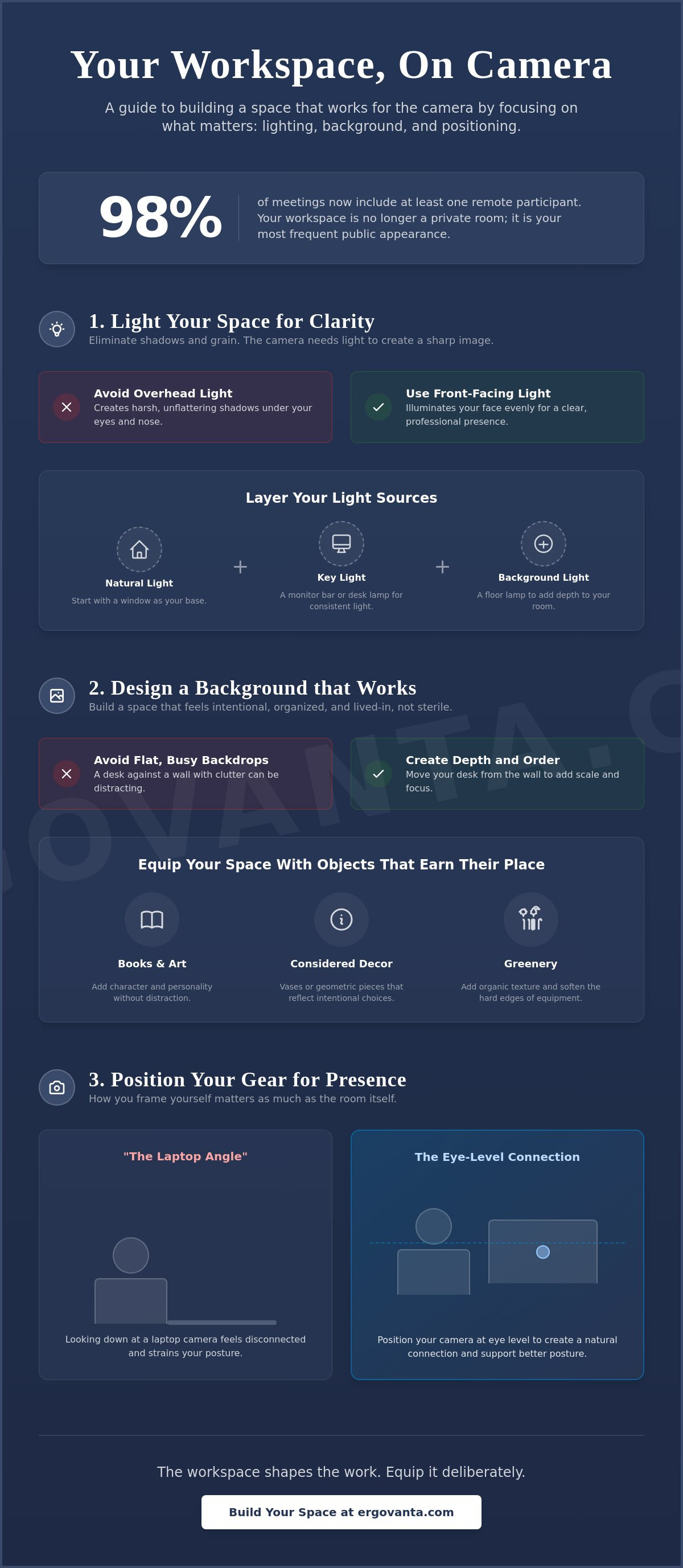
The workspace shapes the work. Equip it deliberately. If you want to know how to make home office look good on zoom, start with the light. Shadows and grain happen when your camera sensor is starved for photons. Position your primary light source behind the camera to illuminate your face evenly. Natural light from a window is a great foundation, but it's also inconsistent. Clouds move and the sun sets. Layer your sources by combining window light with dedicated lamps to maintain a balanced image throughout the day.
As Web Conferencing Technology has evolved into a daily requirement for the people who do the work, the quality of your video feed impacts how your contributions are perceived. Avoid harsh overhead fixtures. These create deep shadows under the eyes and nose, making you look tired or distracted. Instead, focus on soft, front-facing light that clarifies your presence and helps you appear as sharp as your ideas.
To better understand how environment design impacts your on-screen appearance, watch this helpful video:
The Utility of Monitor Light Bars
Monitor light bars are small objects that earn their place by saving valuable desk real estate. They provide focused illumination for your desk and face without the bulky footprint of a traditional lamp. These bars are designed to reduce screen glare, which helps you stay focused during long meetings. Look for models with adjustable color temperatures. You can use cool daylight tones to stay sharp in the morning and shift to warm evening tones as you finish your tasks and prepare to wind down.
Choosing Task Lighting That Earns Its Place
Select desk lamps that offer directional control. You need to be able to angle the light to highlight your face without being blinded by the glare. Consider the physical design of the lamp; it often appears in the corner of your frame and should reflect an intentional choice rather than an afterthought. Don't forget the background. A well-placed floor lamp in the corner of the room adds depth and prevents the flat look of a makeshift setup. Build a room that feels considered and ready for the work.
Designing a Background That Supports the Work
If you spend serious hours at a desk, the room around it matters more than you think. Don't treat your background like a static corporate set or a sterile backdrop. Instead, build a space that reflects a room that actually gets used, where even the architectural details like air returns are upgraded with decorative options from VentCoverCreations.com. When considering how to make home office look good on zoom, depth is your most effective tool. Move your desk a few feet away from the wall if the floor plan allows. This distance naturally creates a soft blur behind you, separating you from your environment and adding a professional sense of scale to the frame.
The workspace shapes the work, so focus on the small objects that earn their place. Books, art, and considered tech accessories provide character without creating a distraction. According to these Tips for a Better Zoom Presence, your environment should support your message rather than compete with it. Organize your shelves to remove chaotic clutter while keeping items that show intentionality. It is about personal ownership of the space you inhabit every day.
Using Greenery to Soften the Space
Equip your background with organic texture to balance the hard edges of your equipment. Adding faux plants is a practical way to bring life to the frame without the ongoing maintenance. Place a taller plant in a corner to fill empty vertical space and hide unsightly power cables that often cluster near the floor. Smaller greenery on a desk shelf adds a layer of visual interest to the foreground, making the entire composition feel more grounded and complete.
Intentional Decor and Accent Pieces
Equip your space with decor that feels personal but professional, such as vases, figurines, or geometric accent pieces. You can even use a bar cart or wine stand in the far background to signal a room that understands the ritual of winding down after the work is done. Keep the most distracting or reflective items out of the direct line of sight of the lens. If you are unsure which objects will best suit your specific camera angle, you can always get in touch with us for a second opinion on your layout.
Positioning Your Gear for Better Presence
The workspace shapes the work. Equip it deliberately. If you spend serious hours at a desk, the height of your camera matters for both your image and your neck. Most people leave their laptops flat on the desk, which forces an unflattering "looking down" angle. This perspective makes you look like you are looming over the conversation; it signals a lack of engagement. Instead, place your camera at eye level to create a natural, peer-to-peer connection. This is a foundational step in how to make home office look good on zoom while keeping your spine in a neutral position.
Center yourself in the frame. You should have a small amount of headroom at the top of the video window, but not so much that you look like you are sinking. A considered setup allows you to sit back and maintain good posture while remaining perfectly framed. It is about making the room work for you, not the other way around. When you aren't hunched over, you look and feel more present in the meeting.
The Role of Laptop Stands and Monitor Arms
You don't need a complex tripod setup to look sharp. Use laptop stands to lift your integrated camera to the correct height without relying on unstable stacks of books. If you use external screens, equip your desk with monitor arms. These clear up valuable surface space and allow for precise positioning. When your gear is at the right height, you can focus on the meeting rather than adjusting your seat every five minutes. It is a simple fix that changes the whole vibe of the call.
Managing Cables and Workspace Essentials
Clear the visual noise to keep the focus on the contribution you are making. Use cable management solutions to hide power cords from the camera view; a tangle of wires in the background is a distraction you don't need. Keep your workspace essentials within reach so you don't have to awkwardly leave the frame during a call. A clean desk surface allows you to own the space. It builds an environment that feels intentional and ready for the work.
Equip Your Space for the Next Call
The workspace shapes the work. Equip it deliberately. By layering your light sources, building a background with depth, and positioning your camera at eye level, you change how you show up on screen. These aren't just aesthetic choices; they're functional improvements to your daily environment. When you understand how to make home office look good on zoom, you spend less time worrying about your image and more time focused on the work that matters.
We build tools for the people who do the work. From considered ergonomic accessories that support your posture to aspirational lighting for intentional spaces, every object should earn its place. For those looking to refine their entire background, professional services like Cabinet refinishing Denver can transform nearby cabinetry into a sleek, professional backdrop. Your setup shouldn't feel like a temporary fix; it should be a space you own. Start making small, intentional changes today to build a workspace you'd choose to come back to.
Build a workspace that works for you: Shop the Ergovanta collection
Frequently Asked Questions
Where is the best place to put a light for Zoom?
The best position for your primary light is behind the camera and slightly above your eye level. This placement ensures your face is evenly illuminated and prevents the unflattering shadows caused by overhead fixtures. If you use a desk lamp, angle it so the light bounces off a wall or use a monitor light bar to soften the glow. It's a simple way to ensure you look clear and focused rather than washed out.
How can I make my home office look better on video without a window?
You can still master how to make home office look good on zoom even in a windowless room by layering artificial light sources. Use a monitor light bar to provide front-facing clarity and a desk lamp for directional task lighting. Add a floor lamp in the background to create depth and prevent the space from feeling like a cave. This intentional approach mimics natural light and provides consistent results regardless of the time of day.
What should I put in my Zoom background?
Your background should feature objects that earn their place; think books, faux plants, or considered accent pieces. These items provide texture and character without distracting from the conversation. Ensure there is some physical distance between your chair and the background to create a natural sense of scale. A room that looks used and organized signals that you are ready for the work without feeling like a sterile corporate set.
Is it better to sit or stand for a Zoom call?
The choice depends on your personal comfort, but the camera must remain at eye level regardless of your position. Standing often helps maintain higher energy levels during long presentations; sitting can feel more grounded for collaborative discussions. If you choose to stand, use a laptop stand to keep your framing consistent. The goal is to build a setup that supports your posture and keeps you present in the meeting.
From the catalog