June 6, 2026
How to Improve Posture While Sitting at a Desk: Build a Better Workspace

The workspace shapes the work. Equip it deliberately. If you spend serious hours at a desk, the room around it matters more than you think. You've likely felt the slow creep of neck tension by mid-afternoon, feeling like your setup is working against you rather than supporting the task at hand. It's frustrating when physical discomfort breaks your focus, especially when you're just trying to get things done. Learning how to improve posture while sitting at a desk isn't about finding a rigid, "perfect" pose; it's about building a space that allows for natural movement.
We believe in the small objects that earn their place and the rooms that actually get used. This guide will show you how to equip your workspace and align your body to stay focused and pain-free during long hours. We'll explore practical ways to sit better without overthinking it, from intentional tool placement to behavioral habits like the 30/30 rule. You'll learn how to build a workspace that feels intentional and leaves you with less pain at the end of the day. For the people who do the work, the environment is the foundation.
Key Takeaways
- Ground your workspace from the bottom up by keeping your feet flat to stabilize your pelvis and spine.
- Discover how to improve posture while sitting at a desk by equipping your space with considered tools like lumbar pillows and foot rests.
- Focus on the small objects that earn their place to ensure your environment supports the work you do.
- Implement the 30/30 rule to reset your physical frame and maintain mental focus throughout the day.
Aligning the Geometry of Your Space
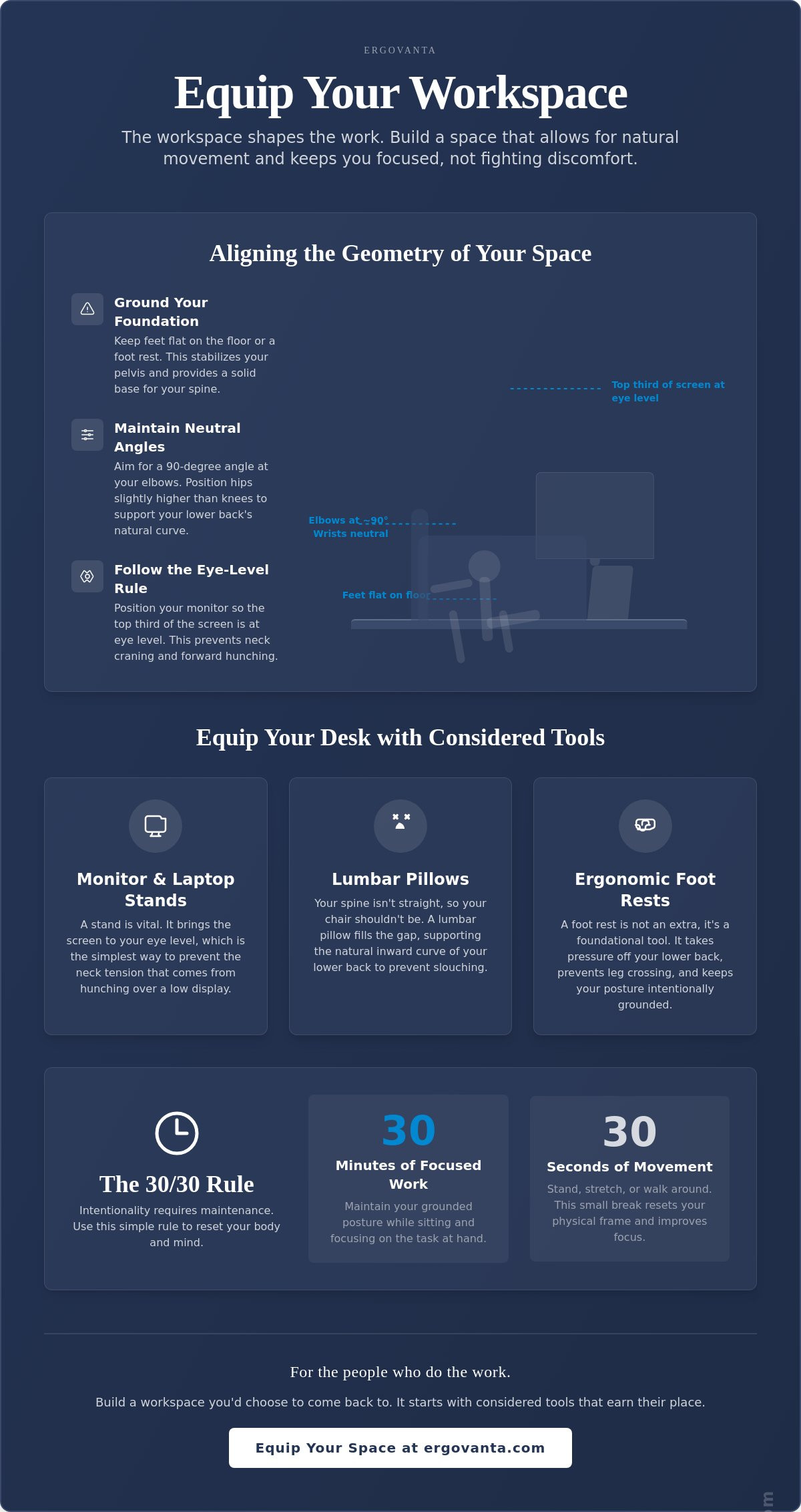
The workspace shapes the work. Equip it deliberately from the ground up. When you're figuring out how to improve posture while sitting at a desk, start with your foundation. Your feet need to be grounded flat to provide a stable base for your pelvis. If your chair is high or your desk isn't adjustable, use a foot rest to close the gap. This isn't about aesthetics; it's about understanding spinal posture to ensure your setup supports your body's natural mechanics.
Position your hips slightly higher than your knees to maintain the natural inward curve of your lower spine. Your wrists should stay flat and neutral, not angled up or down. Ensure your keyboard and mouse are at a height that allows your elbows to rest at a 90-degree angle without tension in your shoulders. If you find yourself shrugging to reach your desk, you're inviting neck pain before the morning coffee is cold.
To see these geometric principles in action, watch this guide on establishing a better frame:
The Eye-Level Rule
When you're refining how to improve posture while sitting at a desk, the monitor height is often the most overlooked factor. Your monitor should be positioned so the top third of the screen is at eye level to prevent neck craning. Equip your desk with a monitor stand or arm to bring the display to you, rather than leaning into it. Hunching often starts with the eyes searching for a screen that is too low. This is the core of "Ergo", the Ancient Greek concept of purposeful function in action. You equip the space to serve the work.
Grounding Your Lower Body
A foot rest is not an optional extra; it's a tool that earns its place by taking pressure off your lower back. It keeps your posture intentional and your alignment grounded. Maintain symmetrical weight through your hips by avoiding the habit of crossing your legs. One-sided leaning creates imbalances that you'll feel by the end of the day. Crossing your legs might feel natural, but it tilts the pelvis and forces the spine to compensate. Keep both feet planted. This symmetry is the simplest way to build a workspace you'd actually choose to come back to.
Equipping Your Desk with Considered Tools
Equipping your space with intentional tools is a practical way to address how to improve posture while sitting at a desk without overthinking it. Good posture is easier to maintain when you have small objects that earn their place in your room. Willpower alone usually fails by mid-afternoon; instead of forcing your spine into a shape it doesn't want to hold, equip your space to support its natural alignment. A lumbar pillow provides the necessary support for the inward curve of your lower back, preventing the slow collapse into a slouch. While some suggest using a rolled-up towel, that's a temporary fix for a permanent problem. A considered workspace requires tools made for the work.
As noted in the MedlinePlus guide to good posture, keeping your back supported is a fundamental step in reducing physical strain. If you spend serious hours at a desk, the room around it matters. A well-organized space reduces the need for awkward reaching or twisting, which often leads to micro-strains over time. By placing your most-used items within easy reach, you maintain a neutral frame and keep your focus on the task at hand.
Support for the Natural Curve
Your spine is not a straight line; your setup should not treat it like one. Standard office chairs often fail to fill the gaps between your body and the seat, leading to fatigue. Using ergonomics and comfort tools helps redistribute your weight effectively. An intentional seat cushion can prevent the pressure buildup that leads to slouching. It's about taking personal ownership of your space to ensure it supports you through the long hours.
Managing Your Display Height
Managing your display height is a critical part of how to improve posture while sitting at a desk. Laptop stands are vital for anyone doing the work from a portable device. Working with a laptop flat on a desk for hours is a recipe for neck tension. Use monitor and laptop stands to bring the screen to your eye level. Monitor arms allow for precision, which is essential if you switch between sitting and standing throughout the day. If you're looking to build a space that works as hard as you do, explore our workspace essentials to see what fits your setup.
Maintaining Intentionality Through Movement
If you spend serious hours at a desk, the room around it matters, but so does how you inhabit it. Even the most considered setup requires you to reset your frame. Movement is medicine. It is a functional requirement for high-level output. This isn't about a "long days" or pushing through pain; it's about recognizing that resting your body is part of the work itself. Whether you are a student finishing a thesis or a freelancer managing a project, these rituals are for anyone doing the work.
Understanding how to improve posture while sitting at a desk means acknowledging that the human body isn't meant to be static. Static loads lead to fatigue, and fatigue leads to slouching. Reset your frame every 30 minutes to stay sharp. This intentionality ensures your workspace remains a place where you can actually get things done without the cost of chronic tension. It's about taking ownership of your physical state throughout the day.
The Ritual of the Reset
Stand up and reach for the ceiling to decompress your spine after a deep work session. This simple action counters the compression that happens when you're focused. For more specific guidance, you can follow posture advice from a physical therapist to target common tension points. The chin tuck is another no-nonsense tool to realign your head over your shoulders. It effectively resets your cervical spine, preventing the neck strain that often comes from leaning into a screen.
Lighting and Visual Focus
Poor lighting is a hidden posture killer. When you can't see your work clearly, you naturally lean forward, which pulls your spine out of alignment. This subconscious shift destroys the geometry you've worked to build. Equip your desk with intentional lighting to reduce eye strain and keep your back firmly against your chair. A monitor light bar is a considered choice for providing clarity without taking up valuable desk real estate. By lighting your space properly, you remove the physical incentive to hunch, allowing your body to sit naturally and stay focused.
Build the Workspace That Works for You
The room around you is the foundation of the work you do. Mastering how to improve posture while sitting at a desk isn't about a single purchase or a rigid set of rules; it's about the intentional alignment of your space and your habits. By grounding your lower body, setting your screens at eye level, and embracing the ritual of the reset, you take ownership of your physical environment. You've learned that purposeful function in action requires both the right geometry and considered objects for intentional spaces. When your environment is built with intention, the friction of physical discomfort fades, allowing you to focus on what actually matters. It's about creating a place that doesn't just house your tasks but actively supports your frame through every hour of the day.
If you're ready to make your setup more supportive, equip your workspace with considered tools at Ergovanta. We build things for the people who do the work. Start with one small adjustment today, whether it's shifting your lighting or adding a lumbar support. Building a better workspace is a process, and every considered choice brings you closer to a day without chronic tension.
Frequently Asked Questions
How high should my monitor be for the best posture?
Your monitor should be positioned so the top third of the screen is level with your eyes. This alignment prevents you from tilting your head up or down, which is a major factor in how to improve posture while sitting at a desk. If you're using a laptop, a dedicated stand is essential to reach this height. The goal is to bring the work to your eyes rather than moving your body to the screen.
Do I really need a foot rest if my feet reach the floor?
A foot rest is useful even if your feet touch the floor because it stabilizes your pelvis and lower back. Many people find that to keep their elbows at a 90-degree angle to the desk, they must raise their chair height. This often leaves feet dangling or barely touching. A foot rest ensures your weight is distributed symmetrically, preventing the hip tilt that leads to lower back pain.
How often should I stand up when working at a desk?
You should aim to stand or move for at least 30 seconds every 30 minutes. This is known as the 30/30 rule and serves as a key part of behavioral ergonomics. Even the most considered workspace setup requires you to reset your physical frame. Frequent micro-breaks prevent your muscles from locking into a static position, which helps you maintain focus and reduces the risk of musculoskeletal strain over time.
Can a better desk lamp actually help my posture?
Yes, a better desk lamp can significantly help your posture by reducing the need to lean forward. When lighting is poor, you subconsciously hunch to see the details of your work. This forward lean is a common obstacle when learning how to improve posture while sitting at a desk. Equipping your space with intentional lighting provides the clarity needed to keep your back against your chair and your neck neutral.
From the catalog