May 31, 2026
How to Reduce Screen Glare: A Guide to Building a Clearer Workspace

The workspace shapes the work. Equip it deliberately. Glare is a lighting problem, not a screen problem, and if you spend serious hours at a desk, the room around it matters more than you think. You've likely felt the midday eye fatigue or struggled to figure out how to reduce screen glare when the sun hits your window at the wrong angle. It's frustrating to have your focus broken by reflections that shouldn't be there.
We agree that a washed-out display and persistent headaches shouldn't be part of your routine. You shouldn't have to squint at your own data just because it's 2:00 PM. This guide will show you how to identify light traps and position your desk to work with your environment rather than against it. You'll learn to build a workspace that feels intentional and functional without having to work in total darkness.
We'll cover everything from OSHA's 30 foot-candle illumination standards to the specific objects, like monitor light bars and matte protectors, that earn their place on your desk. It's time to build a space where the contrast is high and the eye strain is gone for good.
Key Takeaways
- Identify the difference between direct and veiled glare to pinpoint exactly where your workspace lighting is failing.
- Use the 90-degree rule to position your screen perpendicular to windows; this simple move eliminates the worst natural light reflections.
- Learn why overhead lighting often works against you and how to equip your desk with task-specific tools like monitor light bars.
- Master the fundamentals of how to reduce screen glare by building a lighting setup that prioritizes high contrast and visual clarity.
The Physics of Glare: Identifying Your Workspace Light Sources
The workspace shapes the work. If you spend serious hours at a desk, the room around it matters more than you think. Glare isn't just a nuisance; it's a breakdown in how you see your own output. Physically, it happens when light reflects off your monitor and washes out the contrast between pixels. Understanding the physics of screen glare is the first step in reclaiming your visual clarity and learning how to reduce screen glare for good.
To better understand this concept, watch this helpful video:
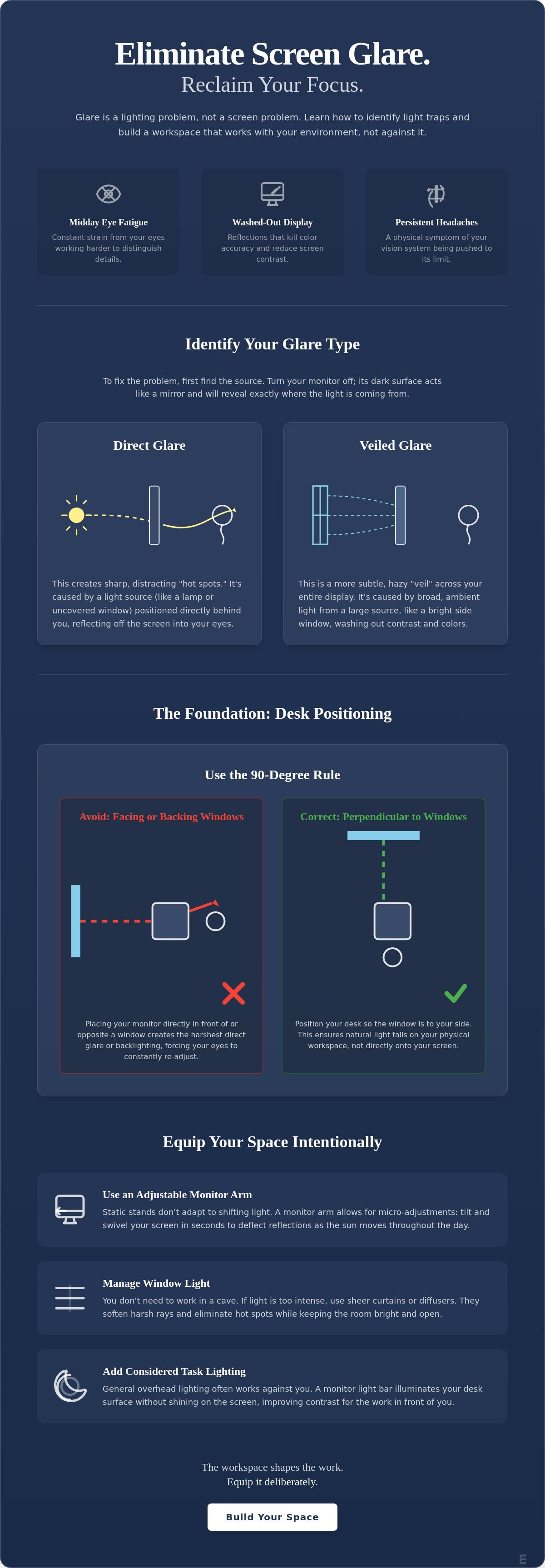
Before you buy a filter, try a simple, no-cost diagnostic. Turn your monitor off. A dark screen acts like a mirror, revealing exactly where light hits the glass. If you see a clear reflection of a window or a bright lamp, you've found your primary culprit. This is the most effective way to start identifying how to reduce screen glare in your specific room. It's about seeing the environment for what it is: a collection of light sources that need to be managed.
Direct vs. Veiled Glare
Not all reflections look the same. Direct glare creates sharp, distracting hot spots that force you to shift your head to see "around" the light. Usually, this comes from a light source sitting directly behind you, like an unshaded bulb or a desk lamp pointed at the wrong angle. Veiled glare is more subtle but equally draining. It happens when ambient light, often from a nearby window, creates a hazy "veil" across the entire display. Veiled glare is the primary cause of midday eye fatigue because it kills color accuracy and forces your eyes to work harder to distinguish shapes.
High-contrast environments are essential for people who do the work. When your screen is clear, your focus remains on the task rather than the environment. Building a space that minimizes these distractions isn't about style. It's about making sure your workspace essentials actually support your productivity. If you can't see the details, you can't do the work well.
Strategic Positioning: How to Arrange Your Desk for Visual Clarity
The floor plan is your first line of defense. If you're struggling with how to reduce screen glare, start by looking at where your desk sits in relation to the windows. OSHA guidelines suggest positioning your monitor at a right angle to windows rather than directly in front of or behind them. This "90-degree rule" is highly effective because it ensures that natural light falls across your workspace rather than reflecting directly off the glass into your eyes. It's a simple, intentional change that keeps your display clear without forcing you to work in the dark.
Avoid "backlighting" at all costs. While facing a window might seem like a good way to enjoy the view, it creates a high-contrast environment that is brutal on your vision. Your eyes have to constantly adjust between the bright outdoor light and the darker screen, which is a fast track to midday fatigue. Instead, position your desk so the window is to your side. If the light is still too intense, a slight tilt of the monitor can often deflect the remaining reflections away from your field of vision.
The Role of Monitor Arms in Light Control
Static stands are often the root of the problem because they don't account for the fact that the sun moves. A versatile monitor mount allows you to tilt and swivel the screen to adapt to shifting light patterns throughout the day. These micro-adjustments are essential for maintaining a clear view as the afternoon sun creeps across the room. By equipping your space with adjustable tools, you gain the ability to deflect glare in seconds without having to move your entire desk setup. It's about building a space that is flexible enough to handle the environment it lives in.
Window Management Without Sacrificing the View
You don't need to block out the world to see your work. If the 90-degree rule isn't enough to handle a particularly bright day, use diffusers or sheer curtains to soften the light. The goal is to break up the harsh rays that cause "hot spots" on your screen while still letting the room feel open. Position your desk so that natural light lands on your physical workspace (your keyboard or notepad) rather than the display itself. If you're having trouble finding the right balance for your specific room, feel free to reach out to us for advice on how to build a setup that works for you.
Intentional Lighting: Equipping Your Space with Glare-Free Tools
The workspace shapes the work. Equip it deliberately. Many people assume that solving reflections means working in a cave, but the goal is to build a space where light works for you. Overhead lighting is often the primary enemy of a clear display. Standard ceiling fixtures cast light in every direction; this creates a hazy "washout" effect that makes it nearly impossible to see fine details. If you're trying to figure out how to reduce screen glare, the solution isn't to turn off all the lights; it's to change where that light lands.
Shift your focus to task lighting. This means choosing workspace essentials that illuminate your desk surface without ever touching your monitor glass. Another effective strategy is bias lighting. By placing a soft light source behind your screen, you reduce the harsh contrast between a bright display and a dark wall. This balanced approach eliminates the "floating screen" effect that often leads to late-afternoon eye strain. Mastering how to reduce screen glare is about control, not just brightness.
The Advantage of Monitor Light Bars
Traditional desk lamps often take up valuable space and can still reflect off your screen if positioned poorly. Monitor light bars solve this through an asymmetric optical design. These lighting solutions project light at a specific angle that covers your keyboard and documents while keeping the monitor itself in a "dark zone." Asymmetric lighting is the professional standard for glare-free desks because it provides the visibility you need without the reflections you don't. It's a small object that earns its place by staying out of your line of sight.
Building a Balanced Light Environment
A considered workspace relies on layers. Combine soft ambient light, such as a floor lamp in the corner, with focused task lighting at your desk. This prevents the room from feeling clinical or uninspiring. The key is adjustability. Use tools that allow you to change brightness levels to match the time of day. As the natural light from your windows fades, your intentional lighting should step in to maintain a consistent environment. Equip your desk with tools that support the serious hours you put in. The room should be made for the work.
Build a Workspace That Works for You
The workspace shapes the work. Equip it deliberately. By now, you understand that reflections aren't a permanent condition of your room. It's a solvable conflict between your display and your light sources. Whether you're applying the 90-degree rule to your desk layout or swapping harsh overhead lights for an intentional monitor light bar, every considered choice protects your focus. You've learned how to reduce screen glare by identifying light traps and using flexible positioning to your advantage.
It's time to equip your space with tools that earn their place. At Ergovanta, we provide considered ergonomic solutions designed for the people who do the work. We offer free shipping on orders over $100 to help you build the room you'd choose to come back to every day. Our collection is built on the idea that your environment should support the hours you put in, not work against them.
Equip your space with intentional lighting and ergonomic tools at Ergovanta. Building an intentional environment is a process of constant refinement. Take ownership of your space today and feel the difference in your next midday session.
Frequently Asked Questions
How do I stop sunlight from reflecting on my monitor without closing the blinds?
Position your monitor perpendicular to the window to ensure natural light falls beside your screen rather than directly onto it. If the light remains too harsh, install sheer curtains or diffusers to soften the rays without plunging your room into darkness. These tools are considered additions to your space that maintain a clear, high-contrast display while allowing you to keep the view during the hours you put in.
Are anti-glare screen protectors worth it for professional work?
They are a practical investment for glossy displays that lack built-in matte coatings. For approximately $9 to $17, a multi-pack of matte protectors can effectively diffuse reflections on tablets or laptops. While these can introduce a very slight haze to the image, it's a known trade-off for anyone learning how to reduce screen glare in bright, window-heavy environments. They help keep your workspace functional and your eyes fresh.
Does a monitor light bar actually help reduce screen glare?
A monitor light bar helps by using an asymmetric optical design that illuminates your desk surface without casting light onto the screen glass. Unlike traditional lamps that create "hot spots" or washout, these bars focus light downward to clarify your physical documents and keyboard. This specific lighting method is a reliable way to solve how to reduce screen glare while maintaining a well-lit desk. It's a small object that earns its place by protecting your focus.
What is the best monitor position to avoid eye strain and glare?
The optimal position is at a 90-degree angle to any windows with the top of the screen at or slightly below eye level. This perpendicular orientation prevents both direct and veiled glare from natural light sources from hitting the glass. Tilt the screen slightly backward, roughly 10 to 20 degrees, to deflect overhead light reflections away from your field of vision. This intentional setup ensures your workspace is made for the work rather than for fighting reflections.
From the catalog