July 31, 2026
How to Set Up an Ergonomic Standing Desk: A Practical Guide
The desk is just a platform; the setup is the work. Buying a height-adjustable frame is only the first step toward a functional day. If you spend serious hours at a desk, you already know that standing isn't a magic fix for physical fatigue. In fact, standing with poor alignment can be more taxing than sitting in a bad chair. Knowing how to make a standing desk more ergonomic is the difference between a workspace that supports your focus and one that leaves you with a stiff neck by noon.
You deserve a space built for the way you actually work. This guide provides the intentional measurements and adjustments needed to build a workspace you'll choose to come back to. We will break down the precise angles for your wrists, the correct height for your screens, and the small objects that earn their place on your desktop. Learn to master the transition from sitting to standing without losing your momentum or your comfort. Equip your space deliberately to support the work you do every day.
Key Takeaways
- Learn the specific elbow-to-desk measurements that keep your forearms parallel and your wrists comfortable.
- Find out why the top third of your screen is the critical marker for preventing chronic neck strain.
- Discover how to make a standing desk more ergonomic by using monitor arms and intentional lighting to reduce eye strain.
- Manage standing fatigue by incorporating foot rests and intentional movement into your work rhythm.
- Equip your space with considered accessories that earn their place by supporting your focus.
Finding Your Ideal Standing Height and Alignment
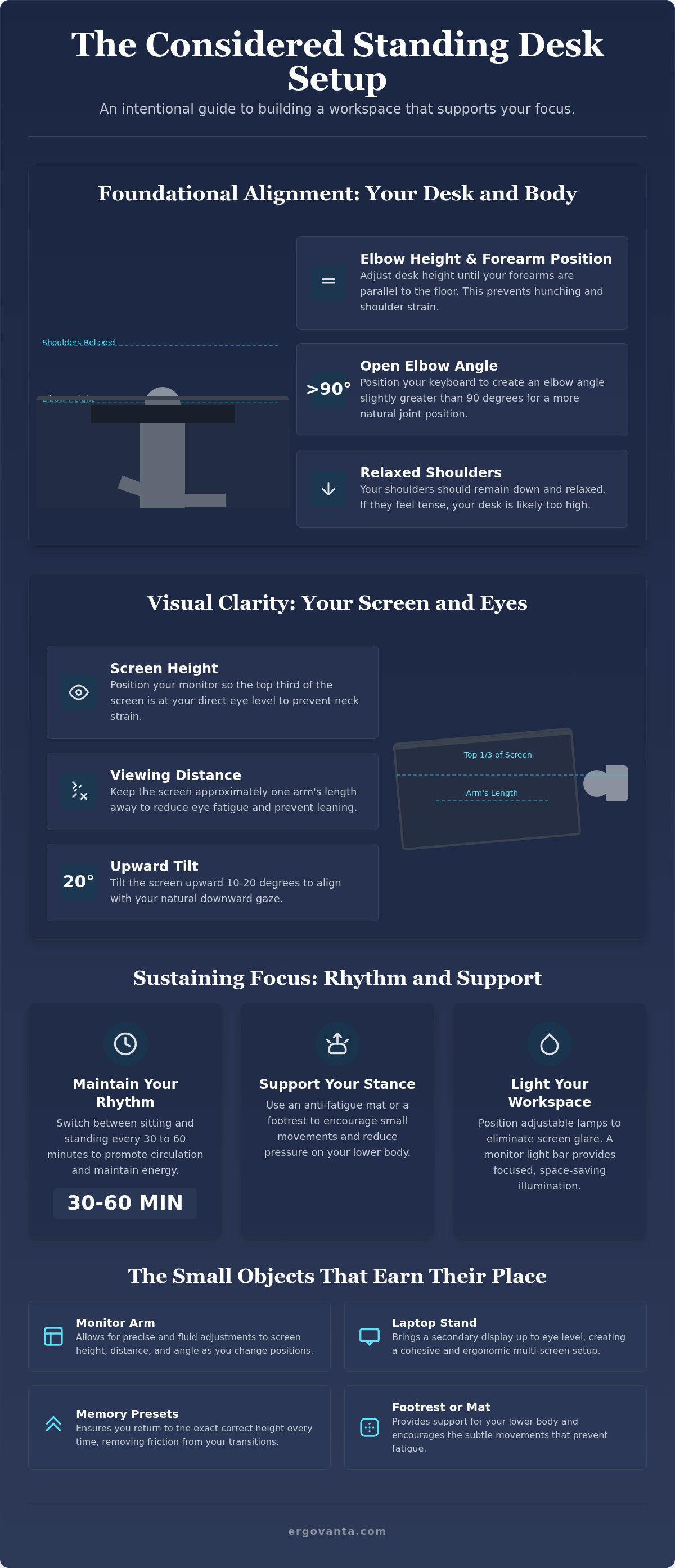
The workspace shapes the work. Equip it deliberately, starting with your elbow height. Your desk surface should meet you where your body naturally rests, not the other way around. Adjust the desk height until your forearms are parallel to the floor when you type. This simple alignment prevents the unconscious hunching that leads to neck and shoulder tension during deep focus sessions.
A Standing desk overview confirms that while these tools offer flexibility, their benefits depend entirely on how you use them. If you're wondering how to make a standing desk more ergonomic, start by observing your shoulders. They should remain relaxed and down, never bunched toward your ears. If you feel tension in your upper back, your desk is likely too high, forcing your arms to "shrug" just to reach the keys.
The Elbow Rule for Keyboard Placement
Position your keyboard so your elbows form an angle slightly greater than 90 degrees. This open angle is more natural for your joints and helps maintain a neutral wrist position. Avoid reaching forward for your mouse or keyboard; keep your input devices close to your body to minimize strain on your rotator cuffs. Consider your footwear as well. A change from flat shoes to supportive sneakers can alter your ideal height by nearly an inch. Adjust your space to match your foundation. Applying these rules is the first step in how to make a standing desk more ergonomic for serious hours of work.
Transitions Between Sitting and Standing
Standing all day is just as taxing as sitting all day. Build a habit of switching positions every 30 to 60 minutes to keep your circulation active and your mind sharp. Most people find success with a consistent rotation, but your body will tell you when it's time to shift. Use the memory presets on your desk controller to save your exact measurements. This ensures you return to a considered setup every time you move, removing the friction from your transitions. Intentionality is the key to a workspace made for the work.
Placing Your Monitor and Lighting for Visual Clarity
Visual alignment is the anchor of a functional setup. If you spend serious hours looking at a screen, eye level is the most important measurement for preventing chronic neck pain. Most people make the mistake of looking down at their displays, which forces the cervical spine into a compromised position. To understand how to make a standing desk more ergonomic, you must ensure the top third of your screen sits exactly at eye level when you are standing tall. This allows your gaze to rest naturally without tilting your chin or straining your upper back.
Static stands often fail because the ideal screen height changes slightly when you transition from a chair to your feet. Equip your desk with monitor arms to allow for quick, intentional adjustments throughout the day. These tools ensure your display is always where it needs to be, regardless of your posture. According to University of Minnesota ergonomic tips, maintaining this alignment helps manage fatigue and keeps your body in a neutral state for longer periods of deep focus. It is a simple change that makes a significant difference in how you feel after eight hours at the desk.
Achieving the Correct Screen Distance
Distance matters as much as height. Place your monitor approximately an arm’s length away from your face to reduce eye strain and prevent leaning forward. Tilt the screen slightly upward, about 10 to 20 degrees, to match your natural line of sight. If you use a laptop as a secondary screen, don't leave it flat on the desk surface. Use a laptop stand to bring the smaller display up to your primary monitor's height. This prevents the constant, taxing head movements between different focal points.
Lighting Your Workspace Deliberately
Lighting must be considered to prevent glare as your desk height changes throughout the day. Position desk lamps to provide even illumination that doesn't reflect off the screen surface. A monitor light bar is an intentional choice for those who want to save space while reducing eye fatigue during late hours. Ensure your light source is adjustable to accommodate the shifting shadows of a moving desk. If you need help choosing the right tools for your space, reach out to our team for guidance on building a setup made for the work.
Managing Fatigue with Foot Support and Movement
Standing for serious hours is a skill that requires more than just a good desk; it requires active support. If you spend your day on your feet, the floor beneath you is as critical as the surface in front of you. Static standing can be just as taxing as sitting if you don't allow your body to move. When considering how to make a standing desk more ergonomic, the real advantage comes from supporting your lower body and encouraging frequent weight shifts. This prevents pressure buildup in your heels and lower back, keeping you focused on the work rather than your discomfort.
The room around your desk matters. Ensure you have enough space to move your feet freely and change your stance throughout the day. Guidelines from OSHA's Computer Workstation eTool emphasize that varied posture and proper support are essential for maintaining a neutral body position. Equip your space with ergonomic accessories that make movement feel natural rather than like a chore. By prioritizing the way your body interacts with the floor, you build a workspace that supports long hours of deep focus.
The Role of Foot Rests and Massage Boards
Use a foot rest to elevate one foot at a time. This simple shift reduces strain on the lumbar spine and keeps your pelvis in a more neutral position. You might also consider a foot massage board. These tools keep your feet engaged and improve circulation while you think. Select objects that earn their place by providing both functional support and durability. A considered setup is one where every tool serves a purpose in your daily rhythm.
Cable Management for Safe Movement
Build a clean environment by securing your cables so they do not snag during height adjustments. It's a practical necessity. Ensure your monitor and power cables have enough slack to reach the desk's highest setting without tension. Check out workspace essentials for organization tools that keep the floor clear and your transitions smooth. A workspace made for the work is one where you can move without friction or distraction.
Build the Workspace You'd Choose to Come Back to
The workspace shapes the work. Setting up a standing desk isn't about following a rigid manual; it's about intentionality and personal ownership. You've learned that alignment starts at the elbows, visual clarity depends on monitor height, and managing fatigue requires active foot support. These are the considered adjustments that help you stay in the flow for serious hours. If you were wondering how to make a standing desk more ergonomic, remember that the small objects earn their place through utility and purposeful function.
At Ergovanta, we provide the tools for function in action. Our curated selection is designed for the people who do the work, offering a clear advantage in your daily rhythm. Your workspace is a personal environment for doing the work, built deliberately to support your focus rather than hinder it. It's time to equip your room with the support it deserves. Build a workspace that works for you by contacting Ergovanta today. Take ownership of your environment and get back to the work that matters.
Frequently Asked Questions
How high should a standing desk be for my height?
Your desk should be level with your elbows. Adjust the surface until your forearms are parallel to the floor and your wrists remain neutral while you type. This height changes depending on your footwear; so check your alignment whenever you switch from sneakers to flats. It's a simple measurement that prevents the unconscious shoulder shrugging that ruins a good work session. Equip your space deliberately to match your body's natural resting point.
Is it better to stand or sit all day at work?
Neither position is a permanent solution for focus. Standing all day is just as taxing on your circulation as sitting all day; so the best approach is a consistent rotation. Switch positions every 30 to 60 minutes to keep your energy steady and your mind sharp. Learning how to make a standing desk more ergonomic is mostly about facilitating these transitions without losing your momentum or causing physical fatigue.
How do I stop my legs from hurting when using a standing desk?
Shift your weight frequently and use a foot rest to keep your lower body engaged. Elevating one foot at a time reduces pressure on your lumbar spine and prevents blood from pooling in your legs. A foot massage board is another intentional choice to keep your feet moving while you think. If your legs hurt, it's usually a sign that you've been static for too long. Movement is the work.
Should I use a monitor arm with a standing desk setup?
Yes, because a monitor arm provides the flexibility that a static stand lacks. Your ideal screen height changes slightly when you move from sitting to standing. An adjustable arm allows you to keep the top third of your display at eye level in both positions. This is a primary step in how to make a standing desk more ergonomic while saving valuable space on your desktop for the objects that actually matter.
From the catalog