August 3, 2026
Lumbar Support for Office Chairs: Serious Workspaces

The workspace shapes the work. Equip it deliberately. If you spend serious hours at a desk, the room around it matters more than you think. Chronic lower back fatigue isn't just a physical distraction; it's a signal that your environment isn't supporting your output. Finding the right lumbar support for office chair use is about more than just adding a cushion. It's about choosing a considered tool that stays in place and fits the look of a room made for the work.
You likely already know the frustration of cheap gear that slides around or clunky braces that look like medical equipment. You need tools that earn their place through both function and form. This guide will show you how to choose and position lumbar support to build a workspace that works as hard as you do. We'll cover how to identify the exact spot where your spine needs the most help, which materials actually hold their shape, and how to integrate these objects into a space you'll want to come back to.
Key Takeaways
- Understand how the natural S-curve of your spine dictates your focus and why physical support is a deliberate choice for doing better work.
- Master the height and depth adjustments required to properly set up your lumbar support for office chair use; ensuring the tool actually does the job instead of just sliding around.
- Identify the materials that earn their place: such as memory foam that uses your own body heat to contour for a fit that feels like yours.
- Equip your space with the philosophy of purposeful function by choosing tools that provide a clear advantage in the room where the work happens.
Lumbar Support: A Foundation for Focused Work
The workspace shapes the work. Equip it deliberately. If you spend serious hours at a desk, physical support is a choice you make to protect your focus. The lumbar curve is the natural inward S-curve of the lower spine that requires consistent support to maintain a neutral alignment while seated. When this curve collapses, productivity usually goes with it. Choosing a dedicated lumbar support for office chair use is a move toward ownership of your environment. It ensures that the room you work in is actually built for the work you do.
A separate tool often earns its place more effectively than built-in chair mechanics. Many chairs offer static support that hits the wrong spot, whereas an adjustable pillow allows for precision. This intentionality helps you avoid the 3 PM slump caused by physical fatigue. Instead of fighting your chair, you can stay locked into your task. Integrating a specific lumbar support for office chair setups means you don't have to compromise on your physical well-being to get the job done.
The cost of an unconsidered setup
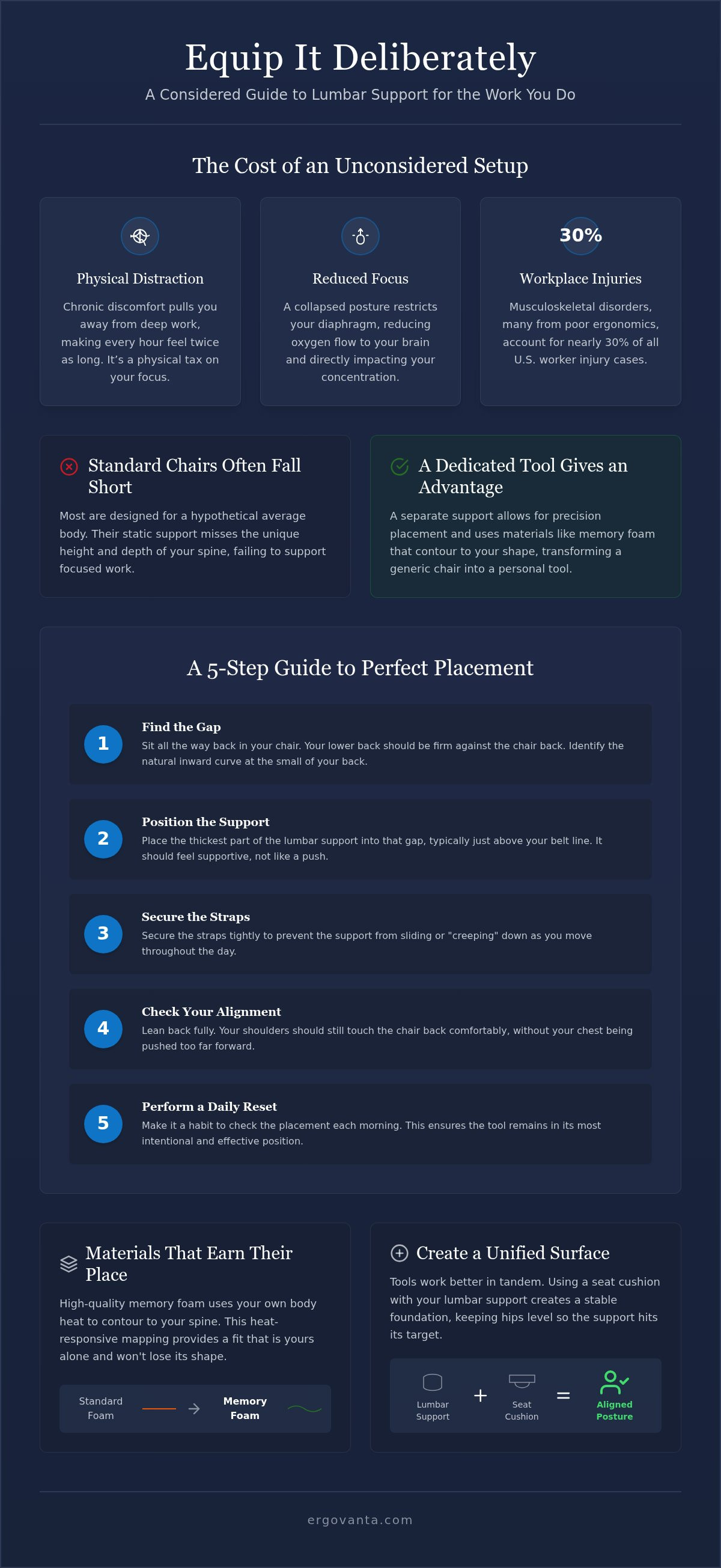
Physical discomfort is a distraction that pulls you away from deep work. It's hard to solve complex problems when your lower back is screaming for a break. Slouching does more than just hurt; it affects how you breathe. A collapsed posture restricts your diaphragm and reduces oxygen flow to your brain. Musculoskeletal disorders account for nearly 30% of all worker injury cases in the U.S., and many of these stem from unconsidered workstation setups. This physical tax makes every hour of work feel twice as long.
Why standard chairs often fall short
Most furniture is designed for a hypothetical average body. In reality, the ergonomic design of office chairs often misses the mark for specific needs. Standard chairs rarely account for the unique height or depth of every individual spine. High-quality lumbar pillows bridge the gap between a generic chair frame and your actual back. By equipping your seat with a tool that fits your frame, you transform a standard piece of furniture into a considered workspace made for the long haul.
How to position and use lumbar support for office chairs
The workspace is an ecosystem. If you've chosen a lumbar support for office chair use, you've made a deliberate decision to support your body. But an unconsidered placement ruins the effect. You need to equip your chair so the support feels like an extension of the frame; not an afterthought that slides around. Proper height and depth are the variables that determine if a tool earns its place or becomes a distraction.
Materials matter for the long haul. High-quality memory foam earns its place through heat-responsive contouring. It uses your own body heat to soften and map to your specific spine, providing a fit that is yours alone. This functional interaction ensures the support doesn't lose its shape after a single session. Objects also work better in tandem. Using a seat cushion alongside your lumbar support creates a unified seating surface. This combination keeps your hips level, allowing the lumbar pillow to hit the correct vertebral target.
A 5-step guide to perfect lumbar placement
- Step 1: Sit all the way back in your chair to identify the natural gap at the base of your spine.
- Step 2: Place the thickest part of the support in the small of your back, typically just above the belt line.
- Step 3: Secure the straps tightly to prevent the "creeping" effect that happens when you move during the day.
- Step 4: Lean back and ensure your shoulders still touch the chair back without your chest being pushed too far forward.
- Step 5: Perform a daily reset every morning to ensure the support hasn't migrated from its intentional position.
Finding the right fit for your chair
Different chairs require different approaches. A mesh task chair might need a support with more aggressive straps, while a solid wood frame requires a pillow with a non-slip backing. According to UCLA's guide to selecting a chair, the goal is always to fit the equipment to the individual. Pay close attention to seat depth. If your lumbar pillow is too thick for a shallow seat, it will push your thighs off the edge and create new pressure points. If you have questions about how a specific tool fits your current setup, reach out to us for more details.
Equipping a considered workspace with tools that earn their place
The workspace is more than just a desk and a chair; it is an environment built for action. At Ergovanta, we look at tools through the lens of Ergo, the Ancient Greek concept of purposeful function in action, and Vanta, a coined word for advantage. A lumbar support for office chair use is a foundational part of this philosophy. It is not a status symbol. It is a functional object that earns its place by removing the physical friction from your day. When you equip your space with workspace essentials that work in harmony, you build a room that you actually choose to come back to.
A holistic approach means looking beyond the back. While spinal support is vital, your eye level dictates your posture as much as your chair does. If your screen is too low, you will naturally hunch forward, rendering even the best lumbar support for office chair setups ineffective. The goal is to build an ecosystem where every object supports a neutral, focused position. This intentionality ensures the room gets used for its intended purpose without causing long-term strain.
The ergonomic ecosystem
True comfort comes from the interaction of multiple tools. Pairing your lumbar support with monitor and laptop stands ensures your neck remains neutral while your lower spine is supported. This setup prevents the tension that usually migrates from the shoulders down to the lower back. Proper lighting is also essential. Poor visibility often causes a "lean-in" habit that ruins your posture, even with a cushion in place. A well-lit desk allows you to sit back and let your equipment do the heavy lifting.
For the people who do the work
We build for the people who spend serious hours at a desk. This means selecting small objects that provide long-term utility rather than temporary fixes. To ensure your workstation is fully equipped, follow this final checklist:
- Position the lumbar support in the small of your back to maintain the natural S-curve.
- Set the top of your monitor at or slightly below eye level to prevent neck tilt.
- Ensure your feet are flat on the floor to keep your hips level and spine neutral.
- Place lighting to avoid screen glare and reduce the need to slouch forward.
Build the room that works as hard as you do
The workspace shapes the work. Equip it deliberately. By now, you understand that physical support isn't a medical fix but a choice for sustained focus. You've learned how to position your lumbar support for office chair use to match your spine's natural curve and why heat-responsive memory foam earns its place. A considered setup is about more than a single cushion; it is an ecosystem of intentional tools that provide purposeful function in action.
Ergovanta is for the people who do the work. We provide an advantage through considered tools for intentional spaces. When every object in your room has earned its place, you can stop fighting your environment and start doing your best work. It is time to move past unconsidered setups and build a space that reflects your dedication. Build a workspace you want to come back to. Your best work happens in the room you choose to be in. Get to it.
Frequently Asked Questions
Where exactly should lumbar support sit on an office chair?
Lumbar support should sit in the small of your back, which is the natural inward curve located just above your belt line. This specific placement ensures the cushion fills the gap between your spine and the chair frame, maintaining your neutral alignment. If the support is positioned too high, it will push your mid-back forward; if it is too low, it will fail to prevent the slouching that leads to fatigue.
Can I use a lumbar pillow with any type of office chair?
Yes, you can equip almost any seat with a separate lumbar pillow to make it more functional for the work. These tools are designed to bridge the gap between a generic chair frame and your actual body, whether you are using a mesh task chair or a solid wood frame. The key is to use the adjustable straps to lock the support into an intentional position so it doesn't migrate during long sessions.
What is the difference between memory foam and mesh lumbar supports?
Memory foam earns its place by using your body heat to contour to your specific shape, while mesh supports rely on tension and airflow. Memory foam provides a more personal fit that maps to your spine's unique S-curve, offering dense support for the long haul. Mesh is often more breathable but can lack the necessary depth to fully support a "serious" workspace setup. For most people who do the work, the heat-responsive nature of foam provides a clear advantage.
How do I know if my lumbar support is positioned correctly?
Your lumbar support for office chair use is correctly positioned when your shoulders rest comfortably against the backrest while your lower spine feels fully supported. You shouldn't feel like the cushion is shoving your chest forward or forcing your hips toward the front edge of the seat. If you can maintain a neutral posture for hours without conscious effort, the tool is doing its job. It should feel like a subtle, integrated extension of your own frame.
From the catalog