August 13, 2026
Modern Desk Accessories: Building a Workspace Made for the Work

The workspace shapes the work. Equip it deliberately. Most people spend their best hours at a desk, yet those surfaces are often filled with generic office supplies that feel corporate and impersonal. You probably know the feeling of visual clutter pulling at your attention or the physical discomfort that sets in after a few hours of focus. It’s frustrating when your tools don't match the quality of your output. We believe modern desk accessories shouldn't just be decor; they must be intentional tools that earn their place through function and rhythm.
You deserve a setup that supports your focus rather than distracting from it. This article will show you how to equip your workspace with items that provide physical comfort and mental clarity. We’ll look at how to build a streamlined environment where every object has a purpose, from monitor light bars that reduce eye strain to laptop stands that fix your posture. By the end, you’ll know how to create a desk setup that feels owned and ready for the work ahead.
Key Takeaways
- Learn how to identify tools that earn their place by prioritizing purposeful function over visual filler.
- Understand why ergonomics is more about your physical comfort than clinical metrics or medical devices.
- Equip your space with modern desk accessories that reduce friction and support your daily focus.
- Follow a deliberate method to build your setup by clearing the surface and positioning your primary tools first.
- Build a workspace that evolves with your career by focusing on the items that prove their utility over time.
Why Your Workspace Shapes the Work You Do
The workspace shapes the work. Equip it deliberately. Your desk is the physical foundation of your daily professional rhythm, acting as the container for every idea you generate and every task you complete. When this environment is cluttered or poorly arranged, it creates friction between thought and execution. You shouldn't have to fight your furniture to get things done. By choosing modern desk accessories that serve a specific purpose, you build a space that supports your focus rather than draining your energy. Intentionality in your surroundings leads directly to intentionality in your output.
A considered space is one you choose to come back to every morning. It isn't about following a trend or buying what everyone else has; it's about creating a setup that feels like yours. When you take ownership of your environment, you stop treating your desk as just a place to sit and start treating it as a tool for your career. This shift in perspective allows you to equip your workspace with items that actually earn their place through daily utility.
The Psychology of an Intentional Desk
Visual clutter creates mental drag. It is difficult to maintain deep focus when your peripherals are a mess of tangled cables and generic plastic. Streamlined tools provide the mental clarity needed for high-level tasks. This isn't just about "tidying up"; it is supported by the study of designing equipment and devices to fit the human body and its cognitive needs. When you use tools designed for purposeful function, you remove the tiny distractions that break your flow. Focus on objects that serve a repeatable purpose, such as a dedicated stand for your phone or a monitor arm that keeps your screen at eye level. This approach ensures your desk remains a sanctuary for work, not a storage unit for office junk.
From Corporate Identity to Personal Ownership
Most office environments are designed for the average of everyone, which usually means they are built for no one in particular. Generic office supplies often feel impersonal and lack the specific utility your unique workflow requires. To do your best work, you need to move away from the corporate template. Your desk should reflect how you actually move and think throughout the day. Consider these factors when choosing your tools:
- Workflow Requirements: Do you need quick access to physical notes, or is your work entirely digital?
- Physical Feedback: How do you feel after four hours at the keys? The right modern desk accessories should solve for discomfort before it starts.
- Personal Connection: Small objects, like a specific lamp or a textured desk mat, help the space feel owned rather than assigned.
Your desk is a tool for your career. Build it to be as efficient and personal as the work you produce.
Defining Modern Utility: Tools That Earn Their Place
Modern utility is a filter, not an aesthetic. While some retailers treat modern desk accessories as a checklist of style categories, we view them as tools that must earn their place on your surface. If an object doesn't solve a specific problem, like eye strain or poor posture, it is simply "desk filler." These are the items that look good in a staged photo but provide zero functional value during a long shift. To build a workspace made for the work, you must prioritize tools that reduce the friction of your daily tasks and support your physical well-being. Every item on your desk should have a clear job to do.
Choosing tools that solve specific problems, like a monitor arm that frees up desk real estate or a lumbar pillow that supports your back, creates a workspace that actually serves you. Avoid the trap of temporary design trends that prioritize a specific "look" over how you actually feel at the end of the day. A considered space is built on durability and material quality, ensuring that your setup remains functional for years rather than months.
The Essential Accessory Categories
Every intentional setup starts with three pillars: lighting, support, and connectivity. Lighting solutions, such as monitor light bars or adjustable desk lamps, are vital for reducing eye fatigue during evening sessions. Support tools like monitor arms and laptop stands ensure your physical alignment stays consistent, preventing the neck strain that often cuts focus short. Finally, tech accessories like wireless chargers and cable management kits keep your tools powered without the visual noise of tangled cords. These aren't just additions; they are the basic requirements of a focused day.
Materiality and the Work Environment
The materials you choose define the longevity of your space. Wood and metal offer a sense of permanence and reliability that generic plastic cannot match. These materials age well, developing a character that reflects years of consistent use. Texture also plays a significant role in how you experience your desk. A felt or leather desk mat changes the tactile feedback of your surface, making it feel more intentional and owned. When you equip your space with considered materials, you aren't just buying a product. You are investing in a tool that will withstand daily use and become a permanent part of your professional environment.
Building a setup that lasts requires looking beyond the surface. If you need help identifying which tools fit your specific workflow, you can get in touch with us to discuss how to build a space you'll want to come back to.
Balancing Ergonomics with Personal Style
The workspace should serve you. Ergonomics is often framed as a clinical set of medical metrics, but it's simpler than that: it is about how you feel. When you choose modern desk accessories, you shouldn't have to decide between a sharp aesthetic and physical well-being. A considered setup supports your body while looking exactly the way you want it to. If you find yourself adjusting your posture to fit your furniture, the tools have failed. Intentional design means your equipment adapts to your movements, not the other way around. This is the essence of purposeful function; ensuring your environment provides a distinct advantage during long sessions of focus.
Visual Order vs. Physical Comfort
Achieving a streamlined look doesn't require sacrificing comfort. In fact, the most effective tools often provide both. Monitor arms clear valuable desk space while ensuring your screen is at eye level, which prevents the neck strain that comes from looking down for hours. Similarly, desk lamps provide focused light exactly where the work happens, reducing eye fatigue without cluttering the room. Laptop stands are another essential; they prevent the "hunch" by raising your screen to a natural height, allowing you to maintain a healthy posture without needing a bulky, permanent office setup.
Selecting Tools Based on Feel
When you evaluate a new accessory, ask yourself two questions. Does this object make your work easier to start? Does it reduce physical fatigue over an eight-hour day? If the answer is no, it doesn't belong on your desk. Personal style is important, but it must be anchored in ownership of your physical health. You can find items that provide this balance in our ergonomic comfort collections, where every piece is designed for considered support. Choose items that provide tactile feedback you actually enjoy, whether it is a firm seat cushion or a textured foot massage board.
Ownership of your workspace means recognizing that your body is the most important tool you have. If you're constantly rubbing your wrists or squinting at a dark screen, your environment is working against you. Equip your desk with items that reduce physical friction. A well-placed monitor light bar or a considered laptop stand can be the difference between finishing the day energized or finishing it exhausted. Build the workspace you'd choose to come back to by prioritizing the tools that respect the person doing the work.
How to Build Your Desk Setup Step by Step
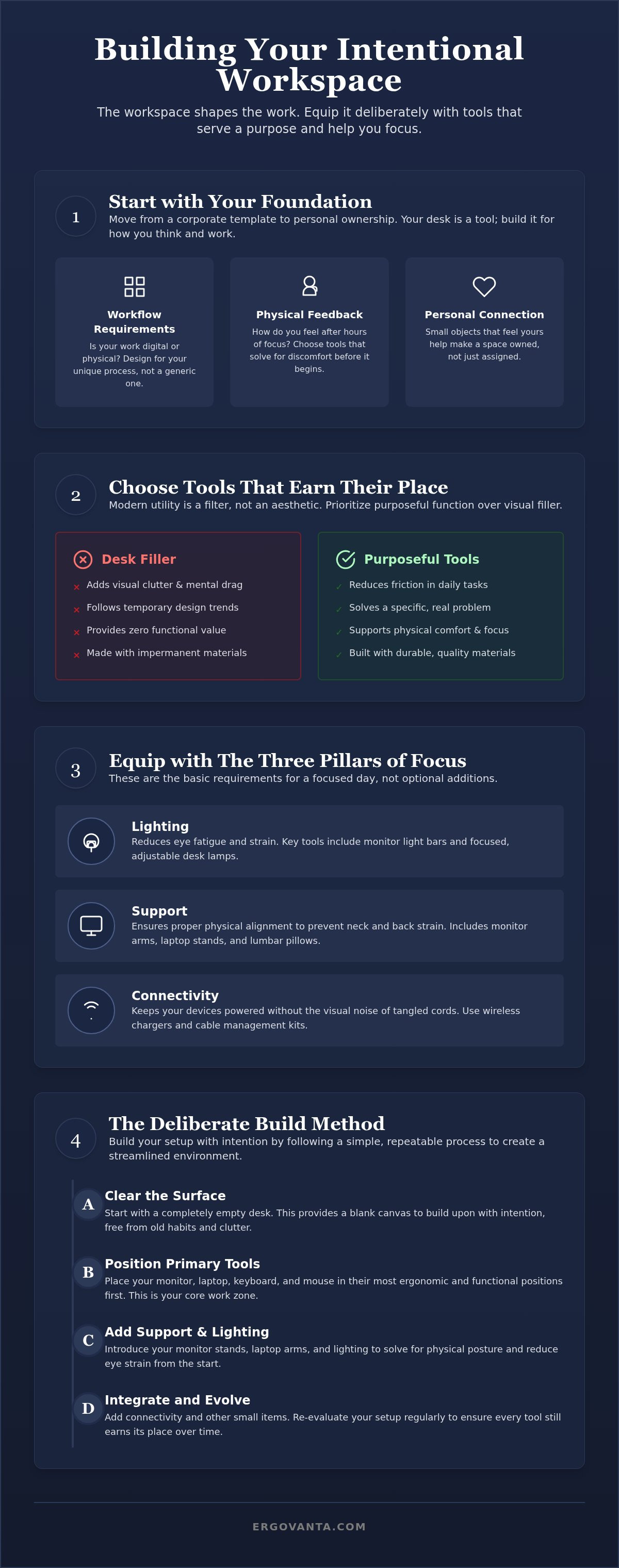
The workspace shapes the work. Equip it deliberately. Building a setup isn't about buying a "look" in a single transaction; it's a process of intentional addition. Start with the surface. Clear everything that does not have a purpose. You need a blank slate to see what actually belongs. Most desks are crowded with items that are only used occasionally, creating visual noise that competes for your attention. By stripping the desk back to zero, you can identify the modern desk accessories that truly solve a problem for your specific workflow.
Identify your primary work tool and position it first. This is usually your monitor or laptop. Once the anchor is set, add lighting that covers your primary work zone without creating glare on your screen. Introduce organization tools only for the items you use daily. If an object isn't touched every single day, it doesn't earn a spot on your primary surface; put it in a drawer or on a shelf. Finally, test the setup for a full week. If you find yourself reaching for a tool that isn't there, add it. If something is in your way, remove it. This iterative process ensures your space remains functional and personal.
The Foundation: Monitor and Laptop Positioning
Use monitor stands or arms to reclaim your desk surface. These tools lift your screen to a height that keeps your neck neutral, preventing the late-afternoon strain that breaks your rhythm. When your monitor is at eye level, your body stays aligned without conscious effort. Keep frequently used tech, such as your phone or headphones, within easy reach but off the main surface using dedicated stands. This keeps the path between your keyboard and your thoughts clear, ensuring you have the room needed for deep work.
The Atmosphere: Lighting and Decor
Layer your light to prevent eye fatigue. Use a desk lamp for focused tasks and ambient light for the rest of the room to balance the brightness of your screen. While we focus on utility, a single non-functional item can ground the space. A faux plant or a small figurine helps the desk feel like yours rather than a corporate station. Check out our workspace essentials for a curated starting point that avoids the clutter of mass-market bundles. These items are chosen because they earn their place through daily utility and considered design.
Equipping Your Space for the Long Haul
Your workspace is a living environment. It is never truly finished; it evolves alongside your career and the specific projects that define your days. When you choose modern desk accessories, you're looking for tools that earn their place through consistent, daily utility. It's easy to get caught up in the desire for a complete overhaul, but a considered space is built slowly. Invest in pieces that solve real problems, such as a monitor arm that saves your neck or a lamp that stops you from squinting at 4 PM. These tools provide a professional advantage by removing the friction that slows you down.
Avoid the temptation to over-equip. A desk crowded with "productivity hacks" is often just a desk crowded with distractions. Focus on the essentials that work for you, not the ones that look good on a social media feed. Your space should be a source of focus, not a museum of unused gadgets. When every object on your desk has a job to do, you create a foundation for deep work that lasts throughout your career.
Maintaining an Intentional Workspace
Intentionality requires maintenance. We recommend a monthly desk audit to ensure your setup still serves your current workflow. Clear the surface and ask of every object: "Does this make my work easier to start?" If the answer is no, remove it. While your software and hardware will inevitably change, your physical tools should be permanent. A well-built monitor stand or a solid desk lamp doesn't need to be replaced every two years. These are the small objects that make the big work possible, providing a sense of reliability in an ever-changing professional landscape.
Ready to Build Your Better Workspace?
The right tools are waiting to help you do your best work. We design for the people who do the work, focusing on purposeful function and the advantage that a well-equipped room provides. You don't need a corporate template to be successful; you need a space that feels like yours and supports your unique rhythm. Whether you are building from scratch or refining a setup you've used for years, we have the considered tools you need. For help equipping your professional environment, reach out to our team. Let's build the workspace you'd choose to come back to.
Equip Your Workspace for the Work Ahead
The workspace shapes the work. Equip it deliberately. Building a setup that supports your daily rhythm is a process of intentional selection; it is never a one-time purchase. You have learned how to identify tools that earn their place through purposeful function and how to balance your physical feel with visual order. By choosing modern desk accessories that provide a professional advantage, you create an environment where focus becomes the default state. Every object on your surface should solve a specific problem; whether it is eye strain from poor lighting or neck fatigue from a low screen.
Our tools are designed for the people who do the work. We believe that purposeful function meets professional advantage when you equip your space with considered tools for professionals. Your desk should be a place you choose to come back to every morning; a space that is entirely yours and built for the long haul. Take ownership of your environment and let it support the career you are building.
The right tools don't just sit on your desk; they help you move forward.
Frequently Asked Questions
What are the most essential modern desk accessories for a small workspace?
Prioritize vertical space to keep your surface clear. A monitor arm and a laptop stand are the most essential modern desk accessories for tight setups because they lift your devices off the desk. This reclaims the area underneath for tactile tasks or note-taking. Add a monitor light bar to provide focused illumination without the footprint of a traditional lamp. These tools ensure your small area remains functional without becoming a cluttered storage zone.
How do I choose between a monitor arm and a monitor stand?
Choose a monitor arm if you need to reclaim desk real estate and require maximum flexibility for your screen. Arms clamp to the edge of the desk, freeing up the area directly underneath for other tools. A monitor stand is a better choice if you prefer a stable, non-clamping solution or need built-in storage drawers. Both options serve the primary goal of keeping your screen at eye level to prevent neck fatigue during long sessions.
Does the material of my desk mat actually affect my work?
Yes, the material changes the tactile feedback of your surface and how your mouse moves. Felt mats provide a warm, textured feel that is ideal for comfort during long typing sessions. Leather or smooth synthetic mats offer a faster glide for high-precision mouse work. Selecting the right material is an intentional choice that reduces physical friction and defines the boundaries of your primary work zone, helping you stay focused on the task at hand.
How can I make my home office feel more professional without a full renovation?
Focus on lighting and organization to shift the atmosphere of the room. Replace generic overhead lights with a dedicated desk lamp that offers warm, focused light for your work zone. Hide visual clutter using cable management kits and dedicated stands for your phone and headphones. These small changes help the space feel like a room made for the work rather than just a temporary corner of your home.
What kind of lighting is best for reducing eye strain at a desk?
Layered lighting is the most effective way to reduce eye fatigue throughout the day. Use a monitor light bar to illuminate your workspace directly without creating screen glare. Pair this with an adjustable desk lamp for task-specific focus and soft ambient light to balance the brightness of your monitors. This setup prevents your eyes from working too hard to adjust between a bright screen and a dark room, extending your comfortable focus time.
Are ergonomic desk accessories worth the investment for a hybrid worker?
Ergonomic tools are vital because they protect your physical well-being regardless of where you sit. If you spend serious hours at a desk, a laptop stand and a lumbar pillow are essential for maintaining a neutral posture. These accessories are often portable and ensure that your home setup is just as supportive as a permanent office station. They prevent the physical fatigue and discomfort that often cut focus sessions short.
How do I hide cables on a minimalist desk setup?
Use cable management trays and clips to route cords along the underside or back of your desk. Grouping cables with sleeves or ties prevents the visual noise of tangled wires that creates mental drag. For a truly minimalist setup, prioritize wireless chargers for your phone and peripherals. Keeping cables out of sight ensures your modern desk accessories remain the focus of the space rather than the mess behind them.
Can modern desk accessories improve my productivity?
Accessories improve productivity by removing the physical and mental friction that interrupts your flow. When your monitor is at the right height and your lighting is balanced, you can work longer without discomfort. Intentional tools that manage your tech and clear your surface reduce the distractions caused by visual clutter. A well-equipped workspace allows you to spend less time adjusting your environment and more time doing the work that matters.
Disclaimer
Ergovanta publishes these guides to help people set up better workspaces. Product recommendations reflect what we sell. Specifications, prices and availability are accurate at the time of writing and may change. Nothing here is medical, ergonomic or professional advice; if you have a specific health concern about your workstation, speak to a qualified professional.
From the catalog