July 12, 2026
Office Lighting: How to Equip a Workspace for Serious Work

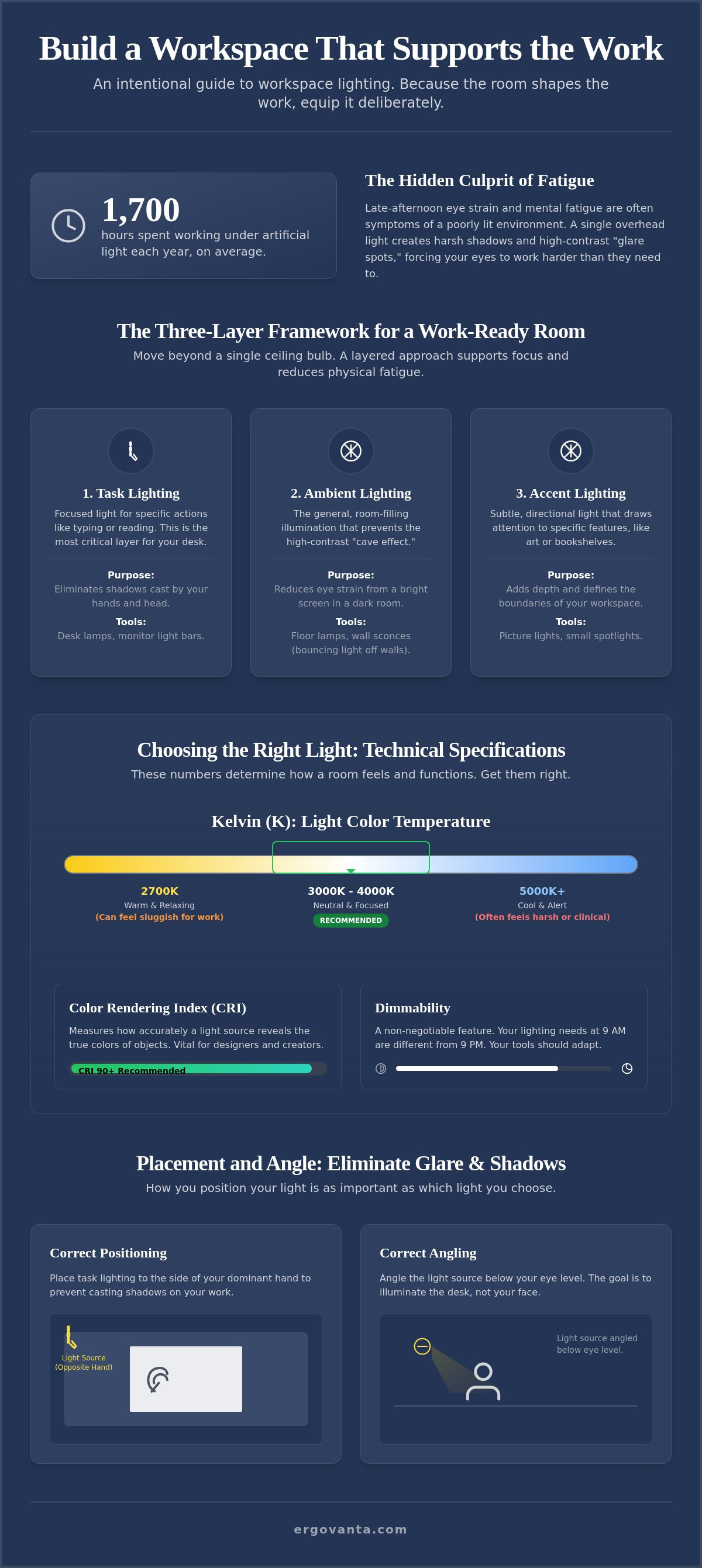
The average person spends over 1,700 hours every year working under artificial light. If you spend serious hours at a desk, the room around it matters more than you think. Most of us have felt that late-afternoon fatigue or the sharp eye strain from screen glare; we often blame the workload when the culprit is actually the environment we built. It is time to treat your workspace like the tool it is.
Equipping your space with the right task lighting for your home office is not about decoration: it is about sustaining the work. You deserve a setup that feels intentional and supports your focus during the long hours. This guide will show you how to build a layered lighting arrangement that reduces physical fatigue and eliminates harsh shadows. We will cover the specific lumen levels and color temperatures needed to create a room that earns its place in your daily routine.
Key Takeaways
- Move beyond the basic ceiling light by mastering a three-layer framework designed for the way you actually work.
- Learn how to select specific task lighting for your home office to eliminate harsh shadows and reduce late-afternoon eye strain.
- Understand how Kelvin and Lumens impact your focus: choosing the right levels prevents your room from feeling clinical or sluggish.
- Build a workspace you would choose to come back to by equipping your desk with intentional objects that earn their place.
The Layers of a Work-Ready Room: Beyond the Ceiling Light
The workspace shapes the work. Equip it deliberately. If you spend serious hours at a desk, relying on a single overhead bulb is a compromise you don't need to make. Effective lighting is a tool for the work; it requires a three-layer framework: task lighting for the desk, ambient lighting for the room, and accent lighting for the atmosphere. A room with only one light source creates harsh shadows and high contrast, forcing your eyes to work harder just to see the screen. This imbalance is the root of the eye strain and physical fatigue many people feel by mid-afternoon.
To better understand how different setups change a room, watch this breakdown of desk lighting options:
Task Lighting: The Tools for Focus
Task lighting is the most critical layer for any desk. It is focused light designed to illuminate a specific action, such as reading, typing, or sketching. When you set up task lighting for home office use, you are putting light exactly where the work happens. Equip your desk with a desk lamp or a monitor light bar to eliminate the shadows cast by your own head or hands. For smaller desks where every inch of surface area must earn its place, a monitor light bar is a considered choice that keeps the workspace clear while providing high-quality illumination.
Ambient and Accent Light: Managing the Room
Task light alone can't do all the heavy lifting. Without ambient light, you get the "cave effect" where a bright monitor sits in a dark room. This high contrast is a primary cause of late-afternoon fatigue. Use floor lamps or wall lights to bounce light off the ceiling and walls, creating a soft, even glow that fills the space. Finally, accent lights help define the boundaries of your workspace. These small objects earn their place by framing the room. Lighting should be considered alongside your other workspace essentials to create a cohesive environment you actually choose to come back to.
How to Choose the Right Light for Your Desk
Technical specifications determine the utility of your room. Choosing the wrong bulb is a technical error that dictates how you feel in your space; a bulb that is too blue can make your office feel like a sterile lab, while one that is too yellow can make you feel sluggish by noon. To build a setup that actually supports your focus, you need to understand the difference between Kelvin (the color of the light) and Lumens (the amount of light). For those who work with color, such as designers or creators, the Color Rendering Index (CRI) is also vital. Look for a CRI of 90 or higher to ensure the objects on your desk look exactly as they should.
Kelvin: Warm vs. Cool for Intentional Work
Standardize your color temperature to the 3000K to 4000K range. This is the sweet spot for a room that feels both natural and focused. While cooler light (5000K+) mimics daylight and can boost alertness, it often feels harsh in a home environment once the sun goes down. Conversely, warmer light (2700K) is designed for winding down. Save those warmer tones for your bar or refreshment area rather than your primary work surface. According to these American Occupational Therapy Association ergonomic tips, supplementing ambient light with targeted sources is essential to prevent eye fatigue and maintain focus.
Placement and Angle: Eliminating Glare
Position your task lighting for home office use to the side of your dominant hand. This simple adjustment prevents you from casting shadows across your own work while writing or sketching. You should also angle the light below eye level. The goal is to illuminate the desk, not your eyes. If you use multiple screens, a monitor arm helps clear surface area so your lamps can be positioned exactly where they are needed. Dimmability is also a non-negotiable requirement. Your lighting needs at 9:00 AM are different from your needs at 9:00 PM; your tools should be able to adapt. If you have questions about which setup fits your specific workflow, get in touch with us to discuss your space.
Equipping Your Space with Intentionality
Personal ownership is the foundation of a workspace that actually works. Build the environment you would choose to come back to by selecting objects that earn their place through function and durability. Every tool on your desk should be made for the work; skip the descriptors that mask poor quality in favor of hardware that lasts. When you choose task lighting for home office use, you're making a long-term investment in your focus. Consider your lights alongside your other workspace essentials to ensure every element works together as a cohesive system.
The Small Objects that Earn Their Place
A well-built desk lamp is a lifelong tool. Look for materials like walnut, steel, or high-grade polycarbonate that can withstand years of daily use. Every item in the room should have a purpose. If a light does not improve your ability to do the work, it simply does not belong on your desk. Intentionality means understanding that the physical environment is a direct support system for your output. If you find yourself squinting or shifting in your seat to find a better angle, your setup hasn't earned its place yet.
Building a Room That Gets Used
A room that gets used is one that balances technical performance with personal ownership. You can integrate lighting with decor like faux plants to soften the industrial feel of a tech-heavy desk. This isn't about decoration for the sake of it; it's about building a space that feels like yours. The goal is an environment where the physical setting makes it easier to do the work. Once your setup is complete, perform a final check: ensure the room feels intentional and the light supports your focus. Ready to build? Equip your workspace with considered lighting from Ergovanta.
Build a Workspace That Earns Its Place
Focus is a finite resource that is often drained by a poorly lit environment. By applying the layered framework and technical standards discussed, you transform your desk from a place of physical fatigue into a setting optimized for clarity. Your task lighting for home office setup is the most direct tool you have to reduce eye strain and sustain your output throughout the day.
Ergovanta is built on the principle of purposeful function in action. We curate objects that earn their place by meeting the specific demands of a long workday. If you are ready to move past uninspiring room atmospheres and build a workspace you would choose to come back to, our team is ready to assist. Equip your space with considered lighting and experience the difference of an intentional environment. For the people who do the work, every detail matters.
Frequently Asked Questions
Is LED or incandescent better for office lighting?
LED is the superior choice for a workspace that gets used. It offers a 60 to 70% energy reduction compared to traditional bulbs and operates at a much cooler temperature; this is vital when a lamp is positioned close to your hands or face. With a lifespan of 50,000 to 100,000 hours, an LED fixture is a tool that earns its place by requiring almost zero maintenance over years of work.
How many lumens do I need for a home office desk?
You should aim for 500 to 1,000 lumens for effective task lighting for home office use. While the general room may only need 300 to 500 lux, the specific area where you read, write, or sketch requires higher intensity to prevent squinting. Choosing a dimmable light allows you to adjust this output based on the time of day and the specific requirements of your current project.
What is the best color temperature for working at a computer?
The sweet spot for computer-based work is between 3000K and 4000K. This range provides a neutral, focused light that feels natural without being clinical. While cooler temperatures above 5000K can help with morning alertness, they often feel too harsh in a home environment after dark. A user-selectable range allows you to match the light to your natural rhythm throughout the day.
How do I reduce glare on my computer screen?
Eliminate glare by positioning your light source to the side of your monitor rather than directly behind or in front of it. Angle the lamp so the light hits your desk surface below eye level; you should never see the bare bulb while working. Balancing your desk lamp with ambient floor or wall lights also helps by reducing the high contrast between a bright screen and a dark room.
From the catalog