September 25, 2026
Office Refresh Checklist: A Guide for Facilities Managers
What if the best office refresh starts with what’s getting in the way, not what’s on a shopping list? An office refresh checklist for facilities managers should begin with recurring friction: awkward workstations, lighting that makes focus harder, or shared areas that don’t support the work people actually do. The right fix may be smaller than a furniture order.
A refresh also has to fit around daily operations, available resources, and the needs of people who use the space. Buying first can leave you with new items and the same old problems. Start by listening, observing, and separating persistent issues from one-off requests.
This guide helps you identify workspace friction and set a practical order for assessment, purchasing, and rollout. Use the checklist to decide what deserves attention now, what can wait, and how to make choices based on real needs.
Key Takeaways
- Use an office refresh checklist for facilities managers to connect each workspace issue with a specific need before considering purchases.
- Define the refresh scope, then map who uses the space and what work happens there.
- Compare issues by who they affect, how often they occur, and what depends on the fix. Address recurring disruptions before optional visual changes.
- Plan the rollout around owners, dependencies, purchasing, communication, and the realities of keeping the workplace running.
- Choose items only after the need is clear. Check fit, adjustability, compatibility, shared use, and maintenance before selecting them.
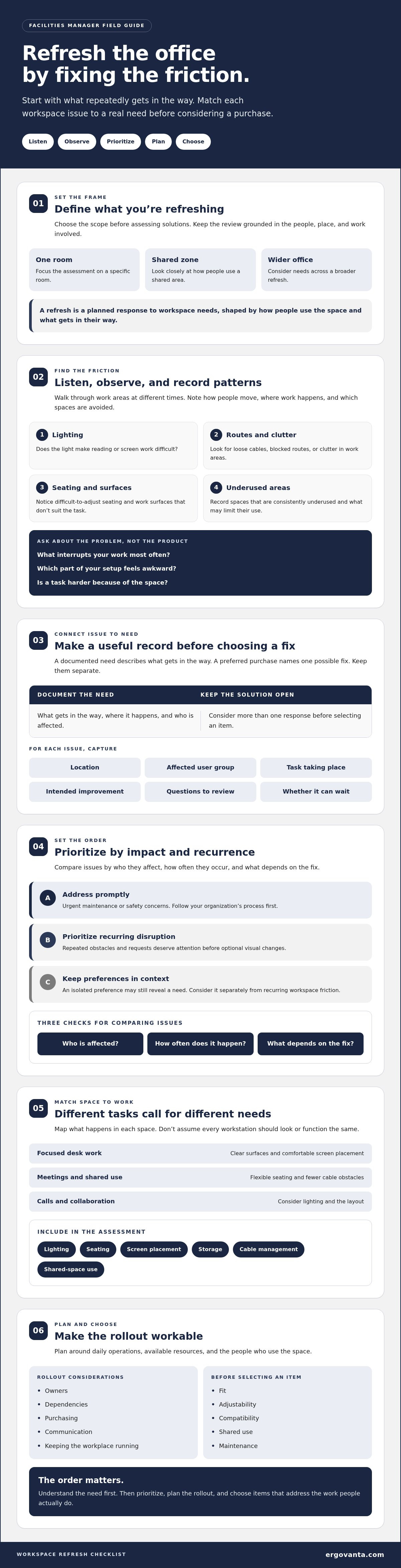
Office Refresh Checklist for Facilities Managers: Start With the Friction
A useful refresh starts with what people repeatedly struggle with, not with a purchase list. Use an office refresh checklist for facilities managers to capture the friction before deciding what to change. A cable crossing a walkway, a dim work area, or a shared table that rarely gets used each points to a different need. Buying first is an easy way to acquire the wrong thing.
Set the scope before assessing solutions: one room, a shared zone, or a wider office refresh. An office refresh is a planned response to workspace needs, shaped by how people use the space and what gets in their way. That perspective on people, place, and process aligns with the broad view of Facility management.
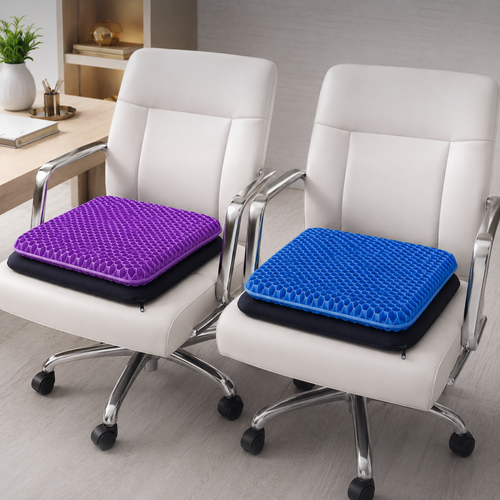
Here’s a short example of an office environment in use:
What should facilities managers assess before an office refresh?
Walk through work areas at different times. A room may look busy during one visit and sit unused later. Note how people move, where work happens, and which spaces are avoided. Record recurring complaints and visible obstacles, such as:
- Lighting that makes reading or screen work difficult.
- Clutter, loose cables, or blocked routes through work areas.
- Seating that feels difficult to adjust or use for a full work session.
- Work surfaces that don’t suit the tasks taking place.
- Areas that are consistently underused, and what may be limiting their use.
Separate urgent maintenance or safety concerns from comfort, organization, and appearance improvements. Follow your organization’s process for urgent issues first. Then look for patterns. A repeated request deserves attention, but an isolated preference may still reveal a need worth understanding.
How can managers gather useful employee input?
Ask short, specific questions: What interrupts your work most often? Which part of your setup feels awkward? Is there a task that’s harder because of the space? Offer a simple way to flag issues, such as a shared form or feedback channel. Ask people to describe the problem, not shop for its solution. That keeps the focus on need rather than on whichever product someone spotted first.
Summarize the themes and explain how feedback will guide prioritization. For example, note that several people flagged poor task lighting while one person requested a different decorative style. The preference isn’t irrelevant, but it belongs in a different part of the conversation. Close this first pass with a clear record of observed friction, who it affects, and whether it needs prompt attention or can wait.
Build an Office Refresh Checklist Around People, Tasks, and Space
Turn your observations into a working document before choosing furnishings or accessories. A useful office refresh checklist for facilities managers connects each issue to the change it may call for, the people affected, and the work taking place. That makes it easier to compare needs across a room without assuming every workstation should look or function the same.
Start with the task and the person using the space. A focused desk setup may need clearer surfaces and comfortable screen placement. A shared meeting area may need flexible seating and fewer cable obstacles. A call-heavy work area may call for different lighting or a quieter layout. The details matter: “new furniture” is not a need, it’s a proposed solution.
A documented need describes what gets in the way; a preferred purchase names one possible fix. Keep those separate in your checklist. For each issue, note the location, affected user group, task, intended improvement, and any questions that need review. This gives others a clear reason for a proposed change and leaves room to consider more than one response.
Match workspace changes to the work being done
Map focused desk work, meetings, calls, collaboration, and flexible or shared arrangements. Then note what each activity requires. Does someone need a clearer work surface, an adjustable setup, better light, accessible storage, or fewer cables underfoot? Consider shared-use patterns, too. A workstation used by different people may need more flexibility than one assigned to a single person.
Include lighting, seating, screen placement, storage, cable management, and shared-space use in the assessment. Flag accessibility, safety, or organizational requirements for review by the appropriate internal teams. Requirements can depend on the organization and location, so check what applies rather than assuming one checklist covers every situation.
Check comfort and function without overpromising
Ask whether seating feels supportive during a typical workday, whether screens are easy to view, and whether frequently used items are within comfortable reach. The OSHA ergonomic principles resource offers general guidance for considering how work and workstations fit people. Use it as a reference, not as a promise of any particular health outcome.
If the documented need involves seating or support, compare relevant options in the ergonomics and comfort collection after confirming what suits the space and users. For questions about available workspace categories, contact Ergovanta as one sourcing step. Keep the checklist focused on fit, usability, and the needs already identified.
Prioritize Office Refresh Items Before You Buy
A clear office refresh checklist for facilities managers turns observations into decisions. Rank issues by how often they occur, how much they interrupt work, who they affect, and what must happen before a response is possible. Priority should reflect impact and fit, not novelty.
Use a simple comparison to make trade-offs visible. “Possible response” is deliberately broader than “purchase.” Repair, rearrangement, and replacement each have a place.
| Observed issue | Who it affects | Possible response | Dependency | Review method |
|---|---|---|---|---|
| Shared work surface is often cluttered | People using the shared zone | Rearrange storage or clarify how the surface is used | Confirm what needs to stay accessible | Check whether the surface is easier to use |
| Repeated cable obstacles near workstations | People moving through or using the area | Review cable routing or consider cable-management items | Check equipment connections and access needs | Inspect the area during normal use |
| Task seating feels difficult to adjust | People using the affected workstations | Check existing chair condition and fit before deciding whether to repair or replace | Confirm user needs and compatibility | Ask whether the setup feels more workable |
Which office refresh needs should come first?
Route reported safety or maintenance concerns through your organization’s established process. Next, assess recurring barriers to everyday tasks, comfort, and use of shared work areas. Put appearance-led changes later, once functional needs and dependencies are clear. A refreshed wall color won’t solve a room that’s hard to use, though both may eventually have a place.
When should you replace, add, or rearrange workspace equipment?
Start with the least disruptive response that addresses the observed issue. If layout or access appears to be the problem, try rearranging before adding anything. Consider an addition when a documented task lacks suitable support, such as a screen setup that doesn’t work for its user. Replace an item only after checking its condition, fit, compatibility, and whether the issue persists.
Each option comes with trade-offs. Rearranging may interrupt room use but avoid adding new items to maintain. An addition can support a specific task, but may not suit a shared setup or existing equipment. Replacement may address a persistent issue, yet requires planning around access and daily operations. Check who uses the item, how it connects or fits with what’s already there, and what upkeep it will need.
Before approving a change, record the reason, the person responsible, any dependency, and how you’ll review the result. That keeps the decision tied to the need, not the appeal of something new.
Plan the Office Refresh Rollout With a Practical Checklist
A good plan keeps a considered refresh from becoming a surprise obstacle course. Use your office refresh checklist for facilities managers to move from confirmed need to follow-up, with a named owner at each step. Adapt the sequence to your space and operating needs:
- Confirm needs: Check that each planned change addresses an observed issue.
- Assign owners: Name who will coordinate decisions, communications, and follow-up.
- Check dependencies: Confirm access, compatibility, delivery details, and any internal approvals.
- Source items: Select products only where the need calls for them. The workspace essentials collection is one place to explore relevant office categories.
- Communicate: Explain what will change, when, and where people can raise questions or issues.
- Implement and review: Coordinate the work, then check whether it addressed the original problem.
How do you refresh an office without disrupting daily work?
Where schedules allow, sequence changes by area or function rather than changing everything at once. For example, plan work in a shared zone separately from changes to individual work areas. Tell affected people what to expect, when the space may be temporarily different, and how they can continue their work. Provide a clear channel for reporting problems during the rollout, and make sure someone is responsible for responding.
Before purchasing, confirm delivery access and timing alongside workplace operating needs. Decide internally who is responsible for receiving items, setup or assembly, moving existing equipment, and handling items being removed. These details aren’t automatic, and product sourcing should not be mistaken for installation support. A short ownership check now can prevent a long email thread later.
What belongs in a post-refresh review?
Set a review point after people have had a chance to use the changed space. Ask whether the change addressed the need identified during assessment. Check whether shared equipment is still usable, organized, and easy to access, and whether the temporary disruption has ended as planned.
Record what improved, what remains unresolved, and who will handle each follow-up. If the original issue persists, revisit the cause before adding another item. The checklist is a working document, not a box to tick and forget.
Choose Office Refresh Essentials That Earn Their Place
Turn documented needs into product categories, not a general wish list. If people report that seating doesn’t suit the work, assess office chairs or task chairs. If screen positioning or limited desk space is the issue, consider monitor or laptop stands. A lighting concern may point to desk lamps or another lighting category, while recurring cable obstacles may call for cable-management products.
Keep each option tied to a specific workspace issue. A product is worth considering when it addresses a defined need, fits the space, and can be used and maintained as intended. The lighting collection is one place to explore if your assessment identifies a task or room-lighting need.
Which workspace categories may address common refresh needs?
Use the checklist to connect observations with possible categories, then verify that each category fits the actual use:
- Seating: Consider office chairs or task chairs when existing seating feels unsuitable for the work or user feedback identifies a recurring concern.
- Screen support: Consider monitor or laptop stands when screen position or usable desk space is a documented issue.
- Lighting: Consider desk lamps when assessment identifies a need for more focused light at a workstation.
- Cable management: Consider cable-management products when cables create recurring clutter or interfere with access to the work area.
These are starting points, not automatic fixes. A shared workstation may need a different setup from an individual desk, and a layout change may resolve an issue without adding anything.
What should facilities managers confirm before sourcing?
Check current availability and product details on the relevant category pages before making a selection. Confirm dimensions and fit with the desk or room, compatibility with existing devices, and whether the setup is intended for one person or shared use. Consider adjustability where different people will use the same equipment, along with cleaning and maintenance expectations.
Keep the shortlist proportionate. If an issue is isolated to one workstation, assess that setup before ordering for an entire area. If the same need appears across a shared zone, check whether the proposed option works for everyone who uses it. The aim is a considered fit, not a matching set for its own sake.
For questions about product categories or options, contact Ergovanta with workspace questions.
Build a Workspace That Works Better Day to Day
A useful office refresh starts with what people experience in the space, then turns those observations into considered changes. Your office refresh checklist for facilities managers can keep the work grounded: document the need, set priorities, plan the rollout, and check whether the change helped. That’s how you avoid buying for appearances while everyday friction stays put.
Keep the shortlist tied to real tasks and users. Ergovanta offers workspace categories including chairs, monitor and laptop stands, lighting, and cable management. Treat them as possible next steps, not automatic answers. Check that each item fits the space, equipment, and people who will use it.
A refresh doesn’t need to change everything at once. A clear need, a practical plan, and a review after rollout can help you build a workspace that feels more functional and considered, one useful choice at a time.
Start with the friction. Keep what works. Make the next change count.
Frequently Asked Questions
What should an office refresh checklist include?
An office refresh checklist should connect every proposed change to an identified workspace issue. Record observations and employee feedback about tasks, lighting, seating, screen setups, storage, and cable management. Include requirements that need internal review, then note each priority, its owner, rollout communication, and a follow-up check. Adapt the checklist to your organization’s policies and needs. A generic list can prompt useful questions, but it can’t replace local processes.
How do facilities managers prioritize an office refresh?
Follow established processes for safety or maintenance concerns, then compare other needs by frequency, effect on work, number of people affected, dependencies, and ease of implementation. Separate functional barriers from optional appearance changes. Record why an item ranks highly, such as a recurring obstacle affecting a shared work area, and review the order with relevant stakeholders. There’s no universal scoring method; the right sequence depends on the workplace.
How often should an office be refreshed?
There’s no single refresh schedule that fits every workplace. Consider the condition of the space and equipment, changing work patterns, employee feedback, whether setups still suit their users, and organizational plans. Schedule recurring walk-throughs to catch emerging friction, and reassess when teams, space use, or work requirements change. Let observed needs guide decisions. A calendar can prompt a review, but it doesn’t mean items need replacing when they remain suitable.
How can you refresh an office without disrupting employees?
Share what’s changing, which areas are affected, and when people can expect temporary changes. Coordinate access and deliveries, then sequence work by area or function where practical. Clarify internally who handles setup and how employees can continue their work. Give people a clear channel to report questions, delays, or access concerns. The workable schedule depends on your organization’s operations. Confirm responsibilities with your team rather than assuming a supplier handles installation or project coordination.
What should facilities managers ask employees before refreshing a workspace?
Ask what tasks people do in the space, which obstacles recur, and whether seating, lighting, or shared equipment feels workable during a typical day. Ask what currently works well, too. Make feedback easy to submit, and invite descriptions of problems rather than product requests. Look for themes across teams, but don’t discard an individual concern just because it’s less common. It may need a separate assessment or internal follow-up.
Should an office refresh prioritize ergonomics or appearance?
Let assessment findings determine the order. Address safety or maintenance concerns through established internal processes, then consider recurring barriers to work, comfort, and usability before optional visual changes. Appearance can still matter, especially if a space feels neglected or is hard to use as intended. This isn’t a strict either-or choice. Keep decisions tied to observed needs, and don’t treat furniture or accessories as a promise of medical benefits.
What office items are worth replacing during a refresh?
Replace an item when its condition, fit, compatibility, or usefulness contributes to a documented issue, and repair or rearrangement isn’t an adequate response. Depending on the need, relevant categories may include chairs, monitor or laptop stands, lighting, and cable management. Before selecting anything, confirm dimensions, device or desk compatibility, shared-use requirements, and maintenance expectations. Verify current product details and availability rather than assuming a category item will suit every setup.
How do you know whether an office refresh worked?
Compare the original issue with observations and feedback after implementation. Ask whether the affected task feels easier, whether shared areas remain usable, and whether the change created new problems. Review each change against its intended purpose, not just how the space looks. Record unresolved needs and assign follow-up actions. This keeps the review practical and avoids relying on unsupported productivity claims or calling a project complete simply because planned items are in place.
Disclaimer
Ergovanta publishes these guides to help people set up better workspaces. Product recommendations reflect what we sell. Specifications, prices and availability are accurate at the time of writing and may change. Nothing here is medical, ergonomic or professional advice; if you have a specific health concern about your workstation, speak to a qualified professional.
From the catalog